
A REST API (Representational State Transfer API) enables communication between client and server over HTTP. It exchanges data typically in JSON format using standard web protocols.
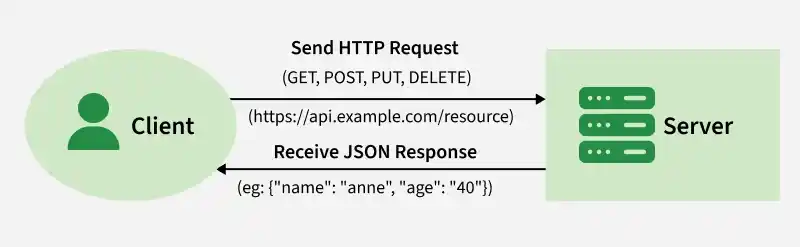
- Uses HTTP methods like GET, POST, PUT, PATCH, and DELETE.
- Client sends requests to server endpoints (URLs).
- Server returns responses such as JSON, XML, HTML, or images.
- Maps HTTP methods to CRUD operations (Create, Read, Update, Delete).
Note: REST is an architectural style that defines how APIs should be designed, whereas HTTP is the protocol used to transfer data between client and server. They work together, but they are not the same.
Common HTTP Methods Used in REST API
In REST architecture, the main HTTP methods are GET, POST, PUT, PATCH, and DELETE, which map to CRUD operations. Other less commonly used methods include HEAD and OPTIONS.
1. GET Method
The HTTP GET method retrieves a resource. On success, it returns data (usually JSON or XML) with 200 OK, and on error, it commonly returns 404 Not Found or 400 Bad Request.
GET /users/123This request fetches data for the user with ID 123.
2. POST Method
The POST method creates new resources. On success, it returns 201 Created with a Location header pointing to the new resource.
POST /users
{
  "name": "Anne",
  "email": "gfg@example.com"
}
This request creates a new user with the given data.
Note: POST is neither safe nor idempotent.
3. PUT Method
PUT is used to update or create a resource. It sends the complete resource in the request body and replaces the existing one at the specified URL.
PUT /users/123
{
  "name": "Anne",
  "email": "gfg@example.com"
}
This request updates the user with ID 123 or creates a new user if one doesn't exist.
4. PATCH Method
PATCH is used to partially update a resource. It sends only the fields to be modified, instead of replacing the entire resource.
PATCH /users/123
{
  "email": "new.email@example.com"
}
This request updates only the email of the user with ID 123, leaving the rest of the user data unchanged.
Differences Between PUT and PATCH
Both PATCH and PUT are used to update resources on the server, but they differ in how they handle the update process:
| PUT | PATCH |
|---|---|
| Replaces the entire resource | Updates only specified fields |
| Must send full data | Only sends changes |
| Idempotent | Not always idempotent |
| Example: Updating a user’s entire profile | Example: Changing just a user’s email |
5. DELETE Method
It is used to delete a resource identified by a URI. On successful deletion, return HTTP status 200 (OK) along with a response body.
DELETE /users/123This request deletes the user with ID 123.
Idempotence: An HTTP method is idempotent if making the same request multiple times results in the same server state as making it once. Repeated requests do not cause additional changes beyond the initial application.
Building a Simple REST API using Node.js and Express
Create a REST API and perform the various HTTP operations.
Step 1: Create the folder
Create the Node.js project by using the following command:
mkdir node-app
cd node-app
Step 2: Install the package.json
npm init -yStep 3: Install Express
To begin building a REST API in Node.js, you need to install Express. Run the following command in your terminal:
npm install expressStep 4: Create the Server
Create a file named server.js in the root directory of the project (node-app) and add the following code:
// Import the Express module
const express = require('express');
const app = express();
const port = 3000;

app.use(express.json());

// Define a route for GET requests
app.get('/users', (req, res) => {
    res.json({ message: 'Returning list of users' });
});

// Define a route for POST requests
app.post('/users', (req, res) => {
    const newUser = req.body;
    res.json({ message: 'User created', user: newUser });
});

// Define a route for PUT requests
app.put('/users/:id', (req, res) => {
    const userId = req.params.id;
    const updatedUser = req.body;
    res.json({ message: `User with ID ${userId} updated`, updatedUser });
});

// Define a route for DELETE requests
app.delete('/users/:id', (req, res) => {
    const userId = req.params.id;
    res.json({ message: `User with ID ${userId} deleted` });
});

// Start the server
app.listen(port, () => {
    console.log(`Server is running on http://localhost:${port}`);
});
Step 5: Start the Server
Run the following command in the terminal from the project root directory:
node server.jsIf the server starts successfully, you will see the message:
Server is running on http://localhost:3000Output: To test the API, open http://localhost:3000 in Postman or another API testing tool.
- GET /users: This route fetches the list of users (or mock data in this case).
- POST /users: This route accepts JSON data from the client to create a new user.
- PUT /users/:id: This route updates the information of a user based on the user ID provided in the URL.
- DELETE /users/:id: This route deletes a user with the specified ID.
Features of REST APIs
- Stateless: Each request contains all required information; the server does not store client session state.
- Client–Server: Client and server are independent, improving scalability and separation of concerns.
- Cacheable: Responses can be marked cacheable to enhance performance.
- Uniform Interface: Uses consistent URLs, HTTP methods, and status codes for standardized communication.
- Layered System: Can operate across multiple layers to support scalability and security.
Real world Example of Rest APIs
REST APIs are widely used across various industries to simplify communication between systems. Some common applications include:
- Social Media: Integrating third-party platforms like Facebook, Twitter, and Instagram for features like login, sharing, and posting.
- E-Commerce: Managing products, processing payments, handling orders, and customer management.
- Geolocation Services: GPS tracking, real-time location updates, and location-based services like finding nearby places.
- Weather Forecasting: Fetching weather data from external sources to provide real-time weather updates and forecasts.
