Arithmetic operations such as addition, subtraction and bitwise operations (AND or, NOT, XOR) are fundamental techniques in image processing with OpenCV. These operations allow for the enhancement, analysis and transformation of image characteristics, making them essential for tasks like image clarification, thresholding, dilation and more.
Step-by-Step Implementation
Let's see the step by step implementation of Arithmetic operations,
Step 1: Install Required Libraries and Import necessary Packages
opencv-python(cv2): Core library for image processing and computer vision.matplotlib.pyplot: For displaying images inside the notebook .numpy: Efficient array operations .
!pip install opencv - python matplotlib

import cv2
import numpy as np
import matplotlib.pyplot as plt
from google.colab import files
Step 2: Upload the Input Images.
The samples used can be downloaded from here.
- files.upload() opens a dialog to pick files from our device.
- cv2.imread() reads an image from disk and loads it as a NumPy array (in BGR color ordering by default).
img1 = cv2.imread('input1.png')
img2 = cv2.imread('input2.png')
Step 3: Visualize Input Images.
if img1.shape != img2.shape:
    img2 = cv2.resize(img2, (img1.shape[1], img1.shape[0]))

line_thickness = 5
height = img1.shape[0]
line = np.full((height, line_thickness, 3), (0, 0, 255), dtype=np.uint8)

side_by_side = np.hstack((img1, line, img2))

side_by_side_rgb = cv2.cvtColor(side_by_side, cv2.COLOR_BGR2RGB)

plt.figure(figsize=(12, 6))
plt.imshow(side_by_side_rgb)
plt.title('input1 input2')
plt.axis('off')
plt.show()
Output:
Step 4: Perform Operations
1. Image Addition
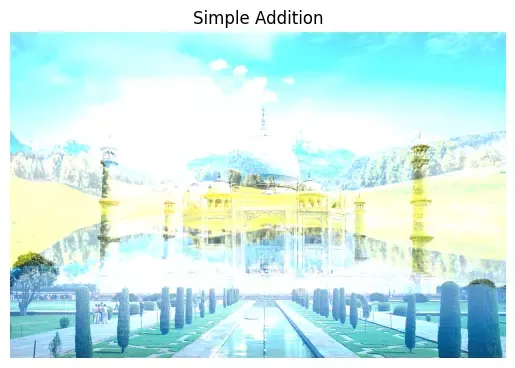
1.1 Simple Addition
cv2.add(): Adds pixel values with saturation.
added = cv2.add(img1, img2)
added_rgb = cv2.cvtColor(added, cv2.COLOR_BGR2RGB)

plt.imshow(added_rgb)
plt.title('Addition (cv2.add)')
plt.axis('off')
plt.show()
Output:
1.2 Weighted Addition
cv2.addWeighted(): Blends two images by specified weights and an optional scalar.
Parameters:
- img1, img2: input images
- 0.7, 0.3: weights (how much each image contributes)
- 0: gamma (brightness adjustment)
weighted = cv2.addWeighted(img1, 0.7, img2, 0.3, 0)
weighted_rgb = cv2.cvtColor(weighted, cv2.COLOR_BGR2RGB)

plt.imshow(weighted_rgb)
plt.title('Weighted Addition (cv2.addWeighted)')
plt.axis('off')
plt.show()
Output:

2. Image Subtraction
- cv2.subtract(): Subtracts each pixel in img2 from img1 (clips negative values to 0).
- Used for change detection, background subtraction, etc.
subtracted = cv2.subtract(img1, img2)
subtracted_rgb = cv2.cvtColor(subtracted, cv2.COLOR_BGR2RGB)

plt.imshow(subtracted_rgb)
plt.title('Subtraction (cv2.subtract)')
plt.axis('off')
plt.show()
Output:

3. Bitwise Operations
3.1 Bitwise AND
cv2.bitwise_and(): Only keeps pixels where both images have bits "on".
and_img = cv2.bitwise_and(img1, img2)
and_img_rgb = cv2.cvtColor(and_img, cv2.COLOR_BGR2RGB)

plt.imshow(and_img_rgb)
plt.title('Bitwise AND')
plt.axis('off')
plt.show()
Output:

3.2 Bitwise OR
cv2.bitwise_or(): Keeps pixels if either image has a bit "on".
or_img = cv2.bitwise_or(img1, img2)
or_img_rgb = cv2.cvtColor(or_img, cv2.COLOR_BGR2RGB)

plt.imshow(or_img_rgb)
plt.title('Bitwise OR')
plt.axis('off')
plt.show()
Output:

3.3 Bitwise XOR
cv2.bitwise_xor(): Keeps pixels if only one image (not both) has a bit "on".
xor_img = cv2.bitwise_xor(img1, img2)
xor_img_rgb = cv2.cvtColor(xor_img, cv2.COLOR_BGR2RGB)

plt.imshow(xor_img_rgb)
plt.title('Bitwise XOR')
plt.axis('off')
plt.show()
Output:

3.4 Bitwise NOT
cv2.bitwise_xor(): Keeps pixels if only one image (not both) has a bit "on".
not_img = cv2.bitwise_not(img1)
not_img_rgb = cv2.cvtColor(not_img, cv2.COLOR_BGR2RGB)

plt.imshow(not_img_rgb)
plt.title('Bitwise NOT (Image 1)')
plt.axis('off')
plt.show()
Output: