
In this article, we will see how to create a News application using Django. We will be using News Api and fetch all the headline news from the api. Read more about the api here news api.
Project Set-Up
Create the project folder and open the terminal in it. Set up the Django project and app using the following commands:

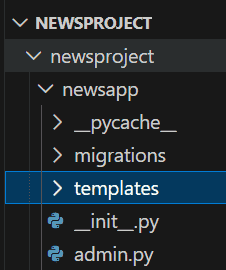
Open the newsproject folder using a text editor. The directory structure should look like this:

Create Templates Folder
Create a templates folder inside newsapp:
newsapp/templates/
Configure Templates in settings.py
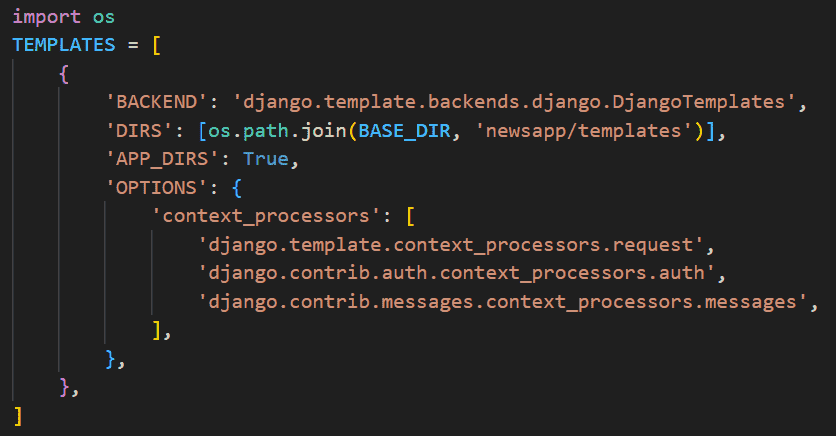
Open newsproject/settings.py and update the TEMPLATES section:
import os
'DIRS': [os.path.join(BASE_DIR, 'newsapp/templates')],
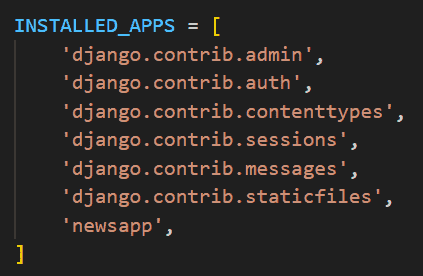
Also add the app in INSTALLED APPS:
Create Views
In views.py, we create a view named index which takes a request and renders an html as a response. Firstly we import newsapi from NewsApiClient.
Note: Replace 'YOURAPIKEY' with your actual API key from News API
from django.shortcuts import render
from newsapi import NewsApiClient

# Create your views here.
def index(request):

    newsapi = NewsApiClient(api_key ='YOURAPIKEY')
    top = newsapi.get_top_headlines(sources ='techcrunch')

    l = top['articles']
    desc =[]
    news =[]
    img =[]

    for i in range(len(l)):
        f = l[i]
        news.append(f['title'])
        desc.append(f['description'])
        img.append(f['urlToImage'])
    mylist = zip(news, desc, img)

    return render(request, 'index.html', context ={"mylist":mylist})
Create index.html
Create a index.html in templates folder and place the following code in it:
<!DOCTYPE html>
<html lang="en" dir="ltr">
  <head>
    <meta charset="utf-8">
    <title>Latest News | Django App</title>

<link rel="stylesheet" href="https://stackpath.bootstrapcdn.com/bootstrap/4.3.1/css/bootstrap.min.css" integrity="sha384-ggOyR0iXCbMQv3Xipma34MD+dH/1fQ784/j6cY/iJTQUOhcWr7x9JvoRxT2MZw1T" crossorigin="anonymous">
<!-- Optional theme -->
  </head>
  <body>
    <div class="jumbotron" style="color:black">

      <h1 style ="color:white">
   Get The latest news on our website
      </h1>

    </div>


    <div class="container">
      {% for new, des, i in mylist %}
              <img src="{{ i }}" alt="">
              <h1>news:</h1> {{ new }}
              {{ value|linebreaks }}

              <h4>description:</h4>{{ des }}
              {{ value|linebreaks }}

      {% endfor %}
    </div>

  </body>
</html>
Map URLs
Now, map the views to urls.py
from django.contrib import admin
from django.urls import path
from newsapp import views

urlpatterns = [
   path('', views.index, name ='index'),
    path('admin/', admin.site.urls),
]
Run the Application
Run the project using this command:
python manage.py migrate
python manage.py runserver
Output: Visit the development URL (http://127.0.0.1:8000/) in a browser, your output of the project should look like this:
