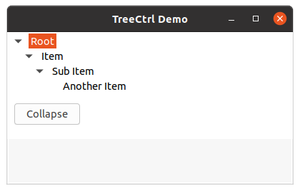
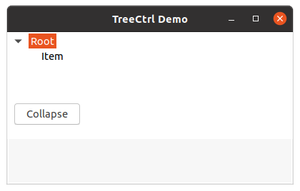
In this article we are going to learn about another function in wxPython, that is, CollapseAndReset() method associated with wx.TreeCtrl class of wxPython. CollapseAndReset() function simply collapses a particular item and removes all its children.
It takes TreeItemId as argument.
Syntax: wx.TreeCtrl.CollapseAndReset(Self, item)
Code Example:
import wx


class MyTree(wx.TreeCtrl):

    def __init__(self, parent, id, pos, size, style):
        wx.TreeCtrl.__init__(self, parent, id, pos, size, style)


class TreePanel(wx.Panel):

    def __init__(self, parent):
        wx.Panel.__init__(self, parent)

        # create Tree Control
        self.tree = MyTree(self, wx.ID_ANY, wx.DefaultPosition,
                                 (150,150), wx.TR_HAS_BUTTONS)

        # Add root to Tree Control
        self.root = self.tree.AddRoot('Root')

        # Add item to root
        self.itm = self.tree.AppendItem(self.root, 'Item')

        # Add item to 'itm'
        self.itm2 = self.tree.AppendItem(self.itm, "Sub Item")

        # Add child item to itm2
        self.itm3 = self.tree.AppendItem(self.itm2, "Another Item")

        # Expand whole tree
        self.tree.ExpandAll()

        sizer = wx.BoxSizer(wx.VERTICAL)
        sizer.Add(self.tree, 0, wx.EXPAND)
        self.SetSizer(sizer)

        # Add button in frame
        self.btn = wx.Button(self, 1, "Collapse", (10,100))
        # Bind event function with button
        self.btn.Bind(wx.EVT_BUTTON, self.onclick)

    def onclick(self, e):
        # collapse all children of itm recursively
        self.tree.CollapseAndReset(self.itm)


class MainFrame(wx.Frame):

    def __init__(self):
        wx.Frame.__init__(self, parent=None,
                      title='TreeCtrl Demo')
        panel = TreePanel(self)
        self.Show()


if __name__ == '__main__':
    app = wx.App(redirect=False)
    frame = MainFrame()
    app.MainLoop()
Output: