
In automation testing, validating that an application behaves as expected is critical. Assertions are the core feature used to validate the expected behavior of the system under test. In TestNG, assertions allow testers to compare the actual results produced by an application with the expected results, ensuring that the test passes or fails based on the conditions set.
When an assertion fails, TestNG marks the test as failed and provides useful feedback to the developer to help debug the issue. Conversely, if the assertion passes, the test continues or completes successfully.
There are two types of Assertion:-
- Hard Assertions.
- Soft assertions.
The Assert class in TestNG provides a variety of methods to handle different types of comparisons and checks.
Key Features of Assertions
- Validation: Verifies that the output of the test method matches expectations.
- Debugging Assistance: Provides meaningful failure messages to make debugging easier.
- Automation: Ensures consistent results across multiple test runs.
Common Assertion Methods in TestNG
TestNG provides several assertion methods that allow developers to validate specific conditions during tests:
| Assertion Method | Purpose |
|---|---|
assertEquals | Verifies if two values are equal. |
assertNotEquals | Verifies if two values are not equal. |
assertTrue | Checks if a condition evaluates to true. |
assertFalse | Checks if a condition evaluates to false. |
assertNull | Verifies if an object is null. |
assertNotNull | Verifies if an object is not null. |
assertSame | Checks if two objects refer to the same instance. |
assertNotSame | Checks if two objects refer to different instances. |
assertArrayEquals | Verifies if two arrays are equal. |
Example 1: Basic Assertion Usage
Let’s look at some basic assertions in TestNG.
package assertion;

import org.testng.Assert;
import org.testng.annotations.Test;

public class AssertionExamplesTest {

    @Test
    public void testEquals() {
        // Verifies if two values are equal
        Assert.assertEquals(5, 5, "Values are not equal");
    }

    @Test
    public void testNotEquals() {
        // Verifies if two values are not equal
        Assert.assertNotEquals(3, 5, "Values are equal");
    }

    @Test
    public void testTrue() {
        // Checks if a condition evaluates to true
        boolean condition = (5 > 3);
        Assert.assertTrue(condition, "Condition is not TRUE");
    }

    @Test
    public void testFalse() {
        // Checks if a condition evaluates to false
        boolean condition = (5 < 3);
        Assert.assertFalse(condition, "Condition is not FALSE");
    }

    @Test
    public void testNull() {
        // Verifies if an object is null
        String str = null;
        Assert.assertNull(str, "Object is not null");
    }

    @Test
    public void testNotNull() {
        // Verifies if an object is not null
        String str = "Hello";
        Assert.assertNotNull(str, "Object is null");
    }

    @Test
    public void testSame() {
        // Checks if two objects refer to the same instance
        String str1 = "Test";
        String str2 = str1;
        Assert.assertSame(str1, str2, "Objects do not refer to the same instance");
    }

    @Test
    public void testNotSame() {
        // Checks if two objects refer to different instances
        String str1 = new String("Test");
        String str2 = new String("Test");
        Assert.assertNotSame(str1, str2, "Objects refer to the same instance");
    }

    @Test
    public void testArrayEquals() {
        // Verifies if two arrays are equal
        int[] arr1 = {1, 2, 3};
        int[] arr2 = {1, 2, 3};
        Assert.assertEquals(arr1, arr2, "Arrays are not equal");
    }
}
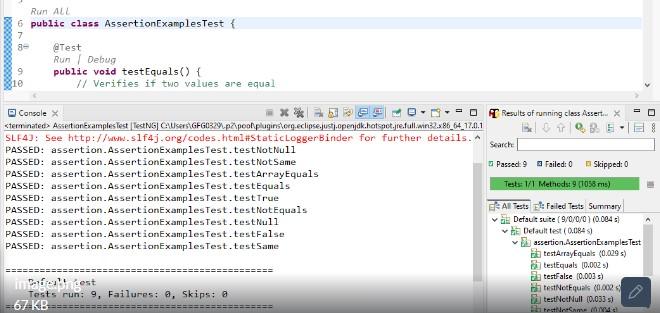
Output:
Soft Assertions in TestNG
Soft Assertions allow the test execution to continue even if an assertion fails. This is especially useful when you want to validate multiple conditions in a single test method without stopping the test execution at the first failure.
Key Features of Soft Assertions:
- Continued Execution: Soft assertions allow the test to continue even when one or more assertions fail.
- Comprehensive Reporting: All assertion failures are reported at the end of the test execution using
assertAll().
To use soft assertions in TestNG, the SoftAssert class is used. This class must be explicitly instantiated and invoked.
Example of Soft Assertions
package assertion;

import org.testng.Assert;
import org.testng.annotations.Test;
import org.testng.asserts.SoftAssert;

public class SoftAssertionExamplesTest {

    /**
     * Demonstrates soft assertions.
     * All assertions are executed even if some fail.
     */
    @Test
    public void testSoftAssertions() {
        SoftAssert softAssert = new SoftAssert();

        System.out.println("Starting testSoftAssertions...");

        softAssert.assertEquals(5, 5, "First Assertion Failed: Values are not equal"); // Pass
        softAssert.assertEquals(6, 6, "Second Assertion Failed: Values are not equal"); // Corrected to Pass
        softAssert.assertTrue("Hello".startsWith("H"), "Third Assertion Failed: String doesn't start with 'H'"); // Pass
        softAssert.assertNull(null, "Fourth Assertion Failed: Object is not null"); // Pass

        softAssert.assertAll(); // Report all assertion failures
        System.out.println("Ending testSoftAssertions...");
    }

    /**
     * Demonstrates normal assertions.
     * Execution stops at the first assertion failure.
     */
    @Test
    public void testNormalAssertions() {
        System.out.println("Starting testNormalAssertions...");

        Assert.assertEquals(5, 5, "First Assertion Failed: Values are not equal"); // Pass
        Assert.assertEquals(6, 6, "Second Assertion Failed: Values are not equal"); // Corrected to Pass
        Assert.assertTrue("Hello".startsWith("H"), "Third Assertion Failed: String doesn't start with 'H'"); // Pass
        Assert.assertNull(null, "Fourth Assertion Failed: Object is not null"); // Pass

        System.out.println("Ending testNormalAssertions...");
    }
}
In the testSoftAssertions method, the second assertion will fail, but the test execution will continue, and all failures will be reported at the end. In contrast, in the testNormalAssertions method, the test stops when the second assertion fails.
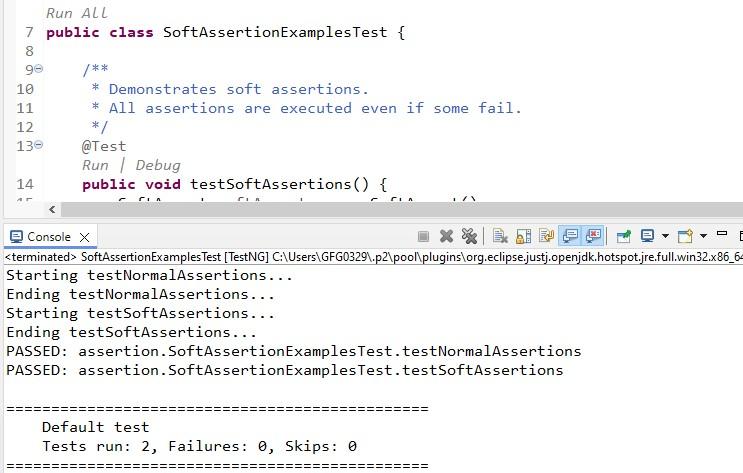
Example Output for Soft Assertions:
If the second assertion fails (i.e., 5 != 6), but the remaining assertions pass, the output will show:
Best Practices for Using Assertions
Here are some best practices when using assertions in your TestNG tests:
- Meaningful Messages: Provide clear, descriptive messages for each assertion. This will make it easier to identify the root cause of failure.
Assert.assertEquals(actual, expected, "Mismatch in user ID");- Judicious Use: Avoid excessive assertions in a single test method. Break down complex tests into smaller, focused tests to ensure clarity and precision.
- Combine with Data-Driven Testing: Use assertions alongside data providers to efficiently test multiple data sets or user inputs.
@DataProvider
public Object[][] testData() {
    return new Object[][] {
        { "user1", "password1" },
        { "user2", "password2" }
    };
}
- Mix Soft and Hard Assertions: Use hard assertions for validations that are critical and should stop the test immediately (e.g., login functionality). For non-critical validations, use soft assertions to gather all failures in one go.
- Ensure Correct Assertion Type: Always use the appropriate assertion method, such as
assertTrue,assertNull, orassertEquals, depending on the type of validation required.
Common Use Cases for Assertions
UI Automation with Selenium
Assertions are commonly used in Selenium UI tests to verify that elements on the web page match expectations. For example, verifying page titles, button text, or element presence:
Assert.assertEquals(driver.getTitle(), "Expected Title", "Page title mismatch");API Testing
When performing API testing with Selenium or other tools, assertions can validate response status codes and ensure the returned data matches the expected format:
Assert.assertEquals(response.getStatusCode(), 200, "Invalid status code");Business Logic Verification
Assertions help verify business logic calculations or rules. For example, ensuring that a total price calculation matches the expected value:
Assert.assertEquals(totalPrice, expectedPrice, "Total price calculation is incorrect");