
In SQL, the ALL and ANY operators are used to compare a value against a set of values returned by a subquery. They help filter results based on conditions evaluated over multiple values.
- ALL checks if a condition is true for every value in the subquery result.
- Must be used with comparison operators like >, <, >=, <=.
- Used in SELECT, WHERE and HAVING for advanced filtering.
SQL ALL
The SQL ALL operator compares a value to every value returned by a subquery. A condition using ALL is TRUE only if it holds for all values in the subquery result.
- Must be used with comparison operators: >, <, >=, <=.
- Useful for filtering data based on comparisons with multiple records.
Example: First, we will create a demo SQL database and table, on which we will use the ALL command.

Query:
SELECT * FROM Products
WHERE Price > ALL (SELECT Price FROM Products WHERE Price < 500);
Output:

Syntax:
SELECT column_name(s)
FROM table_name
WHERE column_name comparison_operator ALL
  (SELECT column_name
   FROM table_name
   WHERE condition(s));
- comparison_operator: This is the comparison operator that can be one of =, >, <, >=, <=, <>, etc.
- subquery: A query that returns the set of values to be compared with the column in the outer query.
SQL ALL with SELECT, WHERE & HAVING
The ALL operator can be used in conjunction with SELECT, WHERE and HAVING statements to refine your data filtering.
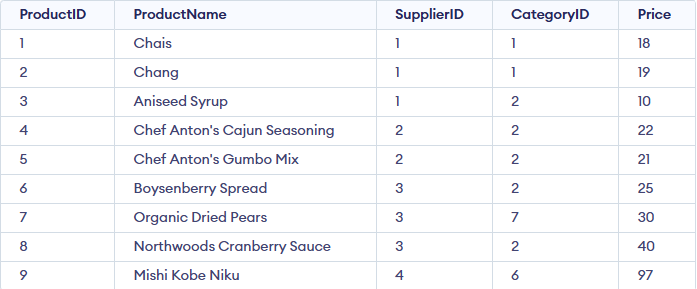
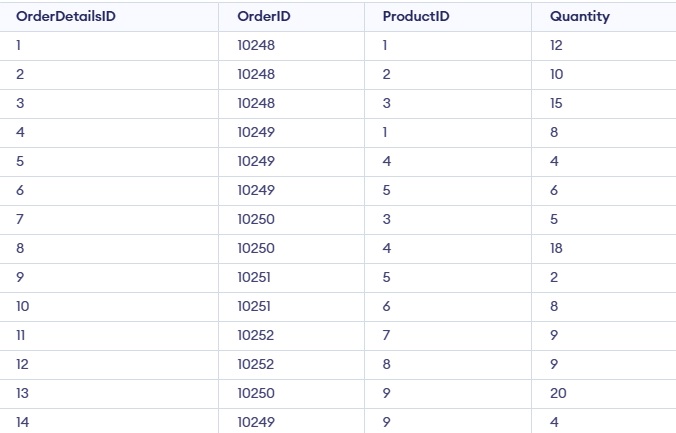
Example 1 : Retrieve all product names from the Products table.
Query:
SELECT ALL ProductName
FROM Products
WHERE TRUE;
Output:
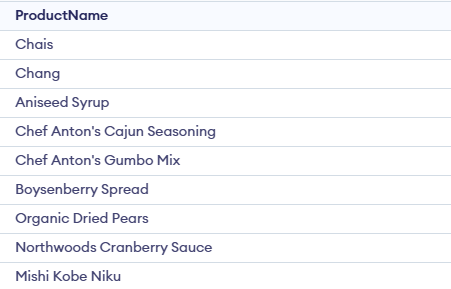
This query retrieves all product names from the Products table because TRUE always evaluates as true for every row.
Example 2: Retrieve product names if all records in the OrderDetails table have a quantity of 6 or 2.
SELECT ProductName
FROM Products
WHERE ProductID = ALL (SELECT ProductID
                       FROM OrderDetails
                       WHERE Quantity = 6 OR Quantity = 2);
Output:

This query ensures that the product names returned have ALL quantities of 6 or 2 in the OrderDetails table.
Example 3 : Find the OrderIDs where the maximum quantity in the order exceeds the average quantity of all orders.
SELECT OrderID
FROM OrderDetails
GROUP BY OrderID
HAVING MAX(Quantity) > ALL (SELECT AVG(Quantity)
                            FROM OrderDetails
                            GROUP BY OrderID);
Output:

This query filters out OrderIDs where the maximum quantity is greater than the average quantity of the orders.
SQL ANY Operator
The SQL ANY operator compares a value with the values returned by a subquery and evaluates to TRUE if at least one value satisfies the given condition.
- It must be used with comparison operators such as
=,>,<,>=,<=or<>. - The subquery used with ANY must return a single column of values.
Example: First, we will create a demo SQL database and table, on which we will use the ANY command.

Query:
SELECT * FROM Products
WHERE Price < ANY (SELECT Price FROM Products WHERE Price > 500);
Output:

Syntax:
SELECT column_name(s)
FROM table_name
WHERE column_name comparison_operator ANY
  (SELECT column_name
   FROM table_name
   WHERE condition(s));
SQL ANY with SELECT, WHERE & HAVING
The ANY operator can be used with SELECT, WHERE and HAVING clauses to filter data by matching a condition against any value in a subquery result.
Example 1 : Find distinct category IDs of products that appear in the OrderDetails table.
Query:
SELECT DISTINCT CategoryID
FROM Products
WHERE ProductID = ANY (SELECT ProductID
                       FROM OrderDetails);
Output:
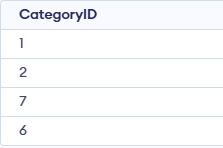
This query finds the distinct CategoryIDs of products that exist in the OrderDetails table.
Example 2 : Find product names with a quantity of 9 in the OrderDetails table.
Query:
SELECT ProductName
FROM Products
WHERE ProductID = ANY (SELECT ProductID
                       FROM OrderDetails
                       WHERE Quantity = 9);
Output:
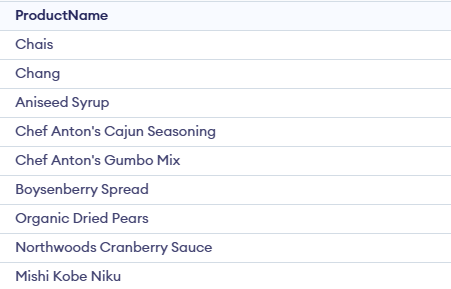
This query retrieves product names where at least one record in the OrderDetails table has a quantity of 9.
SQL ALL vs. SQL ANY
Here is the detailed comparison between SQL ALL and SQL ANY
SQL ALL | SQL ANY |
|---|---|
Condition must be true for every value in the subquery | Condition must be true for at least one value in the subquery |
More restrictive | Less restrictive |
Usually returns fewer rows | Usually returns more rows |
value > ALL (subquery) means the value is greater than all returned values | value > ANY(subquery) means the value is greater than any one value |
Use when comparing against a strict range | Use when comparing against flexible conditions |
