
Renaming tables is a common structural change required during database maintenance or schema updates. SQL provides the ALTER TABLE command to rename tables without affecting existing data.
- Allows changing the table name while preserving all data and constraints.
- Useful when table names need to be updated to match new application or business requirements.
Example: First, let's create a sample Student table to demonstrate the ALTER command:
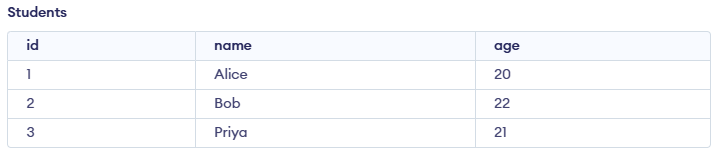
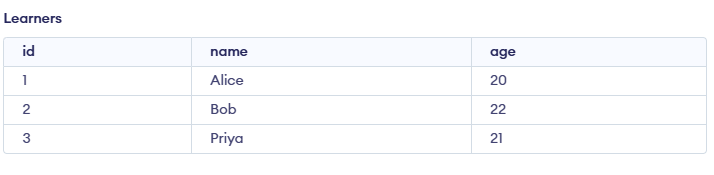
Query:
ALTER TABLE students
RENAME TO learners;
Output:
Syntax for ALTER Command
Here are the common syntax formats for using the ALTER TABLE command:
1. Renaming a Table
ALTER TABLE table_name
RENAME TO new_table_name;
2. Renaming a Column
ALTER TABLE table_name
RENAME COLUMN old_column_name TO new_column_name;
3. Adding a New Column
ALTER TABLE table_name
ADD column_name datatype;
4. Modifying a Column Data Type
ALTER TABLE table_name
MODIFY COLUMN column_name new_datatype;
Examples of ALTER Command in SQL
Below are practical examples to help us understand how to use the ALTER command effectively in various scenarios. These examples include renaming tables or columns, adding new columns, orchanging columndata types. Consider the Student table below:
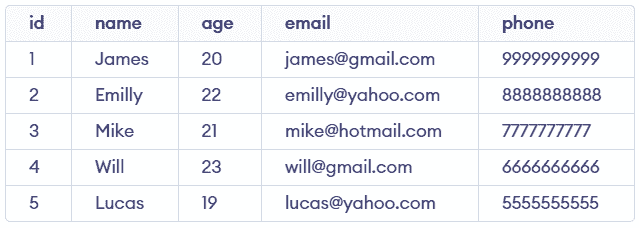
Example 1: Rename a Column
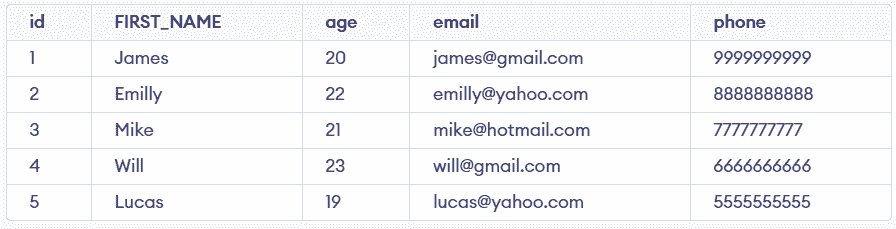
Change the name of column name to FIRST_NAME in table Student. To change the column name of the existing table we have to use Column keyword before writing the existing column name to change.
Query:
ALTER TABLE name RENAME Column name TO FIRST_NAME;Output:
Example 2: Rename a Table
In this example, we want to rename the table from Student to Student_Details using the ALTER TABLE command, making the name more descriptive and relevant to its content.
Query:
ALTER TABLE Student RENAME TO Student_Details;Output:
Example 3: Add a New Column
To add a new column to the existing table, we first need to select the table with ALTER TABLE command table_name and then we will write the name of the new column and its datatype with ADD column_name datatype. Let's have a look below to understand better.
Query:
ALTER TABLE Student_Details ADD marks INT;Output:
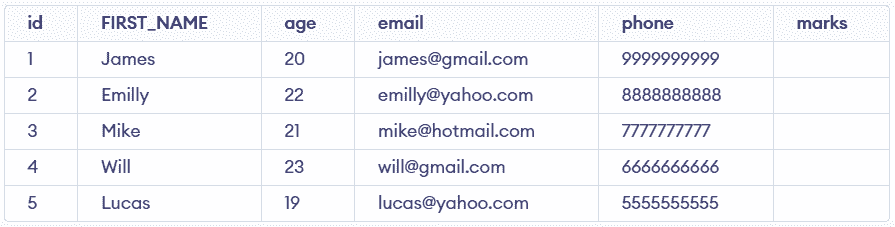
Example 4: Modify a Column Data Type
In this example, the marks column is updated from INT to DECIMAL to store numeric values more precisely, allowing fractional marks and improving data accuracy.
Query:
ALTER TABLE Student_Details
MODIFY COLUMN marks Decimal(5,2);
- The marks column is now of type DECIMAL, making it suitable for storing values with a decimal point.
- Existing data remains unchanged but is stored as integers instead of strings.
Additional ALTER Command Use Cases
The ALTER command can also be used for various other table modifications beyond renaming.
1. Removing a Column: In some cases, we might need to remove a column. To do that, you can use the DROP COLUMN syntax:
ALTER TABLE Student_Details
DROP COLUMN marks;
This command deletes the marks column entirely from the table
2. Changing a Column's Default Value: We can also modify a column’s default value using the SET DEFAULT clause:
ALTER TABLE Student_Details
ALTER COLUMN age SET DEFAULT 18;
3. Renaming a Table or Column in Different Databases: Note that SQL syntax can vary across different database systems. Here’s how we would rename a table or column in MySQL, MariaDB and Oracle:
- MySQL / MariaDB: The syntax for renaming a column is similar, but you must also use the
CHANGE COLUMNcommand, which requires specifying the new column name along with its complete definition (data type and constraints).
ALTER TABLE Student
CHANGE COLUMN old_column_name new_column_name datatype;
- Oracle: Oracle supports the RENAME COLUMN syntax but requires different syntax for renaming a table:
ALTER TABLE Student
RENAME COLUMN old_column_name TO new_column_name;
