


Executive Summary
A common pre-SQL Server 2016 pattern for row-level access control used views: create a view that filters rows based on the current user, grant users access to the view but not the underlying table. This article demonstrates a specific information disclosure vulnerability in this approach: even if a user cannot SELECT a row from the view, they can infer the row exists by attempting to INSERT, UPDATE, or DELETE against the view and reading the resulting error message. SQL Server’s error messages for constraint violations, duplicate key errors, and other integrity errors can reveal information about rows the view is supposed to hide. The fix is SQL Server’s native Row Level Security feature, introduced in SQL Server 2016.
Maintaining a secure environment is very hard. There are so many threats that can be exploited that it demands a specialized security team to continuously evaluate, monitor, and audit the many known and unknown threats. SQL Server is just another process that can be exploited and needs to be monitored. Still, since the database’s nature is to store information, including sensitive information, it is one of the main targets chosen by attackers.
In this article, I would like to show you a technique that can be used to reveal information that a user is not supposed to see and how to protect it. The technique is very simple, and it relies on SQL Server error messages to reveal information that could be stolen by adversaries. This technique has been used for several years in SQL Injection attacks, and many DBAs still overlook it.
The idea is simple; a non-privileged user can write a query referencing a SQL Server view that causes an exception, such as invalid conversion to be thrown during query processing if certain row values exist in the underlying tables. Depending on the query plan, these exceptions may bypass SQL Server permission validations and are thrown even if existing data cannot be retrieved through the view.
Before I move forward with recommendations, let’s understand the problem starting by looking at a simple example.
Note: I’m running all tests on Microsoft SQL Server 2017 (RTM-CU20) (KB4541283) – 14.0.3294.2 (X64) . Other versions may have different results.
A simple view-based row-level security
Before SQL Server 2016 and row-level-security, it was very difficult to implement restrictions on data at the row level. One of the most common solutions for this requirement is to use a view with a predicate filter used to reveal only the information a user has access.
For instance, consider the following scenario:
Create two user accounts that will demonstrate different access capabilities.
|
1 2 3 4 5 6 7 |
USE tempdb GO DROP USER IF EXISTS Manager DROP USER IF EXISTS User1 CREATE USER Manager WITHOUT LOGIN CREATE USER User1 WITHOUT LOGIN GO |
Create a table to hold test data.
|
1 2 3 4 5 6 7 8 9 |
DROP TABLE IF EXISTS TabSalary CREATE TABLE TabSalary ( EmpID INT, Employee VARCHAR(10), Salary NUMERIC(8,2), HideSalary BIT ); GO |
Populate the table with four rows of data.
|
1 2 3 4 5 6 7 8 |
INSERT INTO TabSalary VALUES(1, 'Bob', 1000, 0), (2, 'Jonh', 5000, 0), (3, 'Mark', 8000, 1), (4, 'Robert', 9500, 1) GO -- 4 rows... SELECT * FROM TabSalary GO |
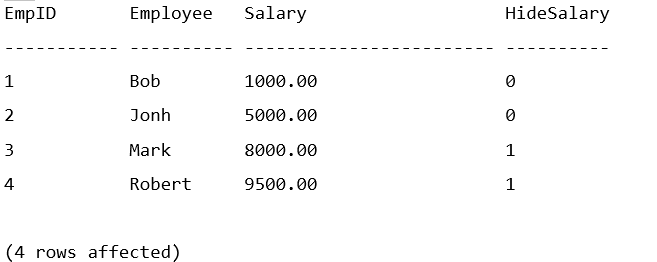
A row-level security view controls which rows each user can see. For instance, the Manager user will be able to see all rows, while any other user will only see rows where HideSalary is equal to 0.
|
1 2 3 4 5 6 7 |
DROP VIEW IF EXISTS vw_LowSalary GO CREATE VIEW vw_LowSalary AS SELECT EmpID, Employee, Salary FROM TabSalary WHERE (HideSalary = 0 OR USER_NAME() = 'Manager') GO |
Grant read access on the view to users.
|
1 2 3 |
GRANT SELECT ON vw_LowSalary TO Manager GRANT SELECT ON vw_LowSalary TO User1 GO |
Now, if User1 tries to access the data, it will return the following:
|
1 2 3 4 5 |
EXECUTE AS USER = 'User1' SELECT * FROM vw_LowSalary GO REVERT GO |
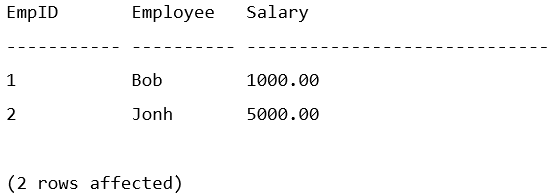
User Manager will have access to all rows:
|
1 2 3 4 5 |
EXECUTE AS USER = 'Manager' SELECT * FROM vw_LowSalary GO REVERT GO |
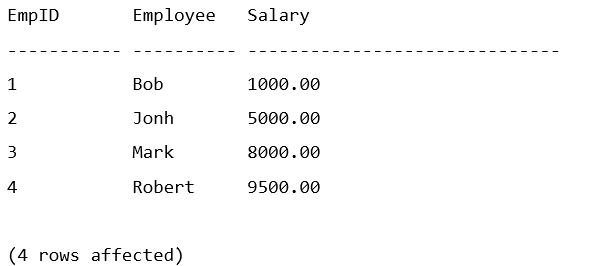
The problem with this approach is that any user with read access to the view can write a carefully crafted query that uses an expression executed in a specific order by the query optimizer. This causes an information leak through the use of the exception error message.
For instance, if a query that attempts to convert the Employee column to an Integer, it returns the following message:
|
1 2 3 4 5 6 |
EXECUTE AS USER = 'User1' SELECT * FROM vw_LowSalary WHERE CONVERT(INT, Employee) = 1 GO REVERT GO |

Bob is a name that User1 could already access, so there is no “leaked information” here. But what about a query that ignores employees Bob and Jonh that User1 can already access?
|
1 2 3 4 5 6 7 |
EXECUTE AS USER = 'User1' SELECT * FROM vw_LowSalary WHERE Employee NOT IN ('Bob', 'Jonh') AND CONVERT(INT, Employee) = 1 GO REVERT GO |
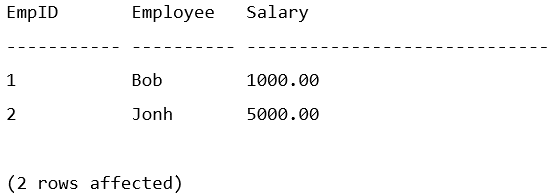
User1 shouldn’t be able to see Mark’s row, right? How can User1 see Marks salary information? Easy, just change the query to convert the salary column.
|
1 2 3 4 5 6 7 |
EXECUTE AS USER = 'User1' SELECT * FROM vw_LowSalary WHERE Employee NOT IN ('Bob', 'Jonh') AND CONVERT(INT, CONVERT(VARCHAR, Salary)) = 0 GO REVERT GO |

As you can see, even though there is a security predicate in place to prevent a malicious user from directly querying other people’s salary, User1 was able to determine the data by running a query that returns a SQL Server error message to leak the data.
Note: To leak the correct information, you need to make sure that the query processor is evaluating the expression in the correct order. Otherwise, it would first try to convert the data in the row the user already has access to and not leak the desired data. The query optimizer will have to create a plan that is pushing the predicate down to the table access. Look at the execution plan of the query to confirm the expression evaluation order. If necessary, you may need to force a short-circuit using a CASE expression.
Row-level security in SQL Server 2016 was introduced to address this problem. Well, kind of. Considering the same scenario, you would need to do the following:
The first step is to create a function with the predicate that will be used in a security policy.
|
1 2 3 4 5 6 7 8 9 10 11 |
DROP SECURITY POLICY IF EXISTS SalaryFilter GO DROP FUNCTION IF EXISTS dbo.fn_SecurityPredicate GO CREATE FUNCTION dbo.fn_SecurityPredicate(@HideSalary CHAR(1)) RETURNS TABLE WITH SCHEMABINDING AS RETURN SELECT 1 AS fn_securitypredicate_result WHERE (@HideSalary = 0 OR USER_NAME() = 'Manager'); GO |
Create a security policy on table TabSalary.
|
1 2 3 4 5 |
CREATE SECURITY POLICY SalaryFilter ADD FILTER PREDICATE dbo.fn_SecurityPredicate(HideSalary) ON dbo.TabSalary WITH (STATE = ON); GO |
Grant access to table TabSalary to users.
|
1 2 3 |
GRANT SELECT ON TabSalary TO Manager; GRANT SELECT ON TabSalary TO User1; GO |
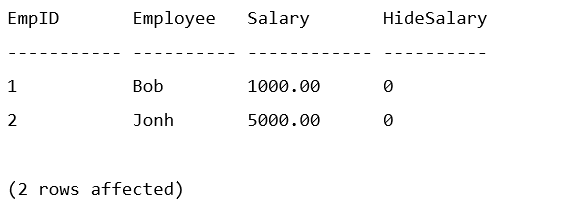
Just like when using the view, User1 only has access to employees “Bob” and “Jonh”.
|
1 2 3 4 5 |
EXECUTE AS USER = 'User1' SELECT * FROM TabSalary GO REVERT GO |
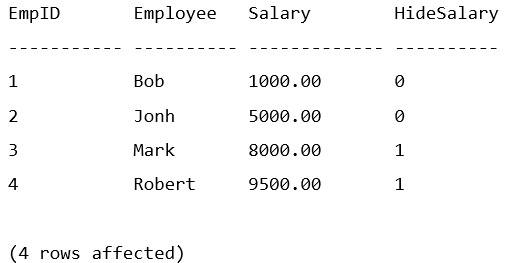
The user Manager can see all rows.
|
1 2 3 4 5 |
EXECUTE AS USER = 'Manager' SELECT * FROM TabSalary GO REVERT GO |
Here is the main difference between the view-based solution and the row-level security feature. If User1 tries to run the implicit conversion query, the query will return the following error message:
|
1 2 3 4 5 6 7 |
EXECUTE AS USER = 'User1' SELECT * FROM TabSalary WHERE Employee NOT IN ('Bob', 'Jonh') AND CONVERT(INT, CONVERT(VARCHAR, Employee)) = 0 GO REVERT GO |

As you can see, the data is masked. Because the query failed, the attacker can still infer that there are more rows in the underlying data. They can even write a query to identify the salary value, but it will be more difficult, and the data will never be leaked to the user screen. A query to infer the salary would be something like:
|
1 2 3 4 5 6 7 8 9 10 11 12 13 14 15 16 17 18 19 |
EXECUTE AS USER = 'User1' GO SELECT * FROM TabSalary WHERE Employee NOT IN ('Bob', 'Jonh') AND Salary = 7999 AND CONVERT(INT, CONVERT(VARCHAR, Employee)) = 0 GO SELECT * FROM TabSalary WHERE Employee NOT IN ('Bob', 'Jonh') AND Salary = 8000 AND CONVERT(INT, CONVERT(VARCHAR, Employee)) = 0 GO SELECT * FROM TabSalary WHERE Employee NOT IN ('Bob', 'Jonh') AND Salary = 8001 AND CONVERT(INT, CONVERT(VARCHAR, Employee)) = 0 GO REVERT GO |
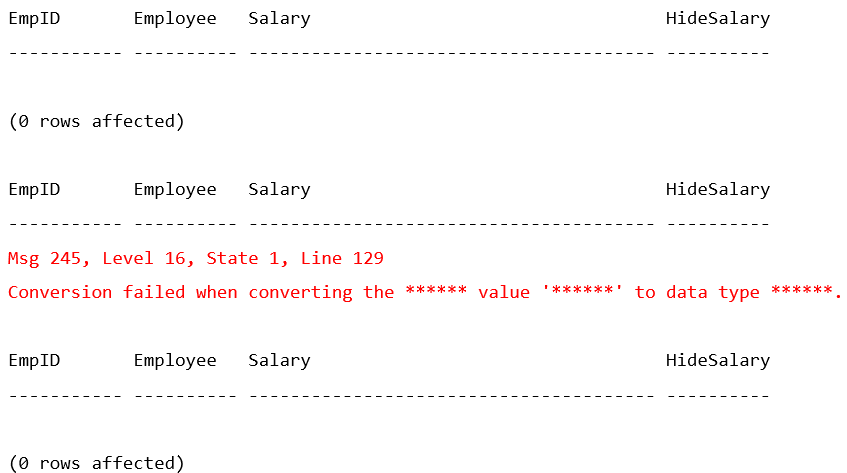
As you can see, a user could write a query in a loop to test a range of values and infer that a value exists. It is limited information, but in some scenarios, this could be a security problem.
Some recommendations to minimize the risk:
- Consider using the row-level security feature to minimize the information exposed to the attacker.
- View-based level security should not be used as an isolated measure to fully secure sensitive data from users running ad-hoc queries on the database. It is appropriate for preventing sensitive data exposure but will not protect against malicious users trying to infer or reveal the underlying data.
- Any SQL Server or associated application providing too much information in error messages on the screen or printout risks compromising the data and security of the system. The structure and content of error messages need to be carefully considered by the organization and development team.
- Databases can inadvertently provide a wealth of information to an attacker through improperly handled error messages. In addition to sensitive business or personal information, database errors can provide hostnames, IP addresses, user names, and other system information not required for end-user troubleshooting but very useful to someone targeting the system.
- Detailed error messages must be visible only to those who are authorized to view them. General users must receive only generalized acknowledgments that errors have occurred. These generalized messages must appear only when relevant to the user’s task.
- Configure audit logging, tracing or custom code in the database or application to record detailed error messages generated by SQL Server for review by authorized personnel.
- Consider enabling trace flag 3625 to mask certain system-level error information returned to non-administrative users.
- Inspect application source code, which will require collaboration with the application developers. It is recognized that, in many cases, the database administrator (DBA) is organizationally separate from the application developers and may have limited, if any, access to source code. Nevertheless, protections of this type are so important to the secure operation of databases that they must not be ignored. At a minimum, the DBA must attempt to obtain assurances from the development organization that this issue has been addressed and must document what has been discovered.
Final thoughts
It is important to understand that this approach to secure data using row level views is not very safe. Any arbitrary T-SQL and access to all views (including system views) should be limited to only specific users.
One other thing I like to do in my environments is to get rid of any permissions granted to the “public” role. You know, by default, SQL Server system objects have permissions granted to public. That means any login will automatically have access to those tables. But do they really need it? I don’t think so. Of course, you’ll have to test it to confirm, but many applications never use system objects. You may want to remove public access to all system objects. Following is a link with a Microsoft article that will help you with that: https://techcommunity.microsoft.com/t5/sql-server/remove-public-and-guest-permissions/ba-p/383594
Sensitive environments require special attention to many things, including application users that may look harmless. Remember, most attacks come from inside; that means any user that already has access to the system should be limited to do only what is intended to do and nothing else. Deny everything and grant access as you go (developers will hate me for that 😊).
It would be nice if there were an option on SQL Server to limit the information returned in an error message. In my opinion, this is the primary security issue here which has been exploited for many years with SQL Injection. Something like TF3625 “Limits the amount of information returned to users who are not members of the sysadmin fixed server role, by masking the parameters of some error messages using ‘******’. This can help prevent disclosure of sensitive information.”.
Am I too cautious? What do you think?
FAQs: Exploring errors to reveal unauthorized information
1. Can SQL Server view-based row filtering be bypassed by users?
Yes. View-based row filtering prevents users from selecting hidden rows, but it does not prevent them from learning about those rows through indirect means. Specifically: (1) Attempting to INSERT a row that would violate a unique constraint involving a hidden row returns an error that reveals the conflicting value. (2) Attempting to UPDATE a hidden row through the view returns an error revealing the row’s state. (3) Error messages can expose column values that the user is not supposed to see. SQL Server’s built-in Row Level Security feature (SQL Server 2016+) resolves these vulnerabilities by blocking inference at the engine level.
2. Is SQL Server Row Level Security (RLS) more secure than view-based filtering?
Yes, for row-level access control. RLS is implemented at the table level in the storage engine – filter predicates apply before any query execution, preventing inference attacks through error messages or timing channels. RLS also applies to INSERT/UPDATE/DELETE operations (BLOCK predicates), not just SELECT. The only meaningful security limitation in RLS itself is side-channel attacks on masked columns – covered in Part 3 of the DDM series. For row visibility control, RLS is significantly more secure than view-based approaches.
3. What is the risk of using SQL Server views for data security?
Views as a security boundary are appropriate for hiding columns (column-level access control) but are unreliable for row-level access control. Risks include: information disclosure through error messages (as demonstrated in this article); views that become stale when underlying tables change (see the Tracking Underlying Object Changes in Views article); and views that can be bypassed by users with access to the underlying tables (if table permissions are misconfigured). For row-level control, use SQL Server RLS. For column-level control, views remain a valid and lightweight approach.
4. What SQL Server version introduced native Row Level Security?
SQL Server 2016 introduced Row Level Security (RLS) as a built-in feature. It is also available in Azure SQL Database and Azure SQL Managed Instance. For SQL Server 2014 and earlier, where RLS is not available, the view-based approach with awareness of its limitations (as documented in this article) is the fallback, supplemented by application-layer access control.





Load comments