◦ Comprehensive security
◦ 24/7 support
WordPress Guide → Development
WordPress development: What you need to know (Complete guide)

WordPress is powerful, flexible, and endlessly customizable—but to truly unlock its potential, you need to go beyond the basics. Whether you want to improve your own site, launch a career as a WordPress website developer, or start selling custom themes and plugins, learning WordPress development opens up a world of possibilities.
Ready to take your WordPress knowledge to the next level? Let’s dive in.
Get fast, reliable hosting for WordPress
Power your site with the industry’s fastest, most optimized WordPress hosting
What is a WordPress developer?
A WordPress developer is a specialized web developer who builds, customizes, and maintains websites using WordPress. They work with WordPress’s core software, themes, and plugins to create functional and visually appealing sites. Their expertise often includes PHP, JavaScript, HTML, CSS, and MySQL, which are essential for modifying WordPress’s structure and performance.
Some developers focus on front-end design, ensuring an intuitive user experience, while others specialize in back-end development, optimizing databases, security, and performance.
Professional WordPress developers can work on a range of projects, from simple blogs to complex ecommerce sites and membership platforms. They may develop custom themes and plugins to meet specific client needs, integrate third-party services, or troubleshoot technical issues.
Learning time
The time it takes to learn WordPress development depends on your experience with web dev and how deeply you want to specialize.
- If you’re a complete beginner, learning the basics of WordPress, such as setting up a site, installing themes and plugins, and managing content, can take just a few days or weeks. However, mastering WordPress development, including coding custom themes and plugins can take several months to a year of consistent learning and practice.
- For someone with basic web development experience, learning to modify themes, create child themes, and understand the WordPress template hierarchy can be done within a few weeks. However, diving into plugin development, working with the WordPress REST API, and optimizing site performance and security takes longer. Many developers become proficient within six months to a year with hands-on projects and real-world experience.
Becoming an expert WordPress developer—capable of building custom solutions, troubleshooting complex issues, and contributing to the WordPress core—typically takes one to two years or more. Continuous learning is key, as WordPress evolves with regular updates and new technologies.
Salary
The average salary for a WordPress developer in the United States varies based on experience, location, and specific skill sets. As of early 2025, the average annual pay for a WordPress dev is $91,000/year, when we average the averages:
- Salary.com reports the average annual pay for a WordPress Developer is $113,745, with most professionals earning between $105,318 and $123,603.
- ZipRecruiter reports that the average annual pay for a WordPress Developer is $84,542, with salaries ranging between $60,500 and $99,500.
- Indeed.com notes that the average hourly wage for a WordPress developer is $35.93, which translates to approximately $74,734 annually.
These variations highlight the influence of factors such as experience level, geographic location, and specific job responsibilities on compensation. For instance, entry-level WordPress developers may earn salaries on the lower end of the spectrum, while those with extensive experience or specialized skills, such as full-stack development, can command higher wages.
Here’s a breakdown of average annual salaries in five major cities:
- San Francisco, CA: WordPress developers in San Francisco earn an average of $135,000 per year.
- New York, NY: In New York City, the average annual salary for a WordPress developer is approximately $108,000.
- Los Angeles, CA: Developers in Los Angeles have an average annual salary of $126,386.
- Chicago, IL: The average salary for WordPress developers in Chicago is around $100,000 per year.
- Austin, TX: In Austin, WordPress developers earn an average of $95,000 annually.
Skills
To be a successful WordPress developer, you need a combination of technical expertise and problem-solving skills. Here are the top five skills that will set you apart:
- Proficiency in PHP and WordPress core development: WordPress is built on PHP, so a strong understanding of this scripting language is essential. Knowing how WordPress functions under the hood—such as the template hierarchy, hooks (actions and filters), and the WordPress database structure—allows you to customize themes, build plugins, and optimize performance.
- HTML, CSS, and JavaScript (front-end development): Front-end technologies like HTML, CSS, and JavaScript are critical for designing and enhancing the user interface of a WordPress site. Mastering CSS frameworks and JavaScript libraries will help you create dynamic, responsive, and visually appealing websites.
- Custom theme and plugin development: While pre-built themes and plugins exist, creating custom WordPress themes and plugins allows for greater flexibility. Understanding how to build a custom theme from scratch and develop custom plugins tailored to client needs will make you a sought-after WordPress developer.
- Database management and MySQL: WordPress relies on MySQL databases to store content, settings, and user data. Knowing how to optimize database queries, prevent SQL injection attacks, and use WP_Query effectively will improve performance and security.
- Security and performance optimization: WordPress sites are frequent targets for hackers, making WordPress security knowledge crucial. Understanding best practices like proper user roles, securing wp-config.php, implementing SSL, and preventing brute-force attacks is essential.
WordPress development basics
There are some key WordPress concepts and basics that you need to know as you work on becoming a developer. It’s important to understand hosting options, admin basics on the WordPress platform, common programming languages, and different types of WordPress development.
1. Hosting for WordPress
Hosting for WordPress refers to the web hosting services specifically optimized for running WordPress websites efficiently and securely. Unlike generic hosting, WordPress hosting provides tailored features such as one-click installations, automatic updates, performance optimizations, and enhanced security configurations designed for WordPress environments.
There are various types, including shared, VPS, managed, and dedicated WordPress hosting, each offering different levels of control, scalability, and performance. Managed WordPress hosting, in particular, is popular, because it includes automatic backups, built-in caching, staging environments, and expert WordPress support, reducing the need for manual maintenance and technical troubleshooting.
WordPress local
Local WordPress development is the process of setting up a WordPress site on a local computer instead of a live server, allowing developers to build, test, and modify websites in a private environment. This is typically done using local development tools like Local by Flywheel, XAMPP, MAMP, or DevKinsta, which create a local server on your computer.
Local development is essential for testing themes, plugins, and custom code without affecting a live site, which improves workflow efficiency and reduces the risk of errors. Once the site is fully developed and tested, it can be deployed to a live server for public access.
Cloud hosting for WordPress
Cloud WordPress hosting is a type of hosting where WordPress websites run on a network of virtual servers instead of a single physical server, offering scalability, reliability, and better performance. Unlike traditional hosting, cloud hosting dynamically allocates resources based on demand, ensuring high uptime and speed.
Compared to shared WordPress hosting, where multiple websites share a single server’s resources, cloud hosting provides better isolation and performance. It is similar to VPS WordPress hosting, where a virtual private server offers dedicated resources.
Managed WordPress hosting
Managed WordPress hosting is a premium hosting service designed specifically for WordPress websites, where the hosting provider handles technical maintenance, security, performance optimization, and updates on behalf of the user.
This eliminates the need for manual server management, making it an ideal choice for businesses, developers, and agencies that want to focus on their website’s content and growth rather than backend operations.
Managed hosting typically includes automatic updates, daily backups, enhanced security, caching, and expert WordPress support, ensuring a smooth and secure website experience.
Benefits of Managed WordPress Hosting:
- Automatic WordPress updates for security and performance
- Daily backups with easy restoration options
- Enhanced security with malware scanning and protection
- Built-in caching for faster page load speeds
- Expert WordPress support from hosting professionals
- Scalability to handle traffic spikes without performance issues
2. WordPress admin basics
The WordPress platform uses a variety of basic tools and structures that you need to be familiar with first.
The WordPress dashboard
There are various types, including shared, VPS, managed, and dedicated WordPress hosting, each offering different levels of control, scalability, and performance. Managed WordPress hosting, in particular, is popular, because it includes automatic backups, built-in caching, staging environments, and expert WordPress support, reducing the need for manual maintenance and technical troubleshooting.
WordPress local
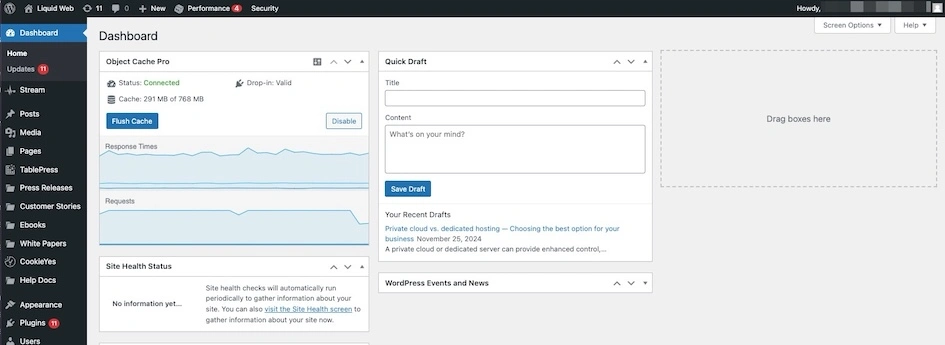
The WordPress dashboard is the central control panel where administrators and developers manage a website’s content, settings, and functionality.
When you log into WordPress, you’re greeted with an overview of site activity, recent posts, updates, and shortcuts to essential areas like pages, plugins, and themes. The dashboard also provides quick access to WordPress updates, SEO tools, performance analytics, and security settings.
For developers, the dashboard serves as a launchpad for customization and troubleshooting. With access to the theme editor, plugin management, and API integrations, developers can fine-tune the site’s appearance and functionality.
The dashboard can also be extended using custom admin menus, widgets, and REST API endpoints, allowing for tailored workflows and automation. Developers often leverage admin hooks and filters to modify dashboard behavior, improving the user experience for site administrators.
WordPress themes
WordPress themes control the visual presentation and layout of a website, defining how content is displayed across different pages.
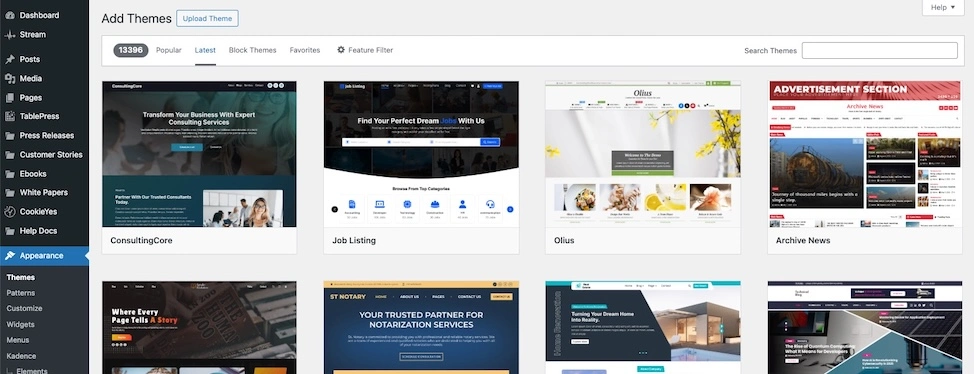
A theme consists of template files, stylesheets, JavaScript files, and PHP code that determine the structure and design of a website. Themes can be installed from the WordPress Theme Directory or created from scratch to meet specific branding and functionality needs.
For developers, themes offer a foundation for custom website builds—whether through child themes or entirely custom designs. Devs can leverage the WordPress Template Hierarchy and Theme Customizer API to create dynamic layouts.
Additionally, theme development involves optimizing performance, ensuring accessibility, and following best coding practices, making it a critical aspect of WordPress development.
WordPress plugins
WordPress plugins extend the functionality of a WordPress site by adding new features without modifying core files.
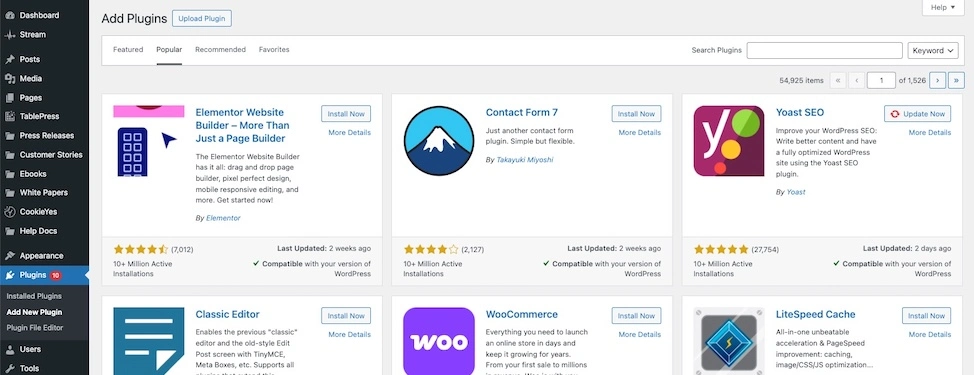
Plugins can range from SEO tools, security enhancements, and performance optimizations to complex integrations like ecommerce systems and membership portals. The WordPress Plugin Repository provides thousands of free and premium plugins for various use cases.
For developers, plugins are a powerful way to add custom functionality without altering the core WordPress system. Plugin development involves working with WordPress hooks, custom post types, shortcodes, and the REST API to introduce new features efficiently. Custom plugins enable developers to provide scalable, modular solutions for client projects.
WordPress pages and posts
Pages and posts are the two primary content types in WordPress.
- Posts are time-based content entries, commonly used for blogs, news, and dynamic updates. They can be categorized, tagged, and displayed in chronological order.
- Pages are static content sections like “About Us,” “Contact,” and “Services” that are not tied to publishing dates.
For developers, understanding the differences between pages and posts is crucial for theme development, custom post types, and content structuring. Custom fields like taxonomies and post templates, enable developers to create advanced content layouts and custom experiences.
Additionally, the WordPress REST API allows for dynamic content retrieval and manipulation, making pages and posts a key component in headless WordPress setups.
WordPress content blocks
Content blocks, introduced with the Gutenberg editor, allow users to create and format content using a modular block-based system. Blocks can include text, images, videos, buttons, tables, and custom embeds, providing a flexible and intuitive way to build rich content without relying on shortcodes or HTML.
For developers, custom block development using React and the WordPress Block API opens new possibilities for customized user experiences. Blocks can be tailored to match brand styles, integrate third-party services, or provide dynamic content features.
Developers can also use Advanced Custom Fields (ACF) or the Block Editor API to enhance the editing workflow, giving clients greater control over content layout and design.
WordPress widgets
Widgets are modular elements that add specific functionality to different areas of a WordPress site, such as sidebars, footers, and headers. They can include elements like search bars, recent posts, social media feeds, and custom HTML blocks. WordPress provides a Widgets API, allowing developers to create custom widgets that extend site capabilities.
For developers, widgets are an efficient way to add site-wide features without modifying theme templates directly. By creating custom widget classes in PHP, developers can add reusable components that site admins can manage through the WordPress Customizer.
With the introduction of block-based widgets, developers can also leverage the Gutenberg block system to create more interactive and flexible widget areas.
WordPress users
The users feature in WordPress manages site roles and permissions, ensuring proper access control. WordPress includes six default user roles:
- Administrator
- Editor
- Author
- Contributor
- Subscriber
- Super Admin
Each role has predefined capabilities, from full site control to limited content contribution.
For developers, the User Roles API allows for custom role creation and permission adjustments, enhancing security and workflow efficiency. Developers often create custom login systems, user dashboards, and role-based access controls using hooks and filters. This is particularly useful for membership sites, ecommerce stores, and client projects that require granular permission settings.
3. WordPress languages
WordPress languages refer to the programming languages and technologies used to build and customize WordPress. The core languages include PHP (for backend functionality), HTML and CSS (for structuring and styling), JavaScript (for dynamic interactivity, including React for the block editor), and MySQL (for database management).
PHP (Hypertext Preprocessor)
PHP is a widely used open-source server-side scripting language designed for web development. It’s embedded within HTML and is responsible for handling backend logic, managing databases, and executing server-side scripts. PHP is particularly known for its ability to generate dynamic web content, interact with databases, and process form data efficiently.
PHP is also the backbone of the entire WordPress platform. It powers the core functionality, including theme templates, plugin development, database queries, and WordPress hooks (actions and filters). Every WordPress page request is processed through PHP, dynamically retrieving and rendering content stored in the MySQL database.
Developers use PHP to create custom themes, plugins, and REST API endpoints, enabling deep customization of WordPress websites.
CSS (Cascading Style Sheets)
CSS is a stylesheet language used to control the presentation, layout, and design of web pages. It allows developers to define styles for HTML elements, such as colors, fonts, spacing, and responsive design rules, making websites visually appealing and user-friendly.
In WordPress, CSS is essential for customizing themes and ensuring a consistent design across the site. Developers use style.css in themes to control global styles, while additional CSS rules can be applied through the Customizer or child themes.
With block-based editing in Gutenberg, CSS plays a crucial role in styling content blocks, ensuring responsive layouts, and enhancing the user experience.
HTML (HyperText Markup Language)
HTML is the foundational language for structuring web pages. It defines elements like headings, paragraphs, images, forms, and links, so browsers can display content correctly. HTML works in conjunction with CSS and JavaScript to create visually rich and interactive websites.
In WordPress, HTML is the framework for displaying content inside themes, templates, and blocks. WordPress uses PHP to dynamically generate HTML that is served to the browser.
Developers modify HTML within theme files (like header.php, footer.php, and page templates) to control the structure of WordPress pages. Additionally, WordPress supports custom HTML blocks in the Gutenberg editor, giving users more control over content layout.
JavaScript
JavaScript is a client-side programming language that enables dynamic and interactive web experiences. It allows developers to create real-time functionality, animations, form validation, and API interactions.
In WordPress, JavaScript is crucial for interactive elements, including Gutenberg block development, AJAX requests, and front-end scripting. The WordPress admin dashboard relies heavily on JavaScript (and React for the block editor) to provide a seamless user experience.
Developers use JavaScript for custom scripts, theme enhancements, and plugin features, improving website interactivity and performance.
4. Types of WordPress development
WordPress development is a big field, which means there are niches within it. Generally, ‘WordPress development’ refers to the creation of whole websites, but some developers specialize.
WordPress website development
WordPress website development refers to the process of building and customizing websites using WordPress, whether through pre-made themes and plugins or by coding custom solutions.
This includes setting up WordPress hosting, configuring settings, installing and modifying themes, adding necessary plugins, and optimizing the site for performance, security, and SEO. WordPress website development can range from simple blogs to complex ecommerce platforms and membership sites, depending on the project’s requirements.
This is the most common meaning of “WordPress development,” because it encompasses everything related to building and maintaining a WordPress site. Many developers and agencies specialize in WordPress website development—offering services such as theme customization, plugin installation, and performance optimization. Even without deep programming knowledge, developers can create fully functional sites by leveraging WordPress’s extensive ecosystem of themes and plugins.
WordPress theme development
WordPress theme development is the specialized process of designing and coding custom themes that define the visual layout and user experience of a WordPress website.
Knowing how to develop custom WordPress themes allows devs to create unique, performance-optimized, and highly flexible designs without relying on third-party themes. This is especially valuable for agencies, businesses, and freelancers looking to provide custom branding and advanced design capabilities for their clients.
Additionally, theme development provides opportunities on its own. Many devs sell premium themes in marketplaces like ThemeForest and the WordPress Theme Repository.
Basic steps to develop a WordPress theme include:
- Set up a local WordPress environment (using Local, XAMPP, or similar).
- Create a new theme folder in /wp-content/themes/.
- Develop a style.css file with theme metadata and custom styles.
- Build essential template files like index.php, header.php, footer.php, and single.php.
- Use the WordPress template hierarchy to structure the theme properly.
- Implement dynamic content using the WordPress loop.
- Add customizer support for easy modifications.
- Test responsiveness and optimize for performance.
- Package the theme and deploy it.
WordPress plugin development
WordPress plugin development involves creating custom plugins that add new features and functionality to a WordPress site without modifying the core files. Plugins can range from simple tweaks (like adding custom shortcodes) to advanced functionalities such as SEO optimization, security enhancements, membership systems, and ecommerce integrations. Plugins are written primarily in PHP, JavaScript, and the WordPress API.
Understanding plugin development is highly valuable, because it lets developers extend WordPress beyond its default capabilities, providing custom solutions for clients and even—similar to themes—selling plugins for profit.
Unlike themes, plugins are focused on functionality rather than design, which makes them essential for enhancing site performance, automating tasks, and integrating third-party services.
Basic steps to develop a WordPress plugin:
- Set up a WordPress development environment.
- Develop a main plugin file (plugin-name.php) with metadata.
- Create a new plugin folder in /wp-content/plugins/.
- Use WordPress hooks (actions and filters) to modify core functionality.
- Build necessary functions, shortcodes, or custom post types.
- Test functionality using debugging tools.
- Ensure security best practices, including sanitization and validation.
- Package and deploy the plugin.
WordPress block development
Block development became essential after WordPress dropped its shiny new Gutenberg editor in version 5.0, transforming content creation into a block-based experience. Block development involves creating custom content blocks that users can add to their posts and pages through the visual editor.
But here’s the twist: block development isn’t your granddad’s WordPress. It’s powered by modern JavaScript – mainly React.js – which means we’ve moved on from the old-school ways to embrace a slick, component-driven future. TL;DR: WordPress has officially gone modular, and it’s not looking back.
Why block development matters:
- Creates intuitive content editing experiences for clients
- Provides consistent design elements across a website
- Enables complex layouts without requiring HTML knowledge
- Allows for dynamic, interactive content components
Key components of WordPress block development:
Knowing how to develop for the WordPress backend is crucial for creating custom themes, plugins, and integrations that extend WordPress’s functionality. Backend developers can build custom APIs, automate workflows, enhance security, and optimize database queries, ensuring high-performance and scalable WordPress websites.
- Block types: From simple text blocks to complex interactive elements
- Core blocks (provided by WordPress)
- Third-party blocks (from plugins)
- Custom blocks (developed for specific projects)
- Block patterns: Pre-designed arrangements of blocks that users can insert and customize
- Save time by creating reusable design patterns
- Ensure brand consistency across content
- Simplify complex layouts for non-technical users
- Block templates: Pre-defined block structures for specific post types
- Control the available blocks and their arrangement
- Guide content creators with structured templates
- Maintain consistent content architecture
The block development ecosystem leverages several key technologies:
- JavaScript (ES6+) for core functionality
- React.js for component-based UI development
- WordPress Block API for registration and configuration
- @wordpress/scripts package for build workflows
- CSS/SASS for styling block interfaces
If you’re a developer eyeing up block development, the Block Editor Handbook is your new best friend – packed with everything you need to know, plus handy examples. Tools like @wordpress/create-block make it easy to scaffold new custom blocks.
Rest API development
The WordPress REST API is your all-access backstage pass to WordPress. Whether you’re building a headless setup, a mobile app, or a JavaScript-fuelled front-end, this API serves everything up as neat little JSON endpoints, making it accessible to any client that can make HTTP requests.
The REST API bridges WordPress with the broader web development ecosystem, opening the door to modern app architectures and smooth integration with other services.
Key aspects of WordPress REST API development include:
- Authentication methods:
- Cookie authentication (for same-origin requests)
- Application passwords (for cross-origin requests)
- OAuth authentication (for third-party applications)
- JWT authentication (via plugins)
- Endpoint customization:
- Extending existing endpoints with additional fields
- Creating custom endpoints for specialized functionality
- Modifying response formats to suit specific needs
- Implementing custom permissions and validation
- Common use cases:
- Headless WordPress (decoupling the front-end from WordPress)
- Mobile app integration
- Single-page applications
- Third-party service integrations
- Custom admin interfaces
Key aspects of WordPress REST API development include:
- Understanding the available endpoints and their capabilities
- Testing API requests using tools like Postman or the built-in API browser
- Implementing proper authentication for secure data access
- Handling data fetching and manipulation with JavaScript frameworks
- Optimizing performance with techniques like data caching and batched requests
For developers new to the REST API, WordPress provides a REST API Handbook with detailed documentation. Tools like WP-API Postman can help with testing and exploring available endpoints.
The REST API represents a significant evolution in WordPress development. It lets you break free from the old all-in-one setup to build flexible, decoupled architectures, all whilst maintaining the benefits of WordPress’s content management capabilities.
WordPress backend development
WordPress backend development focuses on server-side functionality, database management, and API integrations. Unlike front-end development, which deals with visual elements, backend development involves customizing WordPress core features, working with the database, and optimizing performance. This often requires strong knowledge of PHP, MySQL, WordPress hooks, REST API, and server configurations.
Knowing how to develop for the WordPress backend is crucial for creating custom themes, plugins, and integrations that extend WordPress’s functionality. Backend developers can build custom APIs, automate workflows, enhance security, and optimize database queries, ensuring high-performance and scalable WordPress websites.
Good support is important, because technical issues can arise unexpectedly. Reliable support can mean the difference between a quick fix and prolonged downtime. Beginners and non-technical users benefit from knowledgeable WordPress support teams, while advanced users can rely on hosting experts for optimizations and troubleshooting.
This skill is particularly useful for enterprise applications, headless WordPress projects, and large-scale ecommerce sites.
Database operations
If you’re building advanced WordPress applications, having a solid grasp of MySQL is essential. At the heart of WordPress lies a database made up of multiple tables handling everything from posts and pages to user information and plugin configurations.
Knowing how to work with this database safely and efficiently is key to creating high-performing, reliable sites that keep data secure and running smoothly.
Key aspects of WordPress database operations include:
- Core database structure:
- WordPress uses a standardized table structure with prefixes
- Default tables handle posts, users, comments, and settings
- Custom tables can be created for specialized functionality
- SQL query optimization:
- Writing efficient queries to minimize server load
- Using indexes to speed up data retrieval
- Implementing caching strategies to reduce database calls
- Following WordPress best practices for database interaction
- WordPress database APIs:
- $wpdb global object for safe database operations
- WP_Query for retrieving posts with complex filtering
- prepare() method for preventing SQL injection attacks
- get_results(), get_row(), and get_var() for different query types
Common database operations in WordPress development:
- Custom tables management:
- Creating tables during plugin activation
- Updating table structures during version upgrades
- Removing tables during plugin uninstallation
- Following WordPress database version control practices
- Data sanitization and validation:
- Preventing SQL injection with prepared statements
- Sanitizing user input before database operations
- Validating data integrity with type checking
- Performance optimization:
- Implementing object caching for frequently accessed data
- Using transients API for temporary data storage
- Monitoring query performance with debugging tools
- Structuring database calls to minimize server impact
If you’re a developer working with WordPress databases, tools like Query Monitor are a great way to spot inefficient queries early. Pair that with the WordPress Codex, which offers thorough documentation on database APIs, and you’ve got a solid foundation.
Knowing how your database operates becomes especially important when you’re building custom data structures, managing high-traffic sites where performance really matters, or handling complex data relationships that go beyond what WordPress handles out of the box.
How to become a WordPress developer
WordPress development is a valuable and in-demand skill. Whether you want to build custom themes, create plugins, or work on the backend of WordPress, learning how to become a WordPress developer can open up many career opportunities.
Step 1: Get to know WordPress
Before diving into coding, you need to understand how WordPress works from a user’s perspective.
- Choose a hosting strategy: Set up a WordPress installation using local development tools like Local by Flywheel or install WordPress on a shared, VPS, or cloud hosting platform.
- Start building a WordPress project: Create a basic website, experiment with themes, plugins, and settings, and explore the admin dashboard. Hands-on trial and error is the best teacher. Try customizing themes, tweaking site layouts, and testing different plugins to see how they work.
Gain a working knowledge of WordPress before moving into advanced skills – Before learning to code, you should understand WordPress’s template hierarchy, database structure, and core functionality.
Step 2: Start earning credentials
Once you’re comfortable with WordPress basics, it’s time to learn the technical side of development.
- Start with PHP: Since WordPress is built on PHP, learning WordPress-specific PHP is the best place to begin.
- Expand into front-end technologies: Understanding HTML, CSS, JavaScript, and React (for Gutenberg blocks) is essential for theme and plugin development.
- Learn database management: WordPress uses MySQL, so knowing how to write queries and optimize databases is valuable.
- Plug into AI: AI is changing development, and you don’t want to be left behind from the beginning.
Additional skills like SEO, UX/UI design, and security best practices will make you a well-rounded developer.
A few popular courses and resources:
- PHP for WordPress: LinkedIn Learning: PHP for WordPress Development
- WordPress Development Bootcamp: Udemy: WordPress Theme and Plugin Development
- HTML, CSS, and JavaScript: Mozilla Developer Network (MDN)
- React for Gutenberg blocks: React Official Docs
- WordPress AI: Complete AI WordPress Creation Course
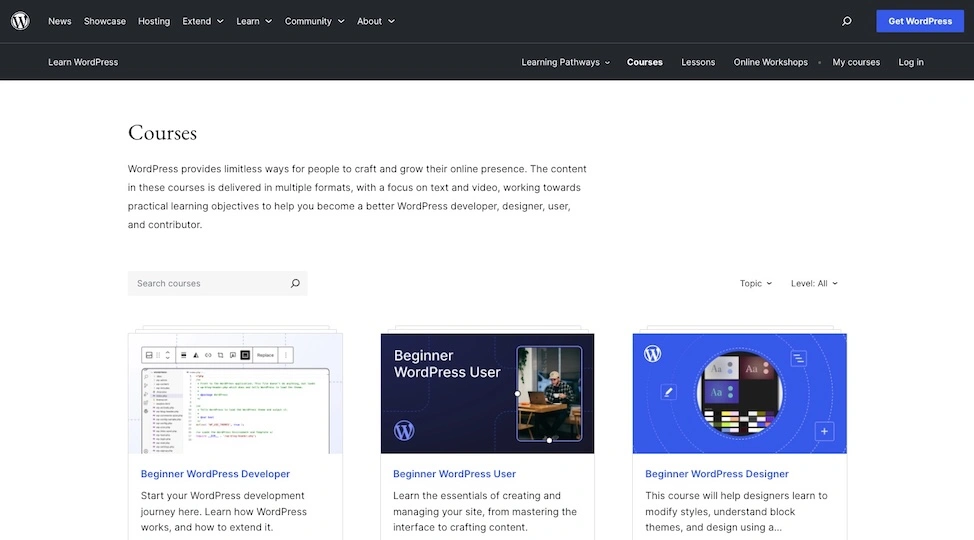
WordPress.org also has a library of courses.
Step 3: Build a portfolio
A WordPress development portfolio showcases your skills, projects, and expertise to potential clients or employers. It’s a personal website or GitHub repository where you highlight your WordPress projects, including custom themes, plugins, or site builds.
How to build a great dev portfolio:
- Create a custom WordPress theme from scratch.
- Develop and publish a simple plugin to demonstrate coding skills.
- Showcase live projects (client work, personal projects, or open-source contributions).
- Use GitHub or CodePen to share code samples.
- Add a blog where you write about WordPress tips, coding challenges, and industry trends.
WordPress development and AI
AI is reshaping career options for WordPress developers by automating repetitive tasks, enhancing development workflows, and creating new opportunities in AI-driven website customization.
While AI-powered tools like code generators, website builders, and AI-assisted design are making certain aspects of WordPress development more accessible, skilled developers are still in high demand for customization, complex functionality, and performance optimization.
How AI is changing the role of WordPress developers:
- Automation of repetitive tasks: AI can generate boilerplate code, optimize SEO, and even assist in debugging, allowing developers to focus on more complex problem-solving.
- AI-generated websites and low-code solutions: Platforms like Wix, Squarespace, and AI-powered WordPress plugins are enabling non-developers to build websites, reducing demand for basic development services.
- AI-driven personalization: Developers can leverage AI to create dynamic content, chatbots, recommendation engines, and automated customer support within WordPress sites.
- Security and performance enhancements: AI-driven security tools can detect vulnerabilities and optimize site speed, but developers are still needed to configure and integrate these solutions properly.
- Opportunities in AI development: Developers who learn AI integration, machine learning APIs, and headless WordPress solutions will have a competitive edge in the job market.
Career outlook for WordPress developers in the face of AI advancements
While AI is streamlining parts of web development, WordPress developers who specialize in custom themes, plugins, API integrations, and advanced security measures will continue to be in demand.
The best way to stay competitive is to adapt to AI tools, focus on high-value development tasks, and expand skills into areas like headless WordPress, automation, and AI-driven applications. Rather than replacing developers, AI is creating new opportunities for those who embrace and integrate it into their workflows.
Getting started with WordPress development
WordPress development is a hugely valuable skill. About half of the web runs on WordPress and it’s not slowing down. WordPress developers will continue to be in-demand for the foreseeable future.
If you’re brand new, the first step is to simply start getting familiar with WordPress. Sign up for a cheap hosting plan or set up a local WordPress server and start making/breaking a website.
If you have a little experience with WordPress, but want to really start training as a developer, start by learning PHP.
Ready to take the training wheels off your WordPress site? Upgrade to professional hosting and see how better speeds, security, and reliability provide a foundation for a website and a brand that people find engaging and trustworthy. Liquid Web’s WordPress hosting options configure business-class servers and support plans specifically for WordPress websites.
Click through below to explore all of our WordPress hosting options, or chat with a WordPress expert right now to get answers and advice.
Additional resources
What is managed WordPress hosting? →
Get details and decide if managed WordPress hosting is right for you.
How to become a freelance WordPress developer →
We’re going to talk about getting started as a WordPress developer but you can use this same advice if you are a designer or even a writer in the WordPress space
A complete guide to WordPress shortcodes →
Shortcodes make life easier. Learn how to get started!
