New to Rust? Grab our free Rust for Beginners eBook Get it free →
How to Fix Node.js Cannot Find Module Errors


Node.js reports MODULE_NOT_FOUND when a CommonJS request cannot resolve to a package or file. ERR_MODULE_NOT_FOUND is the ESM form of the same problem, and relative ESM imports need their file extension. The diagnostic sequence below ran on Node.js v26.7.0 with npm 11.19.0 and separates a missing dependency from an import-path mistake.
Node.js cannot find a module because the request and file tree disagree
The error text identifies the request that failed, so first decide whether it names a package, a relative file, or a package entry point that its metadata does not expose.
Node documents separate resolvers for CommonJS and ECMAScript modules, with CommonJS able to search node_modules directories for a package name while a relative ESM import needs a relative path and an explicit extension such as .js.
Identify the request before changing dependencies
A bare name such as kleur asks Node to locate an installed package, whereas a request beginning with ./ or ../ names a file relative to the importing file and needs a path repair rather than a package installation.
Package names and relative paths fail for different reasons
Check the package name against package.json before you run npm install. If the package appears under dependencies, install from the project directory so npm creates or repairs that project’s node_modules tree.
npm ls kleur
npm install kleur
npm ls shows whether the installed dependency tree contains the package. npm install adds a missing declared package, or records it in package.json when you install it directly.
Check the paths CommonJS will search
CommonJS exposes its search locations through require.resolve.paths(). Run it from the same project directory that runs the failing code. The first project-local path is usually the node_modules directory beside your package.json.
const paths = require.resolve.paths('kleur')
console.log(paths)
The list shows where Node will look for a bare package request, but it does not validate a relative import because ./config.js is resolved from the importing file instead.
Repair a missing package
The recorded run first asked CommonJS for kleur before the package existed. Node returned MODULE_NOT_FOUND, then npm installed kleur in the project and the same require() call printed package resolved.
cd /tmp/cfg-module-proof && ./proof-demo.sh
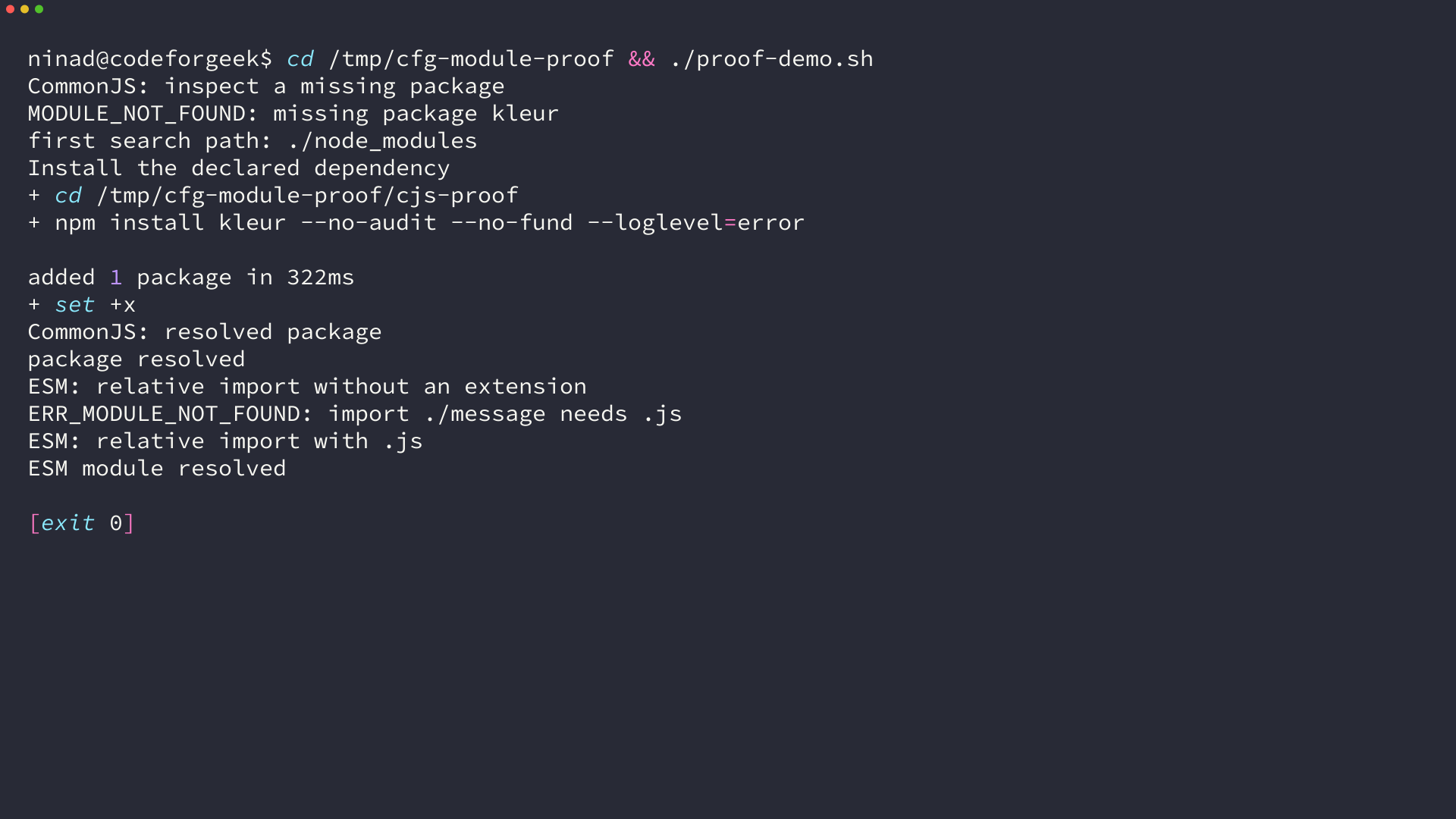
The command succeeds only after its dependency tree changes. If npm ls already shows the package, inspect the spelling, the working directory, and the module system before deleting node_modules.
Repair an ESM relative import
For local ESM files, include both the relative marker and the extension. Node’s ESM documentation requires file extensions for relative and absolute file specifiers.
// Fails when message.js is the file on disk
import { message } from './message'

// Loads message.js
import { message } from './message.js'
The failed request produces ERR_MODULE_NOT_FOUND because ./message does not identify the file under ESM resolution. The corrected request identifies message.js and can load its exported message.
Check package metadata and deployment files
A package can exist on disk and still reject a subpath request when package.json limits public entry points through exports or sets type to module, which changes how .js files are interpreted.
When a request such as package/private-file fails, read the package’s package.json and use its documented export path instead of reaching into a folder that its author has not made public.
node -p "require('./package.json').type"
npm ls --depth=0
The first command shows the module-type setting for the current package, while the second lists top-level dependencies and helps when a production build omitted a dependency or installed only a selected dependency group.
Avoid the unnecessary reinstall
A clean install helps when the local dependency tree is missing or corrupt. It cannot correct a misspelled package, a case mismatch on a case-sensitive filesystem, an extensionless ESM import, or an exports restriction.
Use npm install after you have evidence that the project dependency is absent. For a relative request, compare the import text with the filename and check the extension before changing node_modules.
Frequently asked questions
These checks cover the failures that the error message leaves ambiguous.
Why does Node.js say Cannot find module when the package is installed?
The running file can be outside the project whose node_modules directory contains the package, the package name can be misspelled, or package metadata can block the requested subpath. Run npm ls from the project directory and inspect require.resolve.paths() for CommonJS requests.
Why does an ESM import need .js?
Node ESM requires an explicit extension for a relative or absolute file specifier. Import ./message.js when the file is message.js.
Should I delete node_modules for MODULE_NOT_FOUND?
Delete and reinstall only when the dependency tree is missing or corrupt. Check the request type, package.json, working directory, filename case, and ESM extension first.
Run the resolver check that matches the module system, then repair the request or dependency tree that the error identifies. Node’s CommonJS documentation, ESM documentation, and npm’s npm ls reference describe the behavior used here.