Devnote

Web Development Blog Company, Services India

MySQL Error 121 Duplicate key on write - Practical Repair Strategy
MySQL Error 121 Duplicate key on write – Practical Repair Strategy
February 13, 2026
PHP cURL error 60: SSL certificate problem - Windows & Linux Fix
PHP cURL error 60: SSL certificate problem – Windows & Linux Fix
February 11, 2026
Fix localhost refused to connect After Installing XAMPP / WAMP
Fix “localhost refused to connect” After Installing XAMPP / WAMP
February 9, 2026
Composer Error Memory exhausted When Installing Packages - Real Fix
Composer Error: Memory exhausted When Installing Packages – Real Fix
February 6, 2026
MySQL 8 Error Unknown collation: utf8mb4_0900_ai_ci - Safe Migration Guide
MySQL 8 Error Unknown collation: utf8mb4_0900_ai_ci – Safe Migration Guide
February 4, 2026
Devnote

Type and hit Enter to search

  • Home
  • Laravel
    • Auth
    • Migration
    • DATATABLE
    • Yajra
  • wordpress
    • plugin
    • WPBakery
    • woocommerce
  • PHP
    • MYSQL
    • Ajax
  • Blog
  • Informational
    • About us
    • Privacy Policy
    • Disclaimer
    • Terms and Conditions
  • Contact US
Devnote
  • Home
  • Laravel
    • Auth
    • Migration
    • DATATABLE
    • Yajra
  • wordpress
    • plugin
    • WPBakery
    • woocommerce
  • PHP
    • MYSQL
    • Ajax
  • Blog
  • Informational
    • About us
    • Privacy Policy
    • Disclaimer
    • Terms and Conditions
  • Contact US
How to make a Calculator using HTML CSS JavaScript

How to make a Calculator using HTML CSS JavaScript

Image
Devnote team
July 28, 2023
2
2K Views
0 Comments

In this tutorial, we will learn JavaScript Calculator Project. If you find out How to make a Calculator using HTML CSS JavaScript then you are in the right place. In this tutorial, first, create the UI design of the Calculator using HTML CSS and then create JavaScript code. we will add the functionality to the calculator. This tutorial is the best JavaScript calculator Project for beginners.

Make a Calculator using HTML CSS and JavaScript
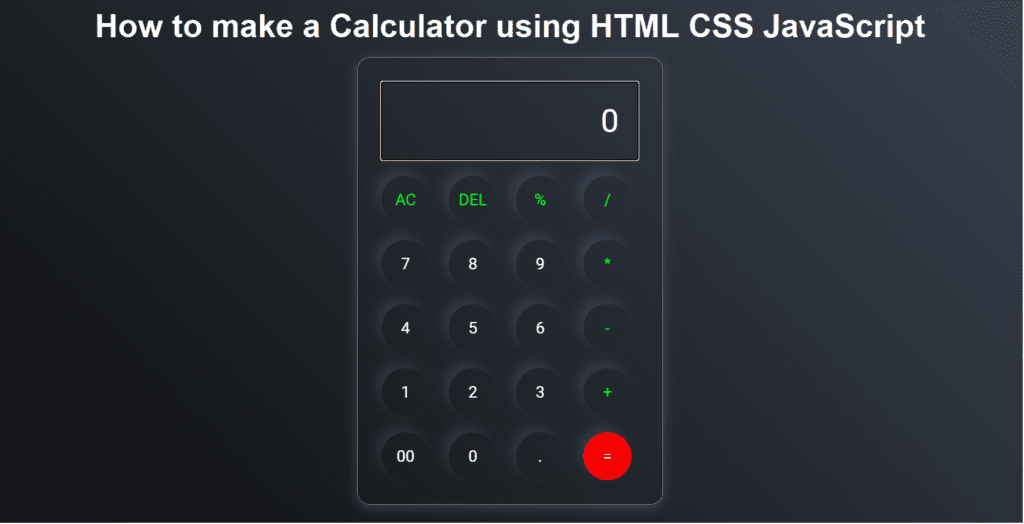
How to make a Calculator using HTML CSS JavaScript
How to make a Calculator using HTML CSS JavaScript Output

index.html

<!DOCTYPE html>
<html lang="en">
<head>
    <meta charset="UTF-8" />
    <meta name="viewport" content="width=device-width, initial-scale=1.0" />
    <link rel="stylesheet" href="style.css" />
    <title>How to make a Calculator using HTML CSS JavaScript - Devnote.in</title>
</head>

<body>
    <div class="container">
        <div class="calculator">
            <input type="text" id="textinput" placeholder="0" />
            <div>
                <button class="button operators">AC</button>
                <button class="button operators">DEL</button>
                <button class="button operators">%</button>
                <button class="button operators">/</button>
            </div>
            <div>
                <button class="button">7</button>
                <button class="button">8</button>
                <button class="button">9</button>
                <button class="button operators">*</button>
            </div>
            <div>
                <button class="button">4</button>
                <button class="button">5</button>
                <button class="button">6</button>
                <button class="button operators">-</button>
            </div>
            <div>
                <button class="button">1</button>
                <button class="button">2</button>
                <button class="button">3</button>
                <button class="button operators">+</button>
            </div>

            <div>
                <button class="button">00</button>
                <button class="button">0</button>
                <button class="button">.</button>
                <button class="button equalBtn">=</button>
            </div>
        </div>
    </div>

    <script src="script.js"></script>
</body>
</html>

style.css

@import url('https://fonts.googleapis.com/css2?family=Roboto:ital,wght@0,100;0,300;0,400;0,500;1,700&display=swap');

*{
    margin: 0;
    padding: 0;
    box-sizing: border-box;
    font-family: 'Roboto', sans-serif;
}

body{
    width: 100%;
    height: 100vh;
    display: flex;
    justify-content: center;
    align-items: center;
    background: linear-gradient(45deg, #0a0a0a, #3a4452);
}

.calculator {
    border: 1px solid #717377;
    padding: 20px;
    border-radius: 16px;
    background: transparent;
    box-shadow: 0px 3px 15px rgba(113, 115, 119, 0.5);
}

#textinput {
    width: 320px;
    border: none;
    padding: 24px;
    margin: 10px;
    background: transparent;
    box-shadow: 0px 3px 15px rgbs(84, 84, 84, 0.1);
    font-size: 40px;
    text-align: right;
    cursor: pointer;
    color: #ffffff;
}

#textinput::placeholder{
    color: #ffffff;
}

button {
    border: none;
    width: 60px;
    height: 60px;
    margin: 10px;
    border-radius: 50%;
    background: transparent;
    color: #ffffff;
    font-size: 20px;
    box-shadow: -8px -8px 15px rgba(255, 255, 255, 0.1);
    cursor: pointer;
}

.equalBtn {
    background-color: #fa0000;
}

.operators {
    color: #00ff1d;
}

script.js

let input = document.getElementById('textinput');
let buttons = document.querySelectorAll('button');

let string = "";
let arr = Array.from(buttons);
arr.forEach(button => {
    button.addEventListener('click', (e) =>{
        if(e.target.innerHTML == '='){
            string = eval(string);
            input.value = string;
        }

        else if(e.target.innerHTML == 'AC'){
            string = "";
            input.value = string;
        }
        else if(e.target.innerHTML == 'DEL'){
            string = string.substring(0, string.length-1);
            input.value = string;
        }
        else{
            string += e.target.innerHTML;
            input.value = string;
        }
    })
})


Categories:

CSSHTMLjavascript

Other Articles

How to Create A Draggable Card Slider in HTML CSS & JavaScript
Previous

How to Create a Draggable Card Slider Using HTML, CSS, and JavaScript

How to auto-verify OTP on the web
Next

How to auto-verify OTP on the web?

No Comment! Be the first one.

Leave a Reply Cancel reply

Your email address will not be published. Required fields are marked *

Related Posts

Fix iOS Safari input type="file" Not Opening Camera - Real Solution

Fix iOS Safari input type=”file” Not Opening Camera – Real Solution

February 16, 2026
The Rise of ES2025: What's New in JavaScript?

The Rise of ES2025: What’s New in JavaScript?

January 24, 2025
HTML Marquee tag

How to use HTML Marquee tag

January 23, 2025
CSS List Property With Example

CSS List Property With Example

December 10, 2024
Devnote

Devnote provides a collection of tutorials about PHP, Laravel, WordPress, Django, MySQL, Bootstrap, Jquery, Ajax, APIs, CRUD operations, etc.

Devnote © , All Rights Reserved.

Page Links

  • Home
  • About us
  • Blog
  • Contact US
  • Site map

Category

  • PHP
  • Laravel
  • wordpress
  • HTML
  • jQuery

Follow Us

Facebook Instagram Twitter Youtube Linkedin Pinterest
Morbi, Gujarat, India - 363641
This website uses cookies to improve your experience. We'll assume you're ok with this, but you can opt-out if you wish. Cookie settingsACCEPT
Privacy & Cookies Policy

Privacy Overview

This website uses cookies to improve your experience while you navigate through the website. Out of these cookies, the cookies that are categorized as necessary are stored on your browser as they are essential for the working of basic functionalities of the website. We also use third-party cookies that help us analyze and understand how you use this website. These cookies will be stored in your browser only with your consent. You also have the option to opt-out of these cookies. But opting out of some of these cookies may have an effect on your browsing experience.
Necessary
Always Enabled
Necessary cookies are absolutely essential for the website to function properly. This category only includes cookies that ensures basic functionalities and security features of the website. These cookies do not store any personal information.
Non-necessary
Any cookies that may not be particularly necessary for the website to function and is used specifically to collect user personal data via analytics, ads, other embedded contents are termed as non-necessary cookies. It is mandatory to procure user consent prior to running these cookies on your website.
SAVE & ACCEPT
Advertisement
Advertisement