-
-
FaceState

Inspiration
Most face filters start with a preset and apply roughly the same effect to everyone. We wanted to try the opposite: start with the person.
FaceState came from a simple curiosity. What would I look like after an all-nighter? Ten years older? As a completely different character? These are fun questions, but the results feel more interesting when they are grounded in something real about your own face.
So we built FaceState around one idea: use real skin measurements quietly in the background, then turn them into a playful experience. No dashboard full of scores. Just one selfie and different states of you.
What it does
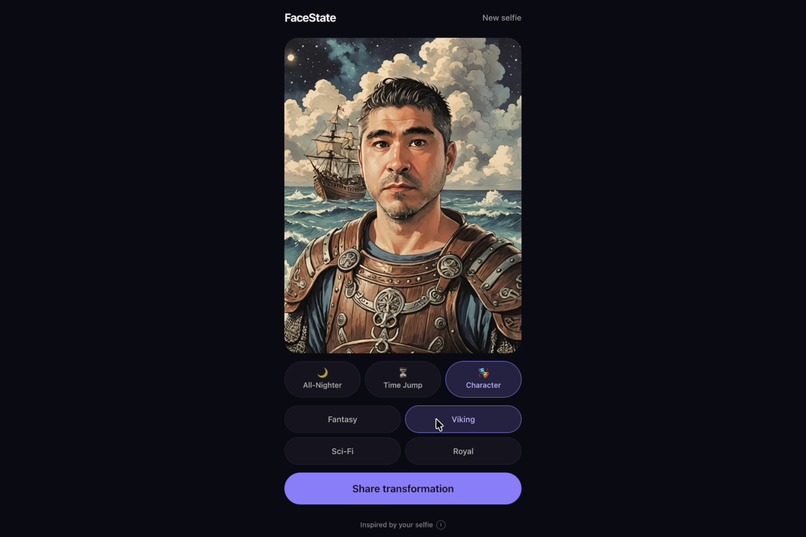
FaceState turns one selfie into three interactive experiences.
All-Nighter uses signals such as dark circles, eye bags, and radiance to create a tired version of your face.
Time Jump lets you move younger or older through an age progression.
Character turns the same selfie into Fantasy, Viking, Sci-Fi, and Royal characters.
The experience stays simple: take a selfie, choose a state, adjust the intensity, and hold the image to compare it with the original. You can also create a before-and-after image to share.
Underneath that simple interaction, FaceState uses YouCam Skin Analysis as a personalized baseline instead of treating every face the same.
How we built it
FaceState is a mobile-first Next.js and React app written in TypeScript.
The selfie pipeline corrects orientation, finds and crops the face, resizes the image for YouCam, and removes EXIF metadata before upload. The YouCam key stays on the server.
Our YouCam integration handles the full S2S workflow: upload the image, create a task, poll for completion, download the result, and validate the response.
Skin Analysis gives FaceState the baseline measurements used across the experience. All-Nighter uses those measurements and YouCam concern masks to decide where the effect belongs, while our own Canvas renderer creates the visible result from the original selfie. Time Jump uses YouCam's aging results and blends between ages locally. Character uses YouCam's Avatar Generator.
We also cache completed results in memory and IndexedDB, deduplicate requests, and change intensity locally so moving a control does not trigger another paid API call.
Challenges we ran into
The biggest challenge was learning what the live APIs actually returned.
Some responses differed from the examples we expected. Skin Analysis returned a signed ZIP. Its scores were also easy to misread because higher values meant healthier skin. Aging returned a full set of age variations rather than one image.
Instead of working around these differences one by one, we saved real responses as fixtures and built normalizers and tests around them.
All-Nighter created another problem. The Skin Analysis masks are useful for locating concerns, but they are diagnostic graphics, not something you want to paint onto a person's face. Our first attempt looked exactly like that. We rebuilt the renderer so the masks provide geometry only, while all visible pixels still come from the original selfie.
Avatar generation had its own constraints around face size and image dimensions. We ended up building a face-aware padding and retry path rather than blindly resending failed requests.
Accomplishments that we're proud of
The part we like most is that FaceState feels like one product rather than several API demos placed next to each other.
One selfie becomes a shared baseline for All-Nighter, Time Jump, and Character. The skin analysis stays mostly invisible to the user, but it still affects what happens.
We are also proud of the engineering underneath the demo: server-only credentials, EXIF stripping, typed errors, caching, request deduplication, race-safe previews, mock fixtures, and on-device share cards.
Those details are not the exciting part of the demo, but they are what made FaceState something another person can actually pick up and use.
What we learned
The biggest lesson was not to assume that an image API behaves exactly the way its documentation suggests. Real responses, real images, and real failures taught us much more quickly.
We also learned how sensitive these systems are to seemingly small product decisions. Cropping, framing, image size, and face position can determine whether an API succeeds at all.
But the most interesting lesson was about personalization.
We started with skin scores. We ended up realizing that users do not need to see those scores. The data can work better as an invisible creative signal that shapes the experience while the product itself stays simple and fun.
What's next for FaceState
We want to add more states that can be meaningfully connected to the person's own features, rather than simply adding more generic filters.
We also want to compare our current All-Nighter renderer with YouCam's native Skin Simulation once that path is available to us, and test the experience across a much wider range of faces, ages, lighting conditions, and skin tones.
Longer term, FaceState could become a small creative playground for imagining yourself in different situations, characters, and visual identities. Brands and creators could build their own states on top of the same personalization engine, while the basic experience remains the same:
one selfie, then see where it can take you.
Built With
- canvas2d
- indexeddb
- next.js
- react
- tailwindcss
- typescript
- vitest
- youcam-api
- zod
- zustand


Log in or sign up for Devpost to join the conversation.