-
-
MotionKey

Inspiration
MotionKey started with a very practical problem: when you are filming yourself, the phone is often across the room exactly when you need to touch it.
Maybe you are cooking, playing an instrument, holding a prop, or already in the middle of a take. Walking back to the tripod breaks the moment.
Gesture control seems like an obvious solution, but most systems give you a fixed vocabulary of gestures. We wanted the opposite. What if the phone learned your gestures instead?
That became MotionKey: teach the phone a motion that feels natural to you, connect it to an action, and use it from across the room.
We also wanted the camera to remain private during use. So personalization happens briefly on an Arm64 training host, then the optimized model moves back to the Arm-powered phone. From that point on, recognition runs locally and offline.
What it does
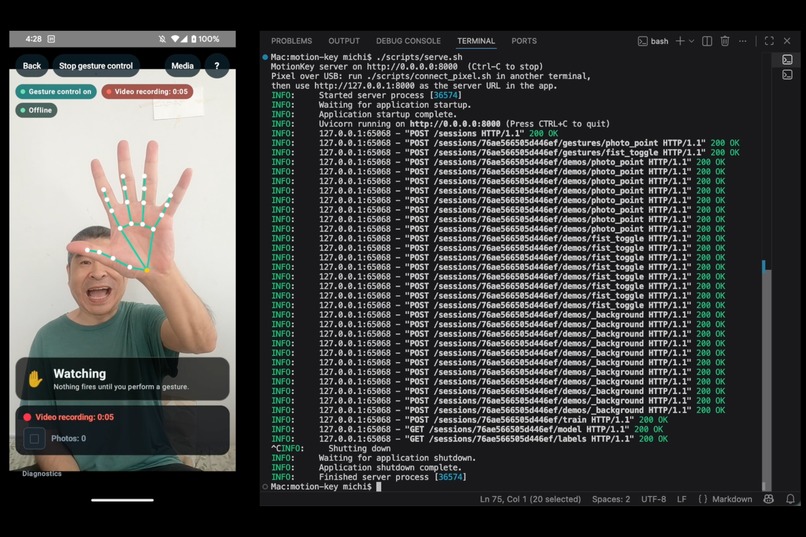
MotionKey lets you create your own hand gestures and map them to actions such as taking a photo, starting or stopping video recording, or advancing a teleprompter.
You name a gesture, choose what it should do, and record a handful of examples. MotionKey also asks for ordinary movements so it can learn when not to react.
The Pixel uses MediaPipe to turn the camera feed into hand landmarks. Only those landmark sequences are sent for training, not the images or video themselves.
An Arm64 training service builds a small personalized neural network, quantizes it to int8, and sends it back to the phone.
After that, the server is no longer needed. Gesture recognition, camera actions, and saved media all work directly on the Pixel, including in airplane mode.
How we built it
The Android app is written in Kotlin and Jetpack Compose. CameraX handles the front camera, while MediaPipe Hand Landmarker tracks the hand and converts each frame into landmark coordinates.
Those landmarks become short motion sequences rather than raw video.
The training service uses FastAPI and TensorFlow. Each build gets a fresh training session, so old gesture data cannot accidentally leak into a new model. The trainer resamples the recordings, creates fixed-length motion windows, normalizes them, augments the data, and trains a compact 1D convolutional network.
We export an int8 LiteRT model along with the information the Pixel needs to reproduce the exact same preprocessing and map model outputs back to the user's gesture names.
On the Pixel, LiteRT and XNNPACK run the personalized classifier. A separate recognition pipeline handles the details that make the feature usable: safe startup, confidence checks, confirmation across multiple windows, one-action-per-gesture behavior, cooldown, and action dispatch.
The result is a small end-to-end system where Arm handles both sides: training and optimization on an Arm64 host, then continuous inference on an Arm64 phone.
Challenges we ran into
The biggest challenges were not about making the neural network bigger. They were about making a tiny amount of personal training data behave reliably.
One early mistake was normalizing every frame independently. That made position and scale more consistent, but it also erased motion. A swipe could effectively become a stationary hand. Moving normalization to the whole sequence preserved the movement we actually wanted the model to learn.
False triggers exposed another problem. At first, the model knew what gestures looked like but did not really know what “nothing” looked like. An empty frame or ordinary movement could therefore be mistaken for a command.
We made negative examples mandatory and explicitly represented the absence of a hand. We also added a neutral arming step so simply opening Gesture Control cannot trigger an action.
Another challenge was keeping Python training and Kotlin inference mathematically identical. A tiny difference in resampling, landmark order, normalization, or standardization can make a perfectly good model fail on the phone. Cross-runtime fixtures and replay tests became essential.
And once gestures started triggering real actions, the project stopped being just an ML demo. Photo capture, video recording, media persistence, camera lifecycle, permissions, and user-visible failure states all had to work too.
Accomplishments that we're proud of
The part we are most proud of is that MotionKey has no hard-coded gesture vocabulary.
The user invents a motion, gives it a name, records examples, and turns it into a real model output. That output can then trigger a real phone action.
Changing what a gesture does does not require retraining because the classifier only learns the motion. The action mapping stays local and can change immediately.
We also designed privacy and trigger safety into the architecture rather than adding them as claims afterward. Recognition has no network dependency, training uses landmarks instead of camera media, and Gesture Control starts disarmed until it has observed a neutral state.
The int8 model is only 39.7 KiB compared with 116.9 KiB for fp32, a 2.9× reduction. On the Pixel 4, the classifier itself runs in a fraction of a millisecond, while our end-to-end measurements made something else clear: MediaPipe hand tracking, not the tiny personalized classifier, is the dominant runtime cost.
That distinction matters because it tells us where future optimization work is actually worth doing.
What we learned
The biggest lesson was that better representation beats a bigger model.
Sequence-level normalization and good negative examples improved the problem more than adding complexity to the network would have.
We also learned that benchmark numbers need to match the boundary the user experiences. Measuring only classifier latency made the system look almost free. Measuring camera-to-landmarks-to-classifier showed where the actual time goes.
And we learned that deploying a personalized model means deploying more than a .tflite file. Preprocessing rules, class indices, names, actions, versions, and installation behavior all need to stay synchronized.
Finally, reliability is partly an interaction-design problem. A classifier can be mathematically correct and still create a bad experience if simply opening the camera fires an action. The neutral arming flow and one-gesture-one-action behavior became just as important as the model itself.
What's next for MotionKey
The next step is testing MotionKey with more people, devices, distances, lighting conditions, and gesture styles.
That will let us measure real-world precision, recall, missed gestures, and false triggers, then tune the recognition pipeline from data rather than assumptions.
We also want to explore more Arm devices, sustained power and thermal behavior, newer LiteRT execution paths, and eventually whether personalization itself can move onto the phone.
On the product side, the larger opportunity is simple: make more things controllable without touching the device.
MotionKey started with creators and a tripod-mounted phone, but the underlying idea is broader:
instead of learning the interface, teach the interface how you naturally move.
Built With
- arm64
- camerax
- fastapi
- jetpackcompose
- kotlin
- litert
- mediapipe
- python
- tensorflow
- xnnpack



Log in or sign up for Devpost to join the conversation.