-
-
Welcome Page
-
Guiding Spirits
-
Recipe


Inspiration
What if composing a song felt as simple—and as joyful—as packing a picnic basket?
Music is everywhere, but making music can still feel intimidating. Many beginner tools immediately introduce users to tracks, timelines, notes, and technical controls before they have had a chance to simply play.
We wanted to approach music from a warmer and more imaginative direction.
Picnic Symphony transforms music-making into an interactive picnic. Instead of placing notes on a staff, users place illustrated ingredients into a basket. Each ingredient contributes a different sound, and together they become a small musical composition.
The idea grew from combining three things we love: music, visual storytelling, and playful experimentation. We wanted the experience to feel less like operating software and more like stepping into a watercolor storybook—one where music can be explored through curiosity rather than prior knowledge.
What it does
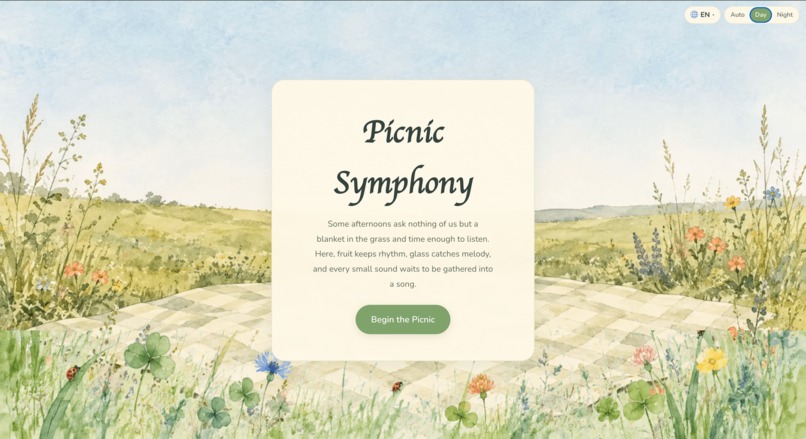
Picnic Symphony is a multilingual, interactive musical playground where picnic ingredients become sound.
Choose a guiding spirit
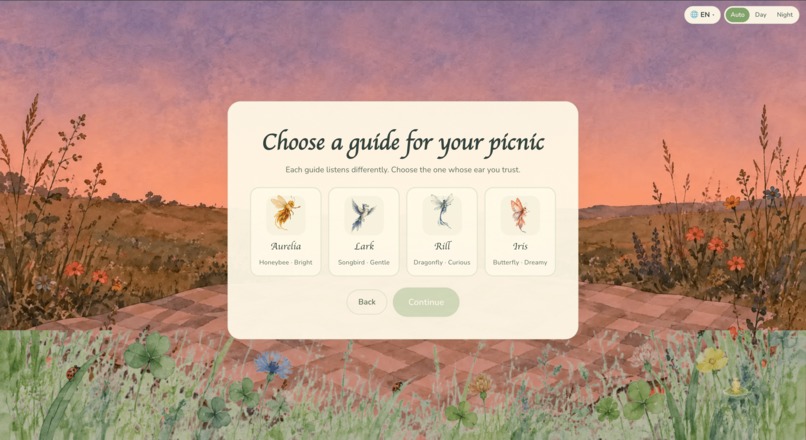
Users begin by choosing one of four guiding spirits:
- Aurelia, the honeybee spirit
- Lark, the songbird spirit
- Rill, the dragonfly spirit
- Iris, the butterfly spirit
Each spirit has its own personality and visual reactions across eight artwork states—idle, hovering, guiding, and celebrating, in both left- and right-facing directions. The selected spirit accompanies the user throughout the experience, points toward recommended ingredients, responds to choices with flutter animations, and celebrates completed compositions.
Choose how to create
Users can then choose how they want to create:
- Free Creation allows complete experimentation with any combination of up to six ingredients.
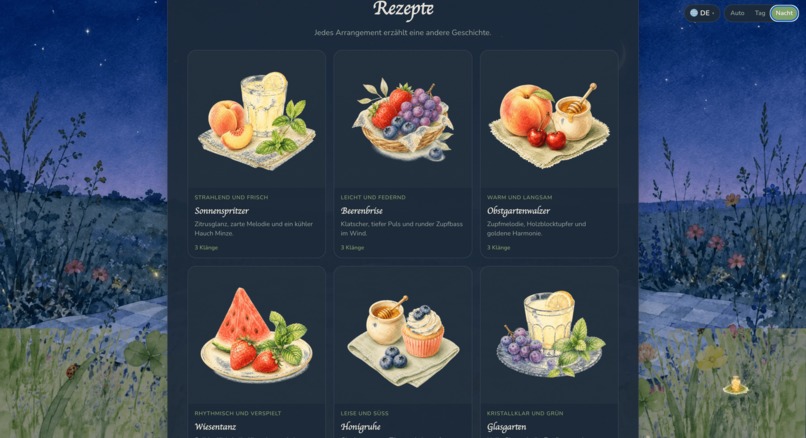
- Guided Recipes guide users through nine preset musical arrangements one ingredient at a time, with real-time validation and mismatch feedback.
- Surprise creates an unexpected random combination for instant inspiration.
Build a synchronized composition
Twelve ingredients each carry a distinct musical role—from watermelon's kick drum to lemonade's glass melody to honey's sustained harmony. Selecting and combining ingredients adds new sounds to a synchronized 16-step loop running at 96 BPM by default. Users can listen to how rhythm, melody, harmony, and texture interact, while adjusting tempo and volume.
Recipe validation
When following a Guided Recipe, the system tracks progress reactively. If the user adds an incorrect ingredient or removes a required one, the interface responds immediately:
- Missing ingredient cards receive a gold highlight with a breathing animation and a translated “Next” badge.
- The spirit's message, highlighted card, and facing direction all point to the same stable ingredient ID.
- If the user attempts to finish with mismatched ingredients, a friendly dialog offers two choices: “Fix the recipe” or “Make it my own.”
- Recipe completion state is derived from the actual ingredients on every change—removing an ingredient after completion immediately returns to the incomplete state.
Postcard and audio export
When the composition feels complete, users can:
- Download a personalized postcard featuring their selected ingredients arranged inside a watercolor picnic basket, with the composition title, spirit name, and ingredient labels—all rendered to a 1600 × 1200 canvas.
- Download their music as a WAV file through an export dialog with configurable tempo (60–140 BPM), volume (0–100%), and flexible length options—either a precise loop count from 1 to 100 loops using a synchronized slider and number input, or a total-duration mode with presets from 15 seconds to 10 minutes and a custom minute:second entry. The export uses the same offline synthesis engine, so the downloaded file sounds identical to live playback. A live summary shows the calculated duration and estimated file size before rendering begins.
The postcard uses alpha-bound cropping for each ingredient illustration and layers them inside the basket with a front-rim overlay for depth.
Additional features
- Nine supported languages: English, 简体中文, Español, Français, Deutsch, 日本語, हिन्दी, العربية, 한국어
- Four time-of-day scenes: Dawn, Day, Dusk, and Night backgrounds that cross-fade smoothly over 1.8 seconds. Auto mode selects a scene based on local time, while users can manually choose Day or Night.
- Smooth theme transitions: All foreground UI surfaces—cards, panels, and buttons—transition alongside the illustrated background with no abrupt color jumps.
- Responsive layouts for desktop, tablet, and mobile with a 4 × 3 ingredient grid.
- Keyboard-friendly interaction and visible focus states.
- Reduced-motion support that preserves functionality without animation.
- A Home button on every non-welcome screen for quick navigation back.
- Confirmation dialogs before clearing an existing creation.
How we built it
We built Picnic Symphony as a browser-based experience using HTML, CSS, and modular JavaScript, with the Web Audio API powering its musical system.
Architecture decisions
The most important technical decision was to give every ingredient a stable internal ID. That ID connects the ingredient's illustration, musical pattern, translated name, recipe position, selection state, and guiding-spirit message. This separation between internal data and visible text allows users to change languages without breaking a recipe or resetting their progress.
For the audio system, we created a shared 16-step sequencer rather than allowing every ingredient to play independently. A centralized scheduler keeps active sound layers aligned when users add, remove, pause, or resume ingredients. Each ingredient's play() function synthesizes sound on the fly using oscillators, filtered noise, and short envelopes—there are no prerecorded audio files.
The same synthesis functions power both live playback and the offline WAV export via OfflineAudioContext, ensuring the downloaded file perfectly matches what the user hears.
State management
A shared state system manages:
- The selected guiding spirit and the full set of 32 directional artwork files
- The active ingredient set, with a maximum of six layers
- Recipe progress derived reactively from current ingredients
- The recommended next ingredient by stable ID
- Language, theme, tempo, and volume
- Postcard composition and naming
Spirit artwork system
Each guiding spirit has a dedicated folder with eight state files:
idle-left/right.png— restinghover-left/right.webp— flying between targetsguide-left/right.png— pointing at a controlflutter-left/right.png— celebrating
A central getSpiritAsset(spiritId, state, direction) helper selects the correct image. Direction is determined by the spirit's position relative to its target: a spirit on the right uses left-facing art to look toward the target, and vice versa.
Translation system
The t(key, vars) function looks up flat, dot-separated keys in a translations object. Missing keys return empty strings—never raw key names—and log development warnings. The setLanguage() function normalizes locale codes, persists the choice, updates document.lang, and re-renders all [data-i18n] elements.
I used Kiro and ChatGPT as AI-assisted development partners during the process. It helped us translate detailed feature specifications into code, examine bugs, and iterate on responsive behavior. We still made the creative decisions, designed the interaction system, reviewed the generated changes, tested edge cases, and refined the final experience.
Challenges we ran into
Keeping the music synchronized
Starting several sounds is easy; keeping them on the same musical clock is much harder. Early versions drifted or restarted awkwardly when ingredients were added while the composition was already playing.
We addressed this by using a shared scheduler and treating all ingredients as layers of one composition rather than separate audio players.
Making the volume audible
Our first gain hierarchy was far too conservative—individual ingredients played at -47 dB, essentially inaudible. We traced this through the full signal chain (ingredient gain × bus gain × master gain) and rebalanced it with a compressor providing safety rather than over-aggressive headroom reduction.
Making multilingual logic reliable
At first, some recipe comparisons relied on visible ingredient names. Changing the language could therefore interrupt recipe progress or cause the wrong ingredient to be highlighted.
Replacing text-based comparisons with stable ingredient IDs solved this problem and made the application's logic independent of the selected language.
Arabic presented an additional layout challenge. Setting dir="rtl" reversed the entire grid and control layout. We resolved this by keeping the structural layout permanently LTR and allowing Arabic text to flow naturally within its containers via Unicode bidirectional rules.
Making recipe state reactive
The original step-index approach only advanced forward. If a user removed an ingredient after completing a recipe, the interface still showed “Complete.” We replaced this with derived state—recalculating completion from the current ingredient set on every change, with versioned celebration timers that get invalidated if the state changes before they fire.
Keeping the postcard preview and download consistent
The preview and exported image initially updated through different paths. We reorganized the postcard system so that both versions use the same renderFullComposition() function with the same parameters, waiting for all images to load before drawing.
Accomplishments that we're proud of
We are proud that Picnic Symphony became more than a collection of attractive screens. It now has a complete creative journey:
Choose a guide → select a mode → build a composition → receive feedback → complete the picnic → download a postcard and audio file
We are especially proud of:
- Building a synchronized 16-step sequencer entirely in the browser with zero audio-file dependencies
- Making recipe validation fully reactive—completion is never a stale boolean
- Supporting nine languages without any logic depending on translated text
- Creating a WAV export that uses the same synthesis engine as live playback
- Giving all four guiding spirits a total of 32 directional artwork files with meaningful functional roles
- Creating distinct dawn, day, dusk, and night atmospheres with smooth 1.8-second cross-fades on both backgrounds and foreground surfaces
- Making the same illustrated experience work across desktop and mobile
- Connecting the final postcard to the user's actual creation with alpha-cropped ingredient illustrations inside a watercolor basket
Most importantly, a user can open Picnic Symphony without understanding music theory and begin creating immediately.
What we learned
Picnic Symphony taught us that a playful interface still needs careful technical structure underneath it.
We learned how to:
- Schedule synchronized sound with the Web Audio API using look-ahead scheduling
- Design data around stable IDs rather than translated text
- Derive state reactively rather than storing it as one-way booleans
- Coordinate application state across multiple screens without race conditions
- Support nine languages, including right-to-left Arabic, without layout reversal
- Connect character artwork to real interface events with directional awareness
- Build responsive layouts around detailed transparent illustrations
- Design animations that still work for users who prefer reduced motion
- Use
OfflineAudioContextto render the exact same composition for download - Test creative features as complete user journeys rather than isolated components
We also learned that accessibility and localization cannot simply be added at the end. They influence navigation, layout, animation, messaging, and even the way application data should be structured.
Above all, we learned that technical systems and artistic decisions work best when they support the same idea. Every sound, ingredient, spirit, animation, and line of text should help the user feel comfortable experimenting.
What's next for Picnic Symphony
We would like to continue expanding Picnic Symphony while preserving its simple and welcoming experience.
Our next goals include:
- Adding MP3 export with a bundled client-side encoder
- Expanding the audio export with waveform previews and sharing options
- Adding more ingredients, sound palettes, and musical styles
- Creating new guided recipes with different difficulty levels
- Allowing users to share compositions through links
- Adding more guiding-spirit reactions and story moments
- Improving offline support with service workers
- Conducting accessibility and localization testing with real users
- Play-testing with beginners to learn which interactions feel most intuitive
- Exploring collaborative picnics where several users can build one composition together
Our long-term vision is for Picnic Symphony to become a creative space where anyone—regardless of age, language, or musical experience—can discover how small sounds come together to create something meaningful.
Follow a spirit. Pack a basket. Make some music.
Built With
- css3
- github
- html5
- internationalization
- javascript
- kiro
- offlineaudiocontext


Log in or sign up for Devpost to join the conversation.