


Inspiration
We realized that creators were losing time with generic tools and sheets
We wanted to fix that fragmentation improving with an AI assistant in a familiar tool for them: Script Breakdown.
A script breakdown is the essential pre-production process of analyzing a screenplay scenes and shots to identify, catalog, and tag every single element required to shoot it.
We wanted to build a:
- Intuitive tool for digital creators (like YouTubers and influencers) to structure their content
- Flexible and robust enough to handle the complex technical breakdowns required for traditional filmmaking.
What it does
Script Breakdown AI is a visual pre-production workspace.
It allows directors and creators to seamlessly manage technical scripts and deconstruct them into structured shot lists.
It drastically simplifies the process of populating and organizing all the necessary technical information required to execute a perfect shot.
How we built it
We used Replit's tools and AI to solve tough backend tasks like setting up the Drizzle ORM database, finding storage solutions, managing safe user login, and our deployment infrastructure.
As agentic assitant we used @google/genai SDK connected to Google Enterprise Agent Platform, using Gemini's model.
For the frontend, we built the interface using the Nuxt framework and styled it with daisyUI to ensure a clean, responsive user experience.
Challenges we ran into
User management and authentication are traditionally our biggest bottlenecks. Replit's infrastructure and AI assistance made this surprisingly effortless. The same was true for adapting our storage solution and resolving deployment issues.
Our main technical hurdle was configuring the authentication for the Google Cloud Agentic platform. Once we engineered a workaround for the credentials, selecting the Gemini model and using the SDK to send prompts and receive content became remarkably straightforward.
Usually, UI/UX design and fine-tuning consume most of our time.
This time, because deploying and connecting the backend was so fast—thanks to the @google/genai SDK and Replit's seamless ecosystem—we actually had the time to properly iterate on the design and user experience.
Accomplishments that we're proud of
Shipping our first AI-powered app! Integrating an AI model into a functional, production-ready application was a milestone we had been wanting to reach.
Thanks to the simplicity of the Google Gen AI SDK and the rapid spin-up capabilities of Replit, we achieved this much faster than we ever anticipated.
What we learned
- Deep, hands-on experience utilizing the new
@google/genaiSDK. - We explored several advanced features of the Google Enterprise Agent Platform. While hackathon time constraints meant we couldn't implement all of them, discovering these capabilities has given us a clear technical roadmap for future development.
- How to sync Git and Deploy on Replit.
Hackathon Prioritization
To deliver a polished and functional product within the deadline, we fiercely prioritized:
Hackathon Prioritization
To deliver a polished and highly functional product within the deadline, we fiercely prioritized:
- UX as a First-Class Citizen: User experience was our top priority. Rather than forcing AI into every corner of the app just for the sake of it, we hyper-focused our UI/UX refinement on the most critical workflows: scene and shot management. We ensured the Google AI tools feel natural, integrated, and genuinely helpful. By prioritizing a clean, frictionless interface over unnecessary gimmicks, we avoided user fatigue while strictly fulfilling the hackathon's technical and design requirements.
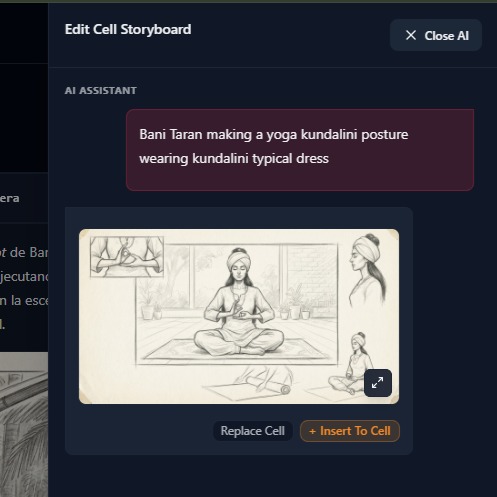
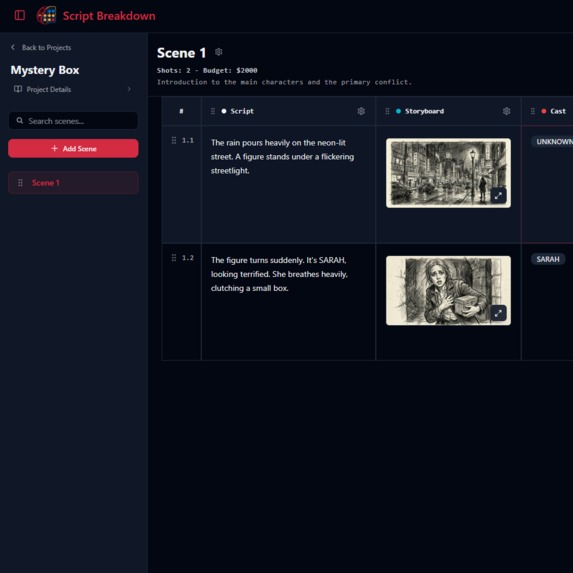
- Zero-Friction Onboarding: New projects instantly load with pre-populated cinematic data so users can immediately experience the platform's capabilities. In upcoming releases, initial breakdown data will be dynamically generated directly from your scene's logline.
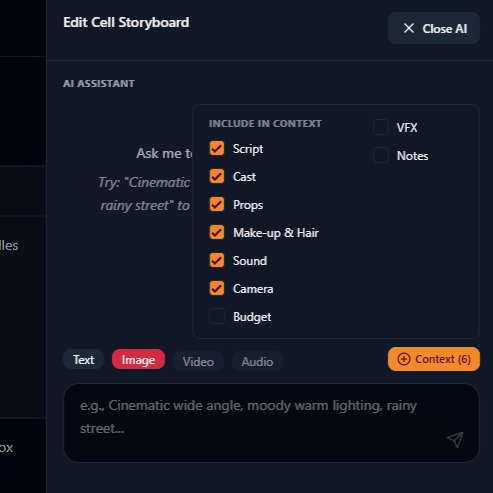
- Gradual AI Context: We prioritized intelligent, context-aware generation. The AI assistant receives gradual context by reading the previously filled columns of the exact same shot, ensuring that generated storyboards and technical text remain highly coherent and aligned with the director's vision.
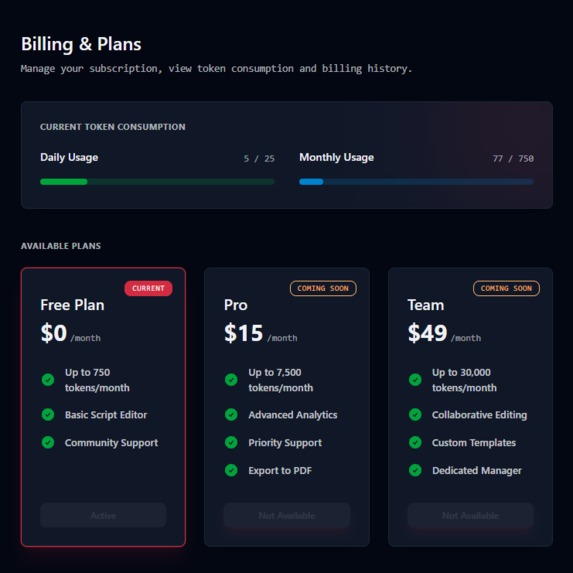
- Transparent Credit Management: We built a visible token consumption system. Users can easily monitor their daily and monthly AI usage via progress bars, ensuring they always have full control over their limits without any billing surprises.
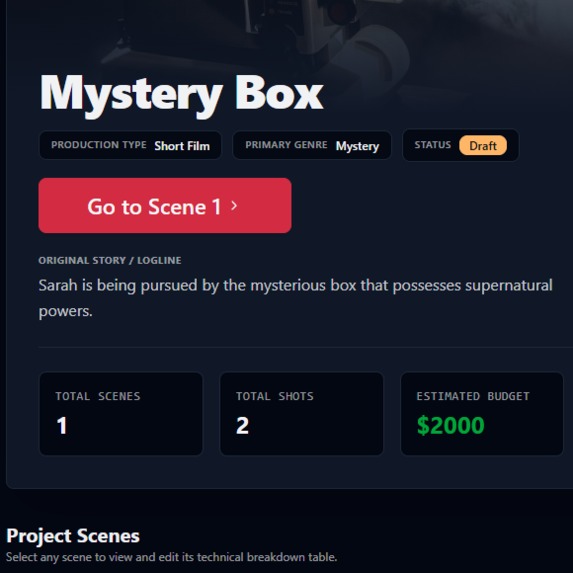
- Built-in Budget & Metadata Tracking: We implemented a project-level dashboard that automatically calculates and displays essential statistics, allowing creators to track their estimated production budget alongside their total scenes and shot counts.
What's next for Script Breakdown AI
- Payment Methods: Add a payment/subscription method to grant access to more credits
- Select Model: Provide access for the user to select between the Gemini Flash or Pro version of the model.
- Smart Imports: Automatic script parsing and AI-driven auto-completion of breakdown columns.
- Collaboration: Adding team members and roles for real-time collaborative editing.
- Scene Sharing: Generating public, read-only links for specific scenes to easily share with cast and crew.
- Contextual AI: Implementing an AI chat history to maintain creative context across sessions.
Built With
- daisyui
- drizzle-orm
- gemini
- google-cloud
- google-enterprise-agent-platform
- nuxt
- replit
- vue




Log in or sign up for Devpost to join the conversation.