




Wharf is an enterprise-grade, AI-powered developer workflow platform engineered to dismantle documentation debt and provide deep, automated insights into complex codebases. Developers frequently struggle with outdated README files, fragmented changelogs, missing profile summaries, and a general lack of visibility into repository health and project structure. Wharf resolves these pain points by connecting directly to version control systems, executing static analysis on codebase trees, and using state-of-the-art Large Language Models (LLMs) to synthesize production-ready documentation, interactive workspace chat logs, and deep repository health reports.
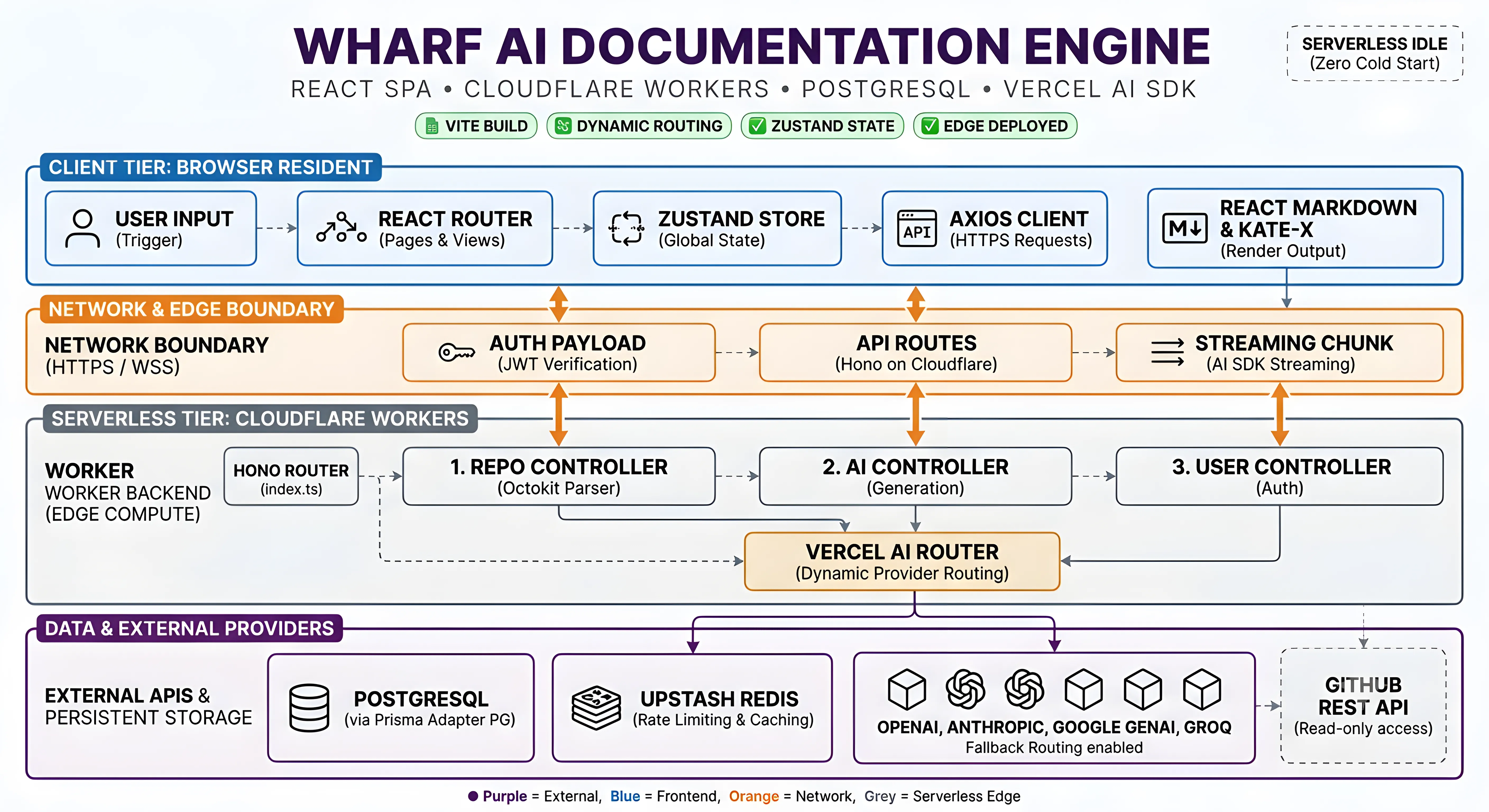
Technically, Wharf leverages a highly modular multi-tier architecture consisting of a React-Vite single-page application, an Express-Prisma-TypeScript API gateway, and an identical Worker-Backend execution engine built to scale computationally heavy analysis. By integrating GitHub OAuth with precise Octokit calls, Wharf securely indexes repositories, detects project frameworks through file AST heuristics, and routes code context to custom LLM prompt pipelines. The platform utilizes advanced caching, token-optimized prompt construction, and secure encryption mechanics to ensure rapid response times, absolute data privacy, and a seamless developer experience.
- Overview
- Features
- Preview
- Tech Stack
- System Architecture
- Project Structure
- Getting Started
- Usage
- API Reference
- Customization
- Future Enhancements
- Contributing
- License
- Author
- Support
- Automated README Generation utilizing static framework detection and structural codebase analysis to generate highly stylized, professional documentation.
- Interactive Codebase Chat featuring persona selectors, suggested follow-ups, code blocks with syntax highlighting, and an advanced prompt context builder to query repositories in real-time.
- Automated Changelog Generator that aggregates git commit histories, tag definitions, and pull requests to build chronological release logs.
- GitHub Profile Builder supplying custom theme pickers, tech stack selectors, custom layout widgets, bio generators, and social badge integrations to form aesthetic portfolios.
- Repository Health Auditing computing comprehensive code health scores based on directory structures, license files, contribution patterns, and tests.
- Advanced Admin Operations monitoring cache hits, estimating API usage costs, identifying anomalies, tracing token distributions, and reviewing live activity feeds.
- Secure Key Routing supporting dual authorization modes: platform-routed subscription models or direct client-provided API key configurations (OpenAI / Anthropic).
- Asynchronous Context Tracking utilizing AsyncLocalStorage to guarantee correlation IDs and request context are carried throughout call chains.
| Landing Page | Features |
|---|---|
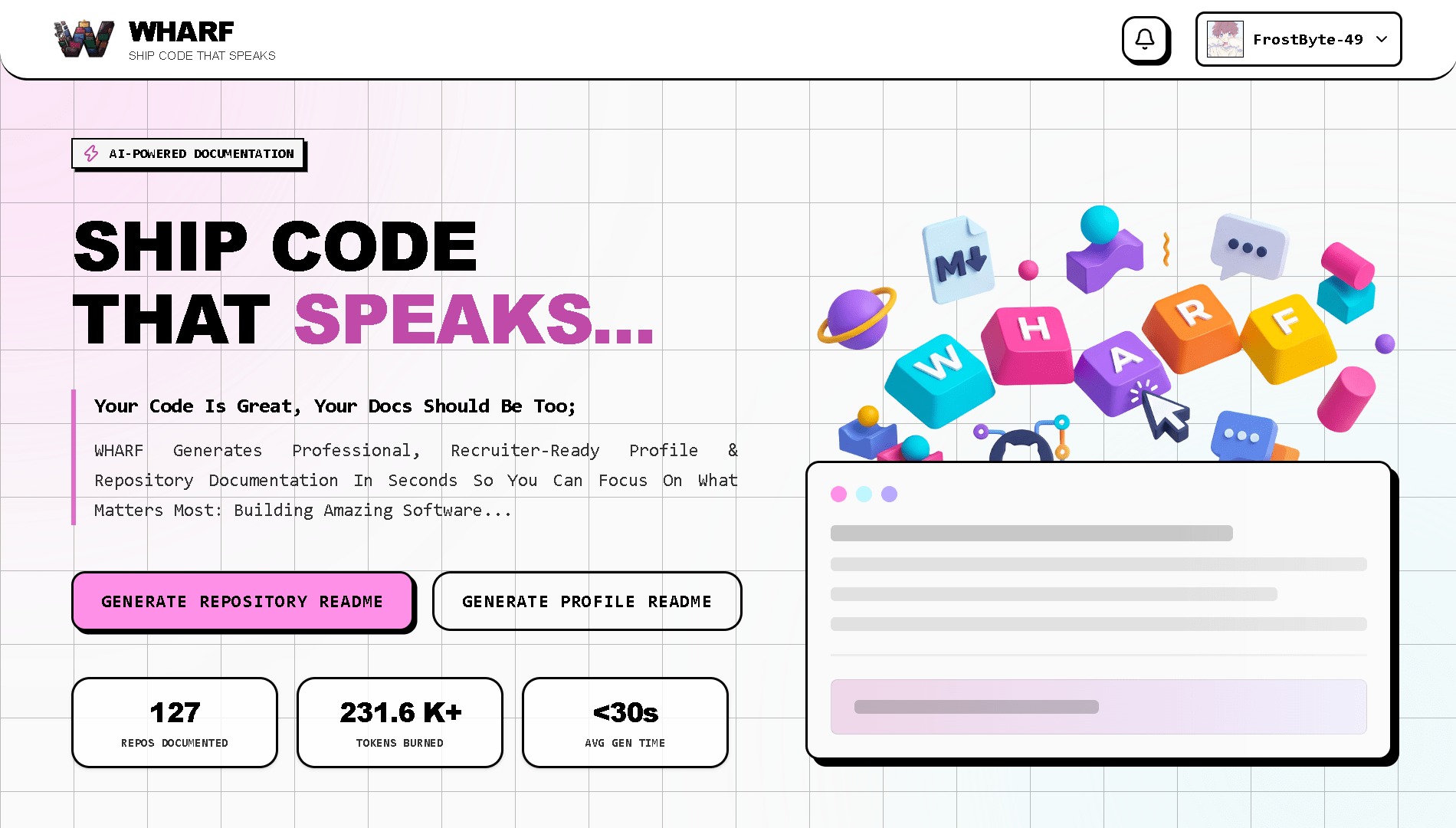 |
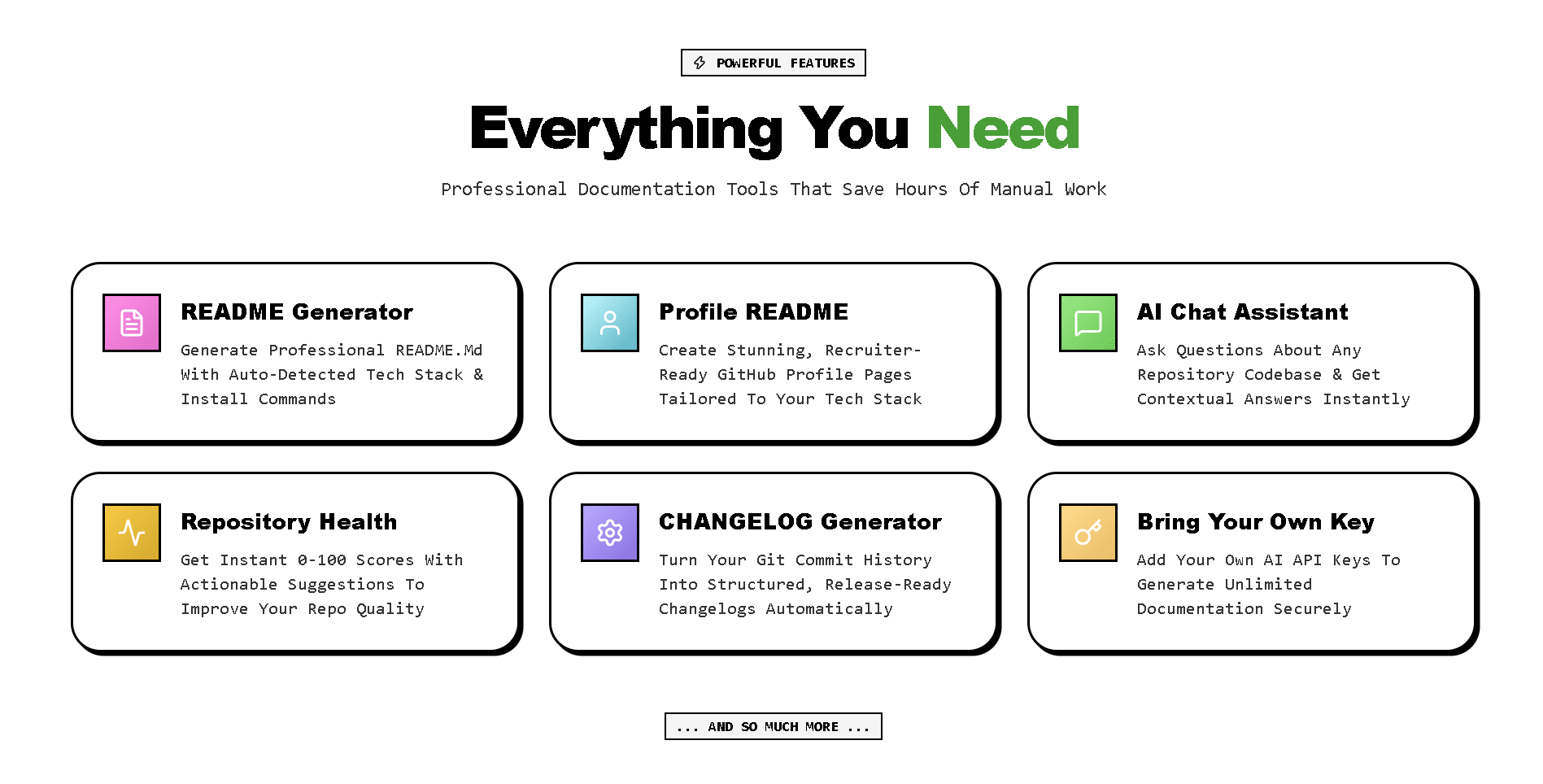 |
| How It Works | Chat Assistant |
|---|---|
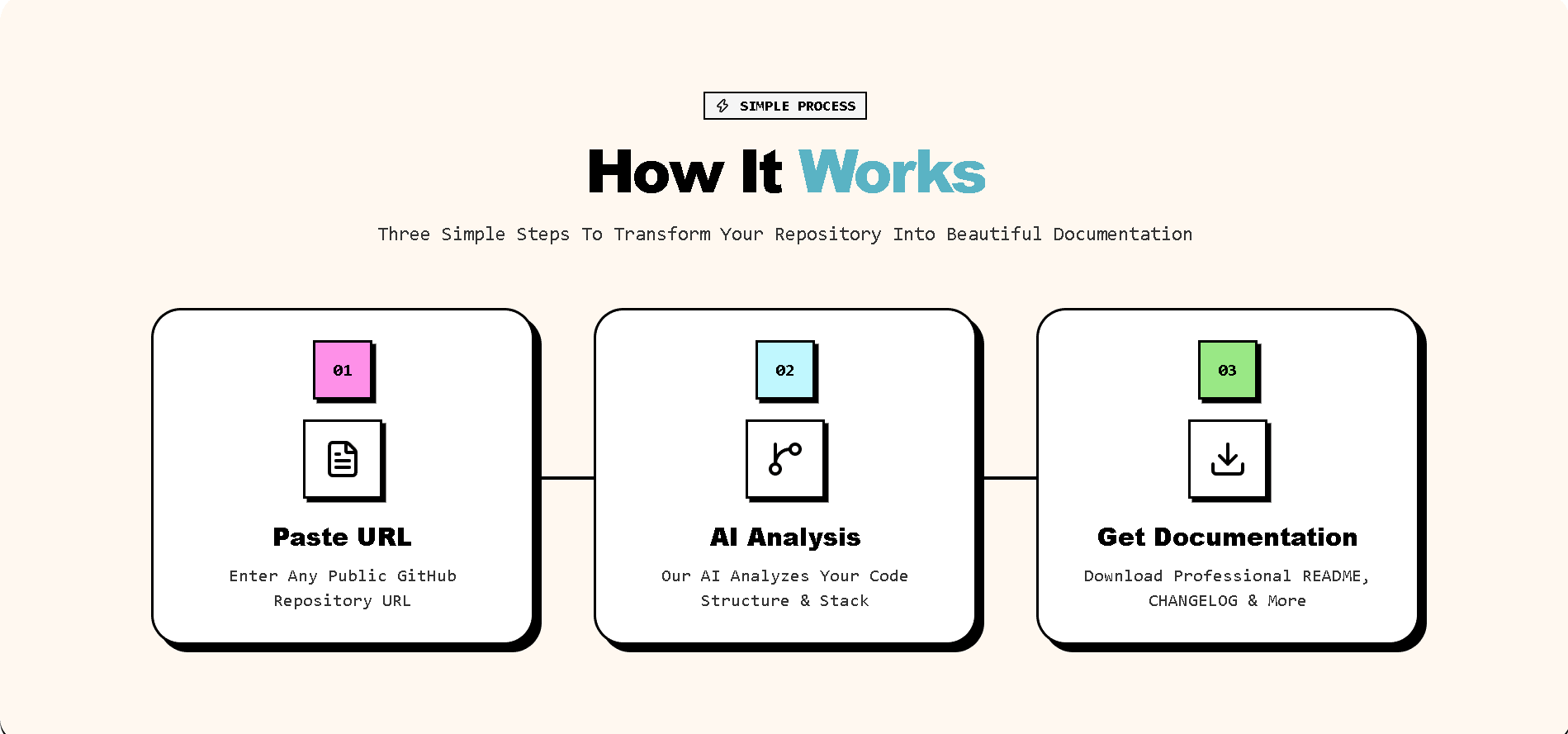 |
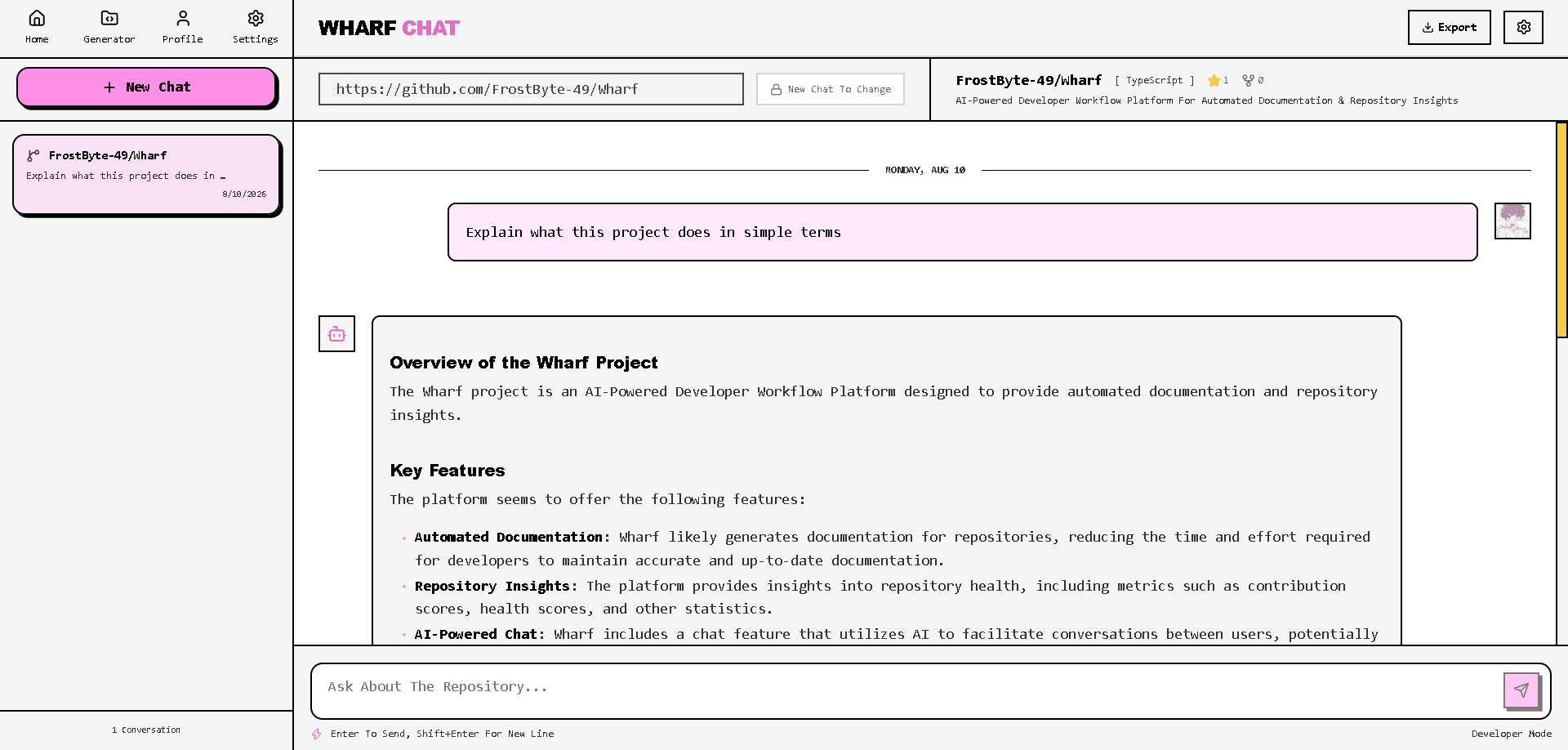 |
| Technology | Purpose |
|---|---|
| TypeScript | Strongly-typed programming interface across Frontend, Backend, and Workers |
| React (v18) | Declarative Component-driven User Interface |
| Vite | Ultra-fast Frontend Bundler and Hot-Module Replacement Engine |
| TailwindCSS | Utility-first CSS styling framework with responsive design constructs |
| Zustand | Lightweight, high-performance global state management for reactive UI updates |
| Express | Event-driven, asynchronous Node.js framework powering web APIs |
| Prisma ORM | Type-safe database mapping, migration management, and SQL abstraction |
| PostgreSQL | Primary relational database for user profile, chat history, and repo metadata persistence |
| Redis | High-speed cache layer, rate-limiter tracker, and cluster session store |
| Octokit API | Programmatic interface for GitHub OAuth, repository ingestion, and commit tracking |
| Vitest & Playwright | Unit, integration, and E2E browser automation test suites |
📁Wharf/                                 # Main project root directory
├── 📁.github/                           # GitHub Actions workflows directory
│   └── 📁workflows/                     # CI/CD pipeline configurations
│       └── ci.yml                       # Continuous integration workflow
│
├── 📁Wharf_/                            # Main application source code
│   ├── 📁backend/                       # Backend API server
│   │   ├── 📁prisma/                    # Database ORM and migrations
│   │   │   ├── 📁migrations/            # Database schema migrations
│   │   │   │
│   │   │   ├── schema.prisma            # Database schema definition
│   │   │   └── seed.ts                  # Database seeding script
│   │   ├── 📁scripts/                   # Utility scripts
│   │   ├── 📁src/                       # Source code
│   │   │   ├── 📁controllers/           # Request handlers (10 files)
│   │   │   ├── 📁middleware/            # Express middleware (4 files)
│   │   │   ├── 📁routes/                # API route definitions (9 files)
│   │   │   ├── 📁services/              # Business logic layer (13 files)
│   │   │   ├── 📁utils/                 # Helper utilities (14 files)
│   │   │   ├── db.ts                    # Database connection
│   │   │   └── index.ts                 # Application entry point
│   │   ├── 📁tests/                     # Test suite
│   │   │   ├── 📁factories/             # Test data factories (6 files)
│   │   │   ├── 📁fixtures/              # Test fixtures (JSON files)
│   │   │   ├── 📁integration/           # Integration tests (9 files)
│   │   │   ├── 📁mocks/                 # Mock implementations (9 files)
│   │   │   ├── 📁unit/                  # Unit tests
│   │   │   │   ├── 📁controllers/       # Controller tests (10 files)
│   │   │   │   ├── 📁middleware/        # Middleware tests (4 files)
│   │   │   │   ├── 📁services/          # Service tests (11 files)
│   │   │   │   └── 📁utils/             # Utility tests (11 files)
│   │   │   ├── setup.ts                 # Test setup
│   │   │   ├── teardown.ts              # Test teardown
│   │   │   └── TESTING.md               # Testing documentation
│   │   ├── .env                         # Environment variables
│   │   ├── .env.example                 # Environment template
│   │   ├── jest.config.ts               # Jest configuration
│   │   ├── package.json                 # Backend dependencies
│   │   ├── resetKeys.ts                 # API key reset utility
│   │   └── tsconfig.json                # TypeScript configuration
│   │
│   ├── 📁frontend/                      # React frontend application
│   │   ├── 📁public/                    # Static assets
│   │   │   ├── 📁assets/
│   │   │   │   └── 📁favicon/           # Favicon files (7 files)
│   │   │   ├── robots.txt               # SEO robots configuration
│   │   │   └── sitemap.xml              # SEO sitemap
│   │   ├── 📁src/                       # Frontend source code
│   │   │   ├── 📁components/            # React components
│   │   │   │   ├── 📁admin/             # Admin dashboard components (17 files)
│   │   │   │   ├── 📁changelog/         # Changelog components (6 files)
│   │   │   │   ├── 📁chat/              # Chat interface components (10 files)
│   │   │   │   ├── 📁generator/         # README generator components (8 files)
│   │   │   │   ├── 📁health/            # Health score components (8 files)
│   │   │   │   ├── 📁home/              # Landing page components (6 files)
│   │   │   │   ├── 📁layout/            # Layout components (5 files)
│   │   │   │   ├── 📁profile/           # Profile generator components (10 files)
│   │   │   │   ├── 📁settings/          # Settings components (10 files)
│   │   │   │   ├── 📁shared/            # Shared components (1 file)
│   │   │   │   └── 📁ui/                # UI primitives (10 files)
│   │   │   ├── 📁hooks/                 # Custom React hooks
│   │   │   ├── 📁lib/                   # Core libraries
│   │   │   │   └── 📁analytics/         # Analytics providers (GA4, PostHog)
│   │   │   ├── 📁pages/                 # Page components (15 files)
│   │   │   ├── 📁stores/                # Zustand state management
│   │   │   ├── 📁utils/                 # Frontend utilities
│   │   │   ├── App.tsx                  # Root component
│   │   │   ├── index.css                # Global styles
│   │   │   └── main.tsx                 # Application entry point
│   │   ├── 📁tests/                     # Frontend tests
│   │   │   ├── 📁components/            # Component tests
│   │   │   ├── 📁e2e/                   # Playwright E2E tests (6 files)
│   │   │   ├── 📁factories/             # Test data factories
│   │   │   ├── 📁fixtures/              # Test fixtures
│   │   │   ├── 📁mocks/                 # MSW mock handlers
│   │   │   ├── 📁pages/                 # Page component tests (7 files)
│   │   │   ├── setup.ts                 # Test setup
│   │   │   └── TESTING.md               # Testing documentation
│   │   ├── .env                         # Environment variables
│   │   ├── eslint.config.js             # ESLint configuration
│   │   ├── index.html                   # HTML entry point
│   │   ├── package.json                 # Frontend dependencies
│   │   ├── playwright.config.ts         # E2E test configuration
│   │   ├── vercel.json                  # Vercel deployment config
│   │   ├── vite.config.ts               # Vite build configuration
│   │   └── vitest.config.ts             # Vitest configuration
│   │
│   └── 📁worker-backend/                # Cloudflare Worker backend
│       ├── 📁.wrangler/                 # Wrangler local state
│       ├── 📁prisma/                    # Database ORM (same structure)
│       │   ├── 📁migrations/            # Database migrations (4 folders)
│       │   ├── schema.prisma            # Schema definition
│       │   └── seed.ts                  # Seeding script
│       ├── 📁src/                       # Worker source code
│       │   ├── 📁controllers/           # Request handlers (10 files)
│       │   ├── 📁middleware/            # Middleware (4 files)
│       │   ├── 📁routes/                # Route definitions (9 files)
│       │   ├── 📁services/              # Business logic (13 files)
│       │   ├── 📁utils/                 # Utilities (14 files)
│       │   ├── db.ts                    # Database connection
│       │   └── index.ts                 # Worker entry point
│       ├── 📁tests/                     # Test suite
│       │   ├── 📁factories/             # Test factories (6 files)
│       │   ├── 📁fixtures/              # Test fixtures
│       │   ├── 📁integration/           # Integration tests (9 files)
│       │   ├── 📁mocks/                 # Mock implementations (9 files)
│       │   ├── 📁unit/                  # Unit tests
│       │   │   ├── 📁controllers/       # Controller tests (10 files)
│       │   │   ├── 📁middleware/        # Middleware tests (3 files)
│       │   │   ├── 📁services/          # Service tests (11 files)
│       │   │   └── 📁utils/             # Utility tests (10 files)
│       │   ├── setup.ts                 # Test setup
│       │   ├── teardown.ts              # Test teardown
│       │   └── TESTING.md               # Testing documentation
│       ├── .dev.vars                    # Development variables
│       ├── package.json                 # Worker dependencies
│       ├── tsconfig.json                # TypeScript configuration
│       ├── vitest.config.ts             # Vitest configuration
│       └── wrangler.toml                # Cloudflare Worker configuration
│
├── .gitattributes                       # Git attributes configuration
├── CHANGELOG.md                         # Project changelog
├── LICENSE                              # License file
└── README.md # Project READMEFollow this sequence to spin up Wharf locally. Complete the environment variable configuration before initializing any frontend or backend services.
Create a .env file inside the Wharf_/backend directory using the provided .env.example as a template. Make sure to supply all required API keys, database connection strings, and OAuth credentials.
# Core Express Server Settings
PORT=5000
NODE_ENV=development
FRONTEND_URL=http://localhost:5173

# Database Connections (PostgreSQL Setup)
DATABASE_URL="postgresql://postgres:postgres_secure_pass@localhost:5432/wharf_db?schema=public"

# Redis Cache Credentials
REDIS_URL="redis://127.0.0.1:6379"

# Encryption Keys (Must be exactly 32 bytes for AES-256-GCM)
ENCRYPTION_KEY="f3b48f93e9a4f218ce7d93b3f2e1a2d5f3b48f93e9a4f218ce7d93b3f2e1a2d5"

# Security Configurations
JWT_SECRET="super_secure_jwt_secret_key_change_in_production"

# GitHub App Integration Credentials
GITHUB_CLIENT_ID="your_github_client_id_here"
GITHUB_CLIENT_SECRET="your_github_client_secret_here"
GITHUB_CALLBACK_URL="http://localhost:5000/api/auth/github/callback"

# LLM Providers API Credentials (If using platform-routed key system)
OPENAI_API_KEY="sk-proj-xxxxxxxxxxxxxxxxxxxx"
ANTHROPIC_API_KEY="sk-ant-xxxxxxxxxxxxxxxxxxxx"With PostgreSQL running, execute the Prisma migration process to build the relational tables, index constraints, and database views. Seed the database to create basic mock profiles and testing definitions.
# Navigate to the backend workspace
cd Wharf_/backend

# Run Prisma schema migrations
npx prisma migrate dev --name init

# Run database seed runner
npx prisma db seedInstall dependencies and boot up the primary backend API server in development mode. The service will spin up on the port specified in your environment configurations (default: 5000).
# Ensure you are in backend workspace directory
cd Wharf_/backend

# Ingest all dependency packages
npm install

# Run backend service in hot-reload developer mode
npm run devThe worker service runs asynchronous analysis pipelines and handles high-intensity processing routines. Start it alongside the main backend server.
# Navigate to the worker-backend directory
cd ../worker-backend

# Install worker requirements
npm install

# Run database code-generation tool
npx prisma generate

# Execute background execution process
npm run devInstall dependencies and launch the frontend client server. Vite will spin up the web app locally (default: http://localhost:5173).
# Navigate to the React-Vite workspace
cd ../frontend

# Ingest required packages
npm install

# Boot development hot-reloading web page server
npm run devWharf ingests repository file structures, identifies tech stack compositions, and outputs production-grade markdown documentation.
# Call Wharf API endpoint directly to generate a project README using default settings
curl -X POST http://localhost:5000/api/generate/readme \
  -H "Authorization: Bearer <JWT_USER_TOKEN>" \
  -H "Content-Type: application/json" \
  -d '{
    "repoId": "clt-12345",
    "tone": "professional",
    "includeSections": ["features", "tech-stack", "system-architecture", "api-reference"],
    "customInstructions": "Structure with clear setup commands for Docker."
}'Converse with Wharf's LLM engine while passing code structural context, directory mappings, or specific file trees directly to the conversation.
# Query the project codebase context with explicit assistant persona models
curl -X POST http://localhost:5000/api/chat/message \
  -H "Authorization: Bearer <JWT_USER_TOKEN>" \
  -H "Content-Type: application/json" \
  -d '{
    "repoId": "clt-12345",
    "message": "Explain how the middleware rateLimiter.ts verifies Token bucket algorithms.",
    "persona": "system-architect",
    "chatHistoryId": "hist-789"
}'Evaluate codebase structure, check for standard repository layout patterns, analyze license status, trace test presence, and return a comprehensive code health score.
# Ingest and scan a repository for codebase health scoring metrics
curl -X POST http://localhost:5000/api/health/analyze \
  -H "Authorization: Bearer <JWT_USER_TOKEN>" \
  -H "Content-Type: application/json" \
  -d '{
    "githubUrl": "https://github.com/FrostByte-49/Wharf"
}'| Method | Endpoint | Description | Auth Required |
|---|---|---|---|
| GET | /api/auth/github |
Redirects user agent to GitHub's OAuth login screen | No |
| POST | /api/auth/callback |
Receives temporary OAuth code and returns valid JWT token | No |
| GET | /api/repo/list |
Returns list of user repositories imported from GitHub | Yes |
| POST | /api/repo/scan |
Runs framework detection parser over repository file tree | Yes |
| POST | /api/generate/readme |
Generates detailed Markdown documentation for a repository | Yes |
| POST | /api/chat/message |
Sends a message to the AI chat assistant with context parameters | Yes |
| POST | /api/health/analyze |
Generates a metric analysis score and actionable recommendations | Yes |
| POST | /api/changelog/generate |
Generates a project release changelog based on git commit history | Yes |
| POST | /api/profile/generate |
Builds custom markdown files for personal developer profiles | Yes |
| GET | /api/admin/stats |
Collects live operational metrics, cost estimations, and cache hits | Yes (Admin) |
Redirects the client browser session directly to GitHub to authorize the Wharf application.
Request Query Params
// No request body parameter required.Response
Status: 302 Found
Location: https://github.com/login/oauth/authorize?client_id=...&redirect_uri=...
Exchanges an authorization code for an OAuth access token, provisions a user profile in PostgreSQL, and signs a JWT.
Request Body
{
  "code": "a93bc71d49e83f0a"
}
Response (JSON)
{
  "success": true,
  "token": "eyJhbGciOiJIUzI1NiIsInR5cCI6IkpXVCJ9.eyJ1c2VySWQiOiJjbHQ...",
  "user": {
    "id": "clt-12345",
    "username": "FrostByte-49",
    "email": "developer@frostbyte.io",
    "avatarUrl": "https://avatars.githubusercontent.com/u/12345"
  }
}Retrieves the repositories belonging to the authenticated user from the local PostgreSQL database, with optional sync options.
Request Query Params
// Header authorization check required: "Authorization: Bearer <JWT>"Response (JSON)
{
  "success": true,
  "repositories": [
    {
      "id": "repo-4819",
      "name": "Wharf",
      "owner": "FrostByte-49",
      "githubUrl": "https://github.com/FrostByte-49/Wharf",
      "framework": "TypeScript",
      "lastScannedAt": "2026-04-26T10:18:18.000Z"
    }
  ]
}Generates a structured, highly polished markdown README based on codebase structure, framework components, and configuration settings.
Request Body
{
  "repoId": "repo-4819",
  "tone": "technical",
  "sections": ["description", "installation", "usage", "tech-stack", "system-architecture"],
  "customInstructions": "Prioritize yarn workspaces and emphasize the worker-backend setup."
}
Response (JSON)
{
  "success": true,
  "readmeMarkdown": "# Wharf: Dev Workflow Engine\n\nThis codebase runs...\n## Technical Stack\n...",
  "tokensUsed": 4512,
  "costEstimate": 0.0135
}Submits a message to the repository chat engine. It resolves repo-specific structures and files to build a highly targeted codebase-aware context prompt.
Request Body
{
  "repoId": "repo-4819",
  "message": "Which file manages the encryption/decryption of the user's personal API keys?",
  "persona": "security-engineer",
  "chatHistoryId": "chat-session-001"
}
Response (JSON)
{
  "success": true,
  "response": "The encryption and decryption of user API keys is managed by `Wharf_/backend/src/utils/encryption.ts`. It utilizes an AES-256-GCM symmetric-key encryption workflow...",
  "suggestedFollowups": [
    "How is the encryption key loaded securely?",
    "Can you show the exact decrypt function signature?"
  ]
}Performs a structural analysis on the repository file tree, calculating an overall repository quality score and generating actionable refactoring recommendations.
Request Body
{
  "githubUrl": "https://github.com/FrostByte-49/Wharf"
}
Response (JSON)
{
  "success": true,
  "healthReport": {
    "overallScore": 89,
    "breakdown": {
      "documentation": 95,
      "testCoverage": 78,
      "licenseCompliance": 100,
      "frameworkStructure": 83
    },
    "suggestions": [
      {
        "impact": "high",
        "category": "testCoverage",
        "message": "Add visual unit test configurations to target components inside the admin dashboard folder."
      },
      {
        "impact": "medium",
        "category": "frameworkStructure",
        "message": "Move duplicate environment check handlers into a centralized config module in backend."
      }
    ]
  }
}Parses Git commit logs and differences between references (tags, branches, or commit hashes) to generate structured markdown release notes.
Request Body
{
  "repoId": "repo-4819",
  "fromRef": "v1.0.0",
  "toRef": "v1.1.0",
  "style": "conventional-commits"
}
Response (JSON)
{
  "success": true,
  "changelogMarkdown": "## Release v1.1.0\n\n### Features\n- **Rate Limiting**: Added Redis token-bucket middleware (#104)\n\n### Bug Fixes\n- **Token Revocation**: Resolved token expiration state mismatches...",
  "generatedAt": "2026-04-26T11:00:00.000Z"
}Synthesizes visual layouts, markdown banners, theme styles, tech stack badges, and widgets into a customized personal profile README file.
Request Body
{
  "theme": "dracula",
  "bio": "Fullstack Cloud Engineer building automated developer systems.",
  "techStack": ["React", "TypeScript", "NodeJS", "PostgreSQL", "Docker"],
  "widgets": ["github-stats", "recent-prs"],
  "socials": {
    "linkedin": "frostbyte-49",
    "twitter": "frostbyte_49"
  }
}
Response (JSON)
{
"success": true,
"profileMarkdown": "<div align=\"center\">\n# Hi, I am FrostByte-49! 👋\n\n\n</div>",
"previewUrl": "http://localhost:5000/api/profile/preview/clt-12345"
}You can configure and extend Wharf's default behavior in several ways:
- Swap AI Provider: Change the model definition parameter strings inside
Wharf_/backend/src/services/ai.service.tsto swap OpenAI with Anthropic, or configure local LLM endpoints using Ollama. - Adjust Repository Health Weights: Fine-tune weighting percentages used to calculate repository health scores inside
Wharf_/backend/src/services/healthScore.service.ts. - Add Custom README Sections: Add custom items to selection matrices in
Wharf_/frontend/src/components/generator/SectionToggler.tsxto expand the document output scope. - Create Chat Assistant Personas: Register new bot behavioral system prompts in
Wharf_/backend/src/utils/chatPromptBuilder.ts(e.g., adding a "DevOps Architect" persona). - Modify Key Cryptography: Swap out standard AES algorithms for custom hardware security module adapters inside
Wharf_/backend/src/utils/encryption.ts.
- Real-Time Git Webhooks: Automatically trigger README updates and health score recalibrations on git push events.
- Automated Pull Request Reviews: Integrate a code-review pipeline that suggests documentation modifications and highlights security concerns directly inside PR threads.
- Multilingual Localization: Automatically translate generated documentation into target languages like Spanish, Japanese, or German.
- Dynamic AST Construction: Implement absolute syntax tree parsing for deeper variable tracing, interface generation, and call stack visualization.
- Predictive Refactoring Analysis: Run code complexity tracking algorithms to predict software components prone to regressions.
- Team Workspace Sharing: Enable team-wide collaborative workspaces with persistent codebase chat channels and interactive documentation previews.
- Fork the repository and create your feature branch:
git checkout -b feature/amazing-developer-improvement- Implement your features, ensuring that your logic is covered by unit tests:
# Run unit and integration tests
npm run test- Commit your changes utilizing conventional commit style formats:
git commit -m "feat: integrate AST parsing for structural code quality tracking"- Push your branch upstream:
git push origin feature/amazing-developer-improvement- Open a Pull Request targeting the development branch of
FrostByte-49/Wharffor review.
- Security & Sandboxing: Enhancing worker service constraints when checking unsafe repository dependencies.
- UI UX Optimization: Creating interactive visualization models for repository directory dependency structures.
- LLM Pipeline Refinement: Speeding up analysis throughput by engineering highly optimized prompt token counts.
This project is licensed under the MIT License. See the LICENSE file for details.
Pranav Khalate ( FrostByte-49 )


If Wharf made automated codebase analysis or README updates easier for you, please consider giving this repository a star and sharing it with other developers on social media!

