Media storage that works harder
One platform that combines the power of LucidLink, Frame, and Dropbox and does 5x more for 70% less
Get Free AirPods when you sign up for demo!*


Your favorite team's favorite file system.
We work with top sports organizations, brands, and production houses worldwide.

WHAT THE H*LL IS SHADE?
In a rush?
Read this.

Why pay for 9+ tools when you could pay for one? Shade is an all-in-one replacement for LucidLink, Frame.io, and Iconik with additional time-saving features.





COMMENTING & REVIEW
Stay on the
same page.
Share with granular permissions to manage internal and external collaboration. Facilitate teamwork by commenting, replying, and reviewing assets together, all in Shade.
Time-stamp comments for precise feedback and streamlined review.
Reply to your team and start a conversation, all directly in Shade.
Mention and react with emojis to collaborate with additional context.
02:03 / 02:12

"The Cubicle"
Season 12
Episode 4
Cold_Open_02.mp4
Share
AI search your workspace...
Details
Comments
Transcript
Similar items

Jonathan Fern
Yesterday
I’m still color grading the other footage but here’s a sneak peak. I’ll upload the rest to the drive in the next hour.
Kai Nguyen
Yesterday
I love it already

Camille Jones
1 hour ago
One of our best yet 🙌 I sent a few frames to @Marcel Breuer — he’s going to be so psyched

2
2
7
7


5
5
Justin Tran
3 hours ago
00:32
@Simon Greene this is perfect for socials

Simon Greene
2 hours ago
We’ll need to play with the aspect ratio but agreed!
Justin Tran
2 hours ago
Dropped the guidelines in the drive
1
1
Kai Nguyen
now
02:03
Leave a comment...

CONSOLIDATE YOUR TOOLS
5x the features for 1/5th the price.

INTELLIGENT METADATA
Automate custom metadata using AI.
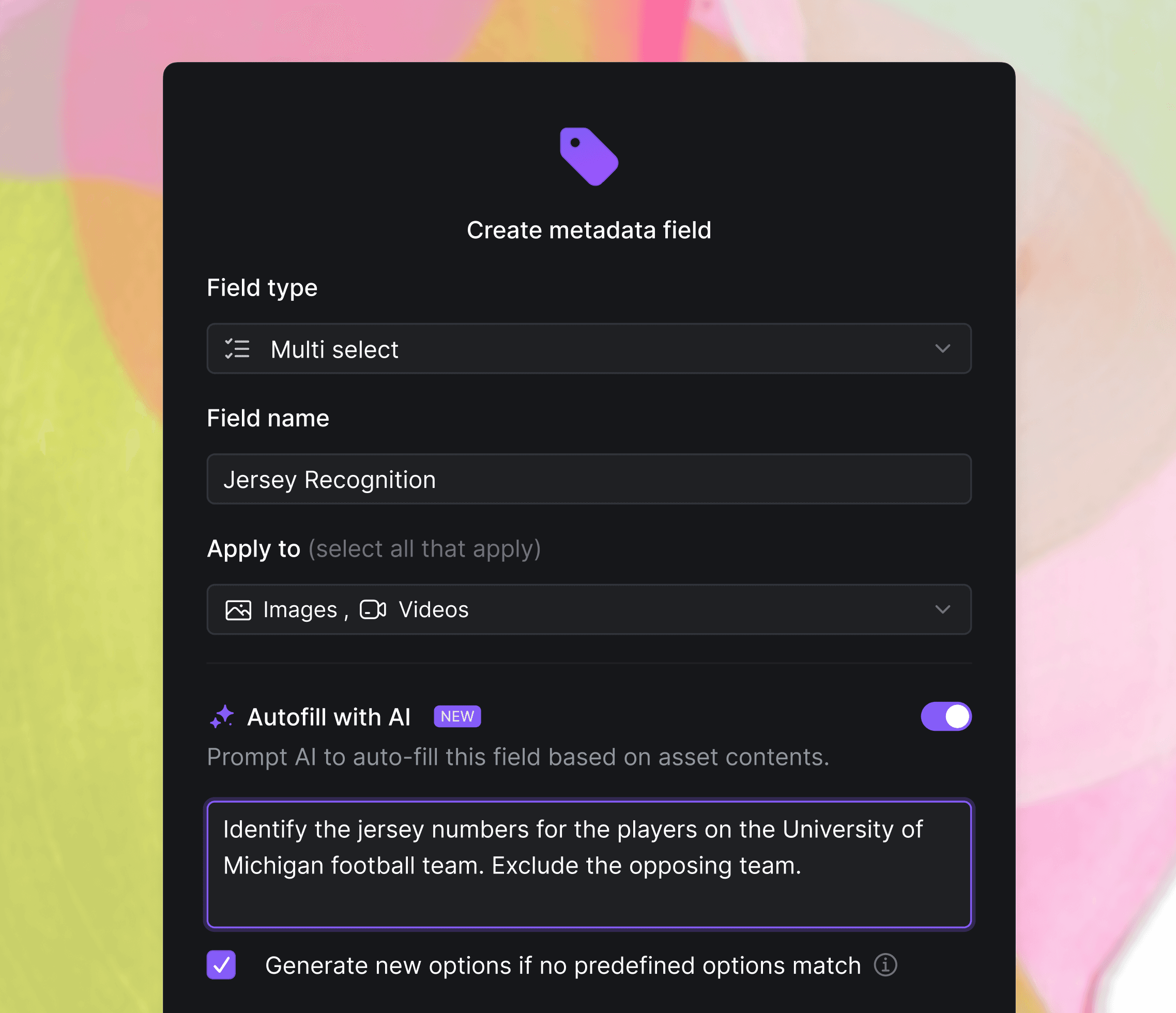
Track what actually matters to you and your workflow. Customize automated metadata fields for each drive and asset type, and seamlessly display this information in a collaborative spreadsheet view designed specifically for you and your team.


System metadata extraction
Shade automatically extracts system metadata for 100+ file formats.

Intelligent user metadata
AI generate or manually add user metadata per drive and per asset type.

WORK LIKE YOU’RE IN OFFICE, EVEN IF YOU’RE NOT
Made for remote
creative teams.
With Shade, work together from anywhere in the world with zero downtime. Streamline your creative workflow
and connect your distributed team like never before.





Shade replaces your entire stack.
One platform. Half the cost.

SENDING LARGE FILES? NO PROBLEM
Instantly access
cloud files locally.
Shade transforms the cloud into a NAS, enabling your distributed team to collaborate as if they were connected to a single, ultra-responsive SSD that can be accessed from anywhere.
Dump your hard drives
Shade “tricks” your computer into thinking the cloud is a hard drive, giving you local file access without extra devices.

Drag cloud files into your NLE
Drag MXF, R3D, MP4, and BRAW files directly into your editing software. No downloading required.

No uploading or downloading = No downtime
With intelligent file streaming, you experience zero
downtime, letting you focus on what truly matters—creating.

Step 1
Mount the drives containing the assets you need in the Shade desktop app.
⌘
O
Step 2
Press shortcut ⌘O on Mac or Ctrl O on Windows to open the assets locally on your computer.
Step 3
Use your files as if Shade were a local hard drive. Drag directly into your NLE or other software.
Step 4 (Optional)
Learn to juggle. Call your mom. Adopt a lizard. Might as well do something with all that time you’re getting back.

AI SEARCH YOUR FILES
Search your assets
with natural language.
Shade’s proprietary AI is specifically trained to analyze media, identify faces, recognize objects, and more. Perform semantic searches without relying on tags, guaranteeing that you always find exactly what you’re looking for, no matter what.


YEAH...WE DIDN’T STOP THERE...
Features that make
your workflow sing.
Facial recognition
Shade auto-detects and clusters faces across all media formats.

Transcription
Shade offers credit-based transcription for audio and video.

Complex previews
Shade autogenerates previews for R3D, MXF, BRAW, and more.

Precision filters
Tailor AI search results with precision filters for any field.

One source of truth
for your entire team.




SHADE INC.734 BROADWAY, FLOOR 4, NEW YORK, NEW YORK 10003
© 2026 SHADE INC. ALL RIGHTS RESERVED
SHADE INC.734 BROADWAY, FLOOR 4, NEW YORK, NEW YORK 10003
© 2026 SHADE INC. ALL RIGHTS RESERVED
Media storage that works harder
One platform that combines the power of LucidLink, Frame, and Dropbox and does 5x more for 70% less
Get Free AirPods when you sign up for a demo!*


Your favorite team's favorite file system.
We work with top sports organizations, brands, and production houses worldwide.
WHAT THE H*LL IS SHADE?
In a rush?
Read this.
Why pay for 9+ tools when you could pay for one? Shade is an all-in-one replacement for LucidLink, Frame.io, and Iconik with additional time-saving features.
COMMENTING & REVIEW
Stay on the
same page.
Share with granular permissions to manage internal and external collaboration. Facilitate teamwork by commenting, replying, and reviewing assets together, all in Shade.
Time-stamp comments for precise feedback and streamlined review.
Reply to your team and start a conversation, all directly in Shade.
Mention and react with emojis to collaborate with additional context.
02:03 / 02:12
"The Cubicle"
Season 12
Episode 4
Cold_Open_02.mp4
Share
AI search your workspace...
Details
Comments
Transcript
Similar items
Jonathan Fern
Yesterday
I’m still color grading the other footage but here’s a sneak peak. I’ll upload the rest to the drive in the next hour.
Kai Nguyen
Yesterday
I love it already
Camille Jones
1 hour ago
One of our best yet 🙌 I sent a few frames to @Marcel Breuer — he’s going to be so psyched
2
7
5
Justin Tran
3 hours ago
00:32
@Simon Greene this is perfect for socials
Simon Greene
2 hours ago
We’ll need to play with the aspect ratio but agreed!
Justin Tran
2 hours ago
Dropped the guidelines in the drive
1
Kai Nguyen
now
02:03
Leave a comment...
CONSOLIDATE YOUR TOOLS
5x the features for 1/5th the price.
INTELLIGENT METADATA
Automate custom metadata using AI.
Track what actually matters to you and your workflow. Customize automated metadata fields for each drive and asset type, and seamlessly display this information in a collaborative spreadsheet view designed specifically for you and your team.
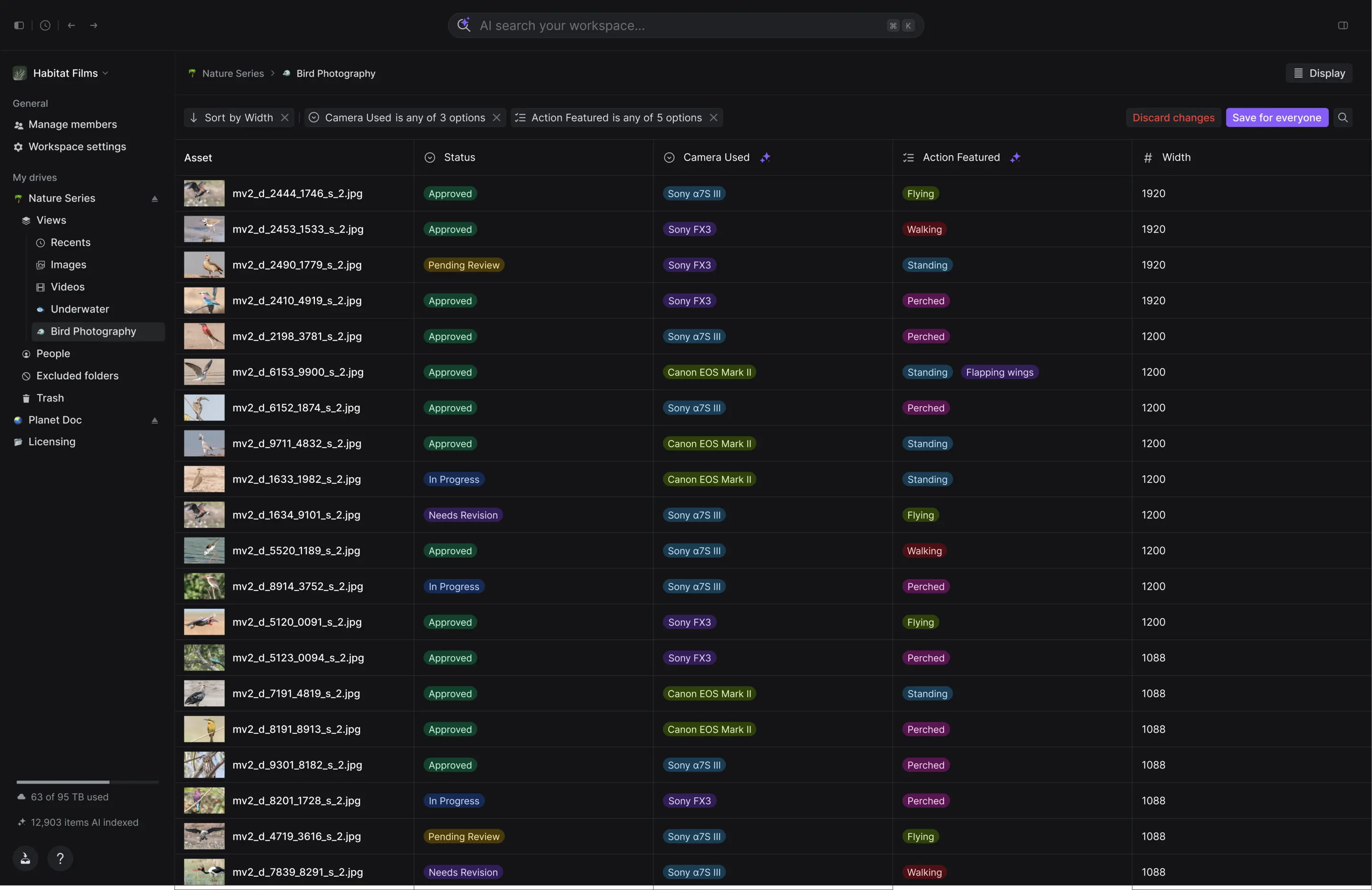
System metadata extraction
Shade automatically extracts system metadata for 100+ file formats.
Intelligent user metadata
AI generate or manually add user metadata per drive and per asset type.
WORK LIKE YOU’RE IN OFFICE, EVEN IF YOU’RE NOT
Made for remote
creative teams.
With Shade, work together from anywhere in the world with zero downtime. Streamline your creative workflow
and connect your distributed team like never before.
Shade replaces your entire stack.
One platform. Half the cost.
SENDING LARGE FILES? NO PROBLEM
Instantly access
cloud files locally.
Shade transforms the cloud into a NAS, enabling your distributed team to collaborate as if they were connected to a single, ultra-responsive SSD that can be accessed from anywhere.
Dump your hard drives
Shade “tricks” your computer into thinking the cloud is a hard drive, giving you local file access without extra devices.
Drag cloud files into your NLE
Drag MXF, R3D, MP4, and BRAW files directly into your editing software. No downloading required.
No uploading or downloading = No downtime
With intelligent file streaming, you experience zero
downtime, letting you focus on what truly matters—creating.
Step 1
Mount the drives containing the assets you need in the Shade desktop app.
⌘
O
Step 2
Press shortcut ⌘O on Mac or Ctrl O on Windows to open the assets locally on your computer.
Step 3
Use your files as if Shade were a local hard drive. Drag directly into your NLE or other software.
Step 4 (Optional)
Learn to juggle. Call your mom. Adopt a lizard. Might as well do something with all that time you’re getting back.
AI SEARCH YOUR FILES
Search your assets
with natural language.
Shade’s proprietary AI is specifically trained to analyze media, identify faces, recognize objects, and more. Perform semantic searches without relying on tags, guaranteeing that you always find exactly what you’re looking for, no matter what.
YEAH...WE DIDN’T STOP THERE...
Features that make
your workflow sing.
Facial recognition
Shade auto-detects and clusters faces across all media formats.
Transcription
Shade offers credit-based transcription for audio and video.
Complex previews
Shade autogenerates previews for R3D, MXF, BRAW, and more.
Precision filters
Tailor AI search results with precision filters for any field.
One source of truth
for your entire team.
*To qualify for free Airpods, you must be a part of a creative team with 5+ members and 25+ TB of active cloud storage
SHADE INC.734 BROADWAY, FLOOR 4, NEW YORK, NEW YORK 10003
© 2026 SHADE INC. ALL RIGHTS RESERVED
Media storage that works harder
One platform that combines the power of LucidLink, Frame, and Dropbox and does 5x more for 70% less
Get Free AirPods when you sign up for demo!*
Your favorite media company’s favorite file system. We work with top production houses, agencies, and brands worldwide.
WHAT THE H*LL IS SHADE?
In a rush? Read this.
Why pay for 9+ tools when you could pay for one? Shade is an all-in-one replacement for LucidLink, Frame.io, and Iconik with additional time-saving features.
COMMENTING & REVIEW
Stay on the
same page.
Share with granular permissions to manage internal and external collaboration. Facilitate teamwork by commenting, replying, and reviewing assets together, all in Shade.
Time-stamp comments for precise feedback and streamlined review.
Reply to your team and start a conversation, all directly in Shade.
Mention and react with emojis to collaborate with additional context.

CONSOLIDATE YOUR TOOLS
5x the features for 1/5th the price.
INTELLIGENT METADATA
Automate custom metadata using AI.
Track what actually matters to you and your workflow. Customize automated metadata fields for each drive and asset type, and seamlessly display this information in a collaborative spreadsheet view designed specifically for you and your team.
System metadata extraction
Shade automatically extracts system metadata for 100+ file formats.
Intelligent user metadata
AI generate or manually add user metadata per drive and per asset type.
WORK LIKE YOU’RE IN OFFICE
Made for remote
creative teams.
With Shade, work together from anywhere in the world with zero downtime. Streamline your creative workflow and connect your distributed team like never before.
SENDING LARGE FILES? NO PROBLEM
Instantly access
cloud files locally.
Shade transforms the cloud into a NAS, enabling your distributed team to collaborate as if they were connected to a single, ultra-responsive SSD that can be accessed from anywhere.
Dump your hard drives
Shade “tricks” your computer into thinking the cloud is a hard drive, giving you local file access without extra devices.
Drag cloud files into your NLE
Drag MXF, R3D, MP4, and BRAW files directly into your editing software. No downloading required.
No downtime
With intelligent file streaming, you experience zero downtime, letting you focus on what truly matters—creating.
Step 1
Mount the drives containing the assets you need in the Shade desktop app.
⌘
O
Step 2
Press shortcut ⌘O on Mac or Ctrl O on Windows to open the assets locally on your computer.
Step 3
Use your files as if Shade were a local hard drive. Drag directly into your NLE or other software.
Step 4 (Optional)
Learn to juggle. Call your mom. Adopt a lizard. Might as well do something with all that time you’re getting back.
AI SEARCH YOUR FILES
Search your
assets with
natural language.
Shade’s proprietary AI is specifically trained to analyze media, identify faces, recognize objects, and more. Perform semantic searches without relying on tags, guaranteeing that you always find exactly what you’re looking for, no matter what.
YEAH...WE DIDN’T STOP THERE...
Features that make your workflow sing.
Facial recognition
Shade auto-detects and clusters faces across all media formats.
Transcription
Shade offers credit-based transcription for audio and video.
Complex previews
Shade autogenerates previews for R3D, MXF, BRAW, and more.
Precision filters
Tailor AI search results with precision filters for any field.
One source of truth for your entire team.
*To qualify for free Airpods, you must be a part of a creative team with 5+ members and 25+ TB of active cloud storage
SHADE INC.
734 BROADWAY, FLOOR 4
NEW YORK, NEW YORK 10003
© 2026 SHADE INC. ALL RIGHTS RESERVED
