

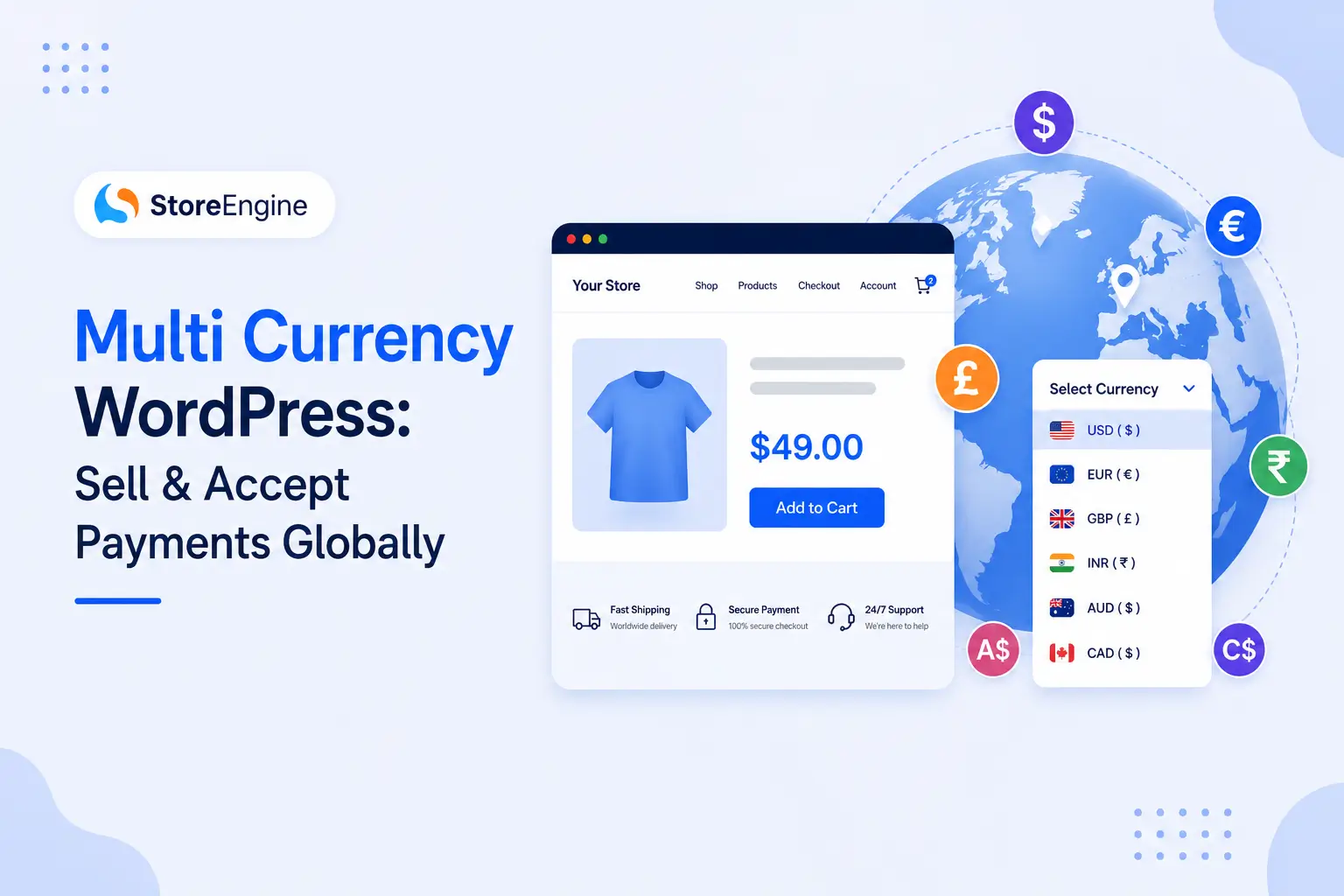

Here’s a scenario every store owner has lived through at least once.
A potential customer in Germany lands on your WordPress store. Prices are in USD. They do the mental math, second-guess themselves, and click away. Not because your product wasn’t right for them — but because the currency felt wrong.
That’s not a minor UX issue. That’s revenue walking out the door, every single day.
Multi currency WordPress support is the mechanism that stops that from happening. When your store speaks the customer’s financial language — local currency, right currency, from first product view through checkout — you remove the friction that kills international conversions. And in 2026, with global B2C eCommerce surpassing USD 6 trillion, this isn’t a “nice to have” anymore. It’s the baseline for any store serious about cross-border selling.
This guide covers exactly how multi currency WordPress works, what separates a real implementation from a cosmetic conversion widget — and why StoreEngine is the smartest way to get there without the plugin pile-up most WordPress store owners end up building.
What Is Multi Currency in WordPress?
Multi currency support means your WordPress store can display prices and process payments in a customer’s local currency — not just show a converted number on the side while charging USD at checkout.
The three layers that actually matter:
Display — Prices shown in the visitor’s currency from the moment they land on your store.
Detection — GeoIP technology automatically identifies where the visitor is and assigns the right currency without them lifting a finger.
Checkout — The payment gateway processes the transaction in the selected currency. This is where most basic setups fail. Showing EUR but charging USD destroys trust at the moment it matters most.
A proper multi currency eCommerce setup closes all three layers simultaneously. Anything less is a half-measure that will cost you international conversions.
Why Your WordPress Store Needs Multi Currency in 2026
Think about your own behavior when shopping online. You see a product you want. Then you notice the price is in a currency you don’t use. Suddenly you’re calculating exchange rates in your head, wondering about hidden conversion fees, and questioning whether the final charge will match what you expected.
Most people don’t push through that friction. They leave.
The case for multi currency is straightforward:
- More markets = more revenue. Customers who see local pricing are far more likely to complete a purchase.
- Reduced cart abandonment. No currency shock at checkout means fewer drop-offs at the most critical moment.
- Built-in credibility. A store that prices in the customer’s own currency signals that it takes international buyers seriously.
- Competitive necessity. Your international competitors already do this. Without it, you’re at a structural disadvantage.
For stores running subscriptions, the case gets even stronger. A customer in Canada signing up for a recurring plan in USD is constantly reminded that this is a foreign service — every billing cycle. In CAD, that friction disappears. If you’re running subscriptions on WordPress, multi currency isn’t optional — it’s part of the retention strategy.
How Multi Currency Works on WordPress (The Full Picture)
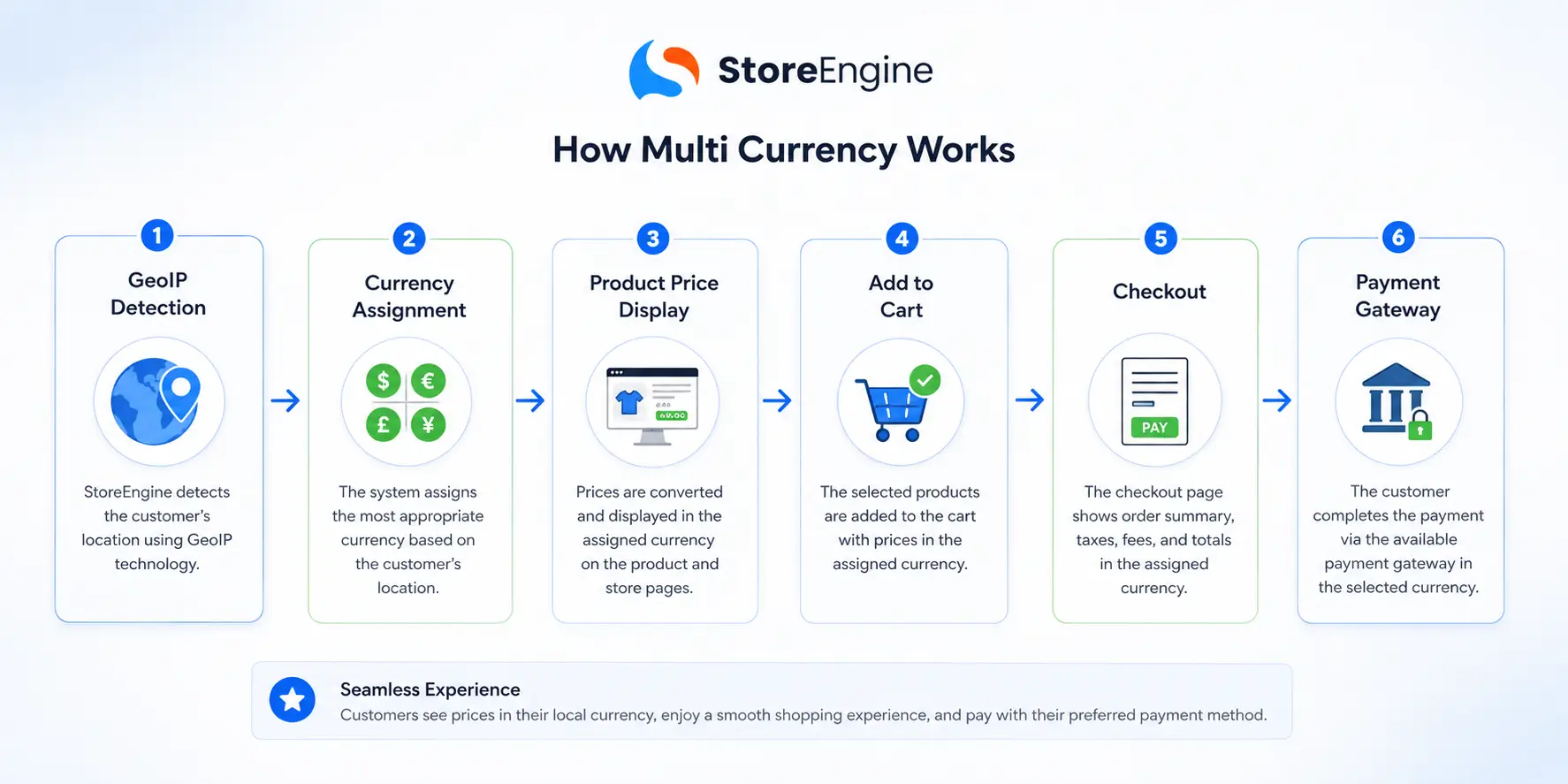
Understanding the architecture helps you choose the right solution. Here’s what a complete multi currency system needs to do:
1. Base Currency — The source of truth. All your products are originally priced in this currency (e.g., USD). Every other currency is derived from or set relative to this.
2. Exchange Rate Source — Either a live API (updated in real time or on a schedule) or manually set rates you control. Both have valid use cases depending on your margin tolerance.
3. GeoIP Detection — The system identifies the visitor’s country via their IP address and automatically assigns the matching currency before they see a single product.
4. Currency Switcher UI — A dropdown, flag selector, or widget that lets customers manually override if needed. This should be placeable anywhere — header, footer, product pages — without writing custom code.
5. Checkout Processing — The payment gateway receives the transaction in the customer’s selected currency. This is non-negotiable for a professional international store.
6. Rounding and Formatting — €19.9736 is not a price. Every currency needs clean rounding rules and locale-appropriate formatting.
The complexity isn’t conceptual — it’s in making all six layers work together without plugin conflicts, without breaking on WooCommerce updates, and without slowing your site down. That’s where your choice of solution determines everything.
What Separates Real Multi Currency from a Surface-Level Widget
|
Feature |
Basic Currency Display Widget |
Full Multi Currency Solution |
|
Shows prices in multiple currencies |
✅ |
✅ |
|
Auto GeoIP detection |
❌ |
✅ |
|
Checkout processed in local currency |
❌ |
✅ |
|
Live exchange rate API |
❌ |
✅ |
|
Per-product fixed pricing by currency |
❌ |
✅ |
|
Payment gateway compatibility |
Limited |
Full |
|
Performance impact |
Variable |
Lightweight |
|
Works without plugin conflicts |
Depends |
Yes (native) |
The right column is what you actually need. The left column is what most “free currency converter” plugins deliver.
The Best Multi Currency WordPress Solution in 2026: StoreEngine
Most WordPress store owners solving the multi currency problem end up doing one of two things:
Option one — stacking WooCommerce with a third-party currency switcher plugin, then watching those plugins conflict with each other, slow the site down, and break on the next WooCommerce update.
Option two — paying for a premium currency plugin that still doesn’t integrate cleanly with their subscription, checkout, or payment gateway setup.
StoreEngine is built differently, and the difference is architectural.
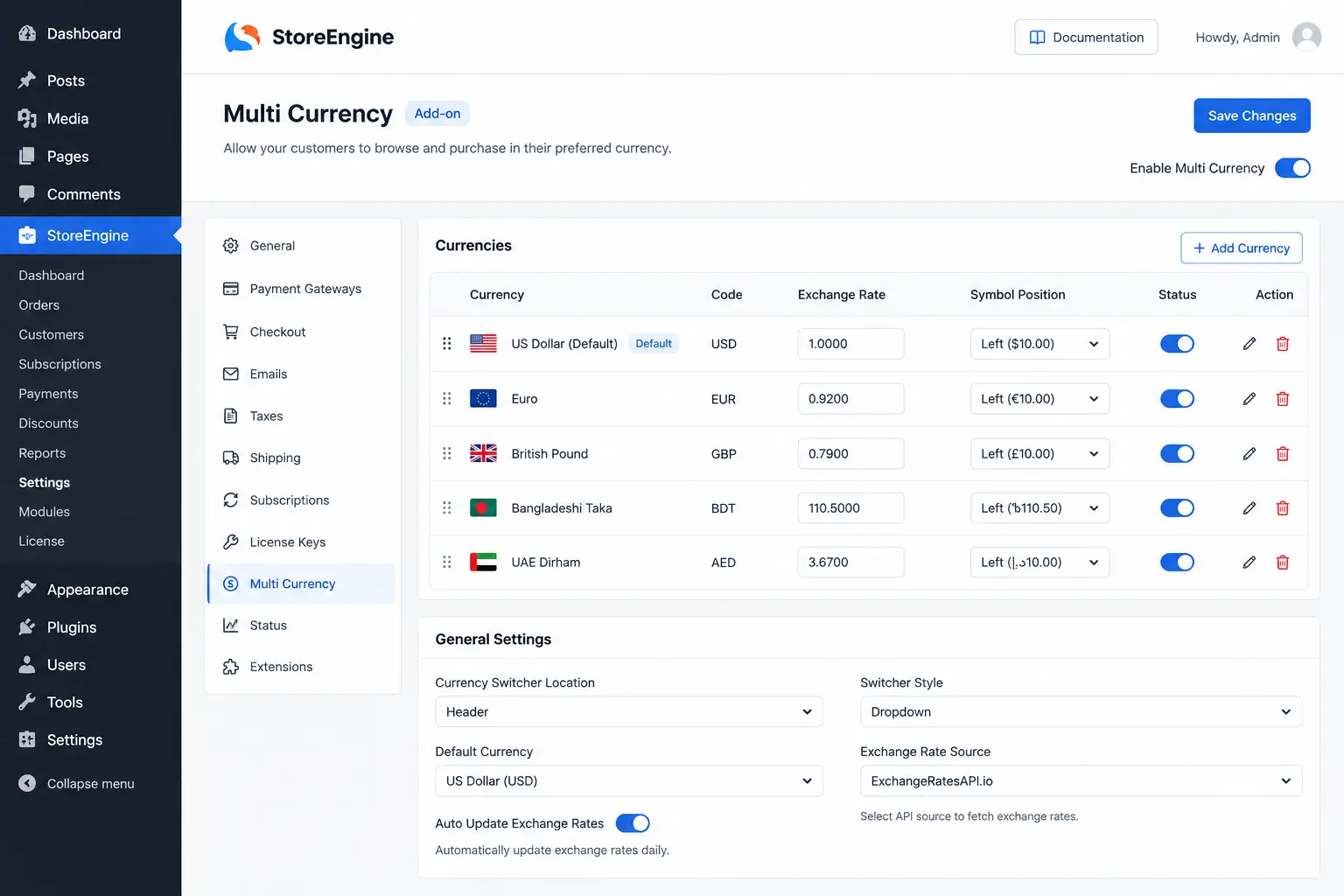
StoreEngine launched its native multi currency addon in version 1.8.0 — built directly into the core plugin, not bolted on as a third-party dependency. The currency switcher lives in the same unified system that handles your payments, products, checkout, subscriptions, memberships, and affiliates. When everything is designed to work together from day one, there are no conflicts. There are no version mismatches. There is no “this plugin broke when I updated WooCommerce” moment.
What StoreEngine’s Multi Currency Actually Does
- Native currency switcher addon — activated with a single click from the StoreEngine dashboard
- GeoIP-powered automatic currency detection via MaxMind integration
- Location-aware pricing that assigns the right currency before the customer sees anything
- Shorthand currency display that formats prices cleanly in every locale
- Full payment gateway compatibility — Stripe (135+ currencies), PayPal, Razorpay, and Paddle all work natively
- No external plugin dependencies — everything runs within one lightweight plugin
StoreEngine vs. WooCommerce + Currency Plugin
|
Capability |
WooCommerce + Plugin |
StoreEngine |
|
Multi currency support |
Requires external plugin |
Native built-in addon |
|
GeoIP auto-detection |
Plugin-dependent |
Built-in via MaxMind |
|
Checkout in local currency |
Varies by plugin |
Full support |
|
Payment gateways |
Varies |
Stripe, PayPal, Razorpay, Paddle |
|
Plugin conflict risk |
High |
None — unified architecture |
|
Performance |
Multiple plugins running |
Single lightweight plugin |
|
Subscriptions + multi currency |
Requires multiple plugins |
One plugin handles both |
|
Setup complexity |
Moderate to high |
Guided wizard |
The math isn’t close. If you want to understand the full cost difference in practice, the WooCommerce vs StoreEngine cost breakdown lays it out clearly.
How to Set Up Multi Currency in WordPress with StoreEngine
Getting multi currency live with StoreEngine involves no custom code and no developer time.
Step 1 — Install StoreEngine
Install from WordPress.org or directly from storeengine.pro. The free tier gets your store fully operational.
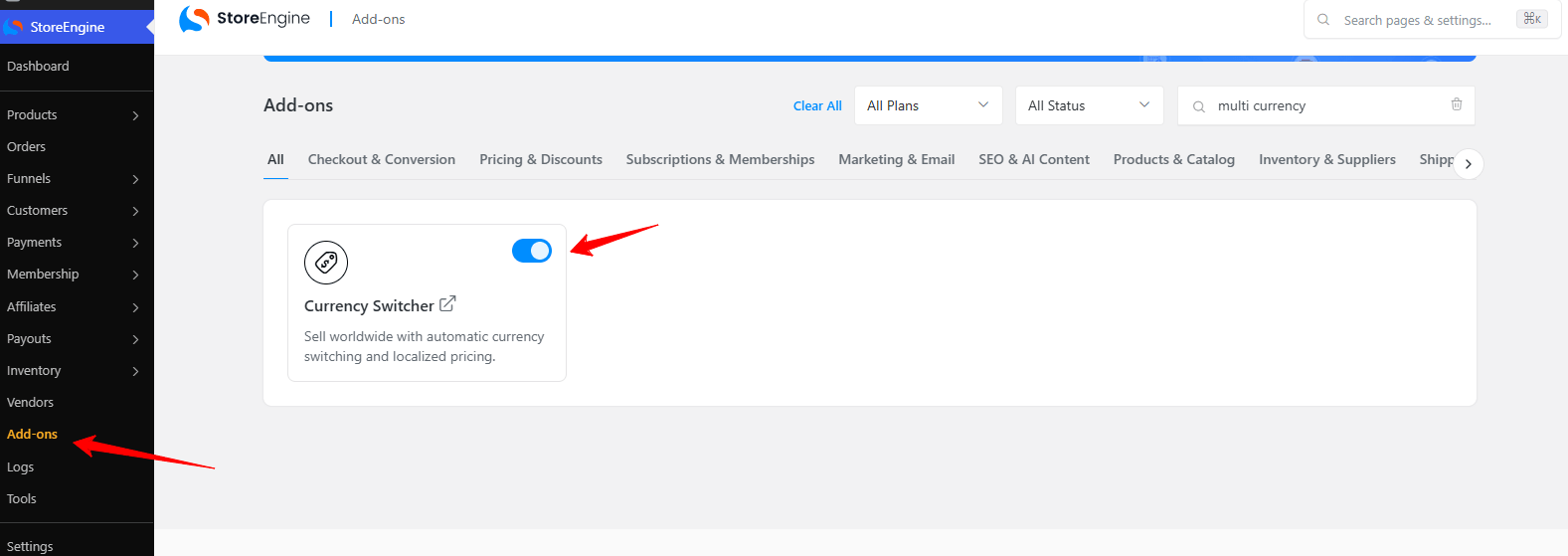
Step 2 — Enable the Multi Currency Addon
From the StoreEngine dashboard, go to Add-ons and activate Multi-Currency with one click. It’s already part of the system — no separate plugin to install.
Step 3 — Set Your Base Currency
Define the currency all your products are originally priced in. This is your store’s source of truth.
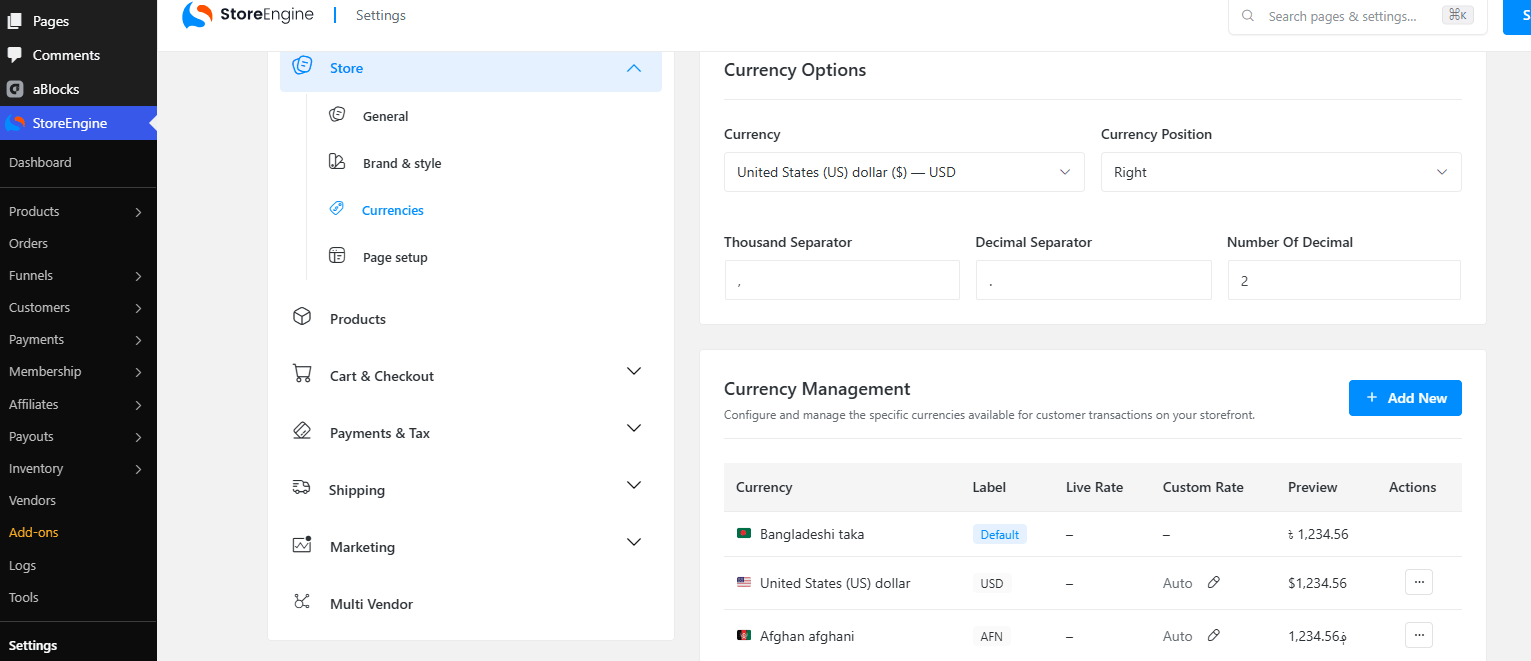
Step 4 — Add Additional Currencies
Enable the currencies you want to support. Set each one to automatic (API-based live rates) or manual (rates you control).
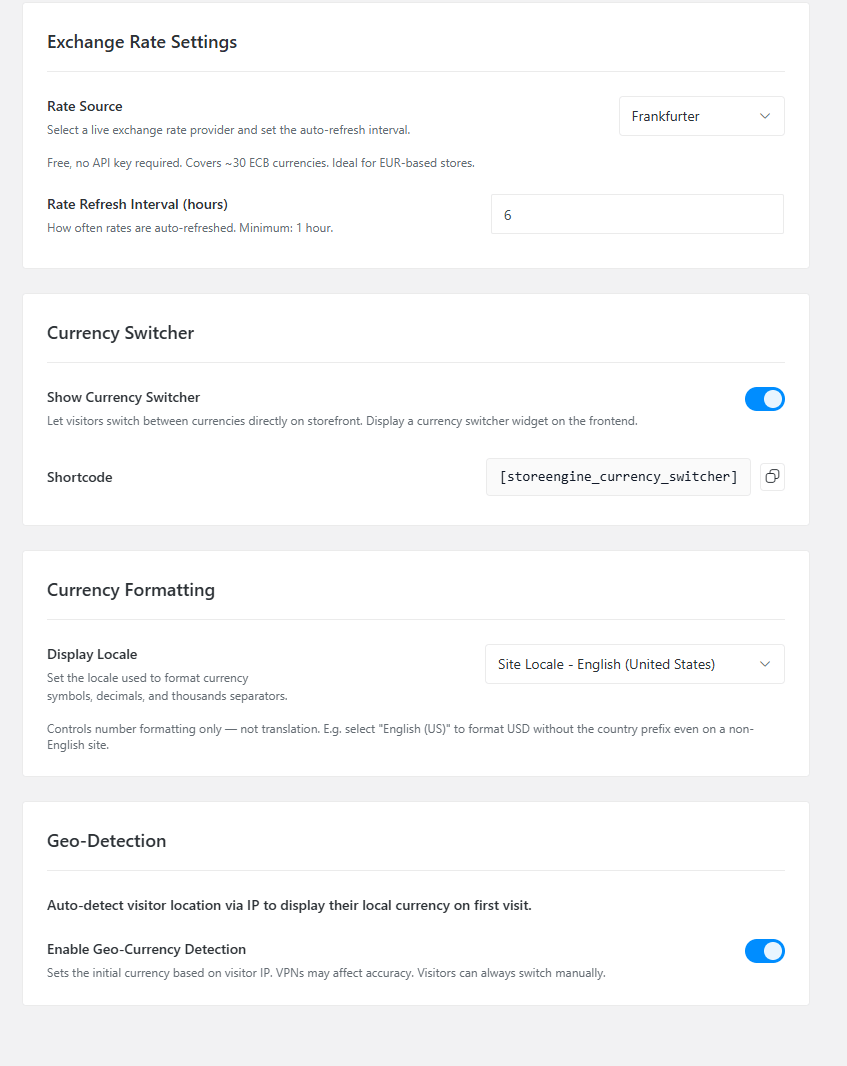
Step 5 — Connect GeoIP Detection
Link MaxMind’s database through StoreEngine’s built-in integration. Visitors now get the right currency automatically from their first page view.
Step 6 — Place the Currency Switcher
Drop the currency selector widget into your header, footer, or product pages using aBlocks — StoreEngine’s visual Gutenberg builder. Drag, drop, done. No code.
Step 7 — Test Checkout in Each Currency
Run test transactions in every enabled currency. Confirm the gateway processes correctly and the customer sees accurate totals throughout checkout.
That’s the complete setup. For a deeper look at how to build your international store end to end, the international selling guide on StoreEngine covers the full strategy.
Multi Currency Across Your Entire Store Stack
Multi currency doesn’t live in isolation. When a customer buys from you in their local currency, that decision touches every part of your store. Here’s how StoreEngine handles each layer:
Physical products — Inventory, variants, and shipping all work alongside currency settings. If you’re selling physical goods internationally, the physical products setup guide covers the full workflow.
Digital downloads — Secure delivery and license management in any currency. The digital downloads feature page explains how StoreEngine handles delivery without extra plugins.
Subscriptions — Recurring billing in the customer’s local currency, with flexible cycles and dunning built in. See how subscriptions work in StoreEngine.
Memberships — Access control and gated content that works globally. Learn more about membership selling on WordPress.
Online courses — Sell courses in local currency with Academy LMS integration. The online courses use case explains the full stack.
Wholesale and B2B — Custom pricing tiers for international partners and trade customers. Wholesale and B2B features are built in.
Multi-vendor marketplace — If vendors from multiple countries are selling on your platform, they need currency handling too. StoreEngine’s marketplace feature handles that natively.
Payment gateways — Every major international gateway is supported natively. The payment gateway guide breaks down which gateway fits which market.
Retail and POS — If you sell in person as well as online, the Retail POS setup keeps both in sync under one currency system.
The eCommerce SEO implications of international selling are also worth understanding. If you’re targeting multiple language markets, the eCommerce SEO for WordPress playbook covers how to structure your store for global search.
Other Multi Currency WordPress Options Worth Knowing
For completeness — if you’re committed to a WooCommerce-based setup, here are the main options the ecosystem offers:
FOX (formerly WOOCS) — 50,000+ active installs, rated 4.4/5. The free version caps at two currencies; unlimited requires the premium version. Solid starting point for testing multi currency viability on an existing WooCommerce store.
YayCurrency — Beginner-friendly with fast drag-and-drop setup. Good for smaller WooCommerce stores that want a quick implementation without advanced configuration.
CURCY — Strong choice if you’re already running WPML for multilingual content, as the two are designed to integrate cleanly.
Aelia Currency Switcher — The long-standing premium standard for WooCommerce, with deep pricing logic and enterprise-level features. Priced accordingly.
The honest assessment: every one of these is a WooCommerce plugin solving a problem that WooCommerce doesn’t solve natively. They all add dependency, conflict risk, and maintenance overhead. If you’re building fresh — or if you’re weighing a migration — moving to StoreEngine eliminates that entire layer of complexity and brings the full commerce stack with it.
Common Multi Currency Mistakes That Kill Conversions
Showing local prices but charging base currency at checkout. This is the most damaging mistake. Customers see EUR throughout the store, get to checkout, and find a USD charge. Trust gone. Cart abandoned.
Stale exchange rates. A rate cached from two weeks ago can create meaningful pricing discrepancies. Use a live API or update manual rates on a tight schedule.
No rounding rules per currency. Every currency has conventions. €9.99 and ¥1,000 look right. €9.97362 looks broken. Set proper rounding for every currency you enable.
No mobile testing on the currency switcher. Dropdowns that work perfectly on desktop often break on mobile. Test every placement on every device.
Missing a fallback currency. If GeoIP detection fails, your store should gracefully default to the base currency — not display a broken price or an error state.
Ignoring payment gateway compatibility. Not every gateway supports every currency. Confirm your enabled currencies are supported by the gateways you’re using before going live.
Understanding how payment models interact with multi currency is also worth studying — especially if you’re mixing one-time purchases with recurring plans. The BNPL vs Subscription vs Layaway breakdown covers the options clearly.
The Bottom Line
Multi currency WordPress isn’t a luxury feature for global-minded stores in 2026. It’s the price of entry for any store that wants international customers to actually convert.
The customers who would buy from you are already out there — in Germany, Canada, Australia, Japan, Brazil, India. What stands between them and your checkout is a number displayed in the wrong currency.
The question isn’t whether to add multi currency support. It’s how to do it without building a fragile plugin stack that breaks every few months.
StoreEngine is the cleanest answer — native multi currency, GeoIP detection, full checkout-level currency handling, and the entire eCommerce stack in a single plugin. No conflicts. No dependency chain. No plugin soup.
Ready to sell globally? → Start with StoreEngine free and have multi currency live within the hour.
FAQs: Multi Currency WordPress
Do I need WooCommerce for multi currency on WordPress?
No. WooCommerce is one path but not the only one. StoreEngine is a complete WooCommerce alternative that includes native multi currency support without requiring WooCommerce or any additional currency plugins.
Can customers actually pay in their local currency, or just see converted prices?
With StoreEngine, customers complete checkout and payment in their selected currency. The payment gateway processes the transaction in that currency — not a backend conversion. This is what distinguishes a real multi currency solution from a display-only widget.
How do exchange rates get updated?
Either automatically via a currency API (in real time or on a set interval) or manually by the store admin. StoreEngine supports both approaches, giving you flexibility based on your margin requirements.
What happens if a customer selects a currency my payment gateway doesn’t support?
Best practice is to only enable currencies that your active gateways support. StoreEngine’s gateway integrations — Stripe, PayPal, Razorpay, Paddle — collectively cover the vast majority of currencies in active global use.
Will multi currency slow my WordPress site?
With StoreEngine’s single-plugin architecture, no. The currency system is part of the core codebase — no additional scripts, no separate database calls from a third-party plugin. The performance impact is minimal.
Can I set different prices for the same product in different currencies?
Yes. StoreEngine supports per-product fixed pricing per currency, so you’re not locked into pure exchange rate conversion. You can price strategically by market.
