Summary: in this tutorial, you will learn how to use the SQL HAVING clause to specify a search condition for a group of rows or an aggregate.
Introduction to SQL HAVING clause #
The HAVING clause is often used with the GROUP BY clause in the SELECT statement to filter group of rows based on a specified condition. The following illustrates the syntax of the HAVING clause:
SELECT
column1, column2, aggregate_function(expr)
FROM
table
GROUP BY column1
HAVING condition;The HAVING clause works like the WHERE clause if it is not used with the GROUP BY clause. The difference between the HAVING clause and the WHERE clause is that the WHERE clause is used to filter rows, while the HAVING clause is used to filter groups of rows.
Let’s take a look at several examples of using the HAVING clause.
SQL HAVING examples #
Let’s take a look at the orderdetails table:

SQL HAVING with SUM function example #
In this example, we will find the sale orders whose total sale is greater than $12000. We use the HAVING clause with the GROUP BY clause to accomplish this as the following query:
SELECT
orderid, SUM(unitPrice * quantity) Total
FROM
orderdetails
GROUP BY orderid
HAVING total > 12000;
How the query works.
- First, for each order line item, SQL calculates the total amount using the SUM function. (The
Totalcolumn alias is used for formatting the output). - Second, the
GROUP BYclause groups the selected rows byOrderID. For each order that we have only one group that containsOrderIDandTotal - Third, the
HAVINGclause gets groups that haveTotalgreater than12000.
SQL HAVING with COUNT function example #
The following query selects all the orders that have at least 5 line items. We use the COUNT function with the HAVING and GROUP BY clauses.
SELECT
orderID, COUNT(productID) products
FROM
orderdetails
GROUP BY orderID
HAVING products > 5;
 #
#
SQL HAVING clause with MAX and MIN functions examples #
Take a look at the products table below:
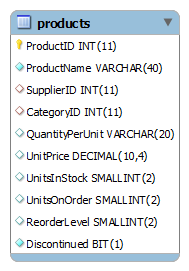
To select the most expensive product in each category, you use the following query:
SELECT
categoryID, productID, productName, MAX(unitprice)
FROM
products A
WHERE
unitprice = (
SELECT
MAX(unitprice)
FROM
products B
WHERE
B.categoryId = A.categoryID)
GROUP BY categoryID;
Notice that a subquery is used in the WHERE clause of the statement to get the correct product in the outer query. For each category, to select the most expensive product that has the price greater than $100, we can use the MAX function in the HAVING clause as follows:
SELECT
categoryID, productID, productName, MAX(unitprice)
FROM
products A
WHERE
unitprice = (
SELECT
MAX(unitprice)
FROM
products B
WHERE
B.categoryId = A.categoryID)
GROUP BY categoryID
HAVING MAX(unitprice) > 100;
Notice that only product whole unit price is greater than $50 is selected.
To select the least expensive product in each category, we use the same technique as we find the most expensive product in each category except that the MIN function is used instead of the MAX function:
SELECT
categoryID, productID, productName, MIN(unitprice)
FROM
products A
WHERE
unitprice = (
SELECT
MIN(unitprice)
FROM
products B
WHERE
B.categoryId = A.categoryID)
GROUP BY categoryID
We can find the least expensive product in each category whose unit price is lower than $5 by using the MIN function in the HAVING clause as follows:
SELECT
categoryID, productID, productName, MIN(unitprice)
FROM
products A
WHERE
unitprice = (
SELECT
MIN(unitprice)
FROM
products B
WHERE
B.categoryId = A.categoryID)
GROUP BY categoryID
HAVING MIN(unitprice) < 5;
In this tutorial, we have shown you how to use the SQL HAVING clause to filter groups of rows.
Databases #
- PostgreSQL HAVING clause
- Oracle HAVING clause
- SQL Server HAVING clause
- MySQL HAVING clause
- SQLite HAVING clause
- Db2 HAVING clause
- MariaDB HAVING clause
Thank you for your feedback!
