-
-
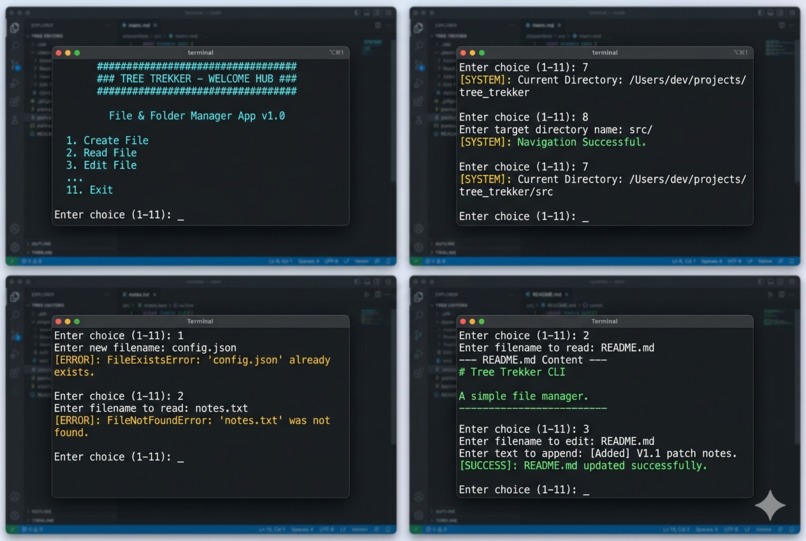
Some Action in vs code

💡 The Inspiration
Every developer knows the friction of jumping between a code editor and a clunky terminal window just to perform basic file operations. Running mkdir, touch, cat, and cd .. repeatedly can disrupt your coding flow. I wanted to build a unified, interactive environment that brings peace to workspace management. The goal was to create a zero-dependency, lightweight command-line companion that eliminates the need to memorize complex terminal syntax, turning everyday folder navigation into a smooth, menu-driven experience.
What it does
Tree Trekker is an interactive, menu-driven command-line interface (CLI) that simplifies workspace management. Instead of forcing you to remember distinct terminal syntax across different operating systems, it provides a unified platform to manipulate files and folders using single-digit commands.File Lifecycle Management: Instantly creates ('x' mode), reads ('r' mode), updates ('a' mode), and deletes (os.remove) files safely without overwriting data.Directory Navigation: Offers dynamic path traversal, allowing you to move into child folders or shift backward to parent folders (cd ..) while tracking your live path environment.Safety Isolation: Wraps every operating system call in defensive error-trapping loops, translating cryptic system crashes into plain, readable alerts.
How we built it
The application is built entirely in Python 3 using native library modules. It leverages a clean, centralized control loop architecture: System Interaction: I utilized the core os module to bridge the script with the host operating system (os.mkdir, os.rmdir, os.remove, os.getcwd, and os.chdir).File Stream Architecture: Standard Python context managers (with open(...)) handle read, write, and exclusive creation operations safely, guaranteeing files close properly even if an error occurs.The Main Loop: A persistent while True loop acts as the engine, capturing input choices and routing traffic to specialized functions.
Challenges we ran into
The Exclusive Creation Trap: Initially, creating files risked overwriting existing data. I resolved this by shifting from standard write modes to the exclusive creation flag ('x'), which intentionally triggers a FileExistsError instead of destroying active user data.Graceful Crash Prevention: Interacting with storage drives exposes a program to dozens of hardware and permission faults. I wrapped every system call in granular try-except blocks, catching specific system exceptions (like FileNotFoundError) so a missing file displays a clean notification instead of crashing the application.
Accomplishments that we're proud of
Zero-Dependency Footprint: Built entirely using native Python libraries without requiring third-party installations like pip, ensuring it runs instantly on any machine with Python installed.Data Destruct Protection: Successfully isolated write streams to prevent accidental file deletion or unintended overwrites during routine workspace creation.Resilient Exception Routing: Engineered a global error-handling map that catches permission issues, missing files, and broken links, making the utility crash-proof during active runtimes.
What we learned
Robust State Management: I mastered working with volatile system states. Navigating the file system with os.chdir('..') changes the global environment context of the script, meaning every function must dynamically adapt to the new os.getcwd() environment.User-Centric Architecture: I learned the importance of designing self-explanatory command-line interfaces (CLIs). Code shouldn't just run; it needs to guide the user gracefully when they type an incorrect option.
What's next for Tree Trekker
To scale the application from a handy script into an advanced power-user utility, our development roadmap includes:Recursive Directory Search: Transitioning the listing algorithm from flat linear time complexity (\mathcal{O}(n)) to deep tree traversal, mapping out complete directory branching networks.Rich Terminal Graphics: Implementing ANSI escape sequences or libraries like rich to provide color-coded file listings, visual size badges, and live progress bars.Cross-Volume Teleportation: Adding bookmarking features so developers can jump instantly between distant file paths without pressing 9 (Backward Folder) repeatedly.


Log in or sign up for Devpost to join the conversation.