
Moderation API changelog
Recommendation Reasons in Item Detail

See why an item was rejected, sent to review, or allowed — which rule fired, the severity score, and the thresholds behind it — right in the item detail view.
When a moderation decision lands in your queue, the first question is always the same:
why? Until now the item detail view showed the recommended action, but not what caused
it.
Today, the item detail view gains an Outcome section that explains every automated
recommendation.
How it works
At the top of every item's detail you'll now see:
Action — Reject, Review, or Allow, with a note when your own application escalated
the decision via a client action.Severity — the item's severity score.
Rule — the rule from your channel's cascade that produced the action: one of your
custom rules, the built-in severity triage (hover it to see the score plotted against
your channel's review and block thresholds), or the channel default when nothing
matched.
Label chips also gained hover tooltips showing each policy's score against its flag
threshold, whether it was shadow flagged (recorded for visibility, never counted toward
the decision), or manually corrected by a reviewer — with a shortcut to edit the policy.
The cause is also stored with every request as machine-readable reason codes in the
moderation API response, so you can build the same explanations into your own tooling.
August Updates: Voice, Unicode Spoofing, New Policies, & more

Moderate voice calls, catch homoglyph evasion with the evidence attached, and send us the verdicts from your own checks.
It has been a few months since the last update. Since then we have added a new content type, three new policies, a way to send us your own verdicts, and a severity score you can actually reason about.
Voice
Trust and safety used to stop at the edge of a call. If your product has live audio — a support line, a voice channel, an AI agent talking to customers — none of it reached your moderation setup.
Today, voice is a first-class content type.
Conversations: a call is a conversation, and every utterance in it is grouped under one record instead of arriving as unrelated requests. The same grouping works for text, so a chat thread and a call read the same way in review.
Your existing policies apply: the text policies you already run on messages score the transcript. Nothing new to configure per policy.
Bring your own id: pass a
conversationIdand the call links straight back to the record in your system, along with any metadata you attach.
Real-time voice is available on custom plans — read the docs or talk to us if you want it turned on.
Unicode Spoofing
НОТ busіnеss рrоduсt reads as plain English. It is not — the Н, О, Т and і are Cyrillic look-alikes. Swapping a few characters is one of the cheapest ways to walk a banned phrase straight past a wordlist, and until now the only evidence you had was a policy that quietly failed to fire.
We're adding a Unicode spoofing policy, and putting the evidence in front of the reviewer.
What it detects
Mixed script: a single word built from more than one writing system.
Look-alikes: whole words that map to a banned word once confusables are folded away.
Invisible characters: zero-width joiners and other separators wedged between letters.
Zalgo: stacked combining marks used to break parsing and readability.
Each signal is toggled independently. If your users legitimately write in Cyrillic, Greek or Han, add those to the expected scripts list and whole-word confusables in them stop counting. You can run the policy in shadow first to see what it would catch.
The evidence, in the queue
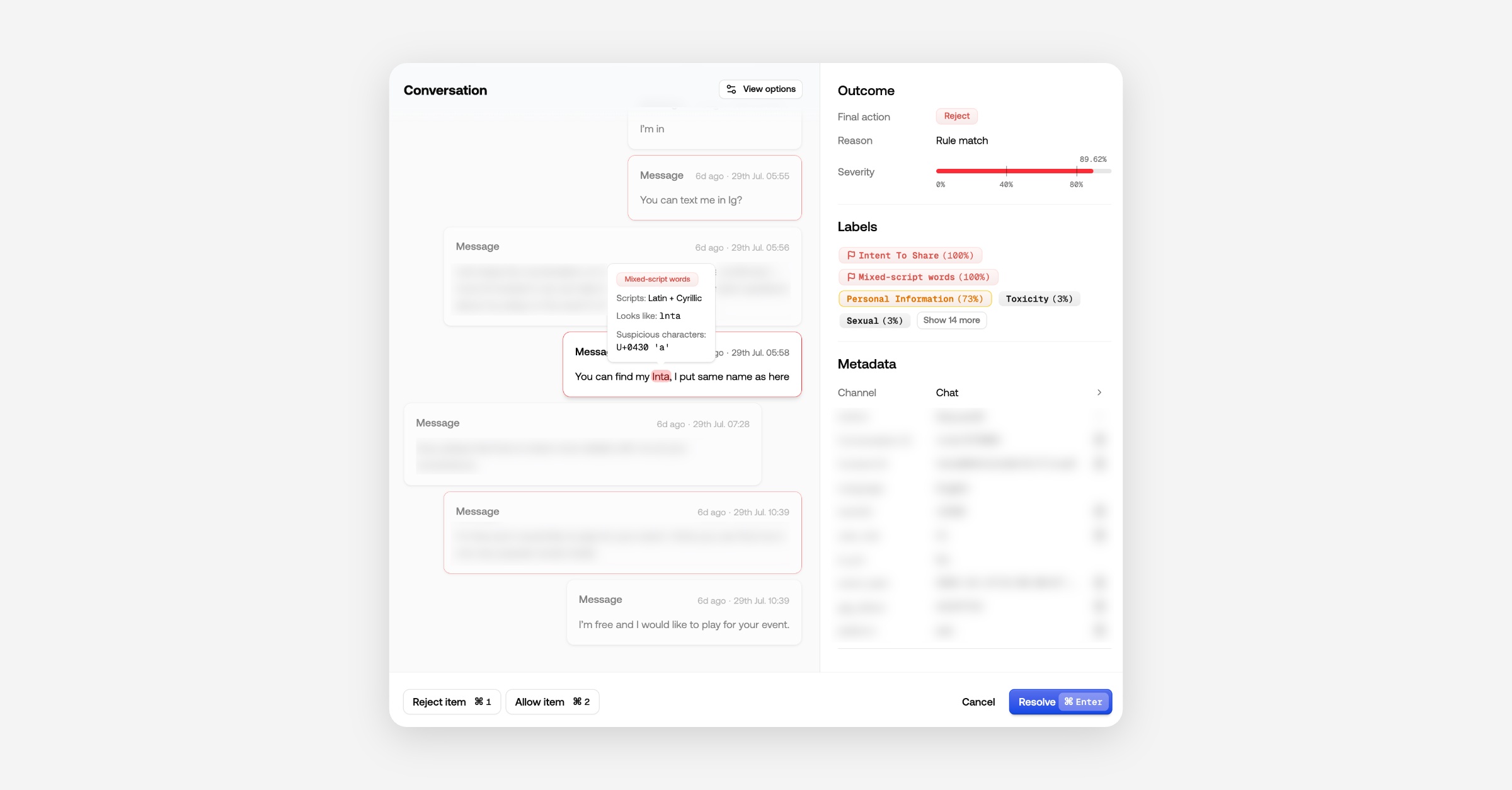
Open a flagged item and the offending tokens are highlighted inline: which signal tripped, which scripts are mixed, what the word looks like once folded, and the exact code points involved. It renders in the single item view, in conversation context, and next to the translation. The reviewer sees why it fired instead of copy-pasting text that looks fine.
Unicode spoofing documentation →
Two More Policies
Face detection flags images by a rule you write in one sentence: flag images that contain at least — or fewer than — N faces. That covers both directions, so you can block group photos or require that a profile picture actually has a face in it. Images only, configured on a channel's Privacy page.
Low-quality content catches low-effort text: posts under a minimum word count, heavily repetitive text like buy buy buy buy now, and the same line pasted over and over. It is fully deterministic — no model call, and no usage cost.
Bring your own moderation flags
Plenty of you run your own checks before calling us — banned IP lists, an internal heuristic, a third-party vendor. There was no way to tell us the outcome, so your verdict never reached the review queue.
You can now send a client action with the content:
{
  "clientAction": {
    "action": "review",
    "behavior": "escalate",
    "source": "banned-ip",
    "reason": "Signup IP on internal blocklist"
  }
}
escalate (the default) applies your action only when it is stricter than ours. You can pull a clean item into review; your
allowcan never suppress ourreject.override replaces our recommendation outright.
Your action is available to the rules engine as
client.action,client.behaviorandclient.source, so you can write rules on it.
The flagged field always reflects our analysis alone, so your reporting stays clean.
Custom Data In The Author Profile
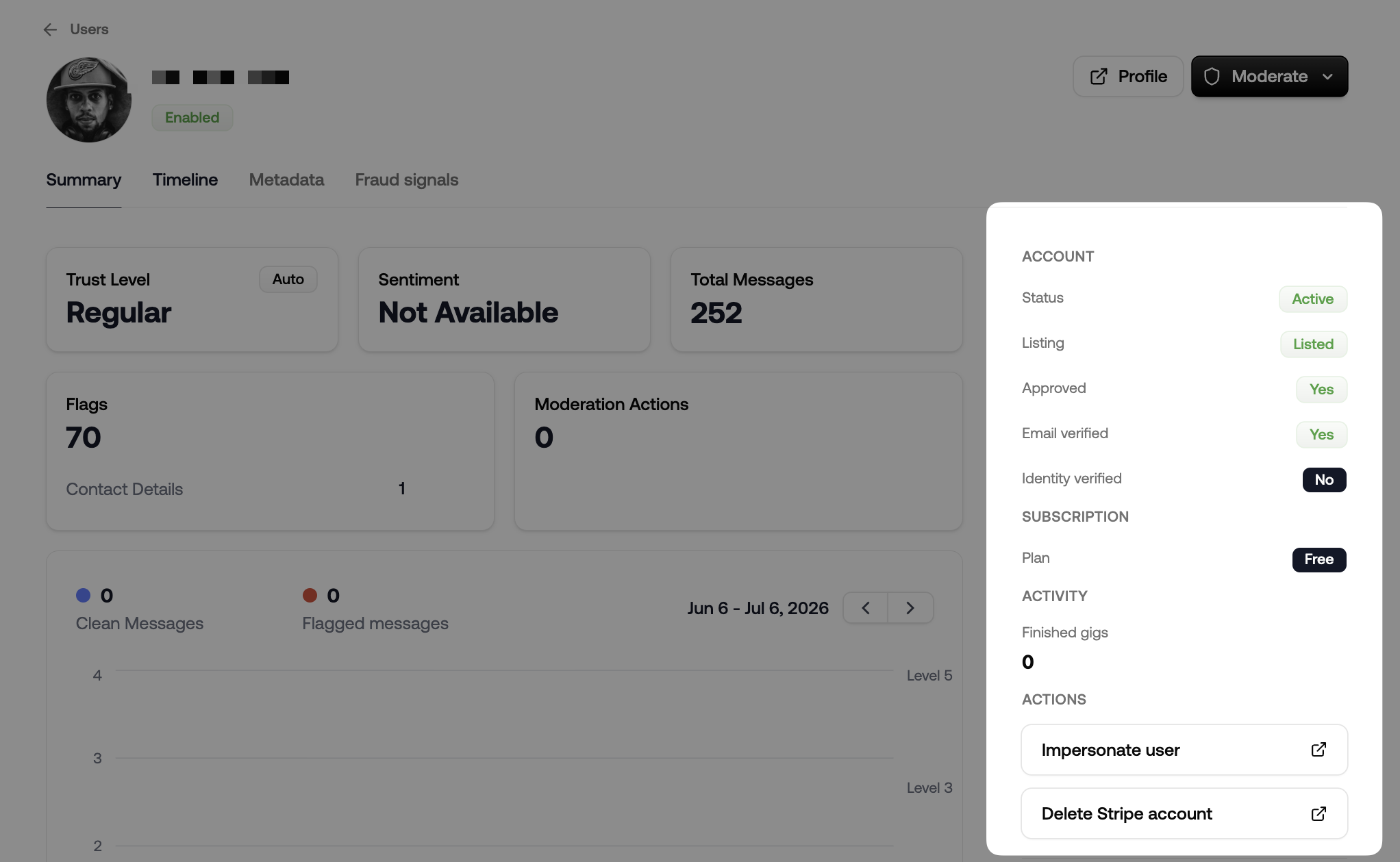
Reviewers judge an account with only the context we hold. The account age, the plan, the open ticket, the impersonation link — all of it lives in your system.
Point us at an endpoint and we will render your data in the author sidebar. We call it when a reviewer opens an author, sending your project's webhook secret plus any headers you configure, and render what comes back: stats, badges, buttons into your own tools. If the call is slow or fails, the panel degrades quietly rather than blocking the review.
Webhooks v2
New webhooks now use a versioned envelope, modelled on Stripe:
{
  "id": "evt_…",
  "type": "queue_item.resolved",
  "api_version": "…",
  "created": "…",
  "data": { "object": { … } }
}
The event id is stable and repeated in a webhook-event-id header, so retries are safe to deduplicate. A webhook-version header lets your handler branch.
v2 also adds author lifecycle events — author.blocked, author.unblocked, author.suspended, author.updated and author.trust_level_changed — fired wherever the change originates, whether that is an automated action, a reviewer, or an expiry. Every event type is documented in the OpenAPI spec.
Existing webhooks stay on v1 and are untouched. Create a new webhook to move to v2.
Everywhere Else
Policies and rules are top-level pages. They no longer hide behind a channel. If you have more than one channel, a switcher appears; if you have one, you never see the channel concept at all.
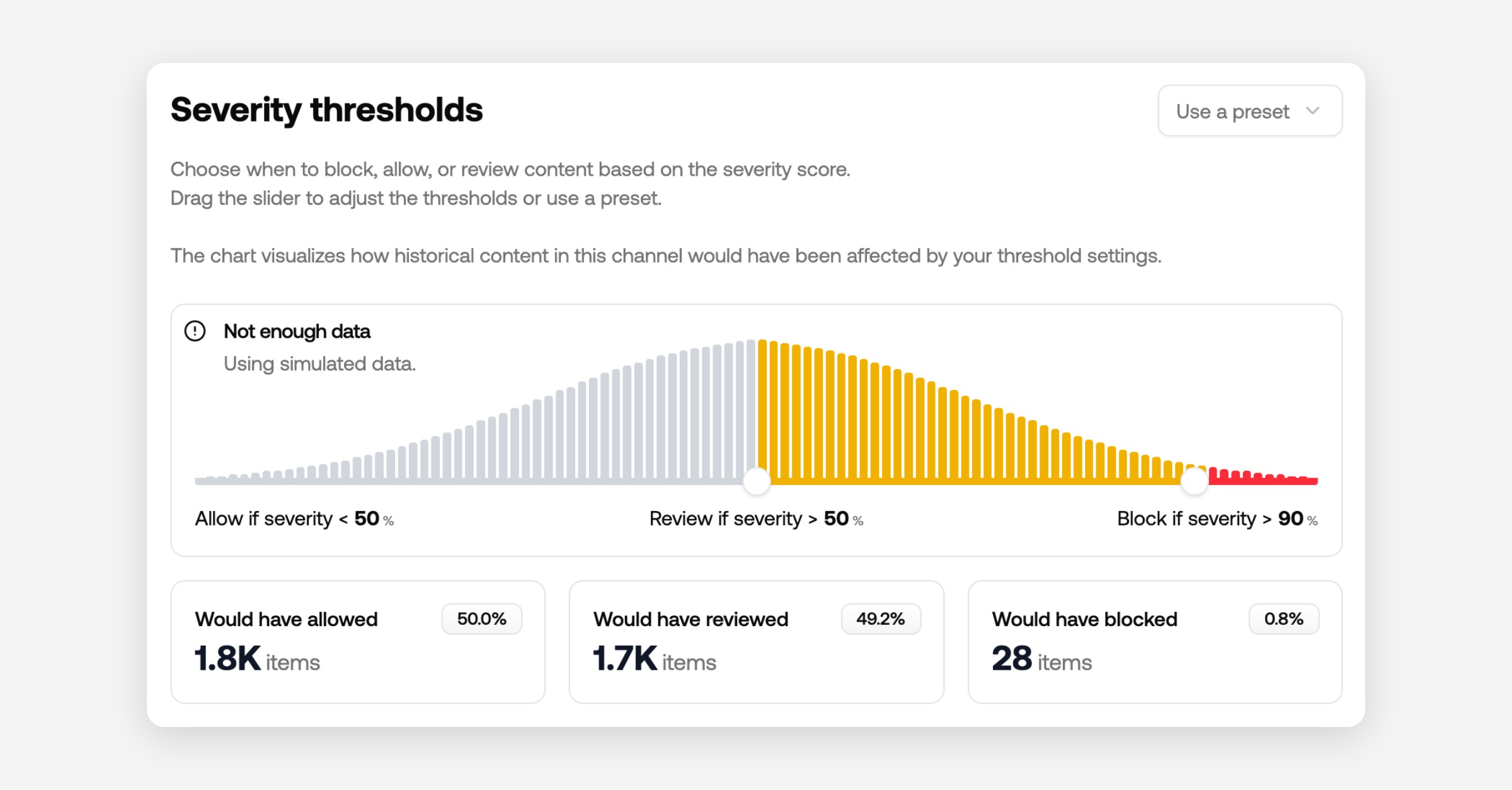
Threshold sliders show exact counts. The histograms under channel thresholds used to be built from a sample of 100,000 items. They are now exact, on a log scale so the high-score tail you are actually setting a threshold on stays visible, with per-bucket counts on hover.
The item detail view got a rework. The content and metadata panes scroll independently, the activity timeline moved beside the metadata, and conversation context scrolls straight to the item under review.
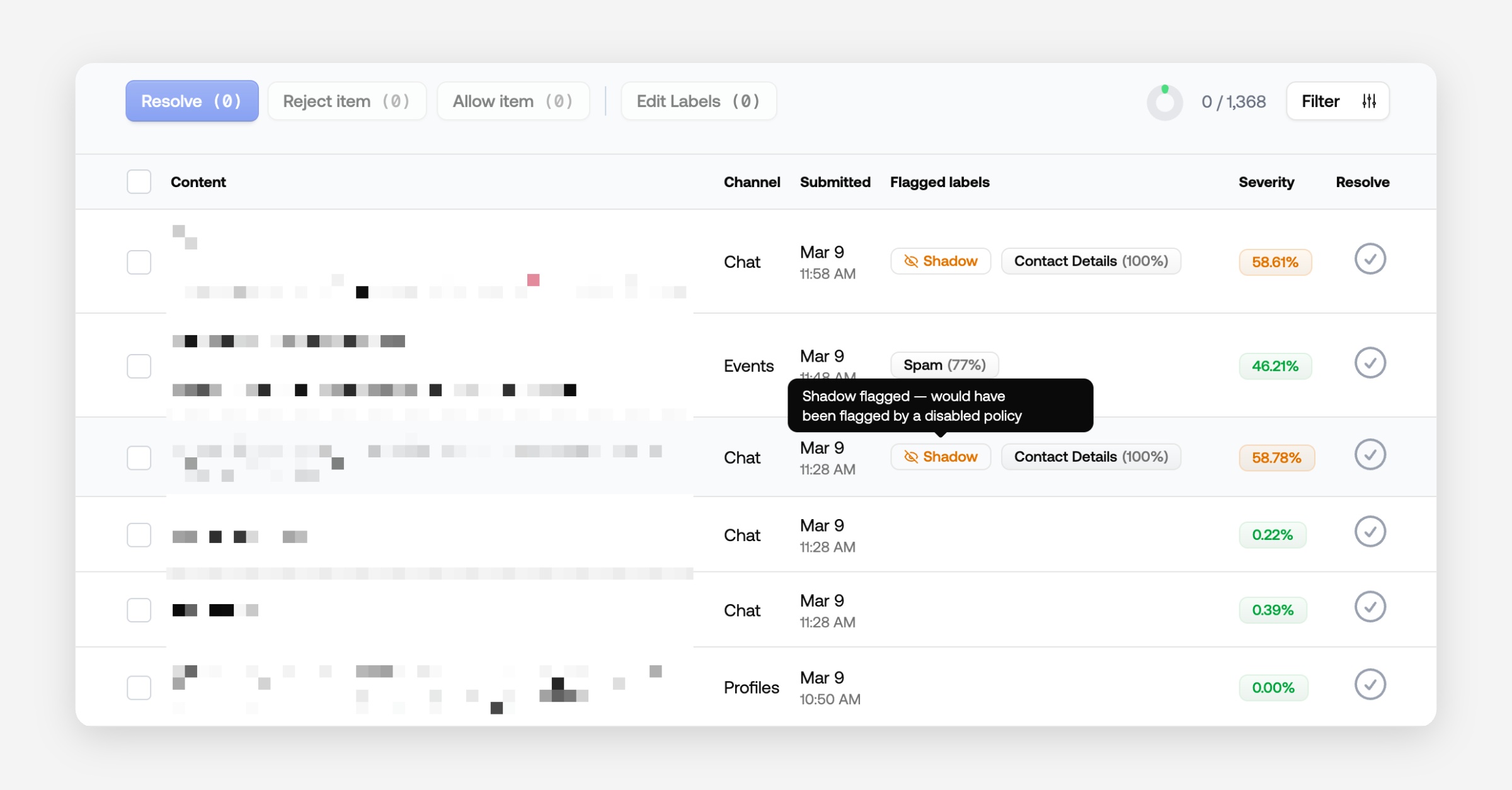
Shadow detections are visible. Labels a shadow-flagged policy triggered now show in the queue table, are selectable in the label filter, and are counted in facets — without counting as a flag.
Reorder your review queues by dragging them in the sidebar.
Undo a resolve. Resolved items show their full detail with an undo button instead of a blurred overlay.
flagged_fieldson webhook payloads tells you which fields of an object triggered the flag, not just that something did.URL Risk catches bare domains written without
http://orwww., and can always flag free link shorteners regardless of threshold.Discord: choose which channels get moderated — all except the ones you select, or only the ones you select.
Authors have a
companyfield, editable in the dashboard and available over the API.
Heads Up: Legacy Endpoints
The per-content-type endpoints (/moderate/text, /moderate/image and friends) are deprecated in favour of the unified POST /v1/moderate, which accepts every content type. If your project still calls them you will see a banner on your project overview and your org owner will get a weekly reminder until you have moved.
The migration is usually a one-line change. If yours is not, reply to the email and we will help.
May updates: Rules, URL risk, & Wellness

This month: more control over moderation logic, real-time link safety, audio support, and a friendlier review queue.
Rules
Decide what happens to content based on any signal in the moderation response — policy flags, severity, author trust, language, URL risk. A few examples:
If user is trusted → Allow
If user is new and URL Risk is Flagged → Review
If Language is not English → Review
Hit Simulate to see how draft rules would have shifted recent decisions before saving.
Available on all plans. Read about the rules engine here.
URL Risk
A new policy that scores links in real time for phishing, malware, brand impersonation, and credential harvesting. URLs are pulled from text automatically — no separate field. Pairs naturally with Rules.
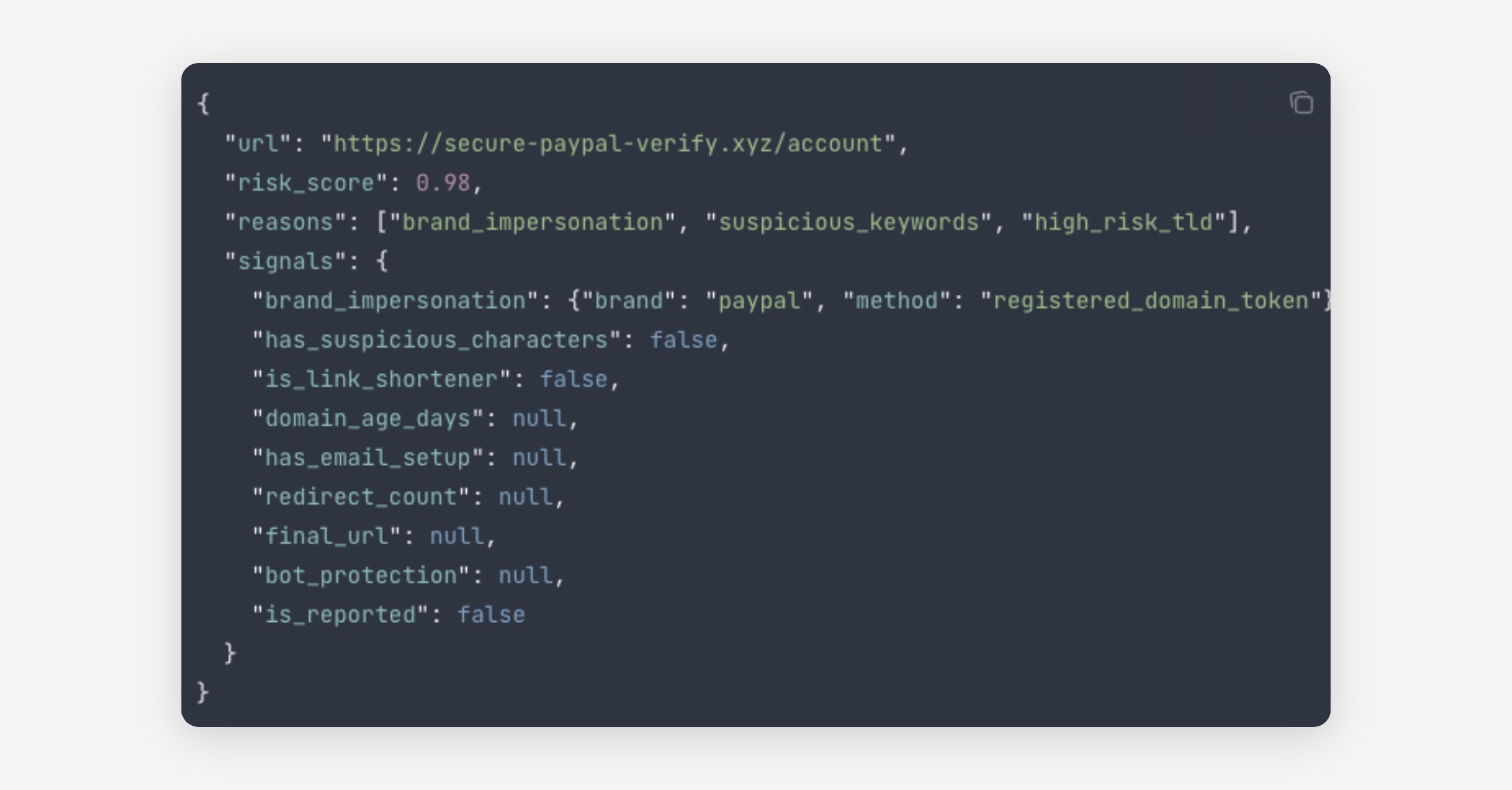
Available on all plans. Read the URL risk docs here.
Audio analysis
Submit an audio file and we'll transcribe it and run every text policy you have enabled. Toxicity, hate, PII, wordlists, guidelines, all of them. The review queue shows the waveform alongside the transcript. Most audio format works (mp3, wav, m4a, opus, and more), up to 50 MB or 10 minutes per file.
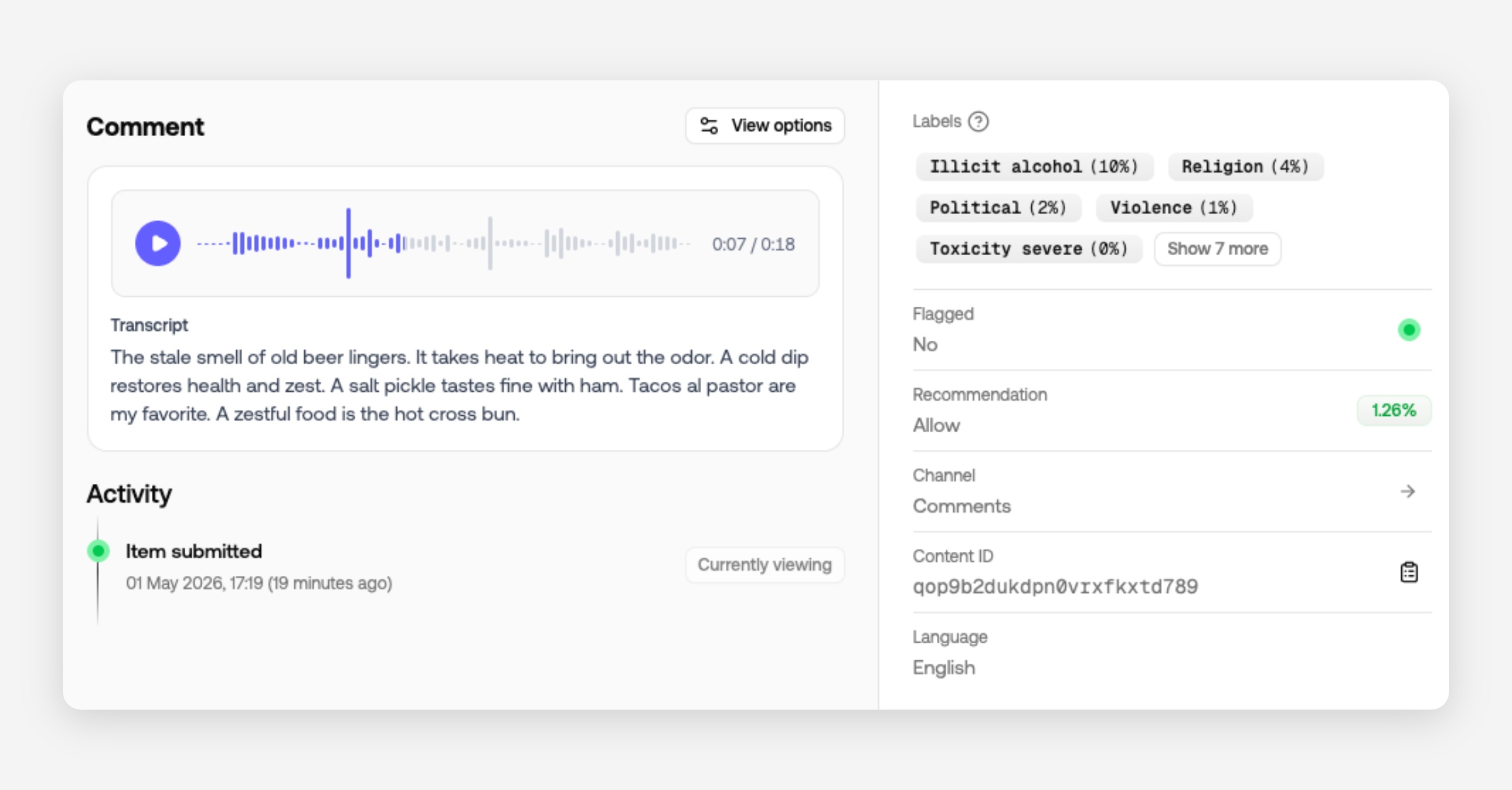
Available on request. Read about audio moderation here.
Reviewer wellness
Blur, grayscale, and default-muted video for the review queue. Project-wide defaults for high-risk queues, personal overrides per reviewer. Settings live on a separate page so nobody dials protection down mid-shift.
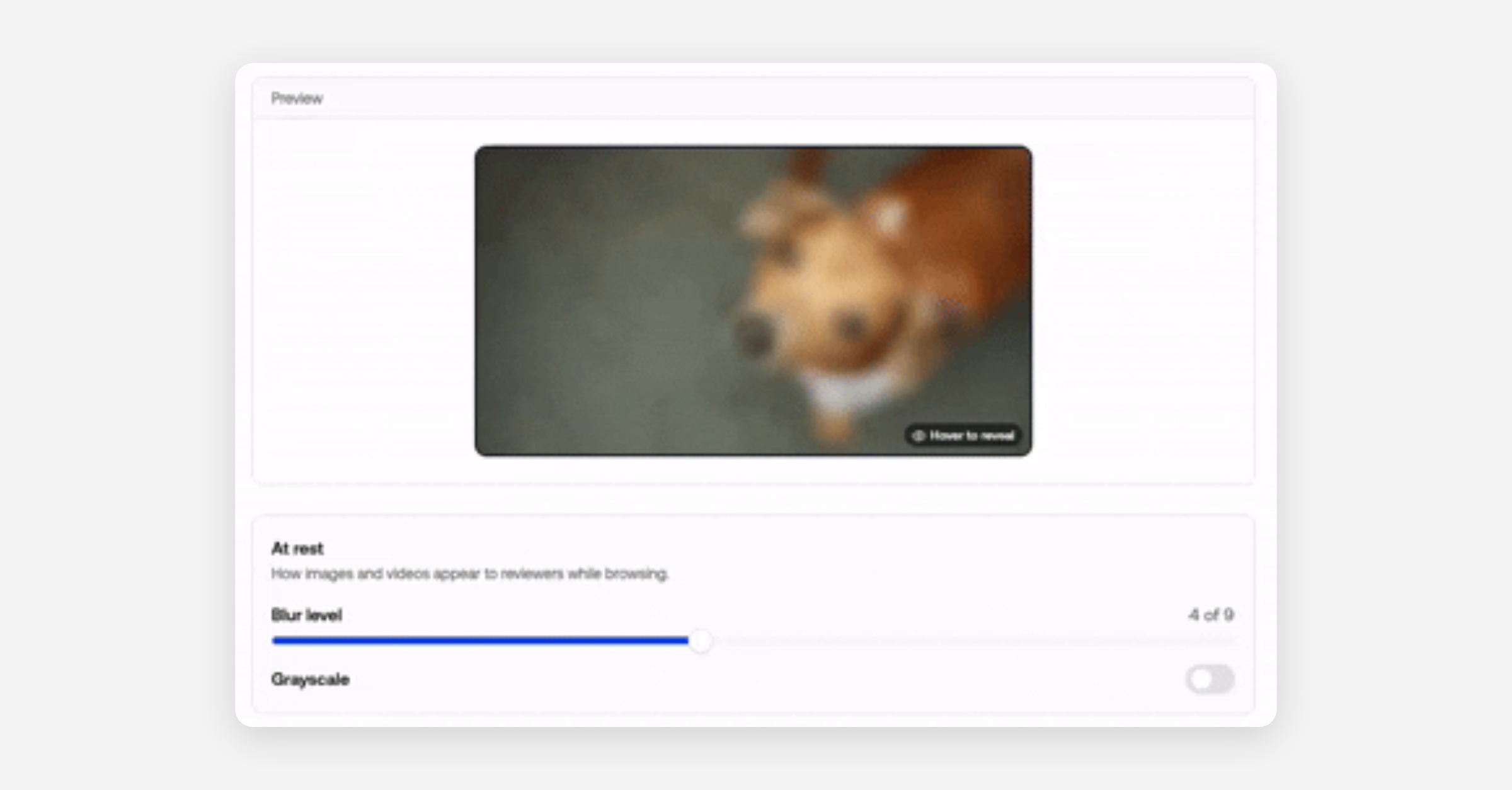
Available on all plans. Read more about reviewer wellness here.
Translation
One-click translation in the review queue — text, object fields, and audio transcripts. Tuned for moderation: slang, slurs, and coded language stay intact. Reused across your organization for 30 days.
Available on all plans. Read about translating content.
Also shipped
Inline entity highlights for URLs, PII, and wordlist matches in queue content
Project context now feeds into AI-generated guidelines
Slack plugin submits author profile pic and name
Faster URL risk verdicts when the call is clear from the URL string alone
March updates: 5 new models, email reports & shadow flagging

This month we're shipping several features that give you more control over how you monitor and tune your moderation setup - plus five new policy models covering regulated content categories.
Email reports
You can now receive email reports for new and unresolved queue items. Each queue can be configured separately, and each user manages their own notification preferences.
Daily, weekly, and monthly reports are available on all plans. Hourly reports are available on Growth and Enterprise.
Shadow flagging
Shadow flagging lets you test new policies before fully enabling them. Items matched by a shadow-flagged policy appear in a dedicated queue but are not acted on. This gives you a safe way to evaluate coverage and tune thresholds before going live.
To enable it, set a policy to "Do not flag" and configure a queue to show shadow flagged content.
Available on all plans.
Policy thresholds
You can now set per-policy thresholds to control how strictly a policy is enforced. To help you calibrate, we show how many messages would have been flagged at any given threshold over the last 30 days.
Available on all plans.
5 new policy models
We've added five new models covering regulated content categories. Each is trained using our risk-based approach: content that poses a direct risk to the end user scores higher, while a passing mention scores lower. This lets you set a threshold that blocks promotional or facilitative content without flagging incidental references.
Adult: Detects content related to adult services, products, and websites.
Firearms: Detects content related to the sale, acquisition, or promotion of firearms and related accessories.
Gambling: Detects content promoting gambling services, platforms, or solicitations.
Crypto: Detects content related to cryptocurrency promotions, investment solicitations, and related financial schemes.
Cannabis: Detects content related to cannabis products, dispensaries, and related services.
Secondary features
Usage rate limit cadence indicator: You can now see your maximum request cadence directly in Billing → Usage & Limits, making it easier to plan traffic bursts and avoid throttling. Available on all plans.
Improvements
API: Switch to a 1-minute rate limit window for clearer, more predictable throttling behavior
Dashboard: Change overview percentages to show share of total messages instead of month-over-month deltas
Discord: Update Discord plugin to use the new endpoint; upgrade to the latest plugin version
General: Fine-tune topic detection for better categorization on edge cases
General: Retrain phishing model to reflect the latest tactics and improve precision
Improvement: Accept Base64 images in submission requests to simplify file handling
Improvement: Update WordPress plugin to the new endpoint; install the latest version to stay compatible
Improvement: Improve item detail load time for a faster review experience
Improvement: Save request timings so you can inspect end-to-end latency in logs
Performance: Speed up review queue queries for snappier filtering and navigation
Fixes
Bug: Author histogram now updates correctly after new data ingests
Bug: Author trust scores classify legacy accounts correctly instead of marking them as new
Bug: Insights now attach when adding policies through the API
Bug: Filter by action works as expected across all queue views
Bug: Resolve slow queries to stabilize response times under load
Bug: Now showing more accurate unique author counts in project overviews
🚀 Launch Week!

We're shipping new features every day this week. Check out what's new and what's coming.
Revamped dashboard

Next time you sign in to Moderation API, the dashboard will look, and work, very differently. We rebuilt it from the ground up to:
Make it easier to configure moderation policies
Improve the development experience
This redesign introduces channels, clearer project scoping, smarter content types, and a faster, more testable workflow.
Content channels
We’re adding a new abstraction: channels.
Think of channels as receivers for different content types. Policies are configured per channel, so each content type can have its own rules. In API calls, you just pass the channel key to apply the right policy set.
Examples for a marketplace:
Chat messages
Reviews
Listing descriptions
Profiles
Channels can represent anything that needs distinct rules: community trust levels, individual apps, client workspaces, and more.
Note: Existing “projects” have been converted to channels, with your previous filters mapped to policies. If you update your configuration, please use the new API endpoint.
Content types
Often our projects require moderating different types of content. Messages, websites, comments, profile descriptions, just to name a few.
Knowing which type of content is being moderated is beneficial for a couple of reasons;
It gives us context to improve the accuracy of the moderation.
We can display the content in a more meaningful way
For example for messages we can look back in the conversation history to gain context, and for comments we can check the relevancy of the article or post.
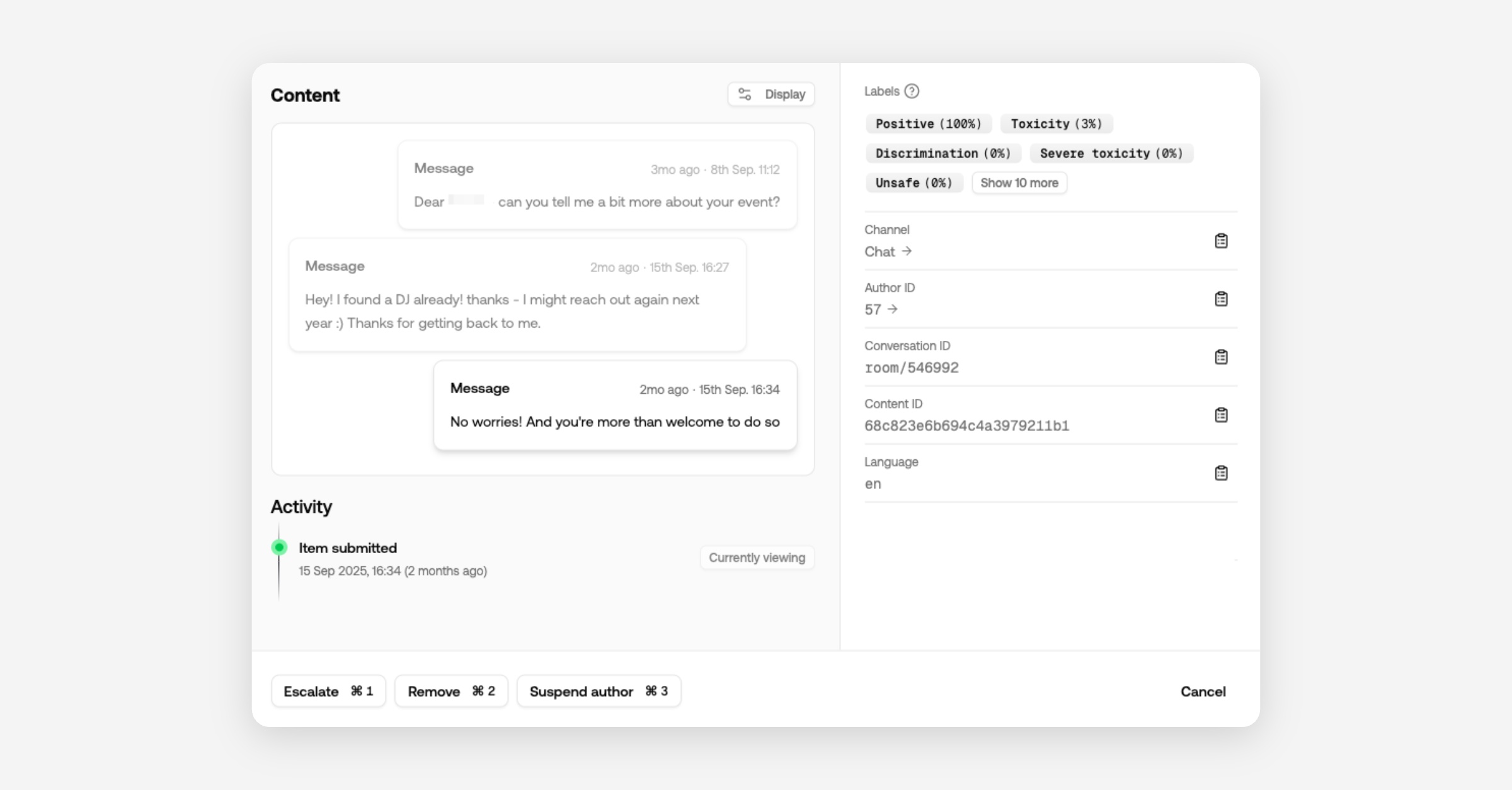
In the dashboard you'll see messages show up in the context of the conversations.
Profiles are displayed as structured objects (picture, description, username), making it obvious which field triggered a flag.
Configure content types per channel or include them in your API call when submitting content.
Projects
Projects now encapsulate all content and users. Review queues, channels, authors, API keys, and moderation actions are scoped to a single project.
That means you can create projects for different development environments to keep test content out of production.
Agencies can create a project per client and invite them to a dedicated review queue.
Custom models and wordlists remain at the organization level, so improvements roll out automatically to all projects.
Playground
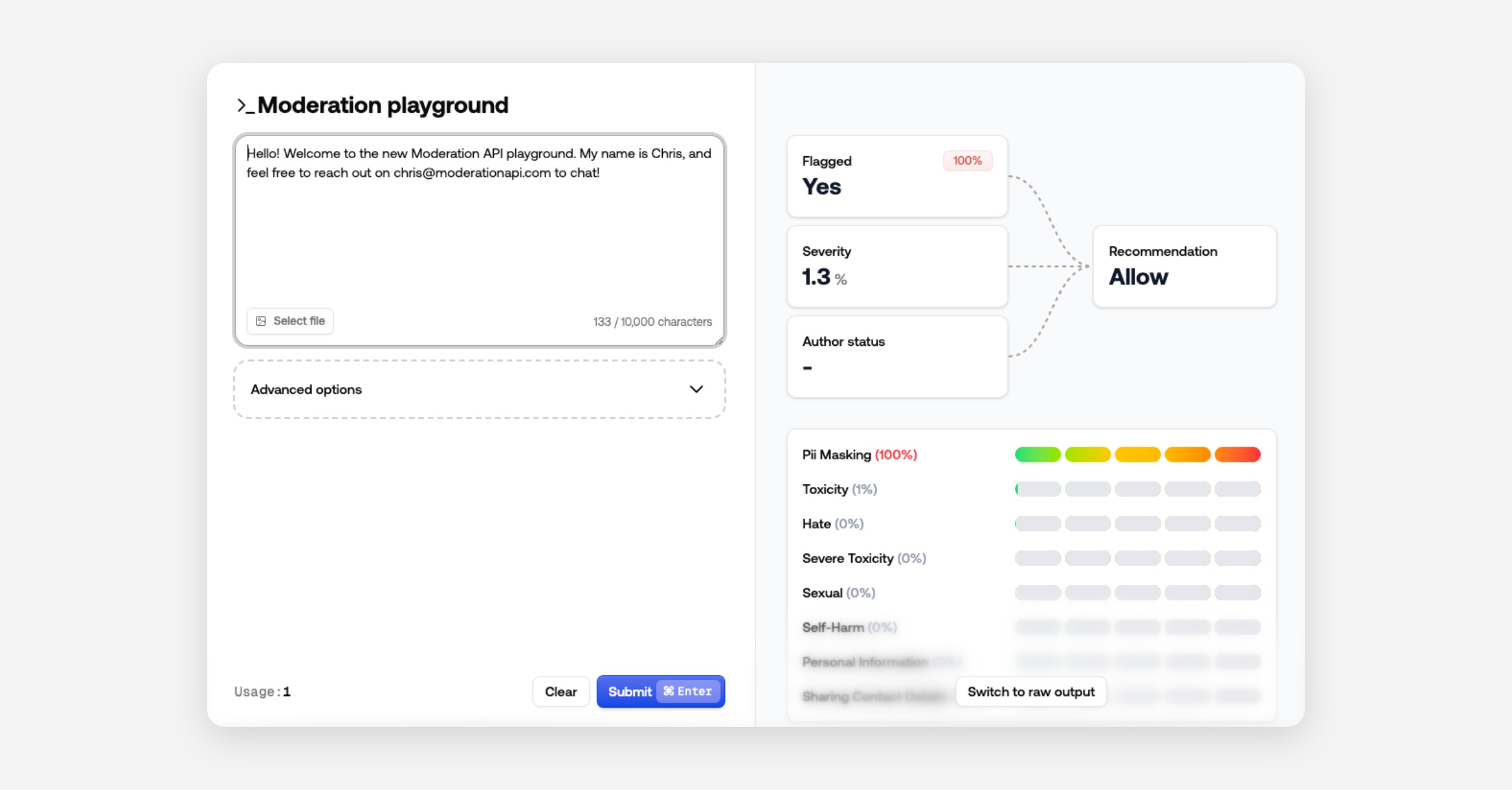
The Playground is now a modal for quick policy iteration and testing.
It also includes results of our new recommendation fields and severity score to show what contributed to the recommended action.
Prefer raw JSON? Switch views - the dashboard remembers your choice.
Other changes
Use channel ID or key in API calls (instead of changing API keys)
AI agents removed in favor of channel-level custom guidelines
Easier organization switching
Performance improvements and bug fixes
Press an author ID in the Content View to navigate directly to that author
Improved authentication
Content severity score in API result
Sort review queues by severity
Recommended action in API result - block, review, allow
Unified moderation API endpoint

We’ve consolidated all moderation routes into a single endpoint to simplify integrations and deliver richer, consistent responses.
New unified endpoint:
https://api.moderationapi.com/v1/moderate
Deprecated:
/moderate/text/moderate/image/moderate/object/moderate/video
The new endpoint streamlines submissions and introduces improved response data, including several new fields.
New response fields
Evaluation
The evaluation field is the final result of the analysis of your policies and other channel specific configurations. It includes a flagged field indicating if any policies caused a flag.
It also includes a new severity score which is calculated based on your selected policies. A higher severity score indicates more serious violations and lower severity less serious.
The severity score can be used as a granular indication, where the flagged field is a simple binary indication. You can also use the severity score to prioritize content in your review queues.
Recommendation
The response also includes a recommended action to help you decide whether to reject, review or allow content.
We recommend using this field for deciding what to do with content in your code.
This recommendation primarily considers severityScore and author status (e.g., blocked or suspended).
You can adjust the thresholds for blocking or reviewing in your channel configurations.
Policies
All enabled policies are returned as an array, each with:
id: the policy’s unique identifier (matches the dashboard)
flagged: whether this policy triggered
probability: the model’s confidence
Some policies include extra data (e.g., PII detection returns matched items).
How to migrate
Using typescript SDK
Upgrade the SDK to at least v2.0.1.
Recommended: Remove the api key from the constructor and add your project API key in your env variables as
MODAPI_SECRET_KEY.
Update all calls in the moderate namespace to use
content.submitand follow the new content structure.Recommended: Include your channel key; use different channels per content type.
Rename contextId to conversationId.
Read flags from
evaluation.flaggedinstead of the root flagged key.Recommended: switch to use
recommendation.actioninstead of flagged, and check forreject,review, orallow.
import ModerationAPI from "@moderation-api/sdk";

const moderationApi = new ModerationAPI();

const result = await moderationApi.content.submit({
  content: { // new content structure
    type: "text",
    text: "Hello world!",
  },
  metaType: "message", // new field
  contentId: "message-123",
  authorId: "user-123",
  conversationId: "room-456", // renamed from contextId
  metadata: {
    customField: "value",
  },
});

// OPTION 1: Same behavior as before
if (result.evaluation.flagged) {
  // Block the content, show an error, etc...
}

// OPTION 2: Use the API's recommendation (considers severity, thresholds, and more)
switch (result.recommendation.action) {
  case "reject":
    // show error, don't save to db
    break;
  case "review":
    // save to db, but review in moderation API dashboard
    break;
  case "allow":
    // save to db
    break;
}
Using API endpoint directly
Switch base URL from
https://moderationapi.com/api/v1tohttps://api.moderationapi.com/v1Replace all calls under
/moderate/{type}with/moderateand follow the new structure for content.Recommended: If you previously used multiple API keys for different projects, you can now use one key and pass different channel keys per call.
Rename contextId to conversationId.
Read flags from
evaluation.flaggedinstead of the root levelflaggedkey.Recommended: Prefer
recommendation.actionoverevaluation.flagged, and check forreject,review, orallowas shown above.
Dive deeper in the docs
See full API reference and content schema:
Severity score for content

When multiple content policies can flag the same item, it’s hard to know whether a violation is minor (e.g., profanity) or critical (e.g., illicit behavior) without digging through each policy.
To solve this we've built a top level model to output a single score to give you an instant idea about the severity of a violation.
Severity score solves this by providing a single, opinionated score across all your policies. It weights violations by impact so you can see urgency at a glance.
For example: illicit content ranks above hate, which ranks above swearing.
Use severity score to:
Sort review queues by severity.
Set thresholds to automate actions (e.g., block above 90%, review above 50%).
Understand historical impact on your dashboard, including how many items would have been blocked. Note: historical data is available if you’ve used an API endpoint that supports severity score for the past 30 days.
Implementation:
Read the score at
evaluation.severity_score.Read the recommended action at
recommendation.action.
