A Retrieval-Augmented Generation (RAG) application for intelligent codebase analysis. Upload any GitHub repository and get instant AI-powered insights, summaries, and context-aware Q&A about your code through semantic search and vector embeddings.
Watch the demo on YouTube: https://youtu.be/eKBP3mmAprc
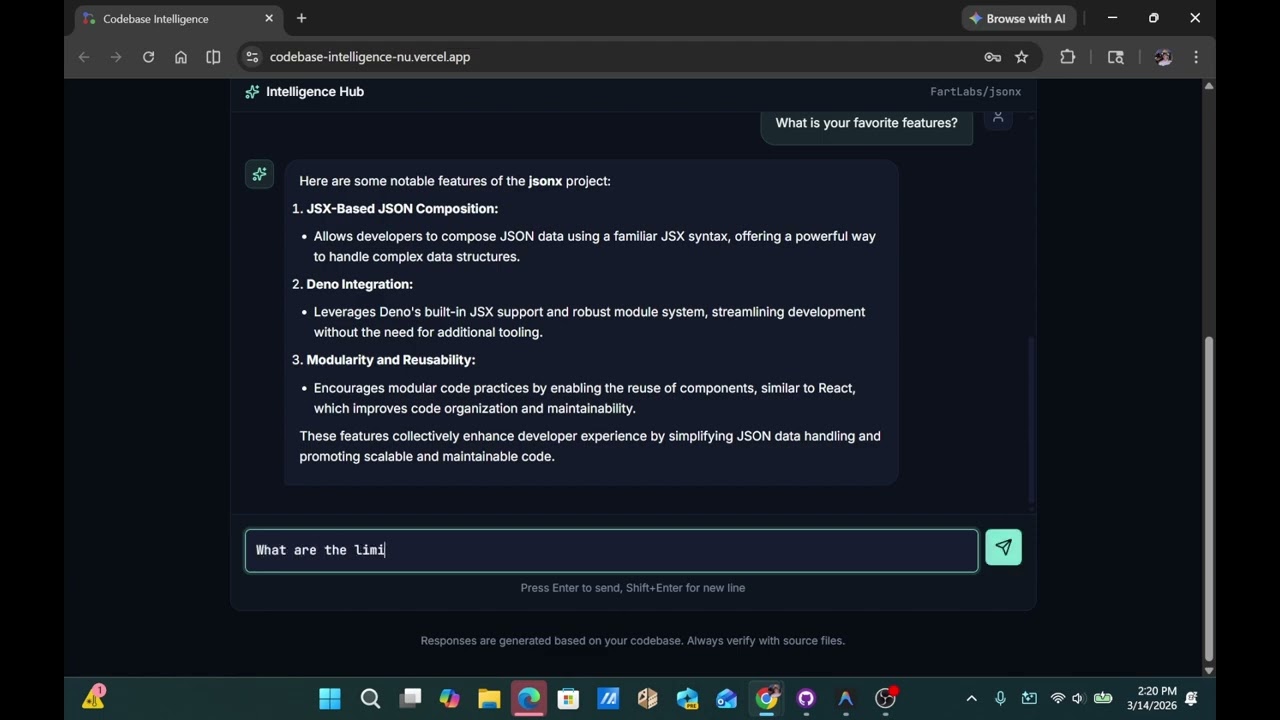





Understanding large, complex codebases and navigating massive GitHub repositories is a major bottleneck for developers onboarding or trying to debug unfamiliar legacy code. I wanted to build a tool that allows engineers to interact with their code context-awarely and get instant, accurate architectural answers.
The project bridges the gap between raw, multi-file code syntax and semantic vector search, letting developers ask natural-language architectural questions about an unfamiliar repository and get grounded, code-informed answers. The goal is to shorten the time spent reading through a large codebase before becoming productive in it — a common bottleneck during onboarding or when debugging unfamiliar legacy code.
- Repository Analysis: Automatically analyze GitHub repositories and extract meaningful insights
- Project Summarization: Generate AI-powered summaries including tech stack, architecture patterns, and code statistics
- RAG-Powered Chat: Ask natural language questions and receive context-aware answers by retrieving relevant code snippets and augmenting LLM prompts
- Vector Embeddings: Uses Pinecone vector database for semantic search and efficient code context retrieval
- Next.js 16 - React framework with App Router and API routes
- React 19 - UI framework
- TypeScript - Type safety
- Tailwind CSS - Styling
- Zod - Runtime type validation
- LangChain - Document loading, chunking, and LLM orchestration
- Pinecone - Vector database for semantic search and retrieval
- OpenAI - GPT-4o for generation, text-embedding-3-small for retrieval
- Node.js 18+
- Git
- OpenAI API key
- Pinecone API key
- GitHub Personal Access Token
- Clone the repository:
git clone <repository-url>
cd codebase-intelligence- Install dependencies:
npm install- Set up environment variables:
cp .env.localStart the Next.js development server:
npm run devThe application will be available at http://localhost:3000
The application implements a three-stage RAG workflow:
- Ingestion (
/api/ingest): Loads GitHub repository files, chunks them on language-aware syntactic boundaries (see below), generates vector embeddings, and stores them in Pinecone with metadata - Summarization (
/api/summarize): Retrieves code context vectors and augments GPT-4o prompts to generate architecture summaries and tech stack analysis - Conversation (
/api/chat): For each user query, retrieves relevant code context from Pinecone and augments the LLM prompt to provide accurate, code-informed responses
A RAG system is only as good as its chunks: each chunk becomes a single embedding, so a chunk that splits a function in half produces two vectors that each represent an incomplete idea, degrading retrieval quality.
Rather than splitting code into fixed-size character windows, the ingestion pipeline chunks on syntactic boundaries so each embedding is a coherent unit:
- Files are grouped by language (detected from their extension), and each group is split with language-specific separators via LangChain's
RecursiveCharacterTextSplitter.fromLanguage()— preferring to break between functions, classes, and other top-level constructs rather than through them. - Supported languages include TypeScript/JavaScript, Python, Go, Rust, Java, C/C++, Ruby, PHP, and more; non-code files (JSON, YAML, CSS, plain text) fall back to a generic recursive splitter so nothing is dropped.
This is heuristic, separator-based splitting (not a full tree-sitter AST parse) — a deliberate tradeoff that captures most of the benefit without per-language parser dependencies.
npm run build- Zod Schemas for request validation across all endpoints
- Type-safe API responses with TypeScript inference
- Client-side validation before API calls
This project is open source and contributions are welcome! Feel free to open issues, submit pull requests, or suggest improvements.
