
Here is a Chrome extension built to support vulnerable users through complex financial decision-making, providing timely tips, summaries, and chat assistance.
This repository follows a Turborepo structure, allowing for efficient management and sharing of code between different parts of the project.
apps/chrome-extension: The core Chrome extension code, containing all assets, background scripts, and the main manifest.json file.apps/here-chat-app: React application to handle chat-related UI components and support services.apps/support-chat-service: NestJS backend service that connects to Google Gemini for AI-powered insights.apps/vulnerability-helper: Chrome extension content script for detecting user interaction patterns and generating tips.
Note
Please follow the latest instructions from nodejs-vertexai repo
-
Make sure your node.js version is 18 or above.
-
Create local authentication credentials for your user account:
gcloud auth application-default login
-
Setup NodeJS environment with
nvm- Follow the nvm installation instruction to install
nvm - Run the following command to setup NodeJS environment
nvm use
- Follow the nvm installation instruction to install
-
Configure
npmas package managercorepack enable -
Install dependencies
Run the following command to install all dependencies:npm install
-
Build the applications
Use the Turborepo command to build the applications:npm run turbo:build
- Setup environment variables for Vertex API
- Create a
.envfrom.env.sample
cd apps/support-chat-service cp .env.sample .env- Set the Google Cloud project ID, location and Vertex AI model from
.envrespectively
- Create a
- Start backend service
cd apps/support-chat-service npm run dev - Install the extension from Chrome
- Go to the Extensions page by entering
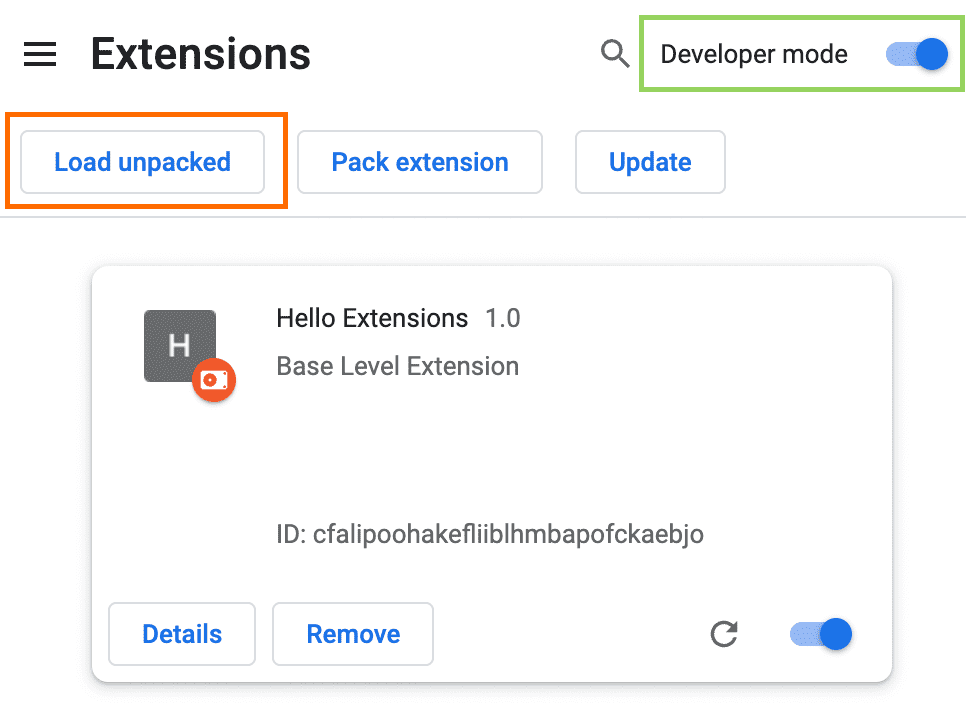
chrome://extensionsin a new tab. - Enable Developer Mode by clicking the toggle switch next to Developer mode.
- Click the Load unpacked button and select the extension directory -
apps/chrome-extensionfrom your local machine
- Go to the Extensions page by entering
Note
Please follow the latest instructions from Chrome for Developers
- Frontend: React (in apps/vulnerability-helper and apps/here-chat-app)
- Backend: NestJS (in apps/support-chat-service)
- AI Integration: Google Gemini with Vertex AI (for insight generation)
- Monorepo: Managed with Turborepo to allow for shared utilities and efficient development.
- Vulnerability Detection: Monitors user interactions (e.g., multiple clicks on the same content or repeated editing in fields) to identify vulnerable users. A contextual tip is generated to help users understand financial terms.

- Insight Generation: Offers detailed insights when a user appears to need help, such as explaining how specific content affects financial decisions.
- Text Summarisation: Allows users to highlight and summarize long texts, helping them quickly understand complex documents.

- Chat Assistance: Users can open a chat to get additional support based on their needs and questions.


- Challenges: Detecting vulnerability patterns accurately across different user behaviors and creating a seamless UI that integrates well with varied website designs.
- Future Plans:
- Integrate data collection to refine user behavior insights.
- Enhance prediction of vulnerable behaviors using Vertex AI.
- Develop a custom model to further improve accuracy in assisting users with financial decisions.
This project is licensed under the Apache License 2.0. See the LICENSE file for details.
