
AnimeWiki is an elegant, feature-rich Android application that transforms the anime exploration experience. Achieved an immersive and intuitive interface by implementing modern Android architecture patterns and reactive programming paradigms, resulting in a seamless, responsive, and visually captivating application.
- Comprehensive Anime Database: Explore thousands of anime titles with detailed information
- Dynamic UI: Experience smooth animations and theme-adaptive interfaces with Material 3 design
- Smart Search: Find anime quickly with powerful search functionality
- Offline Support: Browse your favorite anime even without an internet connection
- Dynamic Theming: Enjoy adaptive color schemes extracted from anime cover images
The application is powered by a dedicated backend server: AnimeWiki Server on Render
AnimeWiki is built with a Clean Architecture approach following the MVVM pattern:
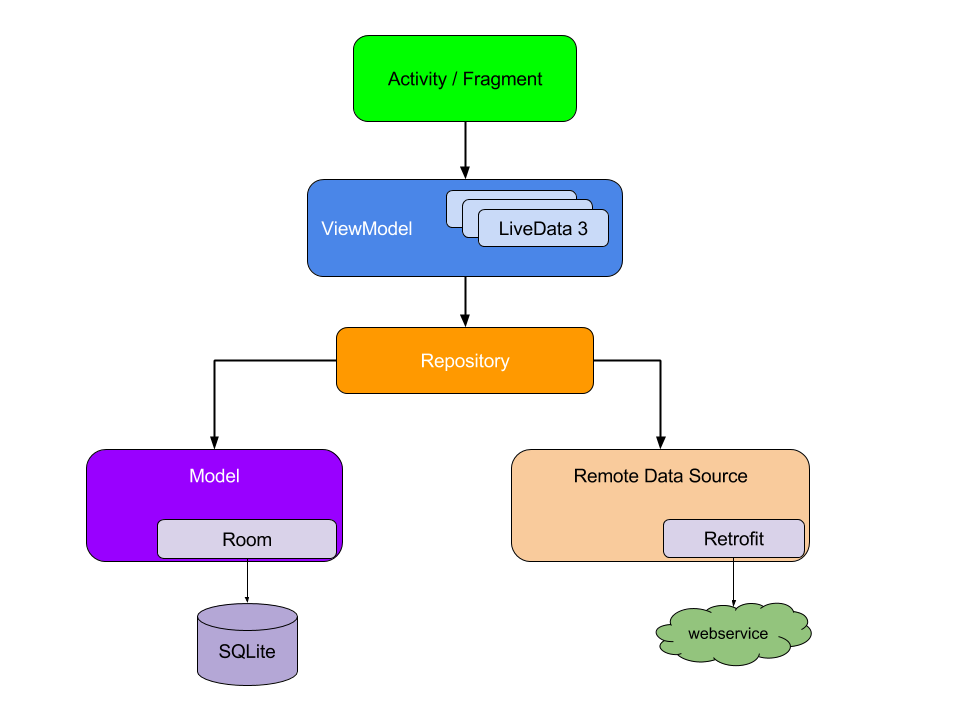
-
📊 Data Layer:
- Handles remote API communication, local database storage, and data modeling
- Implements repository pattern for single source of truth
- Uses Room for persistent storage and Retrofit for network calls
-
💼 Domain Layer:
- Contains business logic and use cases
- Defines repository interfaces
- Pure Kotlin with no Android dependencies
-
🖼️ Presentation Layer:
- Contains screens, ViewModels, and UI state management
- Utilizes Jetpack Compose for declarative UI
- Implements unidirectional data flow with Kotlin Flows
-
🎨 UI Layer:
- Contains theme definitions and color systems
- Implements Material 3 design principles
-
💉 DI Layer:
- Provides dependency injection setup with Hilt
- Ensures proper separation of concerns
| Category | Technologies | Purpose |
|---|---|---|
| Core |  |
Modern, concise language with coroutines for asynchronous programming |
| UI |   |
Declarative UI toolkit with modern design principles |
| Architecture |   |
Separation of concerns and testable code structure |
| Dependency Injection |  |
Simplified DI implementation built on Dagger |
| Networking |    |
Type-safe HTTP client with efficient serialization |
| Local Storage |   |
Database and preferences management |
| Navigation |  |
Type-safe navigation between screens |
| Image Loading |  |
Kotlin-first image loading library |
| Pagination |  |
Efficient loading of large data sets |
| Dynamic Theming |  |
Extract vibrant colors from images |
| Backend |  |
Cloud hosting platform for API |


Note: Create a screenshots directory and add your actual app screenshots.
app/src/main/java/com/example/animewiki/
├── data/                # Data sources, repositories, models
│   ├── local/           # Room database, entities, DAOs
│   ├── remote/          # Retrofit services, DTOs, API responses
│   └── repositories/    # Repository implementations
├── di/                  # Dependency injection modules
├── domain/              # Business logic, use cases, domain models
│   ├── models/          # Domain entities
│   ├── repositories/    # Repository interfaces
│   └── usecases/        # Application use cases
├── navigation/          # Navigation graphs and route definitions
├── presentation/        # Screens, ViewModels
│   ├── common/          # Shared UI components
│   ├── details/         # Anime details screen and ViewModel
│   ├── home/            # Home screen and ViewModel
│   └── search/          # Search screen and ViewModel
├── ui/                  # Theme and color definitions
│   ├── theme/           # Material theme setup
│   └── color/           # Color palettes
├── util/                # Extension functions and helper classes
├── MainActivity.kt      # Main activity hosting the Compose UI
└── MyApplication.kt     # Application class for Hilt setup
Achieved an exceptional anime discovery experience by implementing:
- Reactive Data Flow: Utilized Kotlin Flows throughout the app for reactive UI updates and seamless user experience
- Efficient Pagination: Implemented Paging 3 library to handle large datasets with minimal memory footprint
- Dynamic Theming: Applied Palette API to extract colors from anime images for immersive, content-aware UI
- Clean Architecture: Structured the app with proper separation of concerns for maintainability and testability
- Offline-First Approach: Designed with Room database as single source of truth, enabling offline browsing
- Elegant UI: Created fluid animations and transitions with Jetpack Compose for a delightful user experience
- Android Studio Iguana or newer
- Minimum SDK: 24 (Android 7.0 Nougat)
- Target SDK: 35 (Android 15)
- Kotlin 2.0
-
Clone the repository
git clone https://github.com/yourusername/AnimeWiki.git
-
Open the project in Android Studio
-
Sync Gradle and build the project
-
Run on your device or emulator
- User authentication and personalized recommendations
- Offline-first approach with improved caching
- Advanced filtering and sorting options
- Social features for sharing and discussing anime
- Integration with external tracking services
Built with ❤️ using modern Android development practices
