-
-
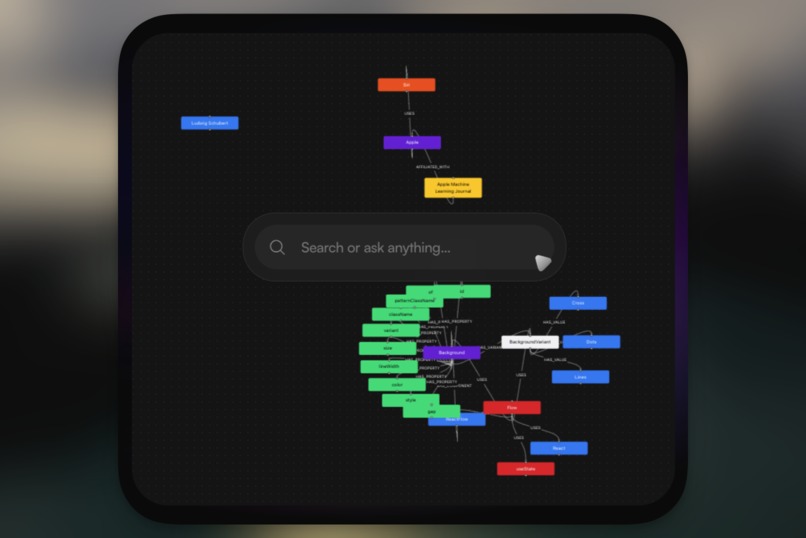
Search Everything you Touched
-
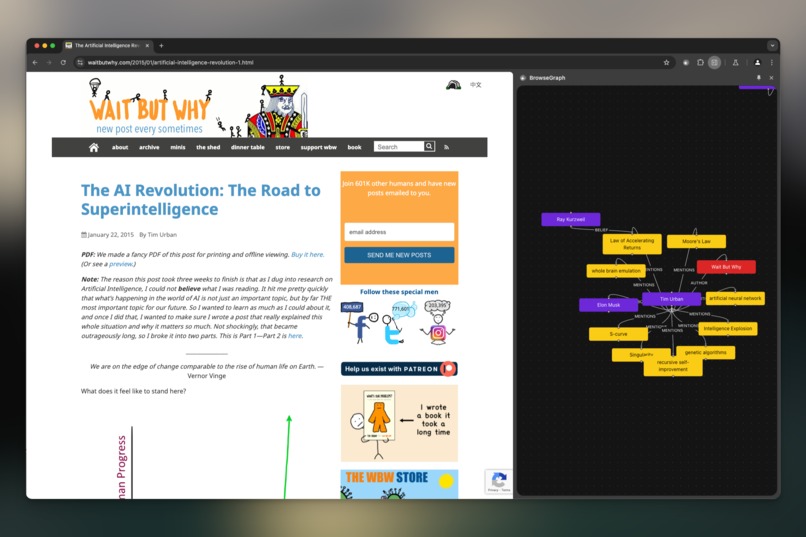
Dynamic Knowledge Graph


Inspiration
I read >100s of websites a week, I was tired of drowning in endless tabs and losing track of important information while browsing. As a visual thinker, I wanted a simple way to connect and recall everything I came across online. That's why I built BrowseGraph—to turn my browsing history into a connected, easily accessible knowledge graph.
What I Learned
Creating BrowseGraph showed me that advanced AI features can run entirely in the browser while keeping user data private. I learned how powerful in-browser AI and local data storage can be when combined effectively.
How I Built It
I used modern web technologies to make BrowseGraph fast and private:
- Local Data Storage: With
pgliteandpgvector, I stored and retrieved data quickly right in the browser. - In-Browser AI: Using Gemini Nano and Chrome's built-in AI, I summarized and filtered content locally.
- Interactive Graphs:
ReactFlowhelped me create dynamic, easy-to-use knowledge graphs. - Fast Search:
cmdkprovided a quick and intuitive search bar.
Challenges Faced
Optimizing AI processes to run smoothly in the browser was a challenge. Specifically prompt engineering a weak LLM had sent me back a few years. Designing an interface that makes complex information easy to navigate also pushed me to think creatively.
Personal Challenge
I wanted to solve my own problem of information overload and make my browsing experience more meaningful. Building BrowseGraph was my way of turning everyday browsing into a powerful tool for knowledge, all while keeping my data private.
Technology Enablers
This project was made possible by:
- In-Browser AI: Allowed advanced features without sending data elsewhere.
- Local Vector Storage: Ensured fast access and full control over my data.
- Modern Web Tools: Made the interface interactive and user-friendly.
Built With
- cmdk
- pglite
- pgvector
- react
- reactflow
- tailwind




Log in or sign up for Devpost to join the conversation.