◦ Comprehensive security
◦ 24/7 support
WordPress Guide → Hosting → Best Managed WordPress Hosting
8 best WordPress hosting providers compared

WordPress powers 43.5% of the internet, remaining the most popular content management system in the world. The extensive functionality it offers, combined with its ease of use and high customization capabilities, make it an appealing choice for many aspiring website owners.
Building a great website will help you increase content engagement. But choosing the right managed WordPress hosting provider will define the success of your online business in the long term. Top managed WordPress hosting providers offer various plans to suit different needs and budgets. From small business blogs to enterprise-level applications, the right hosting solution can make the difference between a site that thrives and one that struggles with performance issues.
So here are eight major WordPress hosting providers, side-by-side, to help you determine which is best for you.
Get fully managed WordPress hosting
Power your site with the industry’s most optimized WordPress hosting
Understanding the different types of WordPress hosting
When choosing WordPress hosting, it’s important to understand the different types available to match your specific needs:
- Managed vs. unmanaged WordPress hosting: With managed WordPress hosting, your provider handles technical aspects like updates, security, and optimization. Unmanaged hosting gives you complete control but requires more technical knowledge to maintain your site.
- Shared hosting: The most affordable option where multiple websites share server resources. Ideal for beginners and small websites with lower traffic.
- VPS (Virtual Private Server) hosting: A step up from shared hosting, offering dedicated resources within a shared server environment. Better performance for growing websites with moderate traffic.
- Dedicated server hosting: Provides an entire physical server exclusively for your website. Best for large, high-traffic websites requiring maximum resources and customization.
- Cloud hosting: Utilizes multiple servers in a network, offering scalability and reliability. Excellent for websites with fluctuating traffic patterns.
- Free WordPress hosting: While available, these options often come with limitations like ads on your site, limited functionality, and potential security risks. Not recommended for business websites.
The top managed WordPress hosting providers
Here’s a quick overview of the providers we’ll be discussing to help you assess which of these options is most applicable to you:
| Provider | Starting price | Best For | Key features | Notable limitations |
| Liquid Web | $4/mo | Small to enterprise-level websites | • 10+ PHP workers • Premium plugins included • 30-day backups • Cloudflare CDN • Visual comparison tool | • No free domain • Limited infrastructure customization |
| Bluehost | $1.99/mo (70% off first year) | Small WordPress blogs and business sites | • Free domain (1st year) • Free SSL • Website templates | • No automated updates • Limited backups • High renewal rates |
| SiteGround | $2.99/mo | Small to medium-sized businesses | • Google Cloud infrastructure • CDN included • 30-day backups • Auto updates | • Limited upgrade path • No free domain • High domain rates |
| Kinsta | $35/mo and up | Enterprise-level websites | • Google Cloud infrastructure • Cloudflare Enterprise • Strong support team | • Expensive • Limited PHP workers • Many paid add-ons |
| HostGator | $3.75/mo (66% OFF for a three-year plan) | Beginners | • Free domain • Free SSL • Daily backups • SiteLock security | • Limited WordPress options • Not for larger sites • No clear upgrade path |
| WP Engine | $20/mo | Small to large mission-critical sites | • Cloud infrastructure • CDN included • Daily backups • Performance monitoring | • Expensive • Many paid add-ons • Limited storage/bandwidth |
| Hostinger | $2.99/mo (managed WordPress) | Budget-conscious users and beginners | • LiteSpeed cache • Free domain (1st year) • Staging environment • Automated backups • 99.9% uptime guarantee | • Limited advanced features on basic plans • High renewal rates • No phone support on basic plans |
| DreamHost | $2.59/mo (shared hosting) | Growing businesses and developers | • Unlimited traffic • Free domain (1st year) • SSD storage • 30-day money-back guarantee • WordPress.org recommended | • No phone support on basic shared plans • Managed WordPress starts at $16.95/mo |
Now, let’s take a look at each of these top wordpress hosting providers in closer detail.
1. Liquid Web

Liquid Web WordPress Hosting webpage
For over two decades, Liquid Web has provided managed WordPress hosting with 100% network uptime guarantee and comprehensive security features. We offer features like staging environments, automatic updates, and specialized WordPress support.
Combining years of experience working with the content management system with cutting-edge technology solutions, we’ve built a secure and highly scalable infrastructure fully optimized for WordPress.
Liquid Web managed WordPress hosting is a perfect solution for small to enterprise-level websites due to a wide range of hosting plans. Smaller cloud plans include everything you need for a great start, and you can easily upgrade as your business grows.
One notable aspect of Liquid Web WordPress hosting solutions is that they have the same tools and optimizations included regardless of the plan you choose. There are no hidden fees or unnecessary add-ons that will make your hosting expenses go soaring as you build your online presence.
Performance and uptime:
Liquid Web ensures high performance by using the cloud hosting architecture and a wide range of server-side optimizations. It includes the best caching solutions, expertly tuned for WordPress, and a generous amount of hosting resources allocated to each website.
Liquid Web includes a minimum of 10 PHP workers on all managed WordPress hosting plans, and 20 PHP workers on WooCommerce hosting solutions. This ensures optimal performance for resource-intensive WordPress sites. On top of that, the amount of system memory per one PHP process is not limited. This helps ensure all resource-intensive plugins and other add-ons you have on your website are functioning properly.
Liquid Web maintains strategically located global data centers and offers a lightning-fast content delivery network with over 20 points of presence worldwide. This global infrastructure ensures that your website loads quickly for visitors regardless of their geographic location.
The strategic placement of these data centers minimizes latency and improves overall user experience, which is particularly important for businesses targeting international audiences. Using the CDN powered by Cloudflare helps bring static content closer to your website visitors and effectively eliminates any geographical performance disparities.
With a guaranteed network uptime of 100% and auto scaling to handle traffic surges with confidence, you can forget about poor website performance and downtime. The platform’s intelligent resource allocation automatically adjusts during traffic spikes, ensuring consistent performance even during promotional campaigns or viral content events.

Performance features for the WordPress hosting plans by Liquid Web
Security:
Security is one of the top priorities for Liquid Web. Managed WordPress hosting plans bring together a wide range of server-side and website-level solutions to build a secure hosting platform. Secure permissions, full user isolation, and advanced firewall rulesets significantly reduce the attack surface by eliminating the possibility of privilege escalation or cross-account hacks.
Solid Security Pro, the industry-leading WordPress security plugin, is included in all our WordPress and WooCommerce hosting plans.
Paired with robust solutions for DDoS and brute force protection and instant attack mitigation, the web application firewall implemented can filter out the vast majority of malicious requests coming to your WordPress website. Free unlimited SSL certificates ensure end-to-end encryption for an improved user experience.
Backups and updates:
Liquid Web offers automatic software updates for WordPress core, themes, and plugins. Using the Visual Comparison tool, a premium solution for tracking any plugin conflicts and potential incompatibilities, makes update management easy and headache free.
Advanced development tools such as Development Sites and additional staging environments offer seamless development and easy deployment. Liquid Web keeps 30 days worth of off-site backups stored at a remote location to offer one-click restores in critical moments of website maintenance.
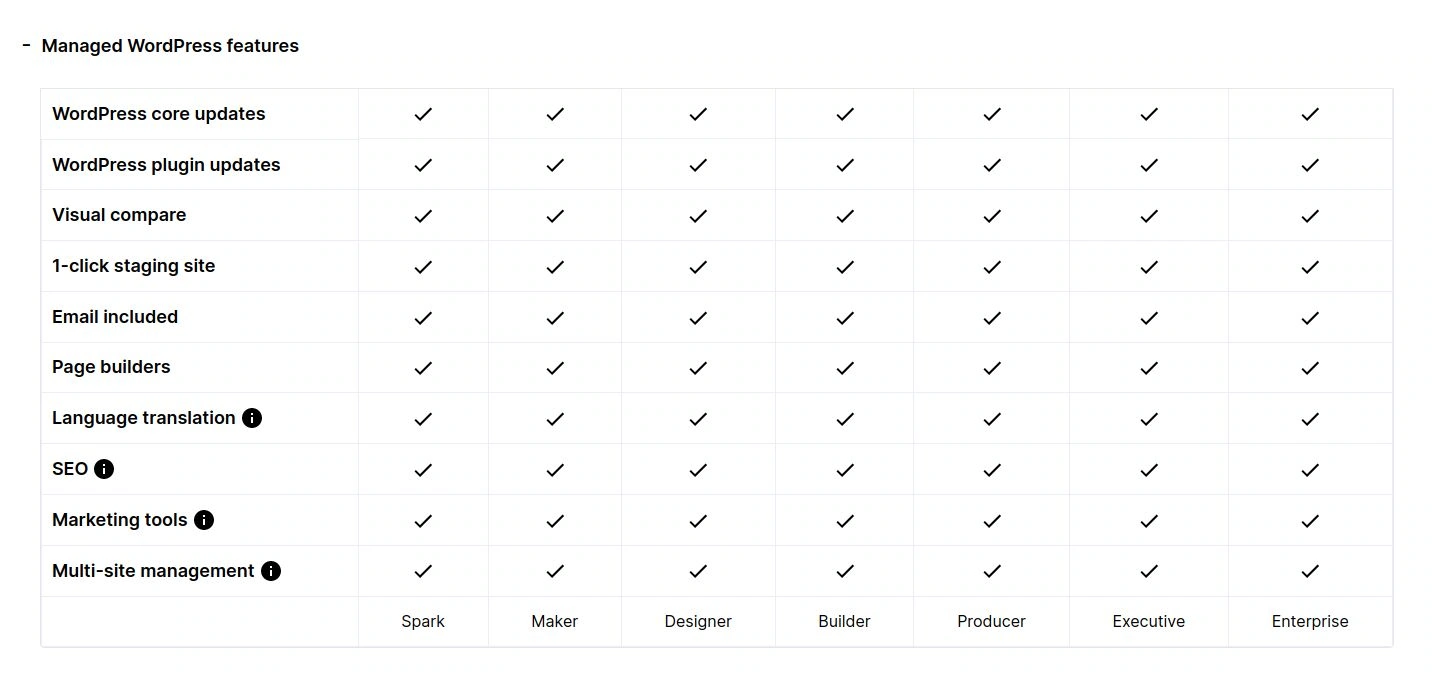
Managed WordPress features from Liquid Web
Premium WordPress software solutions:
Liquid Web focuses on having the best solutions built-in, so WordPress website owners can leverage a high-performance platform with a wide range of premium software solutions included.
Managed WordPress and WooCommerce hosting plans feature the Installer plugin — a catalog of expertly selected premium plugins for WordPress.
Our Installer Plugin allows you to leverage the industry-leading solutions for better performance and security, improved SEO, and advanced ecommerce functionality, free of extra charge. A large number of premium plugins that can be installed in one click makes Liquid Web the best managed hosting for WordPress.
Liquid Web pros:
- Affordable WordPress and WooCommerce hosting plans.
- Automatic updates.
- Advanced development tools.
- Premium WordPress plugins included free of charge.
- Domain registration and global DNS.
- Free SSL certificates.
- 30 days of free daily off-site backups.
- A lightning-fast CDN powered by Cloudflare.
- One management portal for all website administration tasks.
- No upsells or resource overage charges.
Liquid Web cons:
- Limited infrastructure customization options and no root access.
- No free domain name included.
Liquid Web pricing
Liquid Web managed WordPress and WooCommerce plans start at $19. With an annual subscription, you can enjoy three months of premium WordPress hosting for as low as $5.25 for the first three months. The Spark plan allows you to bring your business online, with the Maker (Creator) and Designer (Merchant) plans available as you expand into more websites.
Wondering how we compare? Learn how Liquid Web delivers more value than any other host. Compare our hosting plans now.
2. Bluehost

Bluehost homepage for managed WordPress hosting
Bluehost offers managed WordPress hosting with free domain registration and SSL certificates. That makes it pretty popular in the WordPress community, especially for those just starting their online journey. Let’s see if it can be considered the best WordPress managed hosting provider.
Bluehost offers four managed hosting plans for WordPress that include everything you need for a quick start. Their WordPress hosting starts at $3.95 monthly with website templates and one-click installation. A free domain name and SSL for the first year can make Bluehost WordPress hosting an appealing choice for many aspiring website owners. However, very limited functionality and strict limitations can overshadow the hosting experience.
Bluehost managed WordPress hosting can be ideal for small WordPress blogs and business websites that do not receive many website visitors and do not require much additional functionality. As the hosting provider also offers VPS and dedicated hosting, large and midsize businesses are encouraged to move to their own server infrastructure.
Performance and uptime:
Bluehost does not reveal what infrastructure optimizations are implemented to ensure fast load times, but promises 75% faster response times on their platform compared to using no additional caching and other performance solutions. Bluehost encourages their customers to use Cloudflare to optimize the delivery of static content.
Security:
Bluehost offers free SSL certificates on all managed WordPress hosting plans. While basic DDos protection and a web application firewall can protect WordPress websites hosted, website owners need to implement additional solutions on the website level to achieve a better level of security.
Backups and updates:
Bluehost offers managed updates for WordPress, so users don’t have to worry about installing the latest version of WordPress, themes, and all plugins.
All plans include weekly website backups, including the standard ones.
Bluehost pros:
- One of the most affordable WordPress hosting solutions.
- Free domain name for the first year.
- Free SSL certificates.
- A number of website templates available.
Bluehost cons:
- Very limited functionality included.
- High domain renewal rates after the first year.
Bluehost pricing
Bluehost managed WordPress hosting plans start at $3.95 monthly (this is the 60% off price you can pay with an annual subscription. This discount is only valid for the first year, with auto renewals taking place at regular rates of $9.99/monthly.
All four WordPress hosting solutions do not differ much in terms of pricing as Bluehost expects midsize and large websites to be moved to VPS or dedicated hosting as part of the upgrade path.
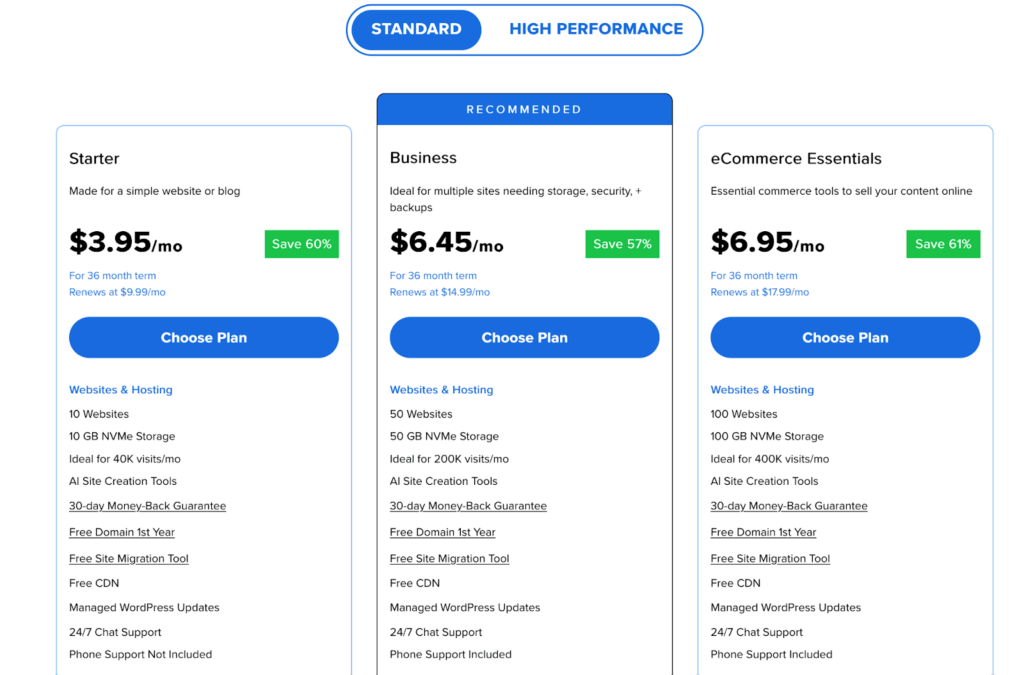
Bluehost pricing for WordPress managed hosting
3. SiteGround
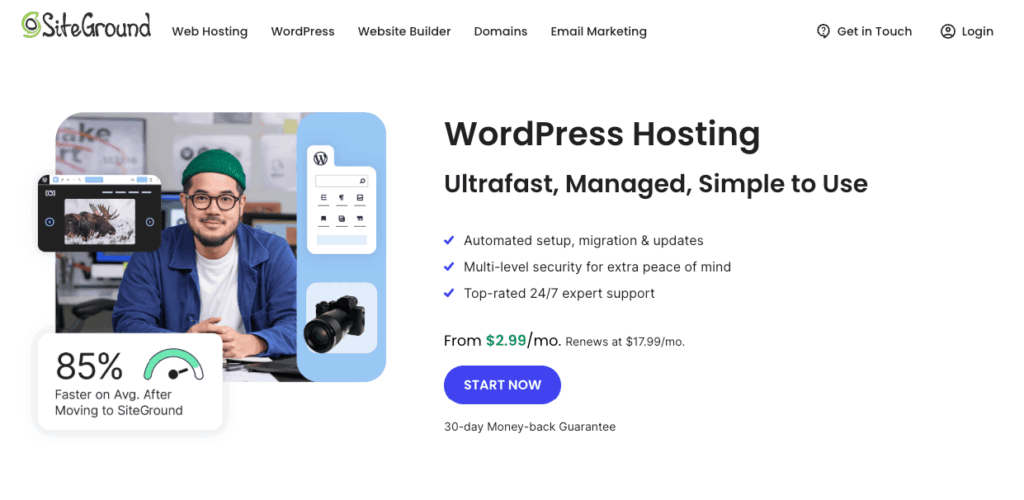
SiteGround homepage for managed WordPress hosting
SiteGround SiteGround targets small to medium businesses with its managed WordPress plans. The company is another hosting provider that offers one of the best managed hosting WordPress solutions for both beginners to the platform and experienced website owners. It uses Google Cloud infrastructure with included CDN and backups.
SiteGround targets small to medium businesses with its managed WordPress plans. The company can be ideal for businesses that need a fast and reliable hosting platform. The three main plans include a wide range of features and built-in tools.
Similar to other managed WordPress hosts on our list, SiteGround ensures high performance and advanced security by using cloud architecture and a web application firewall. The provider includes automatic WordPress updates and 30 days of backups on all plans. However, as SiteGround also offers VPS hosting, larger businesses are expected to rent their own server to accommodate traffic.
Performance and uptime:
SiteGround uses the Google Cloud infrastructure to build their platform for hosting WordPress. The host
implements advanced caching and a number of optimizations to the PHP and database server configuration to ensure great web page load times for all websites.
The host has also recently introduced their CDN and SiteGround Optimizer, a plugin included with all WordPress hosting plans to help website owners manage PHP and enable all performance optimizations.
With all improvements taken into account, SiteGround might be the best managed hosting for WordPress if your website is resource-intensive.
Security:
SiteGround uses a web application firewall with a number of custom rules to keep WordPress websites from authorized access and various security vulnerabilities. On top of that, the host has developed their own intelligent anti-bot software. Free SSL is a great addition to the existing security features.
Backups and updates:
SiteGround offers 30 days of backups on all managed WordPress hosting plans. On GrowBig and GoGeek solutions, you can create up to five on-demand backups at a time.
Automatic WordPress core and plugin updates make SiteGround even more appealing.
SiteGround pros:
- Affordable managed WordPress hosting.
- Automatic backups and WordPress updates included.
- Free SSL certificates.
- A CDN included.
- One management portal for all website administration tasks.
SiteGround cons:
- Limited upgrade path.
- No free domain name included.
- High domain registration rates.
SiteGround pricing
Just like other hosts, SiteGround offers discounts if you prepay for a year. Without any discounts, WordPress hosting pricing ranges from $17.99 to $44.99 monthly.
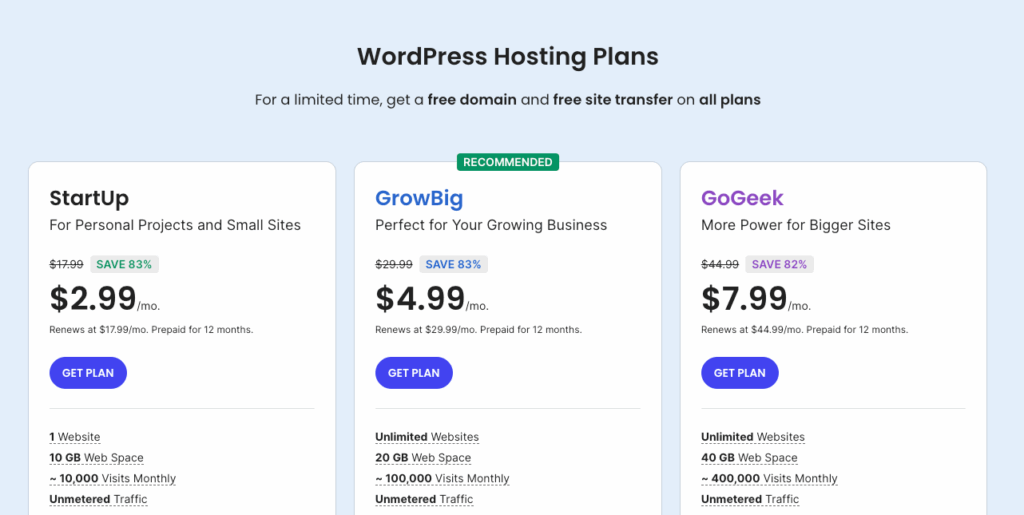
SiteGround pricing for managed WordPress hosting
4. Kinsta
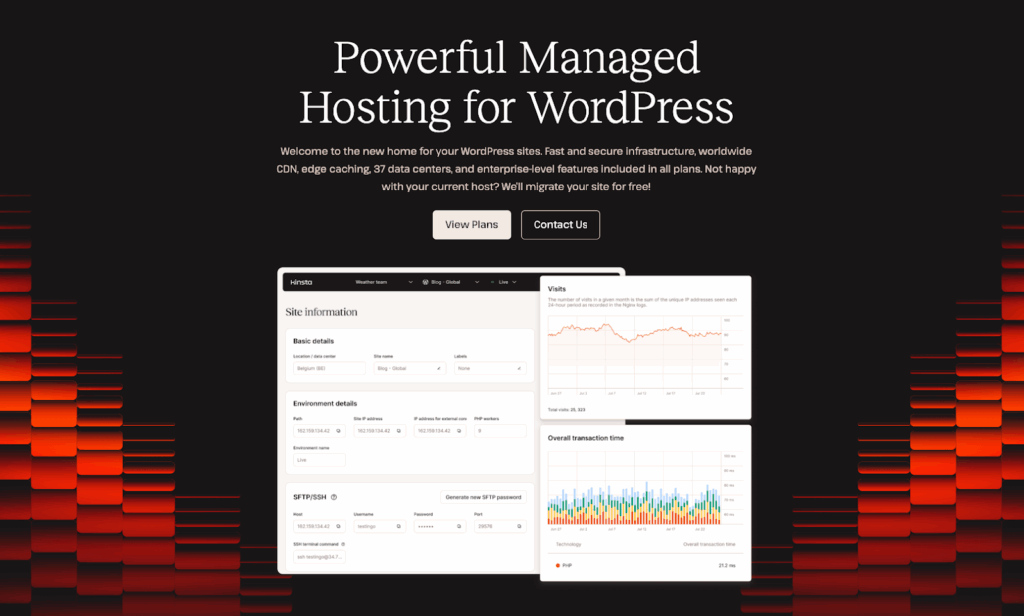
Kinsta homepage for managed WordPress hosting
Kinsta offers managed WordPress hosting using Google Cloud infrastructure. It’s known for enterprise-level support and Cloudflare Enterprise integration. This is a premium managed WordPress hosting provider designed for enterprise-level websites that demand the highest performance.
Kinsta is extremely popular in the WordPress community, but it can not at all be considered an affordable hosting solution, especially for beginners.
They offer 10 different managed WordPress hosting plans starting at $35, which allow for a different number of monthly visits and websites hosted.
One of the first things that catches your attention is the relatively low amount of hosting resources included with each hosting solution. Having focused on building a strong support team and the brand image, Kinsta requires you to pay much more than other hosts to get access to their platform and premium support.
Performance and uptime:
Kinsta builds its WordPress platform on the Google Cloud infrastructure and includes the paid Cloudflare Enterprise plan to ensure high-performance and uptime. Caching and database optimization can help speed up your WordPress website even more.
However, all WordPress hosting plans, including the Enterprise solutions, allocate less than 15 PHP workers per website, which is an extremely low number. You can get 10 or more PHP workers for only having paid over $1000 monthly on the Enterprise 2 hosting plan.
Moreover, solutions such as Redis cache or Nginx reverse proxy are going to cost you an additional $50-100 a month. Liquid Web and some other hosting providers on the list include that free of charge.
We are sure that Kinsta customers leverage the high-performance platform Kinsta maintains, but trying to achieve great web page load times will almost inevitably make your costs soar with this hosting provider.
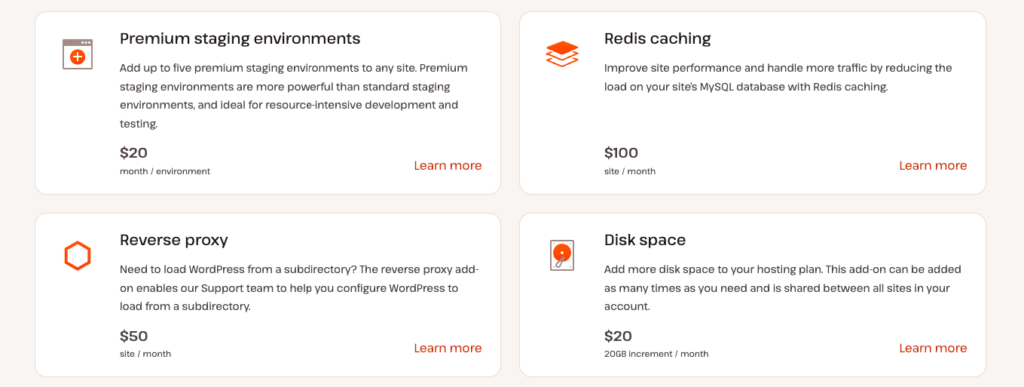
Kinsta add-ons for managed WordPress hosting plans
Security:
Cloudflare Web Application Firewall with managed rulesets ensures a high level of security and protection against DDoS and brute force attacks. Free SSL certificates are included with all WordPress hosting plans.
Backups and updates:
Kinsta includes two weeks to twenty days of daily backups on Starter, Pro, and Business plans, with 30 copies of your website saved on Enterprise plans. If you would like more backups saved, hourly backups will cost you an extra $50-$100 a month.
The need for storing backups externally on Amazon S3 or Google Cloud Storage will also bring additional expenses.
Kinsta does not offer free automatic WordPress updates and encourages their customers to test new releases first in the staging environment. If you do want them to do backups, it’s an extra $3 per month.
Kinsta pros:
- Kinsta is fully focused on hosting WordPress.
- A wide range of hosting plans.
- Free SSL certificates.
- CloudFlare Enterprise included.
- One management portal for all website administration tasks.
- Great support.
Kinsta cons:
- More expensive than other WordPress hosting solutions.
- Constant upsells.
- A small amount of hosting resources allocated.
- No domain registration.
Kinsta pricing
Kinsta managed WordPress hosting starts at $35 monthly for up to 35K visits a month for one site. The pricing of the single-site plans changes depending on monthly visit requirements. For multiple-site plans, pricing starts at $59 for two sites, up to $563 for more than 60 sites. They also have an agency plan with custom pricing you’ll need to contact sales for.
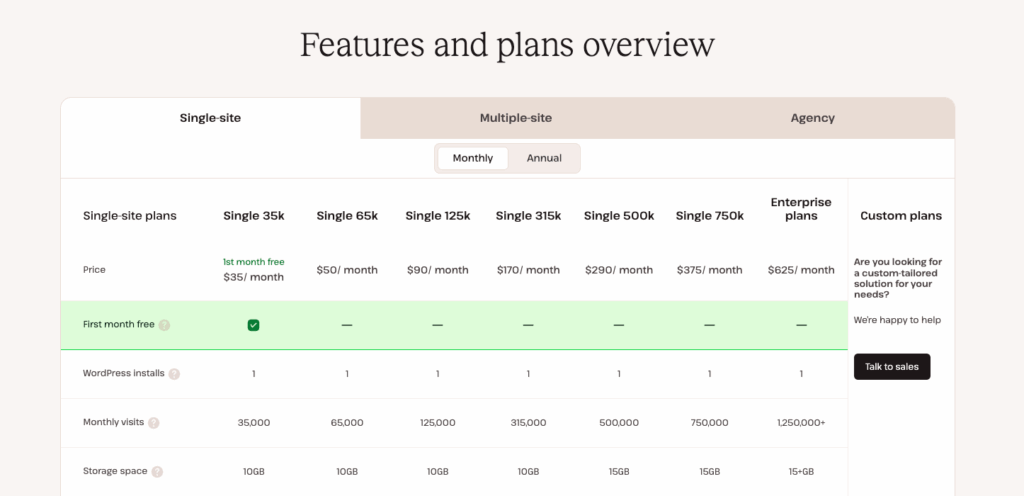
Kinsta pricing managed WordPress hosting plans
5. HostGator
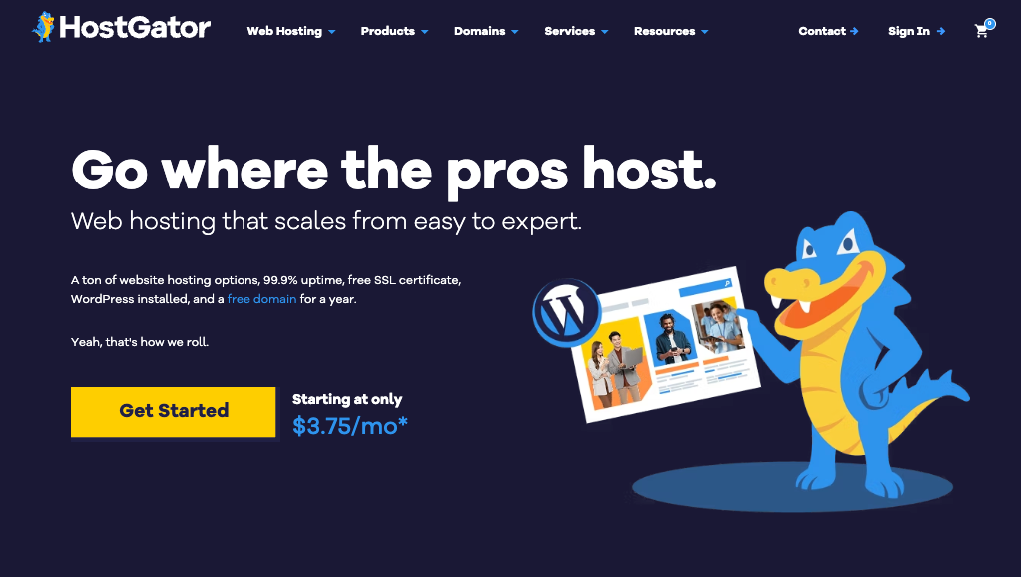
HostGator homepage for managed WordPress hosting
HostGator provides WordPress hosting with free domain registration and daily backups. This makes it one of the best options for absolute beginners who need a reliable platform to start building their online presence using WordPress.
HostGator offers managed WordPress hosting starting at $7.95 monthly with SiteLock security included. On top of that, the free domain name and a number of other features included make HostGator plans one of the best managed hosting WordPress solutions.
HostGator could be good for you if you are just starting your online business and have a long way to go until your website starts receiving a large number of daily visitors. The Starter plan allows you to host just one website, while the Business plan includes three WordPress installations.
However, if you are running a larger website or plan to host an online store, HostGator WordPress hosting is not for you. The provider targets beginners and small websites with its WordPress hosting solutions. Although they offer VPS and dedicated servers, experienced website owners can move to their own platform to accommodate traffic as their business grows.
Performance and uptime:
HostGator guarantees 99.9% uptime and fast page load speed for all WordPress websites hosted. This is achieved by a number of solutions implemented on the server side. Cloudflare is included with all WordPress hosting plans to speed up your website even more.
Security:
HostGator includes free SSL certificates and a number of built-in security solutions. SiteLock Security and CodeGuard offer malware monitoring, vulnerability scanning, and daily backups to provide an additional layer of security for your WordPress website.
Backups and updates:
Daily automatic backups are included in all three managed WordPress hosting plans. HostGator offers from 1 to 3G of storage for daily backups, so the number of website copies you can have at once depends on the size of your website.
Automatic WordPress core, theme, and plugin updates, however, are not provided. HostGator customers are encouraged to run updates manually to ensure the latest versions of the software in use are installed on time.
HostGator pros:
- Best WordPress managed hosting for absolute beginners.
- Very affordable.
- Free SSL certificates.
- Free domain name included.
- Free daily backups.
- A number of premium security solutions included.
HostGator cons:
- Very limited options for hosting WordPress.
- Not suitable for larger websites.
- No clear upgrade path.
HostGator pricing
HostGator offers discounts if you sign in for three years, which is the default option selected once you try to register a hosting account. This way, you can get 66% off and pay just $3.75. monthly for the Hatchling plan. Without any discounts, HostGator pricing for WordPress plans ranges from $10.99 to $29.69 monthly.
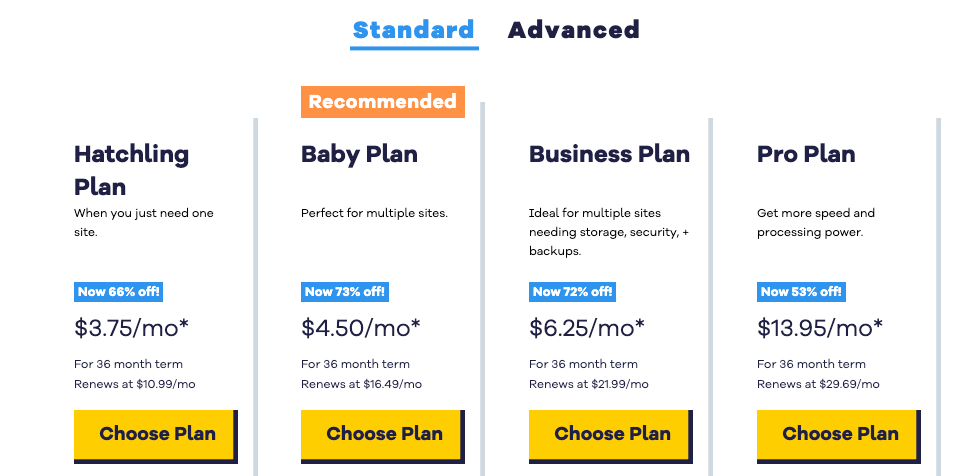
HostGator pricing page for managed WordPress hosting
6. WP Engine
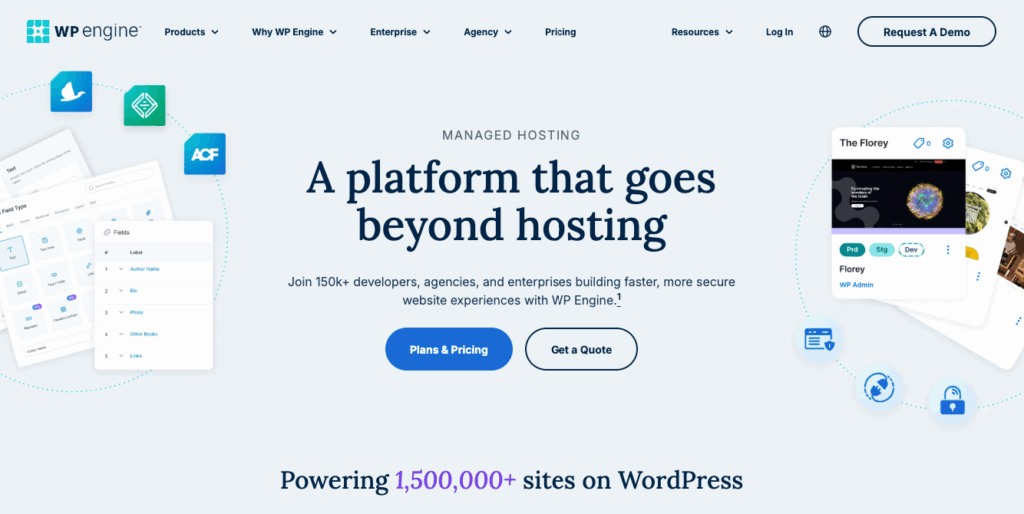
WP Engine homepage for managed WordPress hosting
WP Engine provides managed WordPress hosting with staging environments and daily backups. The provider focuses on performance monitoring for mission-critical sites. This hosting provider is another hosting provider on our list that is focused exclusively on WordPress. From small WordPress blogs or business websites to large, mission-critical portals and marketplaces, WP Engine offers managed WordPress hosting solutions for a large audience of business owners.
Similar to Kinsta, WP Engine positions itself as premium hosting, and the WordPress plans the host offers are not really affordable. Their managed WordPress hosting starts at $25/month with cloud infrastructure and just 10GB of storage and 75GB of bandwidth included with the smallest managed WordPress plans.
Performance and uptime:
WP Engine provides high-performance hosting on a modern cloud infrastructure with WordPress optimized caching. The host guarantees over 99% uptime, and integrates a CDN to speed up the delivery of static content.
Page performance monitoring helps test how fast the critical areas of your website load and gives recommendations on how to achieve better web page load times.
Security:
WP Engine offers malware monitoring, automatic threat detection, and free SSL certificates to ensure end-to-end encryption. The provider includes automated threat detection and performance monitoring tools on all plans. You will need to pay an additional $15 a month to get more advanced web application firewall protection, with $4 extra to enable website monitoring.
Backups and updates:
The host offers free daily and on-demand backups with one-click restores. When it comes to updates, WP Engine will keep your website using the latest versions of WordPress and PHP, but you will have to pay extra to get automated plugin updates.
WP Engine allows you to create additional development and staging environments to test out new functionality before pushing it to the live site.
WP Engine pros:
- High-performance WordPress hosting.
- A CDN included.
- Free SSL certificates.
- Free daily backups.
- Automated plugin updates.
WP Engine cons:
- Rather expensive.
- A number of add-ons for an extra charge.
- No domain registration.
WP Engine pricing
WP Engine offers four main hosting options for WordPress, with prices starting from $25 monthly for one website if you pay for an entire year. This plan can be adjusted according to the number of websites you need.
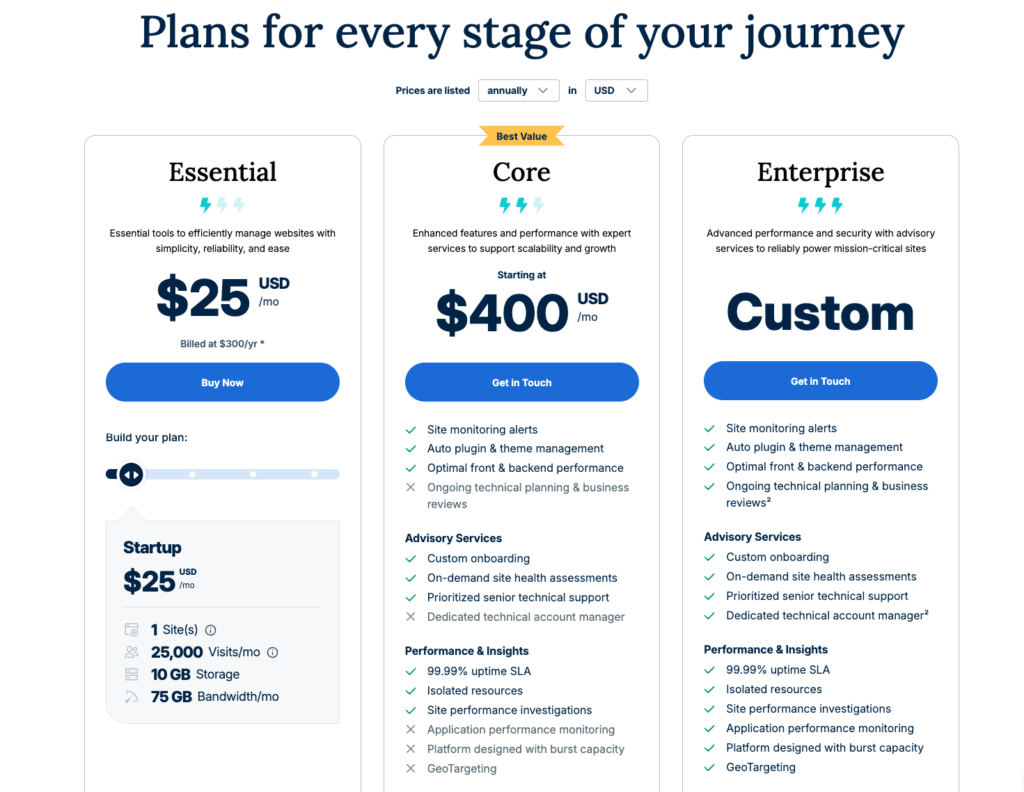
WP Engine homepage for managed WordPress hosting
7. Hostinger
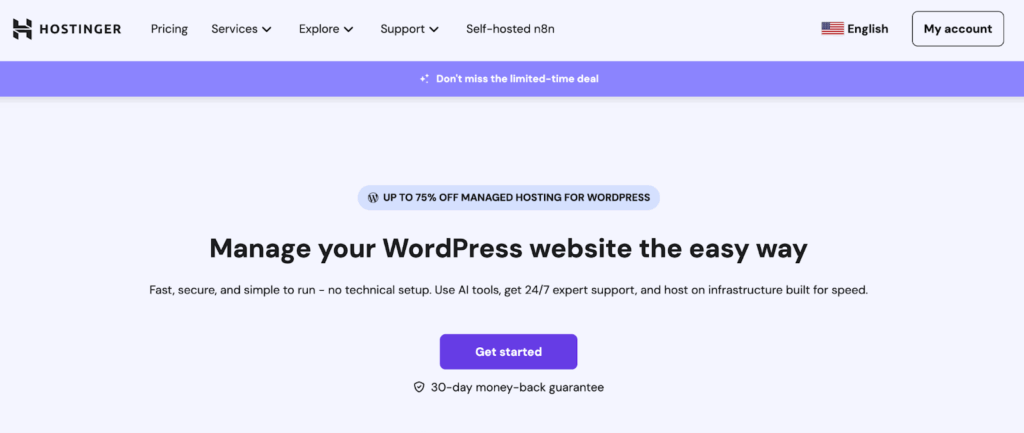
Hostinger homepage for managed WordPress hosting
Hostinger offers budget-friendly managed WordPress hosting starting at $2.99 monthly. Hostinger provides LiteSpeed cache, free SSL, and one-click WordPress installation. The provider has gained popularity by making WordPress hosting accessible to individuals and small businesses with tight budgets.
Hostinger leverages LiteSpeed web server technology, which significantly outperforms traditional Apache servers. The hosting includes staging environments, automated backups, and a 99.9% uptime guarantee on all plans. With data centers globally and built-in caching optimizations, Hostinger delivers impressive performance for its price point.
Performance and uptime: Hostinger guarantees 99.9% uptime across all WordPress plans. The LiteSpeed Cache plugin comes pre-installed, providing immediate performance benefits. However, sites with complex functionality may experience limitations compared to premium providers like Liquid Web.
Security: Free SSL certificates and basic DDoS protection are included. Hostinger provides malware scanning and automated security monitoring, though advanced features require higher-tier plans.
Backups and updates: Weekly backups are standard on basic plans, with daily backups on Business plans. WordPress core updates are automated, but plugin and theme updates require manual intervention.
Hostinger pros:
- Very affordable pricing starting at $2.99/month.
- LiteSpeed server technology.
- Free domain for first year.
- Staging environment included.
- 30-day money-back guarantee.
Hostinger cons:
- Limited PHP workers on basic plans.
- High renewal rates (up to $10.99/month).
- No phone support on basic plans.
- Resource limitations on shared environment.
Hostinger pricing
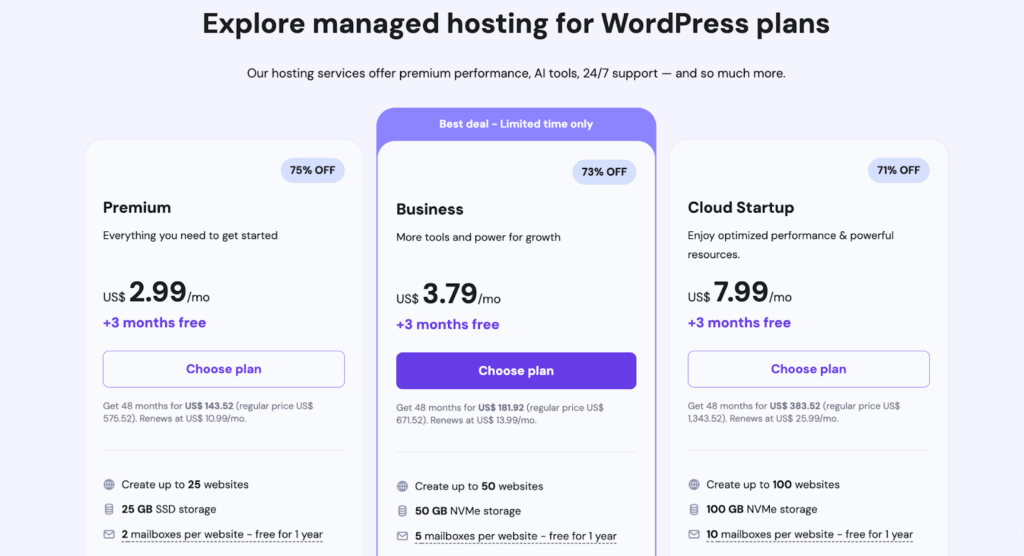
Hostinger pricing plans for managed WordPress hosting
Hostinger managed WordPress hosting starts at $2.99 per month with a 48-month commitment, offering the best value for long-term users. Monthly plans are available at $7.99, though the value proposition is significantly reduced. The Business plan at $3.79/month (48-month term) offers the best balance of features and price for most WordPress sites, including daily backups, enhanced performance, and support for up to 100 websites.
8. DreamHost
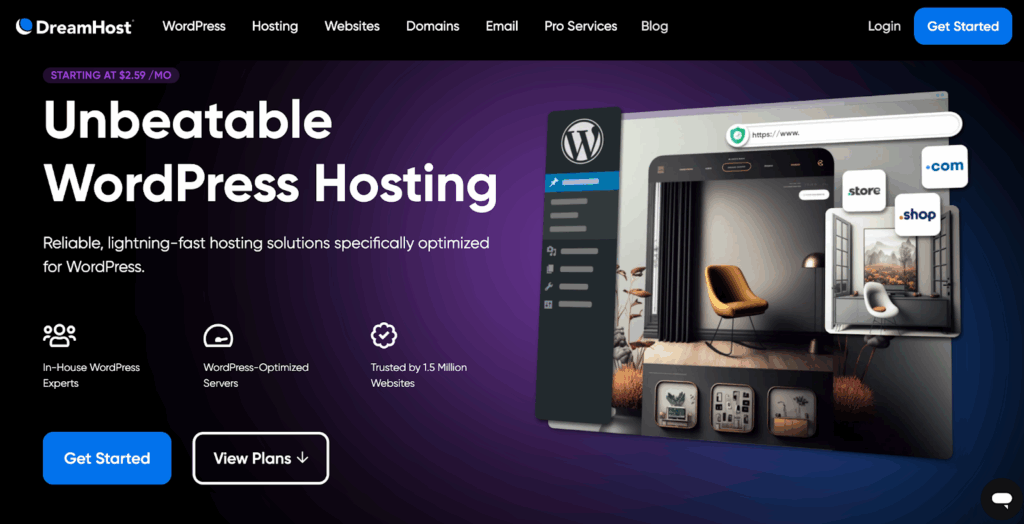
Dreamhost webpage for WordPress hosting
DreamHost is an officially recommended host by WordPress.org. DreamHost offers unlimited bandwidth and a 97-day money-back guarantee. As one of only three hosts officially recommended by WordPress.org, DreamHost has built a reputation for reliable, developer-friendly hosting over its 27 years in business.
DreamHost provides both shared WordPress hosting starting at $2.59 monthly and managed WordPress hosting through DreamPress. While shared hosting is extremely affordable, DreamPress (starting at $16.95/month) provides staging environments, daily backups, and CDN integration for businesses requiring advanced features.
Performance and uptime: DreamHost guarantees 100% uptime with service credits for any downtime. The provider uses SSD storage and built-in caching to optimize WordPress performance. DreamPress includes Cloudflare CDN and server-side caching for enhanced speed.
Security: All plans include free Let’s Encrypt SSL certificates and automated malware scanning. DreamPress adds isolated resources, automatic malware removal, and dedicated IP addresses for enhanced security.
Backups and updates: DreamPress includes daily automated backups with 14-day retention and one-click restore. WordPress core updates are automated on all plans, with optional plugin automation on DreamPress.
DreamHost pros:
- WordPress.org officially recommended.
- 97-day money-back guarantee.
- Unlimited bandwidth on all plans.
- Free domain for first year.
- 100% uptime guarantee with credits.
- Free automated migrations.
DreamHost cons:
- No phone support on shared plans.
- DreamPress significantly more expensive than shared.
- Proprietary control panel (not cPanel).
- Email hosting costs extra on basic plans.
DreamHost pricing
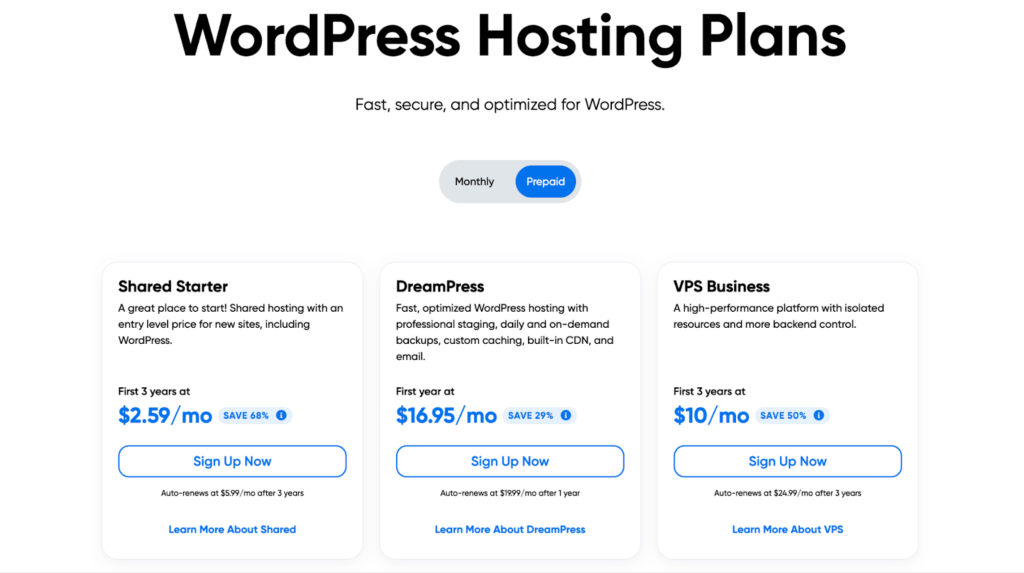
DreamHost pricing for WordPress hosting plans
Shared WordPress hosting starts at $2.59/month (three-year commitment) with free domain and SSL. DreamPress managed WordPress begins at $16.95/month annually or $19.95/month monthly, providing substantial performance and feature upgrades suitable for growing businesses.
WordPress hosting for specific use cases
Different website types have unique hosting requirements. Here’s how to choose the right hosting based on your specific needs:
- Ecommerce Websites: Online stores require managed WordPress hosting with robust security and reliable uptime. Liquid Web and WP Engine offer specialized WooCommerce hosting with optimized performance for product pages and checkout processes.
- Agency sites: Agencies need WordPress hosts with multi-site capabilities and client management tools. SiteGround, Kinsta, and Liquid Web offer excellent features for agencies.
- Local business websites: Small business sites benefit from affordable, reliable hosting with good SEO performance. Bluehost and HostGator provide cost-effective solutions with the necessary tools for local SEO.
- Blogs: Content-focused sites need good page loading speeds and content delivery. SiteGround and Liquid Web offer excellent caching and CDN integration for optimal content delivery.
- Enterprise solutions: Large corporate sites require maximum security, scalability, and support. Kinsta, WP Engine, and Liquid Web offer enterprise-grade solutions with dedicated resources and premium support.
- Beginners: Those new to WordPress need user-friendly interfaces and helpful support. HostGator and Bluehost offer intuitive dashboards and extensive knowledge bases to help newcomers get started.
Managed WordPress provider FAQs
Choosing the best managed WordPress hosting provider
Managed WordPress hosting allows you to focus on your business while a team of WordPress experts is responsible for managing all technical aspects of your online presence. With a hosting platform optimized for WordPress, you can significantly simplify your life as a website owner. But how do you choose the best managed hosting for WordPress?
Choosing the best managed WordPress hosting provider is challenging. When you are just starting out, you need an affordable hosting solution with a great website builder and a number of WordPress plugins. But as your business grows and receives more attention, you start prioritizing website performance and security.
Liquid Web has the best solutions built-in, allowing you to stop prioritizing one aspect of website hosting over another. Whether you are new to WordPress or are currently running a large website with thousands of active users, we can meet your unique hosting needs.
Explore our plans to get started today.
Additional resources
What is managed WordPress hosting? →
Get details and decide if managed WordPress hosting is right for you.
How to use your WordPress admin login page →
How to find your login page and get started
How to build a WordPress site →
A complete beginner’s guide—from choosing a domain to your pre-launch checklist

Tiffany Bridge, based in Washington, D.C., is the Product Manager of Ecommerce Applications, Security, and Professional Services at Liquid Web, where she spends every day thinking about the needs of ecommerce businesses and the people who own them. Tiffany is an experienced product leader with a particular emphasis on building great stakeholder relationships, using data to inform intuition, and building deep domain expertise, all to inform a ruthlessly pragmatic roadmap. She has spent her whole career helping businesses, nonprofits, and government agencies get the most out of their websites. Find her on LinkedIn.
