◦ Comprehensive security
◦ 24/7 support
WordPress Guide → Plugins → Community
7 best WordPress community plugins [2026]

As anyone who runs a website knows, one of the most essential things to focus on is keeping your visitors engaged with your content. And the best way to do that is to build up an online community on your site.
Enter community plugins on WordPress. Instead of having to develop your own community features from scratch, WordPress plugins can be installed and set up in minutes.
What’s more, unlike traditional social media platforms, WordPress community plugins can be customized to fully fit your website’s and community’s needs.
Let’s look at what these handy WordPress plugins are, the benefits of using them, and how to choose the best to help you grow your online community — without having to build a community website from the ground up.
Lastly, we’ll review some of the top community plugins to help get you started.
Get fast, reliable hosting for WordPress
Power your site with the industry’s fastest, most optimized WordPress hosting
What are WordPress community plugins?
Community plugins are plugins that let you add features to your WordPress site to make it easier for members to engage and connect with one another.
When you first install WordPress, it’s essentially a blank canvas. On the one hand, this is wonderful as it means there are almost limitless opportunities for how to design your website. But on the other hand, it can make it difficult for first-time website designers to get started.
You want to start developing your online community website but probably don’t want to take the time to design and code the features you want individually.
And this is why community plugins are so useful.
Community plugins let you skip the arduous task of creating your own code and instead let you pick from a variety of pre-made plugins, many of which are free to use when getting started.
Here are a few examples of what community plugins can help your users do:
- Create user profiles.
- Contribute to discussion forums.
- Share, like, and comment on posts.
- Chat with other community members on your website.
- Subscribe to newsletters and receive email notifications.
How to choose the best WordPress community plugins

With so many different kinds of community plugins on the WordPress platform, it can be tough to know how to choose the right one for your type of community.
Let’s go over some of the essential things to bear in mind when selecting community plugins to install on your WordPress site:
- Functionality: What the plugin does and how it will benefit your community. Some plugins are for ecommerce, while others are for staying in contact with your customers. Specifying which functionalities you want your website to have can help narrow down your search.
- Security: If the plugin is secure and tested and whether or not it will damage your site. Good plugins should come with features that allow things like malware and corrupted file removal, real-time backups, and bot protection.
- Support: Whether there’s customer support to help troubleshoot if you run into a problem. Plugins with good support can help you in the event of a security breach or plugin crash.
- Ease of use: How easy is the plugin to install, set up, and use? The easier a plugin is to use, the better you can take advantage of its community-building features. Many plugins have drag-and-drop functionality that is both beginner-friendly and efficient for designing multiple web pages.
- Cost: Is it a free plugin, or does it only have a limited free version available? Paid plugins can add increased customizability to your community website but come with the downside of costing more, sometimes from $20 to $400 or more.
- Compatibility: Whether or not your chosen plugin is compatible with other plugins on your website. Downloading multiple, incompatible plugins could lead to glitches or site crashes, negatively impacting your community members’ experience.
The best community plugins for WordPress
Now that you have a solid understanding of what WordPress community plugins are and how to choose them, it’s time to talk about the best community plugins for WordPress that you should consider adding to your own website.
1. BuddyPress

BuddyPress is an open-source WordPress community plugin that lets you transform your WordPress site into its own social network of sorts. BuddyPress is free to use, making it an ideal choice for beginners setting up their first community site.
Key features of this plugin include the following:
- Creating member profiles and profile pages
- Connecting with community members
- Sending private messages
- Showing activity streams
- Building out user groups
Although BuddyPress is an excellent plugin for developing an online community, it’s not compatible with every WordPress theme. This handy directory lists out all the compatible BuddyPress templates so you can ensure your website is compatible.
Best WordPress community plugin for: Social networks
Price: Free
2. Paid Membership Subscriptions
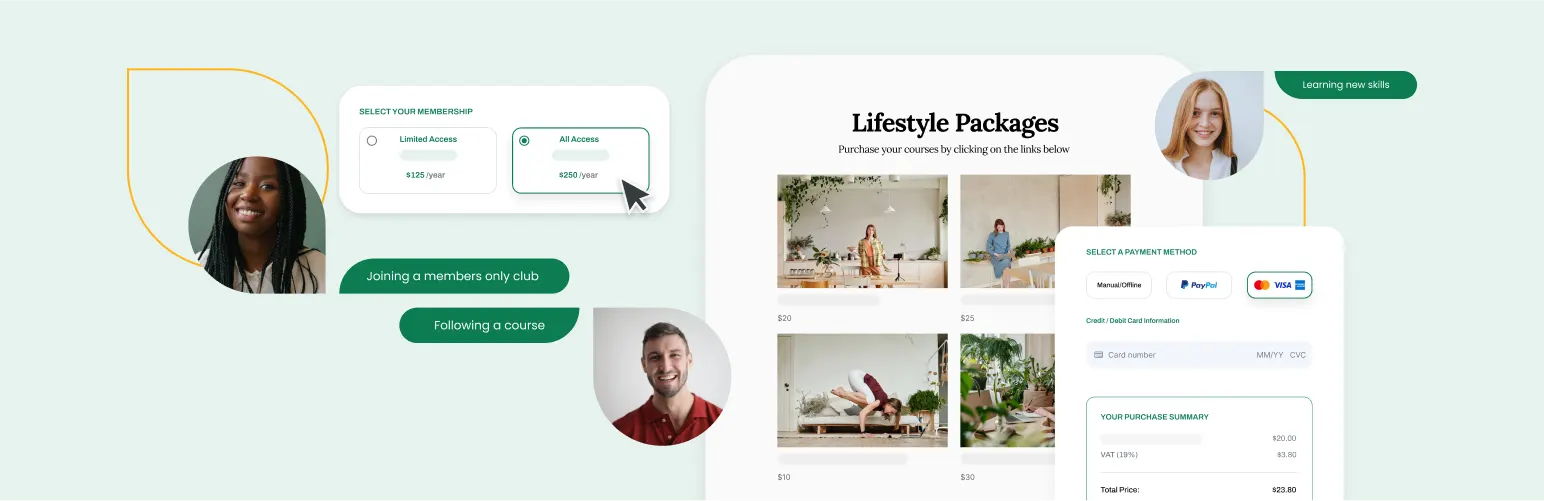
Paid Membership Subscriptions is a WordPress membership plugin that lets you create and manage a subscription service for your website.
Key features of this plugin include the following:
- Register users
- Set custom profile features
- Manage subscriptions
- Restrict premium content
- Set up recurring member payments
What’s particularly useful about this plugin is that it also integrates with WooCommerce. So, if you manage an ecommerce store, you can fit it into your existing platform.
Best WordPress community plugin for: Ecommerce websites.
Price: Free. Starting at $75 for the pro version.
3. wpForo Forum

wpForo Forum is a WordPress forum plugin that allows you to build out a feature-rich digital meeting place for your community members.
All the forums built with this plugin are responsive and offer the following benefits:
- Multi-lingual forum functionality
- Badge and rankings system
- SEO-friendly layout
- Anti-spam blockers
Better yet, this forum integrates well with a number of other WordPress community plugins. It even integrates with the aforementioned BuddyPress, allowing you to reap the benefits of both a community forum and social media network.
You can also purchase add-ons with wpForo Forum if you want to further extend your site’s functionality.
Best WordPress community plugin for: Forums
Price: Free. Add-ons available.
4. User Profile Builder
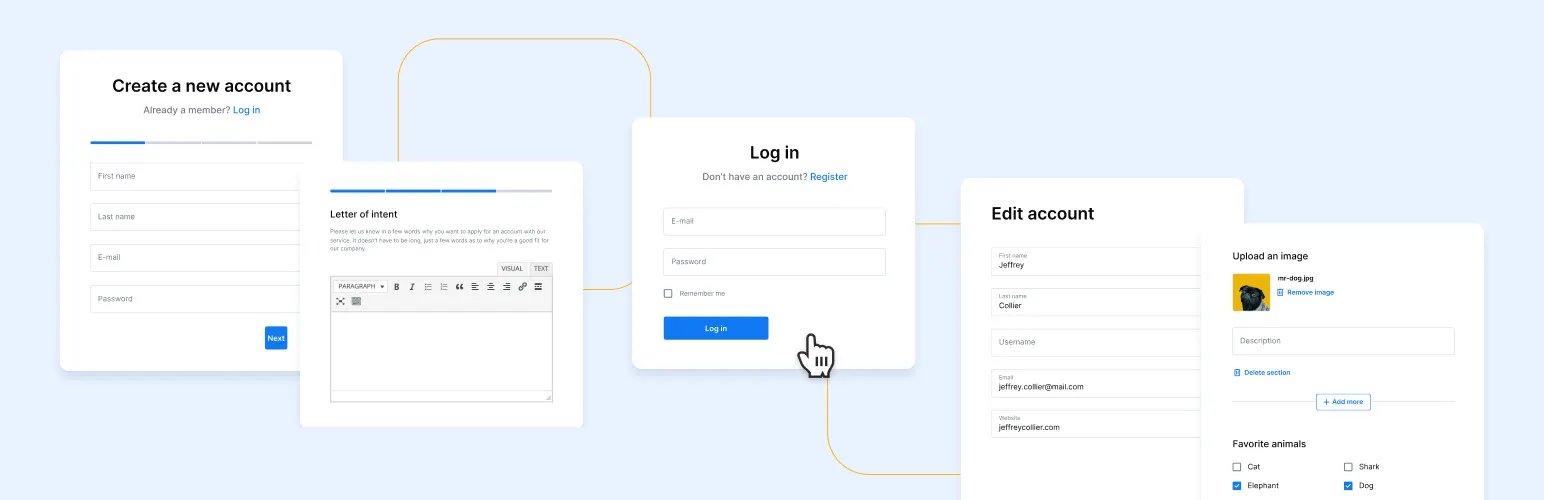
User Profile Builder is another user management tool, this time used to create and manage user registration forms. This plugin makes it simple to customize a front-end login widget for your website, providing you with the tools you need to assign user roles and capabilities to your members.
Other key features of this plugin include the following:
- Member directories and user listing pages
- Custom logins from anywhere on your site
- Multiple registration form creation
- Multiple edit profile form creations
- User role editor
Best WordPress community plugin for: Managing users.
Free: Free. Starting at $75 for the pro version.
5. PeepSo
PeepSo is a free community plugin that gives you the tools to build a social network on your WordPress site.
This easy-to-use plugin comes with the following helpful features:
- Messaging and live chat
- Media uploads, including videos and photos
- Custom widgets for community engagement
- Links from a multitude of supported members, including YouTube
This theme’s lightness and slim design make it compatible with a variety of WordPress themes, so you can customize your website to your heart’s content.
Best WordPress community plugin for: Social engagement.
Price: Free. Starting at $19/month for pro.
6. bbPress

bbPress is a free and open-source WordPress forum plugin specifically designed for creating discussion boards. Intentionally designed to be beginner-friendly, this plugin integrates elegantly with your existing WordPress community website.
Some of the top features it offers include the following:
- Compatible with numerous WordPress plugins
- Scalable with your community
- Simple, flexible design
What’s great about bbPress is that, as an open-source project, it has the entire knowledge of the WordPress community at its back. Patches and novel configurations are regularly added, and if there’s something specific you’d like for your website, you may even be able to request it.
Best WordPress community plugin for: Discussion boards.
Price: Free
How to maximize the value of your WordPress community website
Maximizing the value of your WordPress community website involves blending user engagement enhancement, valuable content provision, search engine optimization, and leveraging monetization opportunities. Here are strategies to consider.
Focus on quality content
- Regularly update content: Keep your community engaged with frequent, relevant content updates like blog posts, tutorials, news, or discussions that cater to their interests.
- User-generated content: Encourage users to contribute their own content, enriching your site with diverse perspectives and increasing engagement.
Enhance user experience (UX)
- Responsive design: Ensure your website is mobile-friendly to improve accessibility and user satisfaction.
- Navigation and usability: A clear, intuitive layout helps users find information quickly and enhances their experience.
Community engagement and social features
- Interactive features: Implement forums, comments, social sharing options, and private messaging to encourage interaction and build community.
- Gamification: Introduce elements like badges, leaderboards, or rewards for participation to boost engagement and involvement.
Search engine optimization (SEO)
- Use SEO plugins: Plugins like Yoast SEO can help make your content more discoverable by search engines.
- Keywords and content strategy: Optimize headings, meta descriptions, and content with relevant keywords to improve your search rankings.
Monetization strategies
- Advertisements: Use advertising networks like Google AdSense to earn revenue without disrupting user experience.
- Memberships/subscriptions: Offer premium content or features for a subscription fee, including exclusive articles, videos, or community perks.
- Affiliate marketing: Recommend products or services and earn a commission for each sale through your affiliate links.
Analytics and feedback
- Use analytics: Tools like Google Analytics help track user behavior, informing content, design, and feature decisions.
- Gather feedback: Use surveys, polls, and feedback forms to understand what users value and identify areas for improvement.
Security and performance
- Regular updates and backups: Keep your site and its components updated and backed up to prevent data loss.
- Speed optimization: Use caching plugins and optimize images to improve site speed and user experience.
Networking and partnerships
- Collaborate with other communities: Build relationships with similar communities for shared growth opportunities.
- Guest posting: Exchange content with influential bloggers or community leaders to broaden your reach.
Getting started with WordPress community plugins
Designing and managing a WordPress community website is an excellent way to showcase your brand, share knowledge, and connect with like-minded individuals around the world.
And without a doubt, installing the right WordPress community plugins can help make the process of designing an eye-catching website easier and more affordable.
But before you can build a WordPress community website, you have to choose a hosting provider. With Liquid Web’s 99.999% uptime guarantee and proactive security measures, you’re not just getting a secure, reliable web host – you’re getting complete peace of mind for your WordPress site.
Ready to upgrade your hosting? Compare Liquid Web’s hosting options for WordPress today and discover why thousands of businesses trust us with their critical web presence.
Additional resources
What is a WordPress plugin? →
A complete beginner’s guide to WordPress plugins and how to manage them
How to build a thriving online community →
6 steps to building a strong online community
The WordPress security checklist →
18 steps anyone can take to ensure the security of your WordPress site

Maddy Osman is a WordPress expert, WordCamp US speaker, bestselling author, and the Founder and SEO Content Strategist at The Blogsmith. She has a B.A. in Marketing from the University of Iowa and is a WordCamp Denver organizer.
