◦ Comprehensive security
◦ 24/7 support
WordPress Guide → Plugins → Google Analytics
7 best Google Analytics plugins for WordPress

Want to understand your site visitors better? Google Analytics is the go-to tool for tracking website traffic and user behavior—but it can be a pain to implement without the right plugin. These WordPress plugins make it simple to connect, view, and act on your analytics data without touching code.
Get fast, reliable hosting for WordPress
Power your site with the industry’s fastest, most optimized WordPress hosting
Analytics plugins, side-by-side
Here’s a quick comparison of the top Google Analytics plugins for WordPress:
| Feature / Plugin | MonsterInsights | ExactMetrics | GA Google Analytics | Site Kit by Google | Analytify | WP Statistics | Independent Analytics |
|---|---|---|---|---|---|---|---|
| Dashboard Reports | Yes | Yes | No | Yes | Yes | Yes | Yes |
| Google Analytics 4 Support | Yes | Yes | Yes | Yes | Yes | Partial | Yes |
| Event Tracking | Yes | Yes | No | Yes | Yes | No | Yes |
| Ecommerce Tracking | Yes | Yes | No | Limited | Yes | No | No |
| GDPR Friendly | Yes | Yes | Yes | Yes | Yes | Yes | Yes |
| Free Version Available | Yes | Yes | Yes | Yes | Yes | Yes | Yes |
| Starting Price (Pro) | $99.50/year | $99.50/year | Free | Free | $59/year | Free | $48/year |
1. MonsterInsights

MonsterInsights is one of the most popular Google Analytics plugins for WordPress, offering powerful tracking features packed into a beginner-friendly interface. With over 3 million active installs, it integrates seamlessly with Google Analytics 4 and provides real-time stats right inside your WordPress dashboard.
You don’t need to touch any code or dig through Google’s UI. It supports advanced features like event tracking, form submissions, ecommerce stats, and affiliate link tracking—all set up in just a few clicks.
- Real-time analytics and traffic sources
- Enhanced ecommerce tracking for WooCommerce, Easy Digital Downloads, and more
- EU compliance and Google Consent Mode integration
- Custom dimensions and event tracking
- Google Analytics 4 and dual tracking support
Best for: Site owners who want full-featured analytics without code
Starting at: $99.50/year
2. ExactMetrics

ExactMetrics is the rebranded version of the old Google Analytics Dashboard for WP (GADWP), developed by the same team as MonsterInsights. It brings in deep analytics features while keeping things intuitive and beginner-friendly.
You can access real-time reports, custom event tracking, and enhanced ecommerce data—all from your WordPress dashboard. It also makes it easy to enable GDPR compliance, link tracking, and author-based reports.
- In-dashboard reports for traffic, behavior, and conversions
- GA4 and Universal Analytics integration
- Enhanced link and button click tracking
- Affiliate link and outbound click tracking
- GDPR-friendly with cookie notice integrations
Best for: Users looking for MonsterInsights-level features with a different UI
Starting at: $99.50/year
3. GA Google Analytics

GA Google Analytics by Jeff Starr is a lightweight, no-nonsense plugin that adds your Google Analytics tracking code to every page. It’s made for users who want a fast and simple way to get GA4 tracking without bloat or unnecessary features.
It doesn’t include dashboards or fancy charts. Instead, it focuses on performance, simplicity, and clean code. It’s a great option if you’re already using Google Analytics directly or via Tag Manager and just need to inject the code.
- Adds GA4 or Universal Analytics tracking code easily
- Works with Google Tag Manager
- Minimalist, fast, and privacy-focused
- Compatible with GDPR requirements
Best for: Developers or minimalists who only want tracking code
Starting at: Free
4. Site Kit by Google

Site Kit is Google’s official plugin for integrating Analytics, Search Console, AdSense, and PageSpeed Insights into WordPress. It’s completely free and built to simplify connecting your WordPress site to various Google services.
Analytics data is displayed right in your dashboard, along with insights about your search traffic, performance, and ad earnings. While it’s not as customizable as other plugins, it’s ideal for basic site monitoring.
- One-click setup with Google account
- Includes data from multiple Google tools
- No code needed for setup or tracking
- GA4 supported with real-time data and page-level stats
Best for: Beginners who want Google’s official solution
Starting at: Free
5. Analytify

Analytify makes Google Analytics accessible with easy-to-read, colorful dashboards and detailed reports right inside WordPress. It supports everything from GA4 to WooCommerce tracking and campaign performance.
You can view stats per post/page and generate front-end reports for clients. Its dashboard is more intuitive than most, making it great for content creators and agencies.
- Enhanced ecommerce and form tracking
- Campaign and referral tracking
- Front-end reporting for clients or teams
- Per-post/page analytics with social stats
Best for: Agencies and content creators who need detailed, client-ready reports
Starting at: $59/year
6. WP Statistics
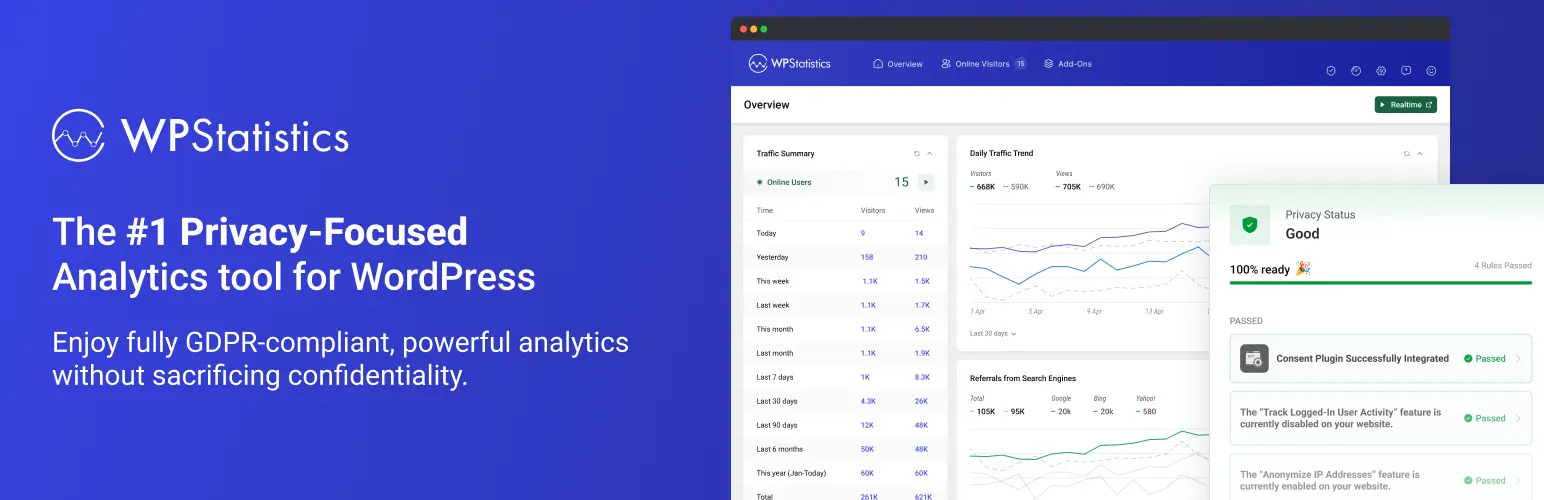
Unlike most plugins on this list, WP Statistics does not rely on Google Analytics. Instead, it tracks and stores all visitor data locally on your server. This gives you full control over your data and helps with privacy compliance.
It tracks visitor locations, browsers, search terms, and referrers—displayed in clear visual reports. It’s not ideal for huge sites due to storage use, but it’s great for privacy-focused or simple sites.
- 100% local data storage (no Google account needed)
- GDPR and CCPA compliant
- Tracks IP, browser, referring sites, search engine terms
- Real-time stats and custom reporting
Best for: Site owners who want analytics without external services
Starting at: Free
7. Independent Analytics

Independent Analytics is a privacy-focused Google Analytics alternative that offers clean, fast, and intuitive reporting directly in your WordPress admin. It tracks views, traffic sources, devices, and geographic location—without using any third-party scripts.
It works out of the box and is fully GDPR compliant. While it’s not powered by Google Analytics, it’s a strong option if you want to avoid third-party data sharing while still getting useful insights.
- No tracking cookies or third-party scripts
- Fast and lightweight with modern UI
- Campaign and referral tracking
- Includes GA4 migration tools for comparison
Best for: Privacy-first sites that want built-in analytics
Starting at: $48/year
Why use a Google Analytics plugin for WordPress?
Installing Google Analytics directly on your site isn’t always beginner-friendly. These plugins make the process easier and give you more useful data with less effort.
Here’s why using a plugin is a smart move:
- No code required: Most plugins install tracking without touching your theme or editing your header files.
- Visual dashboards: View traffic, page views, and conversions without leaving WordPress.
- Custom tracking: Easily track events, form submissions, button clicks, and ecommerce activity.
- Enhanced GDPR compliance: Many plugins include privacy features like cookie consent, data anonymization, and local storage.
- Better site performance: Plugins manage scripts in ways that minimize performance impacts, especially when supporting GA4 and Tag Manager.
Next steps for choosing the best Google Analytics plugin
Google Analytics plugins make it easier to track your site’s performance, uncover user behavior, and optimize content—all without needing a data science degree.
Pick a plugin that matches your skill level and reporting needs. If you need advanced tracking and visual reports, go for MonsterInsights or Analytify. Prefer minimalism or privacy? GA Google Analytics or Independent Analytics are great fits.
Ready to upgrade your WordPress experience? Professional hosting improves speeds, security, and reliability for a website and a brand that people find engaging and trustworthy.
Don’t want to deal with server management and maintenance either? Our fully managed hosting for WordPress is the best in the industry. Our team are not only server IT experts, but WordPress hosting experts as well. Your server couldn’t be in better hands.
Click through below to explore all of our hosting for WordPress options, or chat with a WordPress expert right now to get answers and advice.
Additional resources
What is a WordPress plugin? →
A complete beginner’s guide to WordPress plugins and how to manage them
WordPress Countdown Timer: Top 7 Plugins →
Discover the best WordPress countdown timer plugins to boost urgency and drive more conversions on your site.
How to check if a plugin is safe →
Simple steps to evaluating a plugin before you install and activate it
