

Input and output are fundamental operations in Java programs. Input allows a program to receive data from the user, while output allows it to display results to the user.
- Java commonly uses the Scanner class to take console input.
- System.out.print(), System.out.println(), and System.out.printf() are commonly used to display output.
Input and Output
In a Java program, data generally flows in two directions:
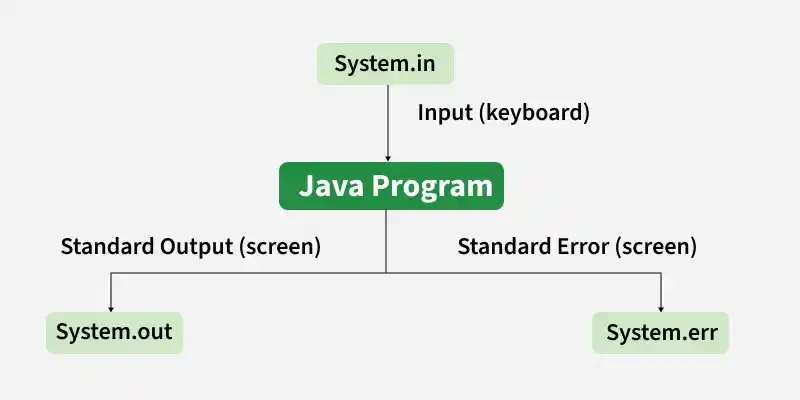
In Above diagram shows how Java handles standard input and output using System.in, System.out, and System.err. System.in receives input, while System.out displays normal output and System.err displays error messages.
For example, a program can take two numbers from the user as input, add them, and display their sum as output.
import java.util.Scanner;

class GFG{

    public static void main(String[] args){

        Scanner sc = new Scanner(System.in);

        System.out.print("Enter first number: ");
        int a = sc.nextInt();

        System.out.print("Enter second number: ");
        int b = sc.nextInt();

        System.out.println("Sum: " + (a + b));

        sc.close();
    }
}
Input:
10
20
Output:
Enter first number: 10
Enter second number: 20
Sum: 30
Here, Scanner reads the values entered by the user, while System.out.println() displays the result.
Printing Output
Java provides the standard output stream System.out for displaying information on the console. The three commonly used methods are:
1. Using System.out.print()
The print() method displays output without adding a new line.
class GFG{

    public static void main(String[] args){

        System.out.print("Hello ");
        System.out.print("Geeks");
    }
}
Output
Hello Geeks
Both statements produce output on the same line.
2. Using System.out.println()
The println() method prints the given value and then moves the cursor to the next line.
class GFG{
    public static void main(String[] args) {
        System.out.println("Hello");
        System.out.println("Geeks");
    }
}
Output
Hello
Geeks
3. Using System.out.printf()
The printf() method is used when formatted output is required.
class GFG{
    public static void main(String[] args) {
        String name = "Alice";
        int age = 25;

        System.out.printf("Name: %s, Age: %d%n", name, age);
    }
}
Output
Name: Alice, Age: 25
Here, %s is used for a string and %d is used for an integer.
Taking Input
Java provides several ways to take input. For beginners, the Scanner class from the java.util package is one of the simplest approaches.
To use Scanner, first import it:
import java.util.Scanner;
Then create a Scanner object:
Scanner sc = new Scanner(System.in);
Here, System.in represents the standard input stream, which is normally connected to the keyboard.
Example: Taking Integer Input
import java.util.Scanner;

class GFG{
    public static void main(String[] args) {
        Scanner sc = new Scanner(System.in);

        System.out.print("Enter your age: ");
        int age = sc.nextInt();

        System.out.println("Your age is: " + age);

        sc.close();
    }
}
Input:
25
Output:
Enter your age: 25
Your age is: 25
Taking Different Types of Input
The Scanner class provides different methods for different types of data.
| Method | Used For | Example |
|---|---|---|
| nextInt() | Integer | int n = sc.nextInt(); |
| nextLong() | Long integer | long n = sc.nextLong(); |
| nextFloat() | Float | float n = sc.nextFloat(); |
| nextDouble() | Double | double n = sc.nextDouble(); |
| nextBoolean() | Boolean | boolean b = sc.nextBoolean(); |
| next() | Single word/token | String s = sc.next(); |
| nextLine() | Complete line | String s = sc.nextLine(); |
Example: Taking Different Types of Input
import java.util.Scanner;

class GFG{
    public static void main(String[] args) {
        Scanner sc = new Scanner(System.in);

        System.out.print("Enter name: ");
        String name = sc.nextLine();

        System.out.print("Enter age: ");
        int age = sc.nextInt();

        System.out.print("Enter marks: ");
        double marks = sc.nextDouble();

        System.out.println("\nStudent Details");
        System.out.println("Name: " + name);
        System.out.println("Age: " + age);
        System.out.println("Marks: " + marks);

        sc.close();
    }
}
Input:
Alice
20
89.5
Output:
Enter name: Alice
Enter age: 20
Enter marks: 89.5Student Details
Name: Alice
Age: 20
Marks: 89.5
Other Ways to Take Input in Java
Apart from Scanner, Java provides other mechanisms for reading input, such as:
- BufferedReader
- Console
- StreamTokenizer
For beginner programs, Scanner is generally easier to understand because it directly provides methods such as nextInt(), nextDouble(), and nextLine().
