Adding Firewall Rules in Plesk
Windows servers using Plesk can use firewall rules to manage help manage server traffic. You can also add firewall rules using Windows Firewall, but adding firewall rules in Plesk is a good first line of defense.
Windows servers using Plesk (such as a Plesk VPS) can use firewall rules to manage help manage server traffic. You can also add firewall rules using Windows Firewall, but adding firewall rules in Plesk is a good first line of defense. If you have a Linux server using Plesk, it’s likely you are using CSF as your firewall solution, which is not controlled via Plesk.
- Log into your Plesk control panel.
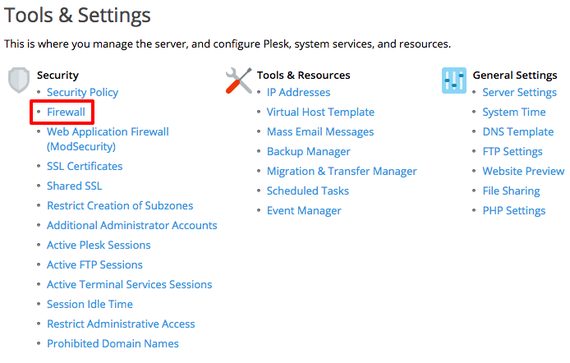
- In the left navigation menu, click on Tools & Settings.
- In the Security Section, click on Firewall.

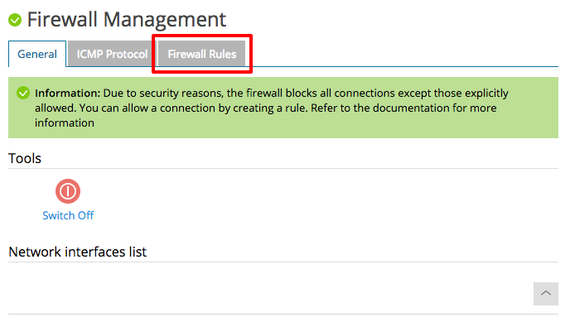
- Click on the Firewall Rules tab. You’ll see a list of all the current Plesk firewall rules.

- There are multiple default firewall rules. Some default rules are not editable, as they are integral to your server functioning properly. Either click on a rule to edit it or click on Add Firewall Rule.
Tip:
We recommend looking through the rules before adding a new rule to make sure there isn’t already a rule you can edit. Sometimes there may also be a conflicting rule already in place. A rule denying something will always take precedence over a rule allowing something.
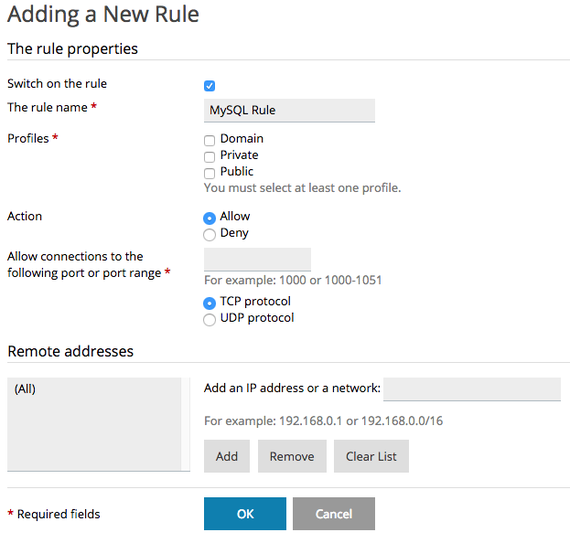
- Fill in the fields to set your rule’s properties. How you fill in the fields will vary based on what you want your rule to do. Some common examples:
- Deny connections on a specific port number.
- Deny connections from specific IPs on a specific port number.
- Allow connections on a specific port number.
- Allow specific IPs to connect to specific ports.

- Once you’ve created or edited your rule, click OK.