Install WHMCS
The WHMCS software suite is an all-in-one client management, billing & support interface for web hosting businesses allowing you to automate repetitive tasks so you can focus on growing your business.
WHM Installation through Softaculous
Install WHMCS with the use of Softaculous through any of our fully managed cPanel servers.
Avoid any PHP, configuration, or Mod Security errors that could come from conflicting requirements with other software by installing WHMCS in it’s own cPanel User Account.
Once you have determined the installation location for WHMCS:
- Proceed to that cPanel account directly, navigate to the Softaculous interface.
- Select WHMCS, or look for it in the search bar.
- Fill in the setup information:
- Protocol
- http:// or https://
- HTTPS is highly recommended. If your site has an SSL, choose the HTTPS option.
- Domain and Directory in which WHMCS will be installed
- This domain or subdomain/subfolder should not contain any existing content, as this may conflict with the WHMCS install.
- Company Name
- Name of company associated with the WHMCS install.
- Admin Account
- Provide a username, email and password to generate an admin user.
- Save this in a secure location as this user has full access to the client base, bills, etc.
- First/Last Name on Account
- Protocol
- Once this is filled out, simply hit install and proceed.
Login using the Admin user and password you created during the setup. You will be prompted to follow an initial setup guide when you log in to WHMCS for the first time.
WHMCS Licensing
A single complimentary WHMCS license is included in your reseller agreement with Liquid Web. If you are interested in learning more, please contact your Partner Development Manager to receive this license. If you are not currently a partner with us, and you believe that you would be a good candidate for partnership, you can apply directly through our partner community page.
However, if you are not looking to partner with Liquid Web and simply interested in WHMCS, we encourage you to look at the pricing available directly through WHMCS.
Change License Key
Already Have WHMCS Installed and Switching to our License?
- Log in to your WHMCS Admin Dashboard.
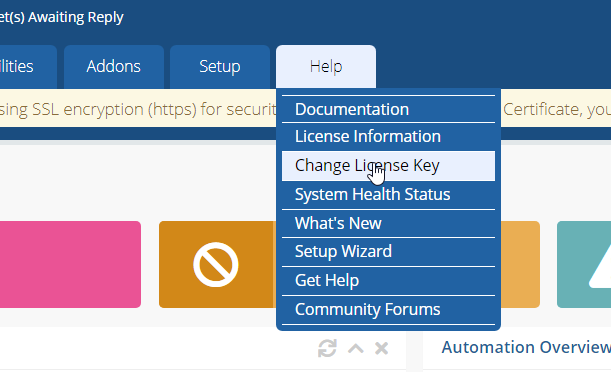
- Navigate to Help > Change License Key.

- Enter in your License Key and hit Save.