

Creating a Sub-domain in Interworx Web Panel
To create a subdomain like "blog.domain.com" on your InterWorx Web Panel server, access SiteWorx and navigate to the Hosting Features section. From there, you can easily create the subdomain for your blog or test site.
You’ve already created your first domain on your InterWorx Web Panel server (if you haven’t created a domain yet, see Creating a User Account/Domain in Interworx Web Panel). But now you’d like to create a sub-domain for a blog or test site and name it blog.domain.com or something similar. You can create a subdomain in SiteWorx in the Hosting Features section.
Creating a SubDomain as the Domain User in SiteWorx
- Login to your InterWorx Server using the domain user credentials. For help with logging in, see Logging into InterWorx Web Panel).
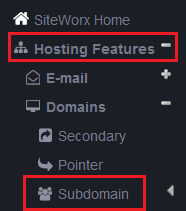
- Click on the Hosting Features menu in the left navigation group, then click on Domains, then click Subdomain.
- You are now in the Domain Management: SubDomains screen. Select the primary domain for which you want to create a subdomain from the drop-down menu at the top of section.

- Enter the subdomain name in the text box and click Add.

The subdomain is now created and you can begin adding content to the subdomain.
