Skip to content
Image
Image
Search our site for answers
Login
  • Help Docs
  • API Docs
  • liquidweb.com
  • Hosting Services
    • Cloud VPS Hosting
    • Dedicated Servers
    • GPU Hosting
    • Hosting For WordPress
    • Hosting For WooCommerce
    • Email Hosting
    • VMware Hosting
    • Add-ons
  • Security & Compliance
    • SSL Certificates
    • Firewalls
    • Cloud Hosting
    • Two Factor Authentication
    • DDoS Protection
    • Compliance
    • Malware Protection
  • Domain & DNS
    • Domain Registration
    • DNS Settings
    • Nameservers
    • Subdomains
    • Domain Forwarding
    • Email DNS Setup
  • Account & Billing
    • Account Setup
    • Payment Methods
    • Billing Cycles
    • Refunds Cancellations
    • Invoices Receipts
    • Account Security
  • Email Hosting
    • Email Setup
    • Email Forwarding
    • Spam Protection
    • Microsoft 365
    • G Suite Setup
    • Account Security
    • Email Troubleshooting
  • Performance & Optimization
    • Server Optimization
    • Caching Strategies
    • Content Delivery Network
    • Database Performance
    • Image Optimization
  • Server Administration
    • Server Setup
    • SSH Access
    • Command Line Basics
    • Database Management
    • CRON Jobs
    • Apache Nginx Setup
    • Log Analysis
  • CMS & Applications
    • WordPress
    • WooCommerce
    • Magento
    • Joomla
    • Drupal
  • Backups & Recovery
    • Backup Strategies
    • Cloud Backups
    • Disaster Recovery
    • Restoring Backups
    • Raid Configurations
  • Reseller & Partner Support
    • Reseller Program
    • White Label Hosting
    • Partner Portal
    • Client Management
  • Policies & Compliance
    • Terms Of Service
    • Privacy Policy
    • GDPR Compliance
    • Acceptable Use Policy
Help Docs Hosting Services Cloud VPS (Virtual Private Server) Creating an IP Pool for Your Cloud VPS

Creating an IP Pool for Your Cloud VPS

Reserve IP Addresses for your VPS with an IP Pool for consistent addressing during resizing or creating multiple instances.
Account
2 min read

Note:

All pricing has been taken out of this article as prices are subject to change. Contact our Solutions team for current pricing for IP Pools.

You can reserve a set of IP Addresses for your VPS by creating an IP Pool. This will help when you resize your Cloud VPS and need to keep the same IP Address, or if you’re creating multiple instances on the same account. Let’s walk through the steps to create your IP Pool.

Note:

You cannot assign your primary IP address to two servers. When upgrading, you must destroy the original server before assigning that IP address to the new server. This will mean that you will have some downtime as you destroy the old server and create the new one. Choose a low traffic time to minimize impact on your users.
  1. To create an IP pool, log into your Liquid Web Account.
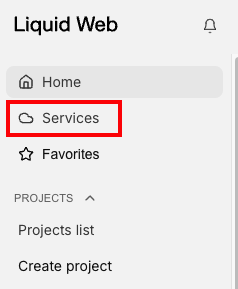
  2. Click on the Services button above the menu on the left hand side of the page.
    Image
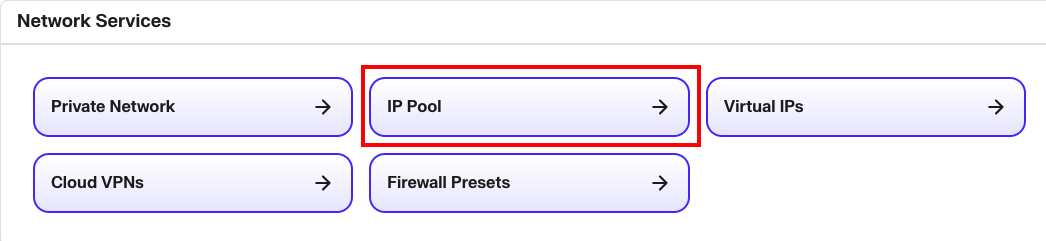
  3. This will open the Services List page. Click IP Pool in the Network Services area.
    Image
  4. Click Create New to add additional IP addresses to your IP Pool.
    Image
  5. Use the Plus or Minus signs to adjust the number of additional IPs you want to add to the IP Pool.
    (NOTE: You are only allowed to add up to 8 IP addresses to an IP Pool.)
    Image
  6. Click Create IP Pool to add IP addresses to the IP Pool. A pop-up will appear allowing you to confirm your request and indicating the new charges associated with your additional IP addresses. Once you confirm the IP Pool creation, your IP Pool will be created and a pop-up will appear to notify you.
Was this article helpful?
Thank you for your input.
Thank you for your feedback.
Don’t wing it this Black FridayGo from prep to profit with our proven ecommerce playbook.
Image
Get the guide
Related hosting content
  • Hosting Add-Ons
  • High-Speed Cloud Hosting Services
  • WordPress VPS Hosting

Hosting

  • Cloud Hosting
  • Dedicated Hosting
  • Email Hosting
  • GPU Hosting
  • Magento Hosting
  • Reseller Hosting
  • VPS Hosting
  • Hosting for WordPress

Additional Hosting

  • Add-ons
  • Agency Hosting
  • Application Hosting
  • Database Hosting
  • Ecommerce Hosting
  • Enterprise Hosting
  • Freelancer Hosting
  • High Availability
  • High Performance
  • HIPAA Hosting
  • PCI Compliant Hosting
  • Private Cloud Hosting
  • Server Clusters
  • Small Business Hosting
  • VPS Reseller Hosting
  • Windows Hosting
  • Windows VPS Hosting
  • Linux VPS Hosting
  • Ubuntu VPS Hosting
  • cPanel VPS Hosting
  • KVM VPS Hosting
  • WooCommerce Hosting

Servers

  • Bare Metal Servers
  • Cloud Dedicated Servers
  • Cloud VPS
  • Custom Servers
  • Dedicated Servers
  • Managed Cloud
  • Gaming Server
  • Windows Servers

Managed Hosting

  • Managed ExpressionEngine
  • Managed Craft CMS
  • Managed Cloud
  • Managed Hosting
  • Managed Hosting for WordPress
  • Managed Magento
  • Managed Servers
  • Managed VPS
  • Managed WooCommerce

Studies

  • Every Second Counts
  • Impact of Downtime
  • Hypergrowth Hosting

Resources

  • API
  • Hosting Coupons
  • Blog
  • Customer Stories
  • Ebooks
  • Help Docs
  • Migrations
  • Sitemap
  • SSL Checker
  • Webinars
  • Web Hosting Tools
  • White Papers
  • What is my IP

Hosting Basics

  • Bare Metal
  • Cloud Hosting
  • Dedicated Servers
  • Gaming VPS
  • GPUs
  • Private Cloud
  • VPS
  • Web Hosting

Partnerships

  • Hosting Affiliate Program
  • Partner Programs
  • Refer-a-Friend

Software & Design Solutions

  • GiveWP
  • IconicWP
  • Kadence WP
  • LearnDash
  • MemberDash
  • Modern Tribe
  • Restrict Content Pro
  • SolidWP
  • The Events Calendar

Get Help

  • Chat
  • Sales
  • Support

Company

  • About
  • Careers
  • Data Centers
  • Hosting Prices
  • News
  • Policies
  • Privacy
  • Security
  • Terms and Conditions
  • Web Hosting Deals
Image
Image
Image
Image
Image
Image
Image
HostingAdvice.com logo
Liquid Web reviewLiquid Web review
Image

Liquid Web, a web hosting company with 18 data centers globally

© 2025 Liquid Web, LLC

California Notice

Image
Do not sell my info
Image

All prices are in USD

* Promotions may be exclusively available to new customers and cannot be applied to existing accounts. Qualification is at the sole discretion of Liquid Web. Reach out with questions.

  • Solutions
    • Solutions by industry
      Ecommerce

      Secure, compliant infrastructure for regulated online sales

      Financial Services

      High-trust hosting built for security and compliance

      Agencies

      Fast, flexible hosting for high-traffic client projects

      Healthcare

      HIPAA-ready environments for protected health data

      Solutions by outcomes
      Compliance

      Hosting aligned with HIPAA, PCI, GDPR, and audit readiness

      Launch

      Configure a high-performance server in minutes

      Commerce Scale

      Infrastructure built to handle surges, orders, and growth

      Disaster Recovery

      Redundant, resilient systems for rapid recovery and uptime

  • VPS Hosting
    • Cloud VPS Hosting
      Windows VPS Hosting
      Linux VPS Hosting
      Add-ons & Backups
      View All VPS Hosting
  • Dedicated Servers
    • Bare Metal Servers
      Managed Dedicated
      Gaming Servers
      View All Dedicated Servers

  • Managed Hosting
    • Managed Hosting
      Managed Servers
      Managed Applications
  • WordPress
    • Hosting for WordPress
      Managed Hosting for WordPress
      VPS for WordPress
      Dedicated WordPress
      WooCommerce Hosting
  • GPU Hosting
    • GPU Hosting
      NVIDIA GPU Hosting
      AI Training & Interface

  • Products
    • Compute
      Cloud Servers

      Scalable, high-speed compute

      Dedicated Servers

      Reliability, power, and control

      Private Cloud

      Isolated, enterprise-grade cloud

      GPU

      Accelerated for AI & ML

      Containers

      Portable workloads for any app

      Platform services
      Cloud Storage

      Storage for growing data needs

      Backups & DR

      Protection for critical workloads

      Global Private Fabric

      Unify networks across servers

      Security & Protection

      Advanced defense for data

      Load Balancing

      Optimized traffic distribution

      Applications
      WordPress

      Optimized for fast, secure sites

      WooCommerce

      Performance for scalable stores

      Magento

      Commerce-ready, built to scale

Log in
  • System status
  • Support | Get Help
Advertisement