

DNS Hosting – NameServers
Where is my DNS Hosted?
Your domain’s designated NameServers (NS) serve DNS records that guide visitors directly to your server when they enter your domain name into a browser so it is important to know where they are hosted, and how to make adjustments, if needed.
NameSevers are configured at the DNS Registrar level, this could be Liquid Web, or a third party DNS provider.
You have three options for configuring the NameServers that will host your DNS:
- The official Liquid Web NameServers:
- ns.liquidweb.com
- ns1.liquidweb.com
or - ns.sourcedns.com
- ns1.sourcedns.com
- Private NameServers you have setup on a server you control.
- Ex.: ns.mysite.com
- A third party server or DNS Provider/Registrar.
- Ex.: Enom, GoDaddy, Namecheap, a friend’s server, etc.
If you don’t update DNS in the right place, your changes won’t take effect and your websites won’t load properly.
Lookup your NameServers
Using the whois command
- In a terminal window, type
whois mysite.comand press Enter. Be sure to replace “mysite.com” with your site’s domain. - You’ll be served information related to your domain, including the current NameServers you domain is using.
Using a Registration data lookup tool
If you are unable to use a terminal, there are free online WHOIS checking tools that can lookup your domain’s publicly available whois information.
Whois Domain Information
The following is an example of Liquidweb.com’s public whois information.
- Name:
- LIQUIDWEB.COM
- Registry Domain ID:
- 1458046_DOMAIN_COM-VRSN
- Domain Status:
- Nameservers:
- NS.LIQUIDWEB.COM
- NS1.LIQUIDWEB.COM
Checking DNS Propagation
You can easily look up what DNS records are propagating from your Nameservers out to the world, by using our free online tool: https://www.liquidweb.com/tools/dns-checker/
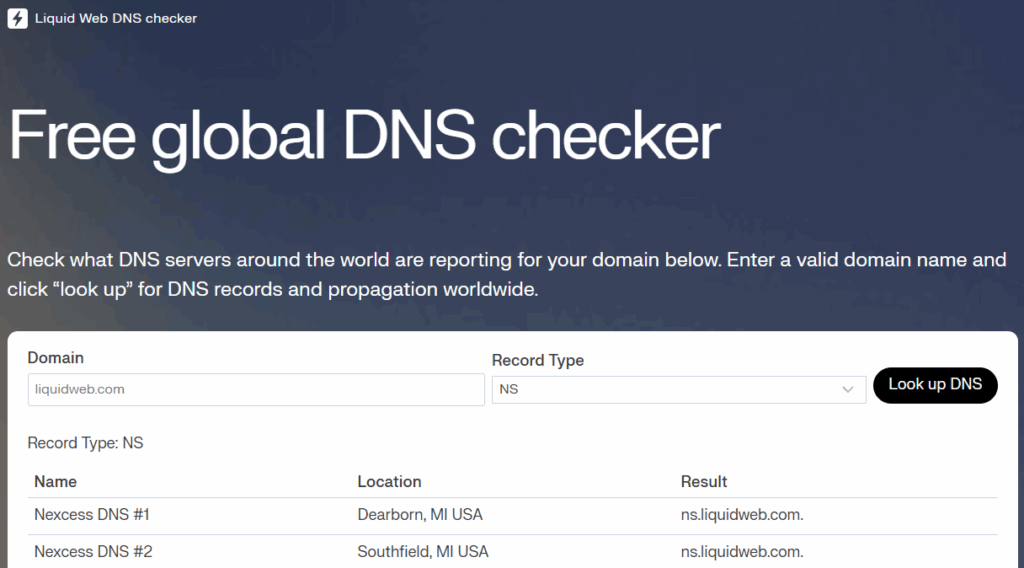
- Enter in your website into the Domain text field.
- Select NS as the Record Type using the dropdown menu.
- Click Look up DNS to find your results.
Learn more about DNS
Learn more about exactly how DNS records work by checking out the following articles:
DNS Tutorials
- If you use Liquid Web nameservers: edit your DNS records in your Liquid Web account.
- If you use private nameservers and have a cPanel server: edit your DNS by logging into WHM and searching for “Edit DNS Zone.”
- If you use a different registrar’s nameservers: edit your DNS records by logging into your account at your registrar.
