Introduction to Linux Operating System
Last Updated :
03 Dec, 2025
Linux is based on the UNIX operating system. UNIX is a powerful, multi-user, multitasking operating system originally developed in the 1970s at AT&T Bell Labs. It laid the foundation for many modern operating systems, including Linux.
- Linux is free and open-source, accessible to everyone.
- This promotes global collaboration and innovation.
- Linux offers efficient performance and strong security.
- It works well across many devices and industries.
Linux combines a wide range of open-source tools and components to form a complete computing environment. These components include file systems, user interfaces, system utilities, and application programs all working together to manage hardware and enable users to interact with their computer systems.
Distributions in Linux
A Linux distribution is a complete operating system built around the Linux kernel, combined with system software, libraries, and applications. It provides users with everything needed to run Linux on different types of devices.
- A distribution includes the Linux kernel, system libraries, and essential software tools.
- Different distributions are designed for different purposes such as desktops, servers, and embedded systems.
- Each distro comes with its own package manager, desktop environment, and default applications.
- Users can choose distributions based on performance, stability, ease of use, or customization level.
Popular Linux Distributions
Around 600 + Linux Distributions are available and some of the popular Linux distributions are:
Importance of Linux
Linux is a free, open-source operating system known for its flexibility, stability, and strong security. It is widely used in personal computing, server environments, and enterprise systems because of its performance and customization capabilities.
- Offers high security and stability, making it ideal for servers and development work.
- Fully open-source and free to use, modify, and distribute.
- Highly flexible and customizable to suit different user and industry needs.
- Supported by a large global community and a vast software ecosystem.
Architecture of Linux
Linux architecture refers to the layered structure of the Linux operating system that defines how its components - such as the kernel, shell, system libraries, and hardware - interact with each other to manage system resources and execute user programs efficiently. It has the following components:
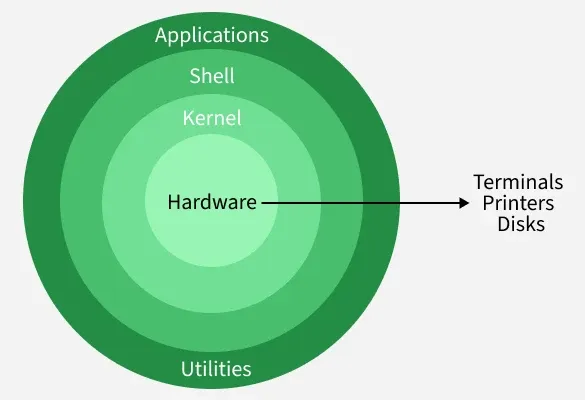
1. Kernel
The kernel is the core of the Linux operating system that manages hardware resources and controls communication between software and hardware.
- Handles process management, memory, and device control.
- Prevents conflicts between multiple running programs.
Types of Kernels: Monolithic, Microkernel, Hybrid, Exokernel
2. System Libraries
System libraries provide essential functions that allow applications to interact with the kernel without needing to access it directly.
- Contain reusable pre-written code for common system operations.
- Act as an interface between applications and the Linux kernel.
3. Shell
The shell is the command-line interface that allows users to communicate with the operating system by entering commands.
- Interprets and executes user commands.
- Acts as a bridge between user actions and kernel processing.
4. Hardware Layer
The hardware layer consists of physical components that execute commands and provide system resources.
- Includes CPU, RAM, storage, and input/output devices.
- Communicates with the OS using device drivers and kernel services.
5. System Utilities
System utilities are built-in tools that help users manage, configure, and maintain the operating system.
- Used for tasks like software installation, user management, and monitoring.
- Simplify system administration processes for both beginners and administrators.
Applications of Linux Operating System
The Linux operating system is widely used across multiple domains due to its flexibility, strong security, and open-source nature. It supports a wide range of applications across different industries, as outlined below.
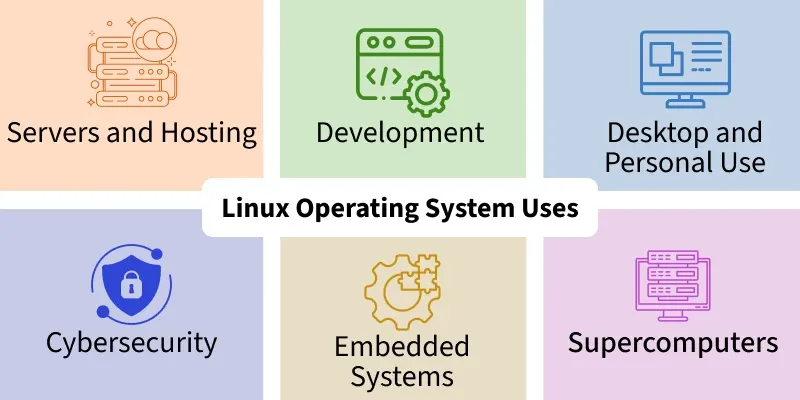
[Application 1]: Servers and Hosting
- Powers most web servers, cloud platforms, and data centers worldwide.
- Offers high stability, security, and uptime for critical services.
[Application 2]: Development
- Provides powerful tools and environments for coding, testing, and debugging.
- Supports multiple programming languages and frameworks.
[Application 3]: Desktop and Personal Use
- Offers customizable and secure desktop environments.
- Supports daily computing tasks like browsing, office work, and media usage.
[Application 4]: Cybersecurity
- Widely used for ethical hacking and penetration testing (e.g., Kali Linux).
- Provides advanced tools for threat detection and security analysis.
[Application 5]: Embedded Systems
- Runs efficiently on low-resource devices like IoT and routers.
- Supports real-time processing and hardware-level control.
[Application 6]: Supercomputers
- Used in high-performance computing environments worldwide.
- Handles massive scientific calculations and simulations efficiently.
[Application 7]: Education
- Helps students learn programming, networking, and system administration.
- Free and open-source, making it ideal for academic institutions.
Selecting a Linux Distribution Based on Your Requirements
Selecting a Linux distribution depends on your personal needs, experience level, and the purpose for which you want to use the operating system. Different distributions are designed for tasks like development, security, servers, or everyday desktop use, offering flexibility and customization for every type of user.
For Beginners
- Ubuntu provides an easy-to-use interface with strong community support for new users.
- Linux Mint offers a Windows-like experience, making it comfortable for first-time Linux users.
For Advanced Users
- Arch Linux is known for minimalism and deep system customization.
- Gentoo allows full control over system configuration but requires advanced knowledge.
For Developers
- Fedora offers the latest development tools and technologies.
- Debian is highly stable with a large software repository for development and production.
For Servers
- CentOS provides enterprise-level stability similar to Red Hat Enterprise Linux (RHEL).
- Ubuntu Server is popular for its ease of use and strong community support.
For Lightweight Systems
- Lubuntu is optimized for low-resource systems and older hardware.
- Puppy Linux is extremely lightweight and runs well on very old computers.
For Security Professionals
- Kali Linux is designed for penetration testing and ethical hacking with pre-installed security tools.
- Used widely for cybersecurity training, vulnerability assessment, and digital forensics.
Installing Linux
Selecting a Ubuntu, Fedora, or Linux Mint distribution which suits your needs is the initial step in the straightforward procedure for installing Linux.
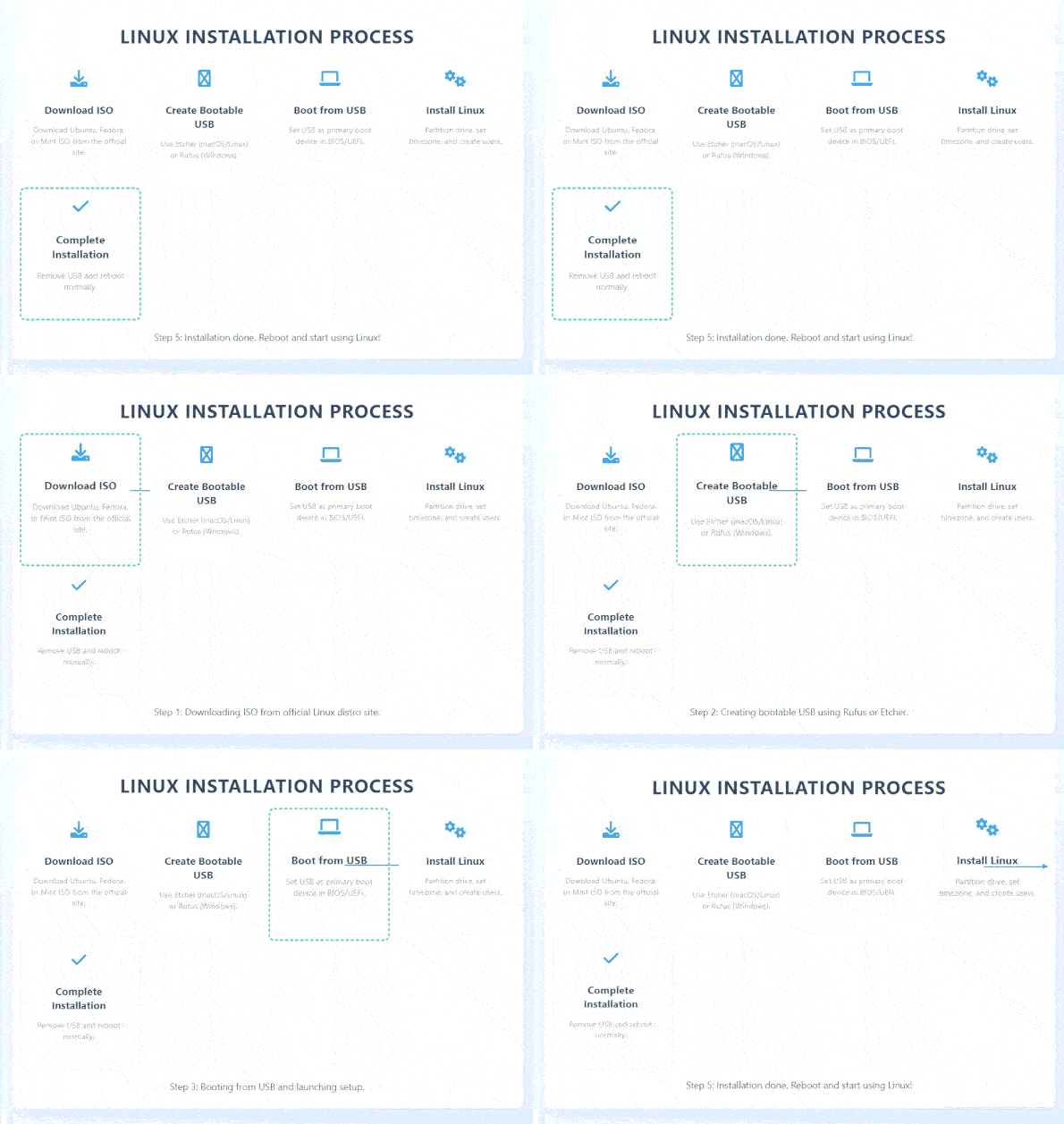 Installing Linux on bootable USB drive
- Download the ISO file from the official Linux distribution website.
- Create a bootable USB using Rufus (Windows) or Balena Etcher (Linux/macOS).
- Insert the USB drive and restart your computer.
- Enter BIOS/UEFI settings and set the USB as the first boot device.
- Boot from the USB and start the Linux installation process.
- Select language, partition disk, and create a user account.
- Complete the installation, remove the USB, and reboot the system.
Installing Software on Linux
On Linux, installing software is simple.
- For Debian-based systems (like Ubuntu), use package managers like
apt
sudo apt install package_name
sudo dnf install package_name
- Software centers are another source for a graphical application installation and searching interface.
- For Python installation specifics, detailed guidance can be found in the provided link.
Linux Commands
Basic tools for utilizing the command line interface (CLI) to communicate with the operating system are Linux commands. Commonly used commands like:
- ls – Lists contents of directories
- cd – Changes the current directory
- pwd – Displays the current directory path
- cp, mv, rm – Used to copy, move, and delete files respectively
- free – Shows memory usage
df – Checks disk space usage- top – Monitors running processes
- netstat, ifconfig, ping – Help monitor and troubleshoot network connections
Package management differs depending on the distribution; Fedora-based machines use dnf, while Debian-based systems use apt. Commands like cat, grep, awk, and sed are required for editing text files. Knowing and performing these directions well enables. For clear understanding about the Linux commands refer this link.
History of Linux
The history of Linux shows its growth from a personal project into the backbone of modern computing systems worldwide.
[Phase-1]: Creation
- Linux was created by Linus Torvalds in 1991 as a free and open-source operating system kernel.
- It was inspired by UNIX and the MINIX operating system.
- Developers from around the world contributed to improving the Linux kernel.
- This led to the development of complete Linux systems called Linux distributions.
[Phase-3]: Growth and Adoption
- Linux started being used in servers, desktops, and enterprise environments.
- Major distributions like Debian, Red Hat, and Ubuntu increased its popularity.
[Phase-4]: Modern Linux
- Today, Linux powers servers, supercomputers, smartphones (Android), cloud systems, and embedded devices.
- It is valued for its security, stability, and open-source nature.
Linux Tutorials | Getting Started | Introduction
Explore
Getting Started with Linux
Installation with Linux
Linux Commands
Linux File System
Linux Kernel
Linux Networking Tools
Linux Process
Linux Firewall
Shell Scripting & Bash Scripting
Linux Administrator System