Introduction to UNIX System
Last Updated :
15 Nov, 2025
UNIX is a multitasking and multiuser operating system designed to provide a stable, secure, and efficient computing environment. It was originally developed at AT&T Bell Labs and later became the foundation for many modern operating systems.
- It supports the execution of multiple tasks or processes simultaneously.
- It is widely known for its reliability, structured design, and long-term stability.
- Its design principles have influenced many modern systems such as Linux, BSD, and macOS.
Key Features
The key features of the UNIX operating system are listed below:
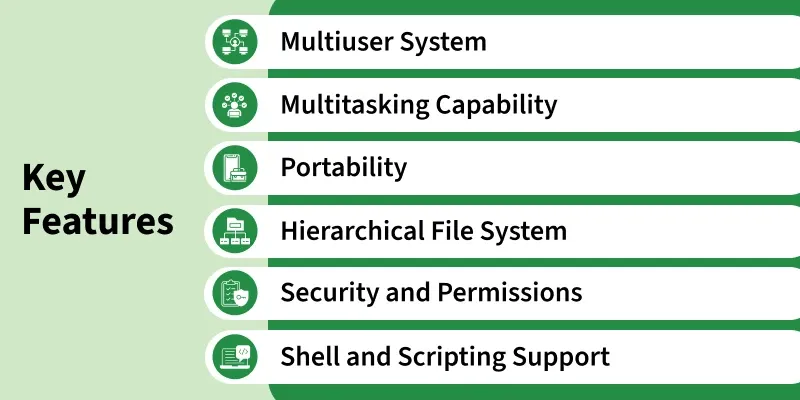
1. Multiuser System
- Multiple users can access the system at the same time without affecting one another’s processes.
- Each user gets separate permissions and environments to ensure privacy and secure operations.
2. Multitasking Capability
- UNIX can execute several processes simultaneously through efficient CPU scheduling.
- Background and foreground tasks can run together, improving productivity and resource usage.
3. Portability
- Written mostly in the C language, allowing easy movement of UNIX to different hardware platforms.
- Only minimal changes are required to adapt UNIX to new systems, making it widely supported.
4. Hierarchical File System
- Files and directories are arranged in a tree-like structure, starting from the root
/. - This structure makes navigation, file organization, and data access simple and systematic.
5. Security and Permissions
- UNIX assigns permissions (read, write, execute) to user, group, and others for file protection.
- Authentication through usernames and passwords ensures secure access control.
6. Shell and Scripting Support
- The shell acts as a command interpreter, allowing users to communicate with the system.
- Shell scripting automates repetitive tasks, making system management faster and easier.
Layered Structure of UNIX Operating System
The layered structure of the UNIX operating system organizes its components into hierarchical levels-hardware, kernel, system utilities, and applications to ensure efficient, secure, and modular system functioning.

The following points describe the role and functioning of each layer in the UNIX architecture:
[Layer-1]: Hardware
- Represents the physical components of the computer, such as the CPU, memory, storage devices, and input/output hardware.
- All system operations depend on this layer, as it forms the base of the entire UNIX architecture.
[Layer-2]: Kernel
- The kernel is the core of the UNIX operating system and directly interacts with the hardware.
- It manages essential tasks such as memory allocation, process scheduling, file handling, device control, and overall resource management.
[Layer-3]: System Programs, Commands, and Utilities
- This layer includes compilers (cc, as, ld), editors (vi, ed), text processors (nroff), and the shell (sh).
- It also contains common UNIX tools and commands like wc, grep, date, who, and a.out, which rely on the kernel to perform different functions such as text processing, file management, and system monitoring.
[Layer-4]: Application Layer
- Represents user-developed or external application programs that run on top of system utilities and shell environment.
- These applications use underlying layers (system utilities and kernel) to execute tasks successfully and provide services to the user.
History of UNIX
The history of UNIX traces its evolution from a simple research project at Bell Labs to one of the most influential operating systems in the world.
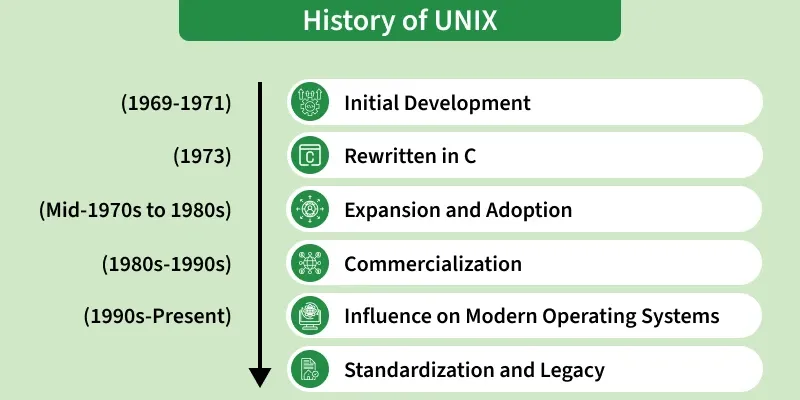
[Phase-1]: Initial Development
- Began between 1969–1971 at AT&T Bell Labs by Ken Thompson, Dennis Ritchie, and their team.
- The first UNIX version was developed on a PDP-7 machine.
- It was written entirely in assembly language, making it hardware-dependent.
[Phase-2]: Rewritten in C
- In 1973, UNIX was fully rewritten in the C programming language.
- This made the operating system portable across different hardware platforms.
- Its flexibility helped UNIX gain popularity in research and academic environments.
[Phase-3]: Expansion and Adoption
- During the mid-1970s to 1980s, universities like UC Berkeley created their own UNIX versions.
- This led to the development of BSD UNIX, adding advanced features and tools.
- AT&T introduced UNIX System V, resulting in two major UNIX families: BSD and System V.
[Phase-4]: Commercialization
- From the 1980s to 1990s, many tech companies built their commercial UNIX variants.
- Popular versions included Solaris (Sun), HP-UX (HP), AIX (IBM), and DEC UNIX.
- UNIX became widely used in enterprise servers, research labs, and workstations.
[Phase-5]: Influence on Modern Operating Systems
- In the 1990s, UNIX inspired the creation of Linux (1991) by Linus Torvalds.
- Modern systems like macOS, Android, and BSD variants follow UNIX design principles.
- Its architecture continues to shape today’s open-source and commercial OS ecosystems.
[Phase-6]: Standardization and Legacy
- Standards like POSIX were created to ensure compatibility across UNIX systems.
- UNIX concepts remain deeply rooted in networking, servers, and enterprise computing.
- Its design continues to influence modern computing, ensuring a strong long-lasting legacy.
Kernel in UNIX Operating System
The kernel is the core and most essential part of the UNIX operating system. It acts as the central controlling unit that manages all system resources and enables communication between hardware and software.
- The kernel directly interacts with the hardware and performs low-level tasks such as memory allocation, device control, and CPU scheduling.
- It manages processes, files, and system calls, ensuring that programs run smoothly and securely.
- The kernel provides an interface for applications to request system services without accessing the hardware directly, ensuring safe and controlled operations.
- It ensures multitasking, resource management, and protection, making UNIX stable, efficient, and secure.
Kernel and Its Block Diagram
The kernel and its block diagram illustrate how the UNIX kernel manages system calls, processes, files, and hardware interactions in a structured manner
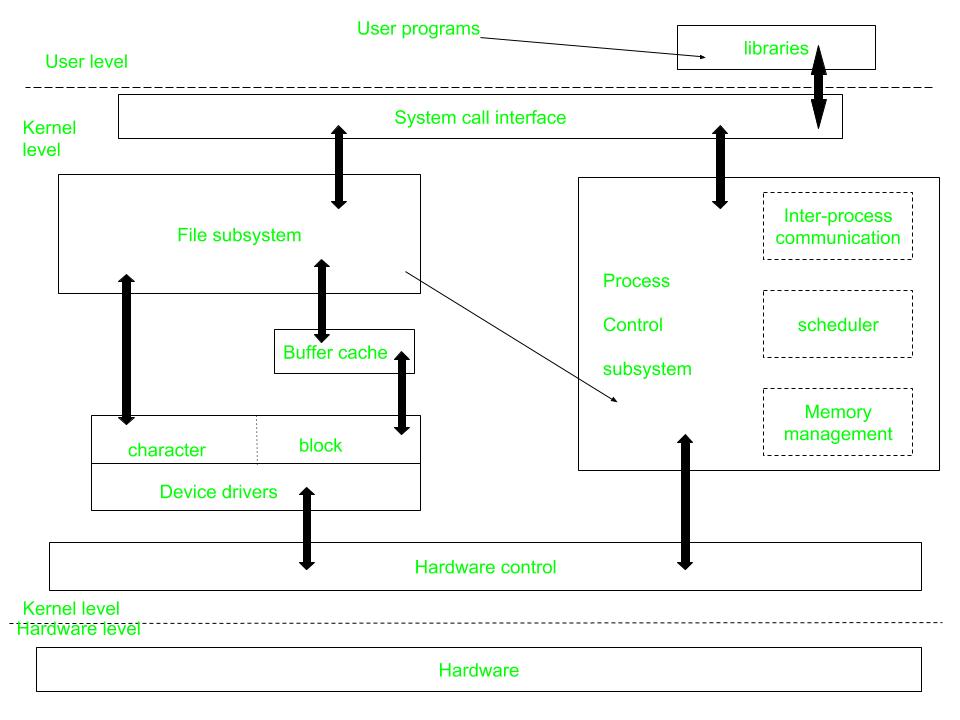
Here,
[Level 1]. User Level
This layer contains user programs and applications, which request services from the operating system using system calls. System calls behave like normal C functions, accessed through libraries linked at compile time.
System Call & Library Interface
- Acts as the communication boundary between user programs and the kernel, ensuring safe system access.
- C programs use library functions, while assembly programs can invoke system calls directly.
[Level 2]. Kernel Level
The Kernel Level manages core system operations such as processes, files, memory, and device control by directly interacting with the hardware.
1. File Subsystem
- Handles file-related tasks such as allocation, access permissions, data retrieval, and storage.
- Provides file-related system calls like open, read, write, close, stat, chmod, and chown.
2. Buffering & Block I/O
- Regulates data flow between the kernel and storage devices through a buffering mechanism.
- Works with block I/O device drivers to manage efficient disk read/write operations.
3. Device Drivers
- Kernel modules that control hardware components like disks, printers, and terminals.
- Support both buffered block devices and raw devices that bypass buffering.
4. Process Control Subsystem
- Manages process creation, scheduling, execution, and termination.
- Works closely with the file subsystem and allocates CPU time to running processes.
[Level 3]. Hardware Level
- Consists of physical components such as the CPU, memory, and input/output devices.
- Generates interrupts that the kernel must handle while managing ongoing tasks.
Difference Between Unix and Linux
Linux is essentially a clone of Unix. But, basic differences are shown below:
| Linux | Unix |
|---|
| The source code of Linux is freely available to its users | The source code of Unix is not freely available general public |
| It has graphical user interface along with command line interface | It only has command line interface |
| Linux OS is portable, flexible, and can be executed in different hard drives | Unix OS is not portable |
| Different versions of Linux OS are Ubuntu, Linux Mint, RedHat Enterprise Linux, etc. | Different version of Unix are AIS, HP-UX, BSD, Iris, Solaris, etc. |
| The file systems supported by Linux are as follows: xfs, ramfs, vfat, cramfsm, ext3, ext4, ext2, ext1, ufs, autofs, devpts, ntfs | The file systems supported by Unix are as follows: zfs, js, hfx, gps, xfs, vxfs |
| Linux is an open-source operating system that was first released in 1991 by Linus Torvalds. | Unix is a proprietary operating system that was originally developed by AT&T Bell Labs in the mid 1960s. |
| The Linux kernel is monolithic, meaning that all of its services are provided by a single kernel. | The Unix kernel is modular, meaning that it is made up of a collection of independent modules that can be loaded and unloaded dynamically. |
| Linux has much broader hardware support than Unix. | Unix was originally designed to run on large, expensive mainframe computers, while Linux was designed to run on commodity hardware like PCs and servers. |
| User Interface of Linux is Graphical or text-based. | User Interface of unix is text-based. |
| Command Line Interface of Linux is Bash, Zsh, Tcsh. | Command Line Interface of unix is Bourne, Korn, C, Zsh. |
Explore
Getting Started with Linux
Installation with Linux
Linux Commands
Linux File System
Linux Kernel
Linux Networking Tools
Linux Process
Linux Firewall
Shell Scripting & Bash Scripting
Linux Administrator System