sort Command in Linux with Example
Last Updated :
09 Nov, 2025
The sort command in Linux is used to sort a file, arranging the records in a particular order. By default, the sort command sorts file assuming the contents are ASCII. Using options in the sort command can also be used to sort numerically.
- Sorts text files alphabetically, numerically, by month, in reverse, and removes duplicates
- Sorts the contents of a text file, line by line.
- By default, the entire input is taken as the sort key. Blank space is the default field separator.
Let's start with a simple example. Consider a file named 'file.txt' with the following content.
cat file.txt
 Displaying content of file using cat command
Here we used cat command to display the content inside the file name 'file.txt'.
To sort the lines alphabetically, you can use the following command:
sort file.txt
 sort lines in text using sort command
Note: This command does not actually change the input file, i.e. file.txt . We can verify this using cat command .
 no change is done to real file
Syntax of sort Command in Linux
sort [OPTION]... [FILE]...
'options' refer to the various flags and parameters that can be used to customize the sorting behavior, and 'file' is the name of the file to be sorted.
Features of sort command
- Lines starting with a number will appear before lines starting with a letter.
- Lines starting with a letter that appears earlier in the alphabet will appear before lines starting with a letter that appears later in the alphabet.
- Lines starting with a uppercase letter will appear before lines starting with the same letter in lowercase.
Options Available in sort Command
These options help control how the sort command arranges data based on different formats like text, numbers, dates, and duplicates.
Options | Description |
|---|
-o | Specifies an output file for the sorted data. Functionally equivalent to redirecting output to a file. |
|---|
-r | Sorts data in reverse order (descending). |
|---|
-n | Sorts a file numerically (interprets data as numbers). |
|---|
-nr | Sorts a file with numeric data in reverse order. Combines -n and -r options. |
|---|
-k | Sorts a table based on a specific column number. |
|---|
-c | Checks if the file is already sorted and reports any disorder. |
|---|
-u | Sorts and removes duplicate lines, providing a unique sorted list. |
|---|
-M | Sorts by month names. |
|---|
Example 1: Sorting Mixed Uppercase and Lowercase Lines
When a file contains both uppercase and lowercase letters, the sort command sorts uppercase lines first, followed by lowercase ones.
Command:
cat mix.txt
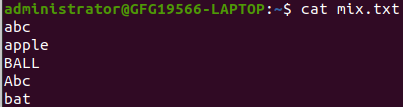 Displaying content of file using cat command
sort mix.txt
 sort uppercase and lowercase lines in text using sort command
Here,
- cat mix.txt: Displays the contents of the file.
- sort mix.txt: Sorts lines alphabetically; uppercase letters come before lowercase.
Example 2: Numeric Sorting in Text Files
By default, sort treats numbers as text and sorts them alphabetically. To perform numeric sorting, use the -n option.
cat file1.txt
 Displaying content of file using cat command
sort -n file1.txt
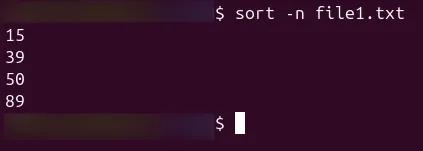
-n: Sorts the content numerically instead of alphabetically.- Useful for files containing numerical data such as IDs, prices, or scores.
Example 3: Sorting Lines in Reverse Order
To sort in reverse order, you can use the '-r' option:
cat example.txt
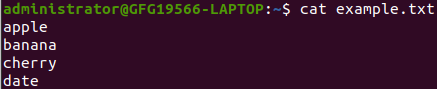 using cat command to display content inside file
Now sorting lines in reverse order using `-r` option in sort command
sort -r example.txt
 sorting lines in reverse order using -r with sort command
- Helpful when you want descending order results (e.g., highest to lowest).
Example 4: Sorting by Specific Fields
If you have structured data with multiple columns (like employee records), you can sort based on a specific field or column using the -k option.
Command:
cat employee_data.txt
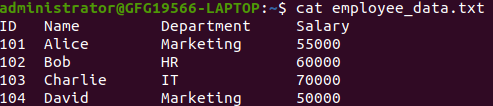 Displaying content of file using cat command
To achieve this, you can use the 'sort' command
sort -k3 employee_data.txt
-k3 Sorts the data based on the third column (e.g., Department).
 sorting a particular column using sort command
In this example, the employee records are now sorted alphabetically based on the 'Department' column. The 'sort' command, with the custom delimiter, allows you to efficiently organize and analyze tab-separated data, making it a valuable tool for managing structured information in various scenarios.
Application and uses of sort command
The sort command helps organize data easily without changing the original file, making it safe for repeated use.
- It can sort any type of file be it table file text file numeric file and so on.
- Sorting can be directly implemented from one file to another without the present work being hampered.
- Sorting of table files on the basis of columns has been made way simpler and easier.
- So many options are available for sorting in all possible ways.
- The most beneficial use is that a particular data file can be used many times as no change is made in the input file provided.
- Original data is always safe and not hampered.
Explore
Getting Started with Linux
Installation with Linux
Linux Commands
Linux File System
Linux Kernel
Linux Networking Tools
Linux Process
Linux Firewall
Shell Scripting & Bash Scripting
Linux Administrator System