A Linux distribution is an operating system built on the Linux kernel, bundled with essential software, tools, and package managers, customized to serve different users like developers, enterprises, cybersecurity professionals, and general users.
- Includes the Linux kernel, system tools, package manager, and optional desktop environment.
- Comes with pre-installed tools, reducing manual setup.
- Built for different purposes like hacking, servers, development, or desktop use.
- Offers flexibility and customization based on user needs.
Top Linux Distributions
Here are some of the most popular Linux distributions, each with its own unique characteristics:
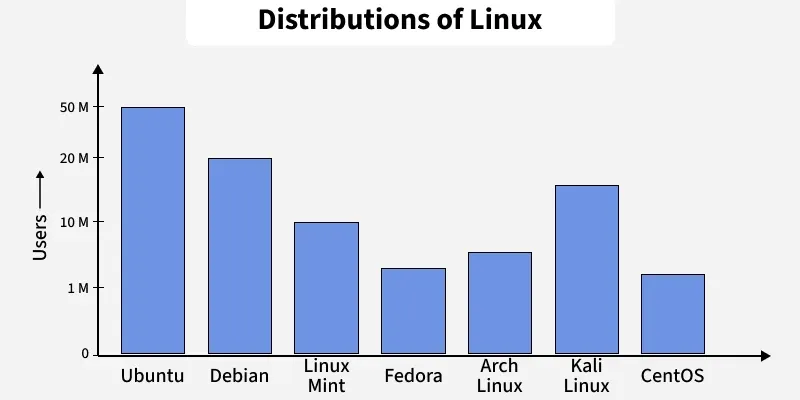 Estimated Users of Linux Distributions by 2025
1. Ubuntu
- Ubuntu is one of the most widely used Linux distributions, especially for beginners. It’s user-friendly and has a large community, which means help is easy to find. It’s also supported by most software vendors.
- Features: Easy installation, long-term support (LTS) versions, and a large software repository.
- Audience: Beginners and general users
2. Kali Linux
- Kali Linux is specifically designed for cybersecurity tasks such as penetration testing, digital forensics, and ethical hacking. It comes preloaded with more than 600 security tools and is widely used by cybersecurity learners and professionals.
- Features: Pre-installed tools (Nmap, Metasploit, Wireshark, Burp Suite), rolling release updates, customized for security and network testing.
- Audience: Ethical hackers, cybersecurity professionals, penetration testers
3. Debian
- Debian is known for its stability and is often used as the base for other distros, like Ubuntu. It’s a great choice for those who want a solid, secure system and don’t need the latest bleeding-edge features.
- Features: Reliable, secure, and versatile.
- Audience: Advanced users and developers
4. Fedora
- Fedora is known for always having the latest software and technologies. It’s backed by Red Hat, a major player in the enterprise Linux world, and is often used by developers who want to work with cutting-edge technologies.
- Features: Newest software, excellent for development, supported by Red Hat.
- Audience: Developers and enthusiasts
5. Arch Linux
- Arch Linux is for those who want to fully customize their system. It’s a rolling release distro, meaning it’s constantly updated, and it gives users complete control over what gets installed on their system.
- Features: Minimalist, highly customizable, rolling releases.
- Audience: Advanced users and tinkerers
6. CentOS
- CentOS is based on Red Hat Enterprise Linux (RHEL) and is commonly used for server environments. It’s free and offers long-term stability, which is perfect for businesses and data centers.
- Features: Enterprise-grade stability, long-term support.
- Audience: Servers and enterprises
7. Mint
- Linux Mint is an easy-to-use distribution that looks and feels similar to Windows. It’s a good choice for users who are new to Linux and want something familiar.
- Features: Simple, user-friendly, and ready-to-use out of the box.
- Audience: Beginners and those transitioning from Windows
Key Components of a Linux Distribution
Every Linux distribution is built from essential components that work together to create a fully functional operating system. These components ensure the system can manage hardware, run software, and provide a seamless user experience -
1. Linux Kernel:
The Linux kernel is the core of the operating system. It manages hardware resources, controls system processes, handles memory management, and provides device drivers. It acts as a bridge between the hardware and user applications, ensuring smooth communication and operation.
2. System Libraries and Utilities:
System libraries, such as the GNU C Library (glibc), play a crucial role in providing standard functions and APIs that applications use to interact with the kernel. These libraries are essential for running programs and executing system calls effectively.
3. User Interface (UI):
Linux distributions offer two primary types of user interfaces -
- Graphical User Interfaces (GUIs): Popular GUIs like GNOME, KDE, and Xfce provide a user-friendly visual environment for interacting with the system.
- Command-Line Interface (CLI): For more advanced users, the CLI offers direct control of the system through terminal commands.
4. Software Packages:
Distributions come preloaded with various software packages tailored for specific use cases. These include -
- Productivity tools (e.g., LibreOffice)
- Web browsers (e.g., Firefox, Chromium)
- Media players (e.g., VLC)
- Development tools (e.g., compilers, IDEs)
5. Package Management System:
Package managers streamline the installation, update, and removal of software. Each distribution uses its own package manager, such as -
- APT for Debian-based distros like Ubuntu.
- YUM/DNF for Red Hat-based distros like Fedora and CentOS.
- Pacman for Arch Linux.
6. Configuration and Customization:
Linux distributions provide extensive tools to configure and personalize the system. Users can adjust network settings, user accounts, security policies, and display preferences. This flexibility allows Linux to be tailored for everything from personal use to enterprise-level deployments.
7. Support and Community:
Most Linux distributions have strong support networks, including documentation, forums, and active communities. These resources allow users to seek help, learn from others, and contribute to the development and improvement of their chosen distribution.
Use Case-Based Classification of Linux Distros
Different distros are designed for specific purposes such as:
- Enterprise and business use (Red Hat, CentOS, Rocky Linux)
- Cybersecurity and penetration testing (Kali Linux, Parrot OS)
- Developers and programmers (Fedora, Arch, Ubuntu)
- Multimedia creation (Ubuntu Studio, AV Linux)
- Lightweight and old hardware use (Lubuntu, Puppy Linux)
Benefits of Using Linux Distributions
Linux distributions are widely used because they provide a flexible, secure, and cost-effective operating system. Here are the key reasons why Linux distributions are preferred:
1. Cost-Free and Open Source
- Most Linux distributions are free to use and don’t require licensing fees.
- They are open-source, allowing users to view, modify, and distribute the code.
2. Customizable
- Linux allows users to modify the operating system’s appearance and functionality according to their needs.
- Users can choose from a variety of desktop environments, file systems, and tools.
3. Security
- Linux is highly secure and less vulnerable to viruses and malware compared to many other operating systems.
- Regular updates and strong user permissions enhance system security.
4. Resource-Efficient
- Linux can run efficiently on older or low-spec hardware, extending the usability of older machines.
- Lightweight distributions like Lubuntu and Puppy Linux are designed for systems with limited resources.
5. Development and Programming
- Linux distributions are ideal for software development due to their compatibility with programming languages and tools.
- Many distributions include pre-installed compilers, editors, and debugging tools.
6. Diverse Options
- Linux offers a variety of distributions tailored to different use cases, such as personal use, servers, gaming, or education.
- Examples: Ubuntu (general use), CentOS (servers), Kali Linux (security).
7. Stability and Reliability
- Linux distributions are known for their stability, especially in server environments.
- They are widely used in mission-critical systems due to their consistent performance.
- A large global community provides extensive support through forums, wikis, and online resources.
- This makes troubleshooting and learning easier for users at all levels.
Choosing the Right Linux Distribution
Choosing the right Linux distribution depends on your needs. Here are a few factors to consider:
- Experience Level: If you’re new to Linux, it’s best to start with a beginner-friendly distro like Ubuntu or Linux Mint. If you're more experienced or need a specialized environment, you might consider Fedora, Debian, or Arch Linux.
- Use Case: For general desktop use, Ubuntu or Mint are excellent choices. If you’re setting up a server, you might want to go with CentOS or Debian. Developers often prefer Fedora or Arch for its latest software.
- System Resources: Some distros are lighter on resources than others. If you’re working with older hardware, distros like Lubuntu or Xubuntu are designed to run efficiently on lower-spec machines.
Also Check:
Explore
Getting Started with Linux
Installation with Linux
Linux Commands
Linux File System
Linux Kernel
Linux Networking Tools
Linux Process
Linux Firewall
Shell Scripting & Bash Scripting
Linux Administrator System