matplotlib.pyplot.figure() in Python
Last Updated :
14 Oct, 2025
matplotlib.pyplot.figure() function is used to create a new figure for our plots. In Matplotlib a figure is like a blank space where all our plot elements such as axes, titles and labels are placed. In this article, we will see how to use figure() to create and customize figures using Python.
Syntax
matplotlib.pyplot.figure(num=None, figsize=None, dpi=None, facecolor=None, edgecolor=None, frameon=True, FigureClass=<class 'matplotlib.figure.Figure'>, clear=False, **kwargs)
Parameters:
- num: A number to identify the figure.
- figsize: A tuple (width, height) in inches. This sets the size of the figure.
- dpi: Resolution of the figure.
- facecolor: Background colour of the figure.
- edgecolor: Colour of the border around the figure.
- frameon: If True frame around the figure is shown (default is True).
- clear: If True it clears any existing figure before creating a new one.
- kwargs: Other options we can use for extra customization.
Return Value: Returns a "figure" object, this object is passed to the backend which helps display the plot.
We will be using Matplotlib library for its implementation.
- lines.Line2D([0, 1, 0.5], [0, 1, 0.3]): Creates a line object that connects the points (0, 0), (1, 1) and (0.5, 0.3). These are the coordinates of the points for the line.
- fig.add_artist(): Adds created line to the figure.
Python
import matplotlib.pyplot as plt
import matplotlib.lines as lines
fig = plt.figure()
fig.add_artist(lines.Line2D([0, 1, 0.5], [0, 1, 0.3]))
fig.add_artist(lines.Line2D([0, 1, 0.5], [1, 0, 0.2]))
plt.title('Simple Example of matplotlib.pyplot.figure()', fontsize=14, fontweight='bold')
plt.show()
Output:
 Basic Figure
- figsize=(6, 4): Sets size of the figure to 6 inches by 4 inches.
Python
import matplotlib.pyplot as plt
fig = plt.figure(figsize=(6, 4))
plt.plot([1, 2, 3], [1, 4, 9])
plt.title('Figure with Custom Size')
plt.show()
Output:
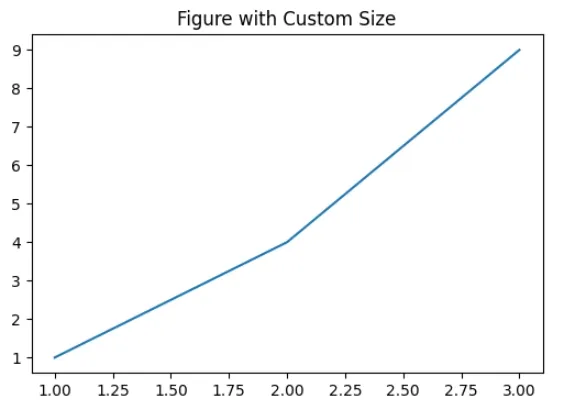 Custom Size
Python
Custom Size
Python
import matplotlib.pyplot as plt
plt.figure(figsize=(6, 4))
plt.plot([1, 2, 3], [1, 4, 9])
plt.title("First Figure")
plt.show()
plt.figure(figsize=(8, 6))
plt.plot([1, 2, 3], [9, 4, 1])
plt.title("Second Figure")
plt.show()
Output:
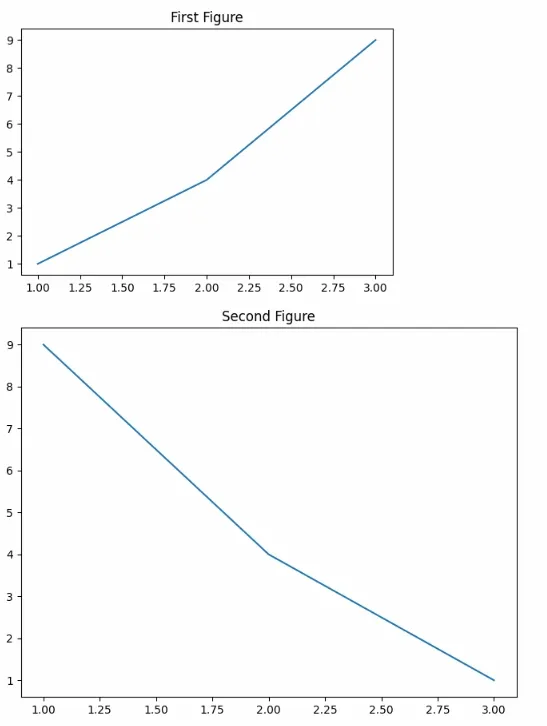 Multiple Figures
With matplotlib.pyplot.figure() function we can easily create a customized space for our plots which gives us the full control over the layout, size and appearance of our visualizations.
Explore
Python Fundamentals
Python Data Structures
Advanced Python
Data Science with Python
Web Development with Python
Python Practice