
 Mohammed Noufal
The SQLAlchemy Toolkit and Object Relational Mapper are extensive utilities that work with Python and databases on the server at your web hosting provider. This toolkit provides a package of popular persistence patterns designed for economical and robust database accessibility. SQLAlchemy allows a developer to use simple SQL statements that provide a helpful method to connect database tables with user-defined Python classes. It primarily uses the SQL Expression language. Other object relational mapping tools often to not have the same level of simplicity. The instructions provided in this post are primarily for a root user on a Liquid Web dedicated server.
Key points
Here are the key points in this article:
- What is SQLAlchemy?
- Understanding SQLAlchemy interactions
- Understanding SQLAlchemy components
- Knowing how to install SQLAlchemy with PIP in a Python virtual environment
- Knowing how to install SQLAlchemy with PIP on AlmaLinux ad Ubuntu
- Learning how to install SQLAlchemy with Git
- Checking and verifying the SQLAlchemy version currently installed
- Exploring additional SQLAlchemy tools
What is SQLAlchemy?
SQLAlchemy is a popular Python SQL toolkit with an object relational mapper tool that provides application developers full SQL capability and flexibility. It is a cross-platform, open-source software released under the MIT license. It provides a complete set of well-known, enterprise-level persistence patterns designed for fast and high-performance database access that is converted into a simple and Pythonic domain language.
SQLAlchemy is famous for its object-relational mapper, or ORM, which allows classes to be mapped to the database and used to transform data between databases or OOP (object-oriented programming) languages like Python.
SQLAlchemy interactions
SQLAlchemy has several ways of dealing directly with the data within a database:
- Raw SQL. Allows for custom, explicit SQL statements that can be developed for a specific purpose or database.
- SQL Expression Language. A SQL-based language that accurately reflects relational database structures and expressions using Python constructs.
- Object Relational Mapper (ORD), With respect to databases, object-relational mapping is a method of coding that translates data between different system types using an object-oriented programming language:
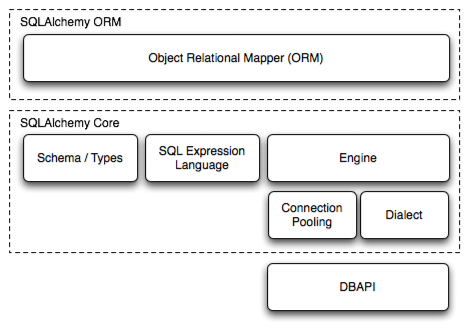
SQLAlchemy components
Engine
The engine is the entryway for the SQLAlchemy application and functions as an abstraction layer of the API and databases. It interacts with the dialect components and the connection pool to deliver SQL statements from SQLAlchemy to the database.
Dialect
Dialect is the framework SQLAlchemy uses to interact with various DBAPI database implementations. All dialects need a suitable DBAPI driver to be installed. SQLAlchemy maintains dialects for multiple database services, including:
- MySQL
- Microsoft SQL Server
- Oracle
- PostgreSQL
- SQLite
- Firebird
- Informix
- Sybase
MetaData
MetaData consists of multiple Python assets depicting tables and other schema-level items. The metadata for the database can be declared by explicitly naming the different components, as well as their properties, using constructs like:
- Table
- Column
- ForeignKey
MetaData can also be generated easily by SQLAlchemy using a procedure termed reflection.
Prerequisites
Here are the prerequisites involved with a PIP install of SQLAlchemy:
- Systems with AlmaLinux 9 or Ubuntu 22.04 installed and running.
- Python 3.11.3 installation with PIP3.11, python3-pip, venv, virtualenv, and setuptools installed on the servers:
- Server permissions via root access to your Linux system or such access facilitated via the sudo command.
How to install SQLAlchemy with PIP
Set up the Python virtual environment
Start by installing the software in a Python virtual environment. Before installing SQLAlchemy, we should set up a virtualenv (or venv, depending on your Python version). If virtualenv is not already installed, use the following command to install it:
[root@noufal ~]# pip3.11 install virtualenv
Collecting virtualenv
  Downloading virtualenv-20.23.0-py3-none-any.whl (3.3 MB)
     ━━━━━━━━━━━━━━━━━━━━━━━━━━━━━━━━━━━━━━━━ 3.3/3.3 MB 29.9 MB/s eta 0:00:00
Collecting distlib<1,>=0.3.6
  Downloading distlib-0.3.6-py2.py3-none-any.whl (468 kB)
     ━━━━━━━━━━━━━━━━━━━━━━━━━━━━━━━━━━━━━━━━ 468.5/468.5 kB 52.3 MB/s eta 0:00:00
Collecting filelock<4,>=3.11
  Downloading filelock-3.12.0-py3-none-any.whl (10 kB)
Collecting platformdirs<4,>=3.2
  Downloading platformdirs-3.5.1-py3-none-any.whl (15 kB)
Installing collected packages: distlib, platformdirs, filelock, virtualenv
Successfully installed distlib-0.3.6 filelock-3.12.0 platformdirs-3.5.1 virtualenv-20.23.0
Before installing SQLAlchemy, use the following commands to create a virtualenv:
- ~]# virtualenv sqlalchemy
- ~]# cd sqlalchemy
- ~]# source bin/activate
Here is the output:
[root@noufal ~]# virtualenv sqlalchemy
created virtual environment CPython3.11.3.final.0-64 in 837ms
  creator CPython3Posix(dest=/root/sqlalchemy, clear=False, no_vcs_ignore=False, global=False)
  seeder FromAppData(download=False, pip=bundle, setuptools=bundle, wheel=bundle, via=copy, app_data_dir=/root/.local/share/virtualenv)
    added seed packages: pip==23.1.2, setuptools==67.7.2, wheel==0.40.0
  activators BashActivator,CShellActivator,FishActivator,NushellActivator,PowerShellActivator,PythonActivator
[root@noufal ~]# cd sqlalchemy
[root@noufal sqlalchemy]# source bin/activate
(sqlalchemy) [root@noufal sqlalchemy]#
Install SQLAlchemy using PIP in general
Next, the quickest method to install SQLAlchemy is to use PIP3.11, the Python package manager. You can install SQLAlchemy using the following command for PIP3.11:
- ~]# pip3.11 install sqlalchemy
Here is the output:
[root@noufal ~]# pip3.11 install sqlalchemy
Collecting sqlalchemy
  Downloading SQLAlchemy-2.0.15-cp311-cp311-manylinux_2_17_x86_64.manylinux2014_x86_64.whl (2.8 MB)
     ━━━━━━━━━━━━━━━━━━━━━━━━━━━━━━━━━━━━━━━━ 2.8/2.8 MB 33.1 MB/s eta 0:00:00
Collecting typing-extensions>=4.2.0
  Downloading typing_extensions-4.6.2-py3-none-any.whl (31 kB)
Collecting greenlet!=0.4.17
  Downloading greenlet-2.0.2-cp311-cp311-manylinux_2_17_x86_64.manylinux2014_x86_64.whl (618 kB)
     ━━━━━━━━━━━━━━━━━━━━━━━━━━━━━━━━━━━━━━━━ 618.8/618.8 kB 50.1 MB/s eta 0:00:00
Installing collected packages: typing-extensions, greenlet, sqlalchemy
Successfully installed greenlet-2.0.2 sqlalchemy-2.0.15 typing-extensions-4.6.2
Next, we will demonstrate how to — using PIP — install SQLAlchemy and other necessary packages onto AlmaLinux and Ubuntu Linux servers.
Install SQLAlchemy using PIP on AlmaLinux
The executable file related to Python 3.11 can be found using the following command to look for it in the path environment variable:
[root@Almalinux9 ~]# which python3.11
/usr/local/bin/python3.11
[root@Almalinux9 ~]#
Before installing SQLAlchemy, you can upgrade PIP3 with the following command:
- ~]# python3.11 -m pip install –upgrade pip
Here is the output:
[root@Almalinux9 ~]# python3.11 -m pip install --upgrade pip
Requirement already satisfied: pip in /usr/local/lib/python3.11/site-packages (22.3.1)
Collecting pip
  Downloading pip-23.1.2-py3-none-any.whl (2.1 MB)
     ━━━━━━━━━━━━━━━━━━━━━━━━━━━━━━━━━━━━━━━━ 2.1/2.1 MB 30.4 MB/s eta 0:00:00
Installing collected packages: pip
  Attempting uninstall: pip
    Found existing installation: pip 22.3.1
    Uninstalling pip-22.3.1:
      Successfully uninstalled pip-22.3.1
Successfully installed pip-23.1.2
You can now install SQLAlchemy via PIP using the following command:
- ~]# pip3.11 install sqlalchemy
Here is the output:
[root@Almalinux9 ~]# pip3.11 install sqlalchemy
Collecting sqlalchemy
  Downloading SQLAlchemy-2.0.15-cp311-cp311-manylinux_2_17_x86_64.manylinux2014_x86_64.whl (2.8 MB)
     ━━━━━━━━━━━━━━━━━━━━━━━━━━━━━━━━━━━━━━━━ 2.8/2.8 MB 28.0 MB/s eta 0:00:00
Collecting typing-extensions>=4.2.0 (from sqlalchemy)
  Downloading typing_extensions-4.6.2-py3-none-any.whl (31 kB)
Collecting greenlet!=0.4.17 (from sqlalchemy)
  Downloading greenlet-2.0.2-cp311-cp311-manylinux_2_17_x86_64.manylinux2014_x86_64.whl (618 kB)
     ━━━━━━━━━━━━━━━━━━━━━━━━━━━━━━━━━━━━━━━━ 618.8/618.8 kB 40.3 MB/s eta 0:00:00
Installing collected packages: typing-extensions, greenlet, sqlalchemy
Successfully installed greenlet-2.0.2 sqlalchemy-2.0.15 typing-extensions-4.6.2
Install SQLAlchemy using PIP on Ubuntu
Before proceeding with the SQLAlchemy installation, you must install Python using the following command:
- ~# apt-get install python3.11
Here is the output:
root@ubuntu22:~# apt-get install python3.11
Reading package lists... Done
Building dependency tree... Done
Reading state information... Done
---
---
root@ubuntu22:~#
You can install SQLAlchemy via PIP using the following command:
- ~# pip3.11 install SQLAlchemy
Here is the output:
root@ubuntu22:~# pip3.11 install SQLAlchemy
Collecting SQLAlchemy
  Downloading SQLAlchemy-2.0.15-cp311-cp311-manylinux_2_17_x86_64.manylinux2014_x86_64.whl (2.8 MB)
     ━━━━━━━━━━━━━━━━━━━━━━━━━━━━━━━━━━━━━━━━ 2.8/2.8 MB 25.4 MB/s eta 0:00:00
Collecting typing-extensions>=4.2.0 (from SQLAlchemy)
  Using cached typing_extensions-4.6.2-py3-none-any.whl (31 kB)
Collecting greenlet!=0.4.17 (from SQLAlchemy)
  Downloading greenlet-2.0.2-cp311-cp311-manylinux_2_17_x86_64.manylinux2014_x86_64.whl (618 kB)
     ━━━━━━━━━━━━━━━━━━━━━━━━━━━━━━━━━━━━━━━━ 618.8/618.8 kB 43.8 MB/s eta 0:00:00
Installing collected packages: typing-extensions, greenlet, SQLAlchemy
Successfully installed SQLAlchemy-2.0.15 greenlet-2.0.2 typing-extensions-4.6.2
When working with PostgreSQL and MySQL, SQLAlchemy requires DBAPI drivers for PostgreSQL and MySQL (python3-psycopg2, python3-mysqldb). To install DBAPI drivers for PostgreSQL and MySQL, you can use the following commands:
- ~# apt-get -y install python3-psycopg2
- ~# apt-get -y install python3-mysqldb
Install SQLAlchemy using Git
You can perform a SQLAlchemy installation using Git by following theses commands:
- ~]# git clone https://github.com/sqlalchemy/sqlalchemy.git
- ~]# cd sqlalchemy/
- ~]# python3.11 setup.py install
Here is the output:
[root@noufal ~]# git clone https://github.com/sqlalchemy/sqlalchemy.git
Cloning into 'sqlalchemy'...
remote: Enumerating objects: 219474, done.
remote: Counting objects: 100% (4147/4147), done.
remote: Compressing objects: 100% (1131/1131), done.
remote: Total 219474 (delta 2663), reused 3772 (delta 2518), pack-reused 215327
Receiving objects: 100% (219474/219474), 98.83 MiB | 19.14 MiB/s, done.
Resolving deltas: 100% (165177/165177), done.
[root@noufal ~]# cd sqlalchemy/
[root@noufal sqlalchemy]# python3.11 setup.py install
running install
--
--
Installed /usr/local/lib/python3.11/site-packages/SQLAlchemy-2.0.16.dev0-py3.11.egg
Processing dependencies for SQLAlchemy==2.0.16.dev0
-
-
Finished processing dependencies for SQLAlchemy==2.0.16.dev0
Check the SQLAlchemy version currently installed
You can use the following commands to check and verify the SQLAlchemy version currently installed on your system:
- ~# pip3.11 show sqlalchemy
- ~# python3.11
Here is the output:
root@ubuntu22:~# pip3.11 show sqlalchemy
Name: SQLAlchemy
Version: 2.0.15
Summary: Database Abstraction Library
Home-page: https://www.sqlalchemy.org
Author: Mike Bayer
Author-email: [email protected]
License: MIT
Location: /usr/local/lib/python3.11/dist-packages
Requires: greenlet, typing-extensions
Required-by:

root@ubuntu22:~# python3.11
Python 3.11.3 (main, Apr  5 2023, 14:14:37) [GCC 11.3.0] on linux
Type "help", "copyright", "credits" or "license" for more information.
>>> import sqlalchemy
>>> sqlalchemy.__version__
'2.0.15'
>>> exit()
And that’s it! SQLAlchemy is installed.
Managed dedicated servers
Get enhanced security measures to help protect your data and sensitive information
Additional SQLAlchemy tools
SqlAlchemyTools provides capabilities similar to Flask-SQLAlchemy and Flask-Migrate without relying on Flask. SQLAlchemy also has an extensive set of tools and accessories to help you increase your library and resources.
Conclusion: Installing SQLAlchemy with PIP or Git
SQLAlchemy is a Python SQL toolkit that allows developers to use Pythonic domain language to access and manage SQL databases. With the above information, you can now install SQLAlchemy via PIP in a Python virtual environment, on AlmaLinux, or on Ubuntu, if you choose to. As an alternative, you may install SQLAlchemy using Git.
To procure a stable, durable and cutting-edge platform that is favorable to SQLAlchemy, contact us to see the full suite of dedicated hosting, including VPS hosting, we have available. Speak with one of our experienced hosting advisors to learn how you can take advantage of SQLAlchemy SQL Toolkit and Object Relational Mapper today.
