◦ Fully managed options
◦ 24/7 expert support
VPS Guide
VPS: A complete beginner’s guide to virtual private servers
Get premium VPS hosting
High-performance VPS hosting that delivers unrivaled power, the fastest speeds available, and 24/7 expert support
What is a VPS?
- Root access to your virtual private server from any location
- Isolated storage, bandwidth, and CPUs for each isolated instance
- Dedicated environment that cannot be affected by neighboring server usage
- More resources and control than shared hosting environments
Finance
Gaming
Hosting
- Best country for VPS hosting
- Host multiple websites on VPS
- IPv6 vs. IPv4 on VPS
- Understanding VPS overlay
- What is a KVM VPS?
- What is a residential IP VPS?
- What is a self-managed VPS?
- What is a VPS platform?
- What is a VPS server hostname?
- What is dedicated IP VPS?
- What is managed VPS hosting?
How to …
OS and control panels
- Best VPS control panels
- Best Windows VPS 2025
- cPanel VPS: pros and cons
- Plesk VPS benefits
- Using Docker on VPS
- What is a Linux VPS?
- What is a Windows VPS?
- What is an ASP.NET VPS?
- What is an OSX VPS?
- What is an Ubuntu VPS?
- Windows 10 vs. Server
- Windows Server 2019 vs. 2022
Security
- Hacked? What to do next
- How to add Let’s Encrypt SSL
- How to backup VPS
- Install Kali Linux on VPS
- Protect your VPS from DDoS attack
- What is DDoS-protected VPS?
Web
Others
How a VPS works
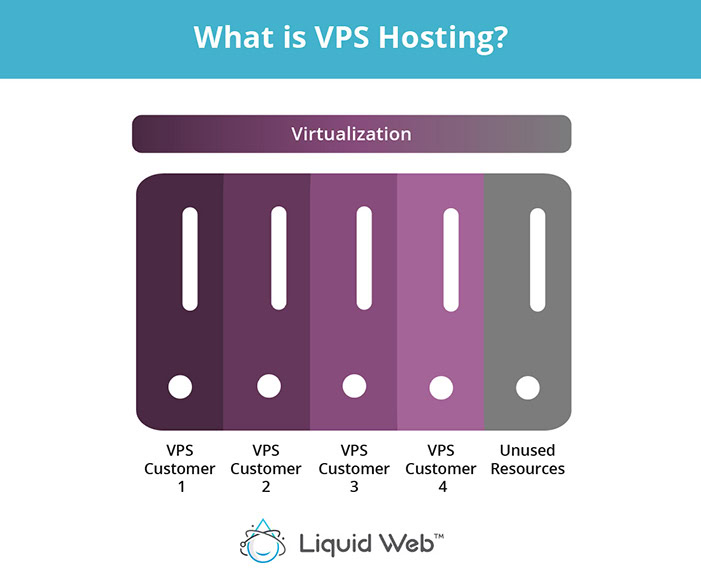
1. A hosting provider sets up a physical server.
2. The server is divvied up into multiple virtual machines.
3. A hypervisor isolates server resources for each VPS.
4. Operation systems and software are installed.
5. The server is fine-tuned for its intended purpose.
VPS benefits
- Reliable performance – A VPS provides dedicated resources, ensuring consistent performance without being affected by other users on the server.
- Tighter security – Isolated hosting environments reduce security risks by preventing vulnerabilities from spreading between accounts.
- Guaranteed uptime – VPS hosting typically includes service level agreements (SLAs) that ensure high availability and minimal downtime.
- Seamless scalability – You can easily upgrade your server’s resources to handle traffic spikes or business growth without downtime.
- Cost-effective performance – VPS hosting balances affordability with dedicated resources, offering better performance than shared hosting without the high cost of a dedicated server.
- Custom software and application compatibility – Unlike shared hosting, a VPS allows full root access, enabling you to install and configure any software you need.
- Automated backup and recovery – Many VPS providers offer scheduled backups and easy restoration to protect your data.
- Faster site speeds – With dedicated CPU, RAM, and SSD storage, VPS hosting delivers quicker load times and improved site performance.
- Greater flexibility – You have full control over server configurations, operating systems, and software, allowing you to tailor your environment to your needs.
Types of servers: VPS vs shared vs dedicated
VPS vs shared hosting
VPS vs dedicated hosting
| Feature | Shared server | VPS server | Dedicated server |
|---|---|---|---|
| Performance | Low – resources are shared with many users | Medium – dedicated portion of resources | High – full resources available |
| Scalability | Limited – must upgrade to VPS or dedicated | High – can adjust resources as needed | High – upgrade hardware as needed |
| Cost | Low – most affordable option | Moderate – higher than shared, lower than dedicated | High – most expensive option |
| Security | Low – shared environment increases risks | Medium – isolated environment | High – complete control over security |
| Customization | Limited – restricted software and configurations | High – can install and configure software | Full – total control over server environment |
| Technical Knowledge | Minimal – beginner-friendly | Moderate – requires some server management | Advanced – requires server admin skills |
| Resource Allocation | Shared – performance varies based on other users | Dedicated portion of CPU, RAM, and storage | Full access to all server resources |
| Best For | Small websites, blogs, personal projects | Growing businesses, moderate traffic sites, apps | Large businesses, high-traffic sites, enterprise applications |
Use cases: What is a VPS used for?
- Hosting websites – A VPS provides more control, performance, and security than shared hosting, making it ideal for business websites, blogs, and eCommerce stores.
- Game servers – Many gamers use a VPS to host private game servers for titles like Minecraft, CS:GO, and Ark: Survival Evolved, ensuring better performance and customization options.
- Running web applications – Developers use VPS instances to deploy web apps, APIs, and SaaS platforms without the limitations of shared hosting.
- Hosting email servers – A VPS can be used to set up a private email server, offering better privacy and customization than third-party services.
- Remote desktop and virtual workstations – Businesses and individuals can use a VPS as a cloud-based desktop environment to access work files, run applications, and enhance security.
- Development and testing environments – Developers use VPS servers to create isolated environments for coding, staging, and testing software before deployment.
- VPN and proxy servers – A VPS can be configured as a VPN or proxy server to enhance online privacy, bypass geo-restrictions, or secure business communications.
- Data storage and backups – VPS hosting can serve as a secure offsite backup solution or a cloud-based file storage system with controlled access.
- Crypto and trading bots – Traders use VPS instances to run automated trading bots and crypto nodes, benefiting from uptime and low-latency connections.
- VoIP and communication servers – Businesses can host VoIP (Voice over IP) and chat servers on a VPS for more reliable, private, and scalable communication.
What is VPS hosting?
When to use a VPS
Increased traffic
Resource limitations
Security concerns
Customization needs
Performance uncertainty
Managed vs unmanaged: Types of VPS hosting
VPS hosting is often available at various management levels and with advanced options.
Managed VPS hosting
Managed VPS is a hands-off approach where the hosting provider handles technical tasks and VPS maintenance, to ensure functionality and security. It’s ideal for businesses if:
- You don’t have a dedicated IT staff, or you don’t know how servers work.
- Security is a priority, but you struggle with keeping systems up to date.
- You need support that can guide you, or take care of issues for you.
- You don’t have the time to (or just don’t want to) figure out how to maintain your server.
Unmanaged VPS hosting
Unmanaged, or self-managed, VPS hosting is an arrangement wherein the client rents a VPS from a hosting provider, but the client is responsible for the management and maintenance of that virtual server. This gives the client complete control to customize the server.
Semi-managed VPS hosting
Semi-managed, or core managed, VPS hosting is a middle-ground solution between managed and unmanaged hosting. Which services are included depends on the hosting provider, so be sure to check.
Is a VPS secure?
Is a VPS reliable?
How to choose a VPS hosting provider
- Performance and resources: Look at the amount of CPU cores, RAM, and storage offered in each plan. Ensure the provider offers the resources you need, with room for growth as your site scales.
- Managed vs unmanaged: Decide whether you want an unmanaged VPS or a managed VPS (where the hosting provider handles server maintenance, updates, and security).
- Scalability: Choose a provider that allows easy resource upgrades. As your site grows, you may need to scale your CPU, RAM, or storage without disrupting your digital operations.
- Uptime: Look for a provider with a high uptime guarantee (typically 99.9% or above) to ensure your website remains accessible with minimal interruptions.
- Security: Ensure the provider offers robust security measures, such as firewalls, DDoS protection, automated backups, and SSL certificates, to keep your data safe.
- Support: Opt for a provider with responsive and knowledgeable 24/7 customer support to assist with any technical issues, especially if you’re new to VPS.
- Value: While cost is important, focus on the value for money by comparing the resources and features included in each plan. Ask about hidden fees related to upgrades and customer support.
VPS and WordPress
For WordPress users looking for more power and control over their website, VPS hosting for WordPress is a significant upgrade from shared hosting. While shared hosting can work for small, low-traffic WordPress sites, as your site grows in terms of traffic, content, or complexity, you’ll likely need more dedicated resources to maintain optimal performance.
One of the key benefits of using a VPS for WordPress is the improved performance. VPS resources are dedicated, which allows your WordPress site to handle more traffic and run faster, especially when it’s resource-intensive or uses a lot of plugins.
Another significant advantage of VPS hosting for WordPress is the level of control it offers. With a VPS, you gain root access to the server, allowing you to customize server configurations, install custom software, and manage security settings to suit your specific needs. This is particularly useful if you need to run advanced WordPress setups, such as multisite installations, or if you need to install specific server-side applications like Nginx or Redis for enhanced performance.
Getting started with a VPS
When you’re ready to get started, or to upgrade your VPS hosting to a high-quality VPS, Liquid Web can help. We’ve been leading the industry for decades, because our VPS servers are fast, cloud-based for easy scalability, and unbeatably reliable. Choose your favorite OS and the management tier that works best for you.
And because we offer the highest quality VPS and dedicated server hosting, you can scale up from a VPS to a dedicated server with a single click. Avoid a painful migration when your business, or database, or audience grows beyond a VPS.
Click below to explore VPS hosting options or start a chat with one of our experts right now to learn more.
Ready to get started?
Get the fastest, most secure VPS hosting on the market.
Additional resources
VPS vs WordPress.org hosting →
Differences, overlaps, and how to choose the best hosting for you
9 incredible benefits of VPS hosting →
From technical concerns to business needs
Managed VPS vs unmanaged VPS →
Advantages and challenges of both, so you can decide what you need
