◦ Fully managed options
◦ 24/7 expert support
Web hosting overview
Web hosting is a service that stores your website’s files on a server and makes them accessible on the internet. These files include text, images, code, and databases. Hosting providers manage these servers and provide internet connectivity. This makes your website accessible to users worldwide.
Key elements of web hosting:
- Accessibility: How easily users can reach your website online, influenced by factors like server reliability and network speed.
- Bandwidth: The amount of data your website can transfer to visitors over a period, affecting how much traffic your site can handle.
- Control panels: User-friendly dashboards (like cPanel or Plesk) that help you manage website settings, domains, emails, and files.
- Cost: The price you pay for hosting services, which varies based on features, resources, and support levels.
- Disk space: The physical space on a server used to store your website’s files, emails, databases, and media.
- DNS (Domain Name System): A system that translates your domain name into an IP address, directing visitors to the correct web server.
- Domain name: The human-readable address (like example.com) that points users to your website’s hosted files.
- File Transfer Protocol (FTP): A standard method for uploading, downloading, and managing files on your web server from a local computer.
- Functionality: Refers to the hosting features that support your site’s operations, like scripting languages, email services, and databases.
- Managed support: Hosting plans that include expert help with server setup, updates, security, and troubleshooting.
- Security: Protects your website and data from threats like malware, DDoS attacks, and unauthorized access through tools like firewalls and SSL.
- Storage: The total space available on the server for your website content, including files, images, scripts, and backups.
- Types: Hosting comes in various forms—shared, VPS, dedicated, and cloud—each offering different levels of performance, control, and scalability.
- Uptime: The percentage of time your website stays online and accessible, with good hosts aiming for 99.9% or higher.
Web hosting types:
- Shared hosting: Multiple websites share server resources, making it an affordable but less secure option. Best for small personal websites and beginners on a tight budget.
- Cloud hosting: Websites are hosted across a network of virtual servers. Best for users who prioritize scalability.
- VPS (Virtual Private Server) hosting: A server is divided into virtual sections with allocated resources for each user, offering more control and performance than shared hosting. Best for developers and businesses that need reliability and security without the spend of a dedicated server.
- Dedicated hosting: An entire physical server dedicated to one client, with full control, high performance, and enhanced security. Best for large websites or apps with high traffic, strict security/compliance needs, or custom software requirements.
- GPU hosting: A type of hosting that includes servers equipped with GPUs, designed to accelerate tasks like AI, machine learning, video rendering, and 3D modeling. Best for developers, researchers, and content creators running compute-intensive workloads.
- WordPress hosting: A shared, cloud, VPS, or dedicated hosting environment optimized specifically for WordPress sites, often with pre-installed tools and performance enhancements. Best for WordPress users who want speed, security, and ease of use tailored to their CMS.
- Managed hosting: A shared, cloud, VPS, or dedicated hosting service where the provider handles server maintenance, updates, security, and performance. Best for site owners who want expert technical support and don’t want to manage server tasks themselves.
How does web hosting work?
- File storage: Your website consists of various files and data that need storage.
- Server: These files are stored on a web server that’s always connected to the internet.
- Access: When users type your website address, their browser sends a request to the server.
- Display: The server sends your website files back to the browser, which displays your website.
When a user types your website address into their browser, their computer sends a request to the server where your website is hosted. The server then responds by sending the requested files back to the user’s browser, which displays the website.
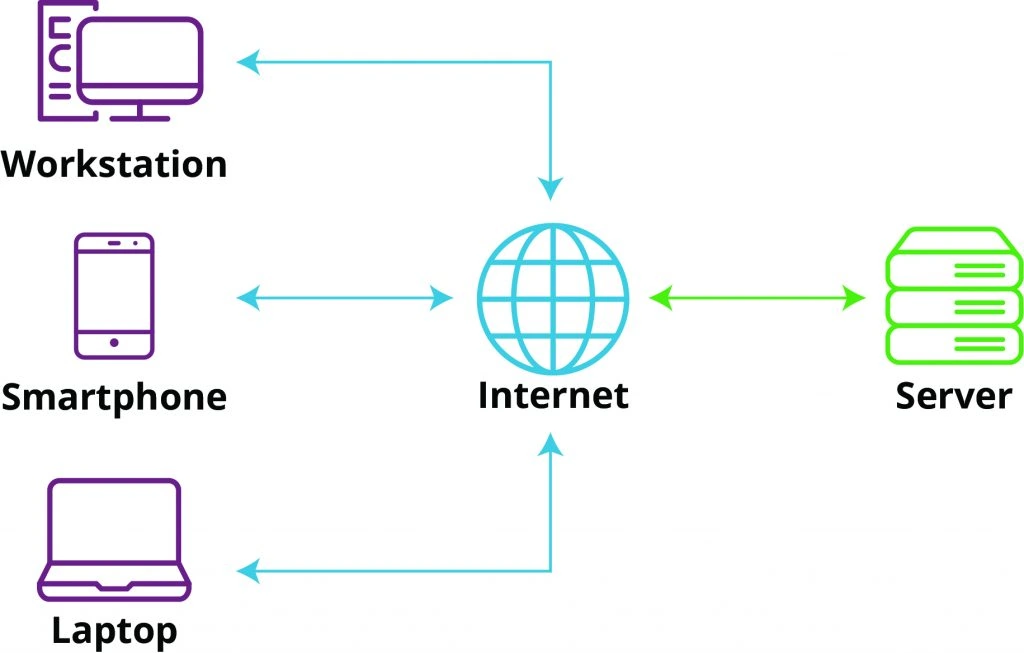
This process ensures your website is available 24/7 to visitors worldwide. This process happens in milliseconds, allowing for seamless digital experiences. The speed and efficiency of this interaction depend on factors like server performance, website optimization, and the user’s internet connection.
There are different types of web hosting, including VPS hosting, cloud hosting, and dedicated server hosting. Each type caters to different needs and applications, offering varying levels of resources, control, and scalability.
Hosting providers offer an array of services and features beyond basic file storage. These may include automatic backups, content delivery networks (CDNs), SSL certificates, and one-click software installations to enhance website functionality and security.
Why is web hosting important?
- Accessibility: Web hosting ensures your website is available to users anytime, anywhere in the world.
- Technical management: Hosting providers handle server maintenance, security updates, and connectivity issues.
- Infrastructure: You can rent server space instead of buying and maintaining expensive equipment.
What is an example of a web host?
Common examples of web hosts include:
- GoDaddy: Popular for domain registration and basic hosting.
- Bluehost: WordPress-recommended hosting provider.
- AWS (Amazon Web Services): Enterprise-level cloud hosting.
- Hostinger: Budget-friendly shared hosting.
- Liquid Web: Managed hosting for businesses.
What web hosting options does Liquid Web provide?
Liquid Web offers the most comprehensive suite of hosting services in the industry – from fully managed VPS hosting to self-managed dedicated servers, and everything in between.
A hosting leader for decades, we provide expert support 24/7, 99.999% uptime, hassle-free hosting migrations, the fastest servers, and the tightest security. Check out our most popular hosting services below, and if you’re not sure where to start, our experts are always available.
VPS
hosting
Best hosting for flexibility and affordability
Dedicated servers
Best hosting for optimal performance and security
WordPress hosting
Best hosting for any WordPress site
Additional resources
The beginner’s guide to VPS →
Everything you need to know about VPS hosting, how it compares, when to use it, and more
What is managed hosting? →
Benefits, tips, and when to choose managed hosting services
How to host your own website →
Five simple steps to taking control of your own server
