

Exclusive Discount Deal
up to 69 off
Offer ends in:
00

days day

00

hours hour

00

Mins Min

00

Secs Sec

Discover the Top Make Alternative for Workflow Automation

Tired of Make’s limits and high costs? Bit Flows is the game-changing alternative with unlimited workflows, no hidden fees, and lightning-fast automation. Say goodbye to task caps and hello to full control over your business automation—start transforming your workflows today!
bit flows large icon
Bit Flows
vs large icon
make icon
Make

Make Vs Bit Flows - The Best Make Alternative

Compare Pabbly and Bit Flows side by side to see which automation tool offers better value. Discover the difference below!
Features
Bit Flows Logo
Image
Ease of Use
User-Friendly
Complex for Beginners
Tasks/Executions
Unlimited
Limited by Pricing Plan
Notifications & Error Handling
Advanced
Advanced
Workflow Setup Process
Very Easy
Complex (needs advanced technical knowledge)
Custom App Integration
Yes
Yes
Data Security
Self-Hosted
Cloud-Based
Pricing Model
Yearly & Lifetime Plan
Subscription-Based
Customer Support
Quick Support & Strong Community
Slower Support
Affordability
Highly Affordable
Highly Affordable

Save 10x More
Highly Affordable

We provide the perfect budget-friendly WordPress automation plugin alternating with Make automation tool. Bit Flows is so lightweight, highly functional, user-friendly, and easy to work. Also, you can seamlessly automate tasks without any complexity. Which one you will select- the choice is yours!
Bit Flows
Starter Pack
Single Site
$199.00/Lifetime
Available Offer
Highest Plan
100 Sites
$699.00/Lifetime
Available Offer
  • Multi-step workflows
  • Unlimited Workflows & Tasks
  • Webhooks & Custom App
  • Advanced Tools (Router, Repeater, etc)
  • Advanced Conditional Logic
  • Advanced Logs & Re-execution
vs large icon
Make
Starter Pack
20k Tasks/month
$192.00/Year
Highest Plan
20k Tasks/month
$636.00/Year
  • Multi-step workflows
  • Limited Tasks
  • Webhooks
  • Conditional Logic
  • Export/Import Workflow
  • Custom App

6 Reasons Why Bit Flows is the Smarter Choice Over Make

Make Vs Bit Flows: Why settle for limits? Bit Flows delivers unrestricted automation, lightning-fast integrations, and zero hidden fees. Experience seamless workflows with complete feature access—no compromises, just smarter automation!
Bit Flows Logo
vs large icon
Image
No limit! You can create and run as much automation as you need without paying extra.
Tasks/Executions
Tasks are limited based on plans. You have to pay extra if you go over the limits.
With Bit Flows, your data is stored on your server, so you get full control and it's more secure.
Data Security
Make stores your data on their own cloud servers, which may feel insecure.
Bit Flows simplifies complicated automation more and faster with advanced tools and optimized design.
Automation Process
Creating complex automation in Make may take more time compared to Bit Flows, especially for beginners.
Bit Flows gives quick support and has a helpful community to answer your questions.
Customer Support
Make offers support, but it can take time to get a response, especially when there are many users.
Bit Flows has a free version on WordPress.org, and tasks are unlimited; you can do automation using the free apps on Bit Flows.
Free Version
Make has a free plan with a 1000 tasks per month limit, which means you can’t run more than 1000 executions per month.
Has Lifetime plans, so you don’t have to worry about monthly payments.
Lifetime Access
With Make, you have to pay by month to keep using it, and the costs add up.

Stop Paying Monthly for Automations
Start With Bit Flows! No Code, No Limits!

Why Bit Flows is a Great Choice Over Make?

Bit Flows is much faster, easier to use, and more customizable, compared to its competitors. If you need something functional, highly affordable, and designed with real business needs in mind.
Bit Flows Logo
Image
bit flow

Drag and Drop Visual Canvas Builder

Bit Flows offers a modern, drag-and-drop workflow builder, enabling users to design complex, multi-step automations effortlessly. With a visual interface, advanced tools like Router, Conditional Logic, and Iterators, users can create highly flexible automation flows in just minutes.
Image

Intuitive Flow Builder

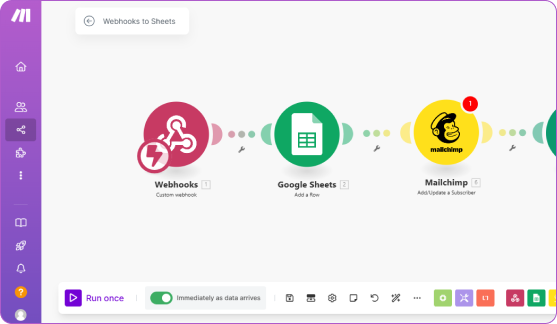
Make builder is intuitive but complex for beginners. Without enough technical knowledge using make is so confusing. Also the automation configuration process is harder than Bit Flows.

Frequently Ask Questions

Here are all questions and answers related to Make Vs Bit Flows. See, why Bit Flows is the better choise over Make. Here is your best Make alternative automation tool. Buy it now.

Make is more expensive, has task limits, and is hard to use for beginners. Bit Flows is affordable and easy to use. It has unlimited flows, tasks, and lifetime plans.

No, Bit Flows has unlimited flows and tasks with no limits. Make has task limits so you need to pay more if you use more.

Yes, Bit Flows is self-hosted so all your data is stored on your server, so you have more control over your data. Make is cloud-based so your data is processed on their servers which may be a privacy concern.

Bit Flows has quick support, a help guide, a forum, a strong community, and video tutorials. Make support is good but Bit Flows community and resources are more user friendly and easier to get help.

Yes! Bit Flows is intuitive. No technical knowledge is required to create advanced workflows. The drag-and-drop interface makes automation easy for everyone.

Yes! Bit Flows allows you to create custom automations without coding. You can create custom apps with triggers and actions.

Yes! Bit Flows has a free version. You can start automating your workflows by installing the free plugin on your site. Most importantly the free version can do a lot of automation magic!


Still Have a Question?
Do you still have unanswered questions? Feel free to reach out to our support team for assistance!
