Search the Community
Showing results for tags 'admin'.
-

Version 1.3.11
121 downloads
NexusCheatRadar you are not obligated to turn web features on but doing so helps you recieve bans and other notifications from other servers **Keep your server clean. Catch cheaters before they ruin the wipe.** exusCheatRadar monitors your Rust server for cheaters across detection systems, sends rich Discord alerts with probability scores , and builds persistent player risk profiles across your entire server network. the plugin informs Admins , they investigate, you decide wether its valid or false then optionally send. to our public Player databse this databse relys on you so dont just report and ban , verifySteam join intelligence — VAC bans, game bans, account age, name history ServerArmour integration — plugin or direct API with local caching Network database — player profiles, aliases, IPs, server visit history, hours played, violations and bans persist across wipes Public website — search any player, view risk profiles, violation history, ban list Admin share flow — violations stay private until you click the Share link in Discord Ban system with /ncr.ban and /ncr.unban — kicks online players, records to network, sends Discord embed Website up and collecting and will be released as the database builds --- ## What It Detects - **ESP** — Flags players who keep looking at other players through walls and rocks - **No-Recoil** — Catches scripted spray patterns that are too perfect to be human - **Aimbot** — Detects unnatural snap-to-target aim movements - **Speed Hack** — Alerts when someone is moving faster than the game allows - **Strafe Hack** — Catches impossible sideways or backward movement speed - **Wall Looting** — Detects players opening containers through solid walls - **Item Spawning** — Flags sudden inventory spikes that don't match normal gameplay - **Debug Camera** — Catches unauthorized use of spectate/freecam mode - **Privilege Escalation** — Monitors for players running admin commands they shouldn't have - **Clan/Team Print to discord** Easily print full clan and their risk to a seperate webhook in discord - ** Ban/Unban** built within the plugin --- ## Discord Alerts Every detection sends a clean Discord embed with: - Player name and Steam64 ID - Quick links to Steam, ServerArmour, and BattleMetrics profiles - Detection details (probability, distance, positions) - Separate webhooks for each detection type so you can organize your channels --- ## Smart About Modded Servers Built for real servers, not just vanilla: - **Server multiplier support** — Won't false-flag on 5x or 10x gather rates - **SkillTree compatible** — Adjusts speed and gather thresholds when SkillTree perks are active - **Backpacks aware** — Doesn't flag item counts when players use their backpack - **Teleport safe** — Automatically ignores position jumps from /home, /tp, and respawns --- ## Steam & ServerArmour Intel When a player joins, NCR checks their background: - Steam account age, VAC bans, game bans, profile visibility - ServerArmour dirty flags, server bans, cheater bans - Previous name history and past risk scores on your server - All sent to Discord as a join intelligence report --- ## Admin Radar Built-in world radar for admins: - See players, sleepers, tool cupboards, stashes, bags, and corpses through walls - Toggle each type on/off with a sidebar UI strip - Color-coded with configurable nameplate sizes - Facing arrows show which direction players are looking --- ## Risk Scoring Every detection adds to a player's risk score. Scores decay over time so one-off incidents fade away. Configure auto-kick or auto-ban thresholds if you want automatic enforcement. --- ## Commands | Command | What it does | Commands /ncr — toggle world radar /ncr.lookup <name/id> — player history and risk /ncr.lookup <name/id> team/clan -player clan/team history and risk sent to discord /ncr.risk <name/id> — risk breakdown /ncr.incidents <name/id> — last 8 detections /ncr.watch <steamid> — priority monitoring /ncr.ban <steamid> [reason] [appeal url] — ban and record /ncr.unban <steamid> — lift a ban /ncr.webshare <steamid> <type> — manually share a violation /ncr.test esp|aimbot|norecoil — test Discord alerts --- ## Permissions - `nexuscheatradar.admin` — Required for all commands --- ## Quick Start Drop the .cs in oxide/plugins Add your Steam API key to config Add Discord webhook URLs to config Set "Nexus Website" > "Enabled": true to join the network — auto-registers on first load, no manual steps --- ## Requirements - Oxide/uMod or Carbon - A Discord webhook URL (at minimum one for ESP alerts) ## Optional Integrations - **ServerArmour** — Enhanced player intel on join (plugin or direct API) ⚠ Important This plugin is in active development. Detection thresholds are configurable and should be tuned for your server. High-latency players, SkillTree movement bonuses, and custom weapon configs can trigger alerts that are not cheating. Review all alerts before taking action. Auto-ban is disabled by default for this reason. Run in alert-only mode for at least one wipe before tightening thresholds. ## Support When requesting support, please include: - Your configuration file - Relevant console output - The detection type involved (ESP, No-Recoil, or Aimbot) ════════════════════════════════════════════════════════════ IMPORTANT NOTES (COMMON “IT DOESN’T WORK” ISSUES) ════════════════════════════════════════════════════════════ Kits may trigger a false item spawn flag if you a solution is being worked on this happens when kits give a abnormal amount of items normally found in 5 x and above servers toggle this feature off in your config should it happen 1) “My ESP alerts are not posting to Discord” If you enable Unified Threat AND suppression, individual ESP/NoRecoil/Aimbot webhooks can be suppressed. Config: "Risk Aggregation" • Use Unified Threat Webhook Reports = true/false • Suppress Individual Type Webhooks When Unified Is Enabled = true/false :contentReference[oaicite:12]{index=12} If suppressed, you may ONLY see reports in the Threat webhook channel (and only if the overall risk meets your minimum). :contentReference[oaicite:13]{index=13} 2) “/ncr commands do nothing” You are not a real server admin (IsAdmin/authlevel). These commands check admin status. :contentReference[oaicite:14]{index=14} 3) “ESP test works but live ESP doesn’t” That means Discord is wired correctly. Live ESP requires the scoring gates (distance/FOV/hits/cooldowns) to be met. Also check if Unified Threat suppression is enabled (see #1). :contentReference[oaicite:15]{index=15} ════════════════════════════════════════════════════════════ RECOMMENDED “FIRST-TIME SETUP” CHECKLIST ════════════════════════════════════════════════════════════ 1) Set Discord Webhooks -> Enabled = true 2) Paste at least ESP Webhook + No-Recoil Webhook + Aimbot Webhook 3) oxide.reload NexusCheatRadar 4) Run: /ncr.test esp, /ncr.test norecoil, /ncr.test aimbot 5) Run: ncr (turn on the radar) 6) avoid leaving detect sleepers on in the esp section as it can causes false positives$19.99 -

Version 1.4.7
1,243 downloads
Introducing Total Control – The Ultimate Rust Server Administration Tool Total Control is a powerful, full-GUI admin plugin designed to give Rust server owners and admins unprecedented control. Whether you’re running hardcore survival or a casual PvE playground, Total Control puts every system at your fingertips live, in-game. Dynamic Schedule System Plan and automate your server’s evolution with ease — no more manual toggling or config edits. The Schedule System lets you: Automate server changes over time – Adjust gather rates, stack sizes, smelting speeds, rewards, raid protection, or PvE/PvP status automatically. Create up to 6 configuration sets per feature (1 default + 5 extra) – Schedule different setups for each stage of your wipe. Scale your server naturally – Increase resource rates as wipes progress or gradually tweak settings to keep gameplay fresh. Fully integrated with the GUI – Configure all schedules directly in-game with the Total Control UI — no external files required. Run your server exactly how you want, exactly when you want — automatically. Core Server Settings Skip Night / Time Freeze – Automate day/night or let players vote, including custom voting percentages and skip limits. Day & Night Length – Configure how long the day lasts and how short nights are. Custom Vote Commands – Define your own chat commands beyond /day. PvE/PvP Modes & Raid Protection – Toggle instantly or schedule on timers, with player HUD indicators. Now includes an option to use in-game or local time. Economy & Progression StackSize Control – Set multipliers per item or entire categories. Gather Rate Control – Fine-tune every item’s resource yield. Easy Item Management – Add or remove items to the GatherRate and StackSize pages directly via chat commands using item shortnames. (Shortnames list: https://www.corrosionhour.com/rust-item-list) Smelting & Cooking – Adjust speeds, outputs, and fuel use. Rewards & Incentives Reward players for kills, gathering, mining, defeating Bradley/Patrol Heli, or emptying crates to encourage active gameplay. Choose between Economics, ServerRewards, scrap payouts or reward all three simultaneously. Configure loot-splitting for Bradley and Heli: split rewards based on damage dealt or grant the full amount to the player landing the final blow. Accessible In-Game Any admin with permission can open the Total Control UI with /tc and adjust settings live no server file access required. Whether your admins are across town or across the globe, they can fine-tune all settings directly in-game. Permissions & Commands Permission: TotalControl.OpenGui (access admin UI) Chat Commands: /tc To open TotalControl /addgather <shortname> Add item to GatherRates page. /removegather <shortname> Remove item to GatherRates page. /addstack <shortname> Add item to StackSize page. /removestack <shortname> Remove item to StackSize page. Join the Community Stay up to date, promote your server, report bugs, or get support: https://discord.gg/AkwHUs8Qma$29.99 -

Version 1.0.3
26 downloads
AdminWarn is intended for situations where players clearly exceed server rules or must be explicitly warned. It is not a lightweight or easily dismissible notification. The purpose is not to preserve gameplay flow, but to deliver a clear and serious warning. Warnings are delivered instantly and ignore conditions such as safe zones or PvP status. Stop guessing whether your warning messages in chat were actually noticed. Tired of sending important warnings as an admin via RCON or global chat and never being sure who actually read them? AdminWarn is built to give admins certainty. AdminWarn is designed for manual warning delivery. This is not an automated warning system. Every warning is intentionally sent by an admin using commands. At the same time, AdminWarn handles warnings smartly and automatically in the background. Warnings sent to offline players are stored and shown automatically when the player next joins, even days later. For individual online players, warnings remain stored until acknowledged, then are automatically cleared. All data is wipe-aware and cleaned up automatically on server wipes. Instead of relying on admin-sent chat warnings that can get lost, ignored, or missed while players are AFK, AdminWarn delivers a mandatory, player-specific GUI warning directly on the player’s screen. Each warning includes a configurable sound effect, using only built-in, local in-game sounds. No external or custom audio files are used. This is not an auto chat message. It is a visual warning that requires player acknowledgment. Even if the player closes the game without confirming it, the warning will reappear on the next login until acknowledged. No hard movement lock is applied. Warnings can be sent via RCON, server console, or in-game admin console (F1). In-game commands /warn and /warnall are used to manually send warnings. /warn can target individual players whether they are online or offline, while /warnall applies only to online players. Discord webhook logs clearly confirm when warnings are acknowledged. Global warnings apply only to online players and do not generate Discord logs, preventing spam and rate-limit issues. How It Works? 1) Admin sends warning (chat/RCON) → Message is delivered via GUI with sound 2) Player must acknowledge → Cannot play until clicking button (No movement lock, only a visual GUI barrier) 3) Offline player support → Warnings sent to offline players are saved and displayed via GUI when they join 4) Data management → Auto-clears on wipe Key Features - GUI warning that requires player confirmation - Works online/offline - Warnings save for offline players - Global warnings - Warn all online players at once - Discord logging - Track acknowledged warnings - Wipe detection - Auto-clear data on server wipe - Professional interface - Clean GUI with sound effects - UTC-based date display - All timestamps are shown in UTC (Coordinated Universal Time) Performance AdminWarn is built with an optimized and efficient code structure, making its presence virtually unnoticeable on the server. It runs smoothly during long uptimes and maintains stable hook memory and performance values under normal server conditions. Wipe Behavior - Restarts: Data preserved (approved warnings are auto-deleted for data optimization) - Server wipe: All warning data automatically cleared - No manual cleanup needed (Most of the time, it is not necessary) Commands ➤ Admin Chat Commands: /warn <player>|<steam64ID> <message> /warnall <message> ➤ Console/RCON Commands: warn <player>|<steam64ID> <message> warnall <message> Note: Player names are not unique and may include different alphabets or special characters. To avoid ambiguity, using Steam64ID is strongly recommended when sending warnings. Permissions Oxide/Carbon oxide.grant group admin adminwarn.admin c.grant group admin adminwarn.admin Discord Webhook Logging When enabled, sends acknowledgement logs to Discord: Player name Warning message Read status (online/after reconnect) Timestamp Does NOT log warning sending (only acknowledgements) Does NOT log global warning acknowledgements (due to DC rate limits) Configuration { "Clear data on wipe": true, "Discord Log Enabled": false, "Discord Webhook URL": "", "Show Date in GUI": true, "Warning sound": "assets/prefabs/building/wall.frame.shopfront/effects/metal_transaction_complete.prefab" } Lang/en { "NoPermission": "You don't have permission to use this command.", "WarnUsage": "Usage: /warn <player name or steamid> <message>", "PlayerNotFound": "Player not found. Use SteamID for offline players.", "DuplicateWarning": "Duplicate warning prevented for player {0}", "WarningSent": "Warning sent to {0}: {1}", "WarningSaved": "Warning saved for offline player {0}.", "WarnAllUsage": "Usage: /warnall <message>", "WarnAllSent": "Global warning sent to {0} online players: {1}", "ConsoleWarnUsage": "Usage: warn <player name or steamid> <message>", "ConsoleWarnAllUsage": "Usage: warnall <message>", "AcknowledgeThanks": "Thank you for acknowledging the warning.", "GuiTitle": "SERVER WARNING", "GuiButtonText": "✔ I ACKNOWLEDGE", "GuiDatePrefix": "Date", "GuiWarningFormat": "Hello {0}, you have received a warning." }$18.99- 6 comments
-
- 1
-

-
- #admin
- #admin tools
- (and 42 more)
-

Version 2.1.2
353 downloads
A straightforward timer plugin that displays customizable countdown timers in the game interface (top right corner). Perfect for coordinating events, announcing restarts, or managing custom countdowns. Now supoorts up to 5 timers at the same time. Features: Custom timer display in the game UI Console and chat (UI) command support Customizable UI (colors, text size, transparent background) Supports up to 5 active timers Integrated permission system Targeted timers: you can display timers only to specific players or groups You can now pause timers and choose if a timers should start upon creation - Credits to @Mobb for the idea You can dinamically choose where to display the times from the settings UI Commands: Chat /timers --> Opens the UI Rcon timer start seconds "text" - Starts a new timer for all players timer start seconds "text" [@group1 @group2 steamid1 steamid2 ] - Starts a timer only for specified players/groups timer stop "text or timerID"- Stops the timer timer list - Gives a list of active timers with ID Configuration: Customizable background color Customizable text color Adjustable font size Optional transparent backgroun { "BackgroundColor": "0 0 0 0.8", "TextColor": "1 1 1 1", "HighlightColor": "0.2 0.8 0.2 1", "EnableNotifications": false, "DefaultDuration": 300, "MaxDuration": 86400, "FontSize": 14, "UIScale": 1.0, "TransparentBackground": false } Support: For any support request: [email protected]Free -
.thumb.gif.931694ee6af9534dc6d23b0aec6390f5.gif)
Version 2.2.2
318 downloads
Auto Ban / Report Ban – Premium Edition AutoBan Enhanced is the ultimate plugin for Rust server administrators who want to keep their community safe, fair, and fun. This premium edition builds on the original AutoBan system with new advanced moderation tools, smarter automation, and seamless integrations with Discord. Key Features Automatic Weighted Banning Players are automatically banned once they reach a configurable number of weighted reports. Trusted players, moderators, or admins can have higher report weights for faster action. Playtime Requirement (NEW) Players must have a minimum amount of playtime (configurable, default 2h) before submitting reports, preventing abuse from fresh accounts. Mass Reporting Protection Includes cooldowns, per-hour limits, and unique report tracking to prevent abuse of the reporting system. Full F7 Integration Captures and processes in-game reports (F7), with optional keyword scanning for valid reasons. Player-Friendly Reporting System Players can submit reports via chat commands or a guided reason menu for consistency. Customizable Ban Durations Supports human-readable ban times like 30m, 4h, 7d, or permanent. Ban History & Report Logs New commands to view report history and a structured audit log of admin actions. Progressive Punishments (optional) Configure warnings, mutes, or bans at different thresholds. Discord Integration with Embeds Sends clean, embedded messages for reports and bans, including player info, reasons, timestamps, and expiration. Ignored Players & Permissions Protect admins and whitelisted users from automated bans. Export & Data Storage Export reports to JSON for external review or backups. Granular Permissions Fine-grained control over who can report, view, ban, unban, reset, or audit. Usage: Chat Commands /report <username> – start a report (shows menu if no reason given). /report <username> <reason> – report with reason directly. /reportreason <number> – pick a reason from the menu. /AB.viewreports – view all current reports (requires permission). /AB.history <userid> – view detailed history of a player’s reports. /AB.auditlog [N] – view last N admin/audit actions. /AB.showbans – view all bans. /AB.unban <userid> – unban a player. /AB.resetreports <userid> – reset reports for a player. /AB.exportreports – export reports to a JSON datastore. 🛠 Console Commands AB.getreports – list all reports in console. AB.getbans – list all bans in console. AB.resetreportsConsole <userid> – reset reports via console. AB.ban <userid> <reason> – manually ban a player. AB.unban <userid> – manually unban a player. Oxide / Carbon Permissions AutoBan.report – allow reporting via F7. AutoBan.chatreport – allow reporting via chat. AutoBan.viewreports – view all reports. AutoBan.ignore – player immune to auto-bans. AutoBan.ban – manually ban players. AutoBan.unban – manually unban players. AutoBan.viewbans – view all bans. AutoBan.resetreports – reset player reports. AutoBan.trusted – weighted reporter (e.g., counts x2). AutoBan.mod – stronger weighted reporter (e.g., counts x3). Example Config { "Max reports till user gets banned (weighted)": 5, "Reason given to banned user": "You have been reported too many times and have been banned for precautionary measures. An admin will review this suspension soon.", "Valid reasons": ["cheating", "aimbot", "hacking", "esp", "teaming", "racism", "griefing", "walling", "doorcamping", "spawn killing"], "Valid report types": ["cheat", "abusive", "name", "spam"], "Scan type of F7 reports": true, "Broadcast ban to chat": true, "Ignored Players": { "76561198000000000": "Admin" }, "Timer for broadcasting bans to admins and console": 820, "Send bans to users with the AutoBan.viewbans permission": false, "Send reports to URL": false, "URL to send reports to": "http://example.com", "Send reports to Discord": true, "Send bans to Discord": true, "Discord Reports Webhook URL": "http://example.com/reports", "Discord Bans Webhook URL": "http://example.com/bans", "Ban Duration": "72h", "Max reports a player can submit per hour": 3, "Max reports a player can receive per hour": 5, "Cooldown between reports from the same player in minutes": 10, "Weighted report permissions": { "AutoBan.trusted": 2,"AutoBan.mod": 3 }, "Use Discord embeds for webhooks": true, "Max lines per chat response to avoid spam": 8, "Minimum playtime (in minutes) required to file a report": 120 } With AutoBan Enhanced, you get automated moderation, better transparency, and flexible punishment systems, freeing up admins to focus on building community instead of fighting cheaters.$24.99 -

Version 1.3.4
251 downloads
This plugin adds logs of players action and convenient control panel for viewing them. Features Logs KIlls + Destruction of buildings (detailed description of the killed / destroyed, distance and what killed 'weapon, damage type etc.') Death (detailed description of the killer, the distance and how player was killed 'weapon, damage type etc.') Respawn (location of respawn and on the sleeping bag or not) Teams (create, invite, accept, leave) Loot (crates, personal boxes, wounded players and all other "lootable" entities) Authorization (in code locks, tool cups, turrets) Construction (everything that builds) Transport (the moment of boarding the transport) Convenient and functional control panel Convenient search for online players Search by name or steam ID throughout the database The ability to conveniently select the date and time, as well as view individual categories of logs Teleport to the log location and its visualization (available only for admins) The history of searching and viewing profiles Save of all the nicknames of the player with whom he logged into the server The first and last connection The database is optimized as much as possible, the data is split, which allows you to store a large number of logs for a long time The ability to clear the database on wipe and players who have not logged on server for a long time, in automatic mode The ability to turn off the log globally and turn it on for certain players Filters for logs The plugin is fully localized for EN and RU languages Permission admineye.usemenu - for open and use panel Command /ae - for open panel Time Zones Time zone its different time between 0 UTC and player time UTC. You need add to configuration all time zones of your admins in seconds. How do it? Go to site UTC Time Standart select city, then you will get the difference in hours behind its + ahead its - Then you need multiply hours to second ( -6 * 3600 ) Done - its difference between zones. Write in config "Washington" : -21600 Then administrator must select (only once) his zone in menu "Time Zones", else plugin use default time zone config Discord At first you must create and copy discord Webhook, then paste url at config (you can use different channels) if you want change color, choose Colors, copy 0xNNNNNN, then paste Here, copy number and paste at config ^_^ Filters If you dont want use filters, set it EMPTY If you want have specific logs, then add short prefabs names to filter EX. For kills - player, scientistnpc_bradley, wall and etc. For loots - names of crates, names of looting ents and etc. For auths - turrets, toolcups For builts - wall, floor and other deployeble entities TEST SERVER Join our test server to view and experience all our unique features yourself! Copy the IP Address below to start playing! connect 194.147.90.147:28015 Future plans Add console commands for search logs Add discord support for send logs (implemented) Add more logs I am waiting for your suggestions for improvement in the discussions Video Config { "Main settings": { "Enable delete all data on wipe": false, "Delete old players data every X hours [0 - off](It works on server startup or plugin reload)": 40, "After how many days the player's data is considered old": 14, "Time zone difference in seconds (set automatically by server zone)": 10800.0, "Time zone of counties (in seconds)": { "New York": -18000, "Moscow": 10800, "Berlin": 3600, "Paris": 3600, "Canberra": 39600, "London": 0, "Beijing": 28800, "Rome": 3600, "Washington": -21600 }, "Permission for use menu": "admineye.usemenu" }, "Log settings": { "Enable logging of kill for all": true, "Enable logging of death for all": true, "Enable logging of respawn for all": true, "Enable logging of team for all": true, "Enable logging of loot for all": true, "Enable logging of auth for all": true, "Enable logging of buildings for all": true, "Enable logging of mount for all": true, "Discord webhooks for logs": { "kills": { "Webhook url": "", "Color": 15105570 }, "deaths": { "Webhook url": "", "Color": 15548997 }, "respawns": { "Webhook url": "", "Color": 2067276 }, "teams": { "Webhook url": "", "Color": 3066993 }, "loots": { "Webhook url": "", "Color": 3447003 }, "auths": { "Webhook url": "", "Color": 9807270 }, "builts": { "Webhook url": "", "Color": 15658993 }, "mounts": { "Webhook url": "", "Color": 10181046 } } }, "Config version": { "Major": 1, "Minor": 2, "Patch": 0 } }$20.00 -
Version 1.0.0
8 downloads
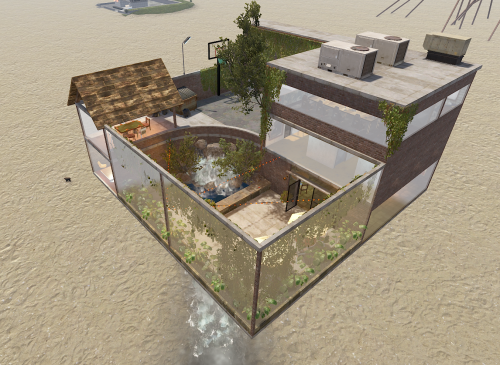
Large Mod/Staff Room The Ultimate Under-Map Sanctuary for Server Administration Provide your staff team with the security and luxury they deserve. The Large Mod/Staff Room is a comprehensive, high-detail prefab designed specifically for server administrators, moderators, and staff members. Built with a focus on both functionality and aesthetic appeal, this "under-the-map" facility serves as a secure logout zone, a private meeting hub, and a recreational space away from the prying eyes of players. ️ Security & Utility Designed to be placed beneath the map terrain, this prefab ensures that staff bodies remain 100% safe from player interaction or raiding during offline hours. It provides a centralized, "off-grid" location for your team to coordinate without interference. Key Features Administrative Wing: Staff Meeting Room: A formal space for team briefings and policy discussions. 2 Secure Holding Cells: Perfect for temporary player containment or roleplay scenarios. Interrogation Room: A dedicated, atmospheric space for staff inquiries. Living & Comfort: 8 Private Bedrooms: Individualized spaces for team members to safely log off. Large Modern Bar & Kitchen: A fully detailed social hub for staff relaxation. Full Bathroom: High-quality interior detailing to complete the "home base" feel. Recreation & Esthetics: Basketball Court Private Courtyard For any Assistance or questions Please contact me on Discord @ https://discord.gg/HNhPTPZVmd$7.99 -

Version 1.0.0
4 downloads
This plugin allows you to view the Tool Cupboards of the entire server on the map, and to see the list of players authorized, if you have permission. Settings : - Radius F1 Commands : - cm.reload (to reload markers) Permissions : - oxide.grant user <steamID/user> cupboardmarker.use WuyZar's Discord : https://discord.gg/NVwRcQwGwh$2.50 -

Version 1.0.0
191 downloads
PlayerDuel.cs Description : - This plugin allows players to duel 1v1 in a dedicated arena. After the fight, you respawn with your original inventory and stats; the arena automatically regenerates between each duel. Settings : - HUD colors - Warmup Time - Fight Time - Request Time F1 Commands (ADMIN) : - pd.spawn1 (To set spawn player 1) - pd.spawn2 (To set spawn player 2) - pd.zone <radius> (To define the zone, arena's auto-clear. - pd.kit <name> (To crate kit) - pd.kits (To see kits list) - pd.deletekit <name> (To remove kit) - pd.test (To test the duel) - pd.stop (To stop a duel) Chat Commands : - /duel <name> <kit> - /duel accept - /duel refuse - /duel (To see kits and commands) Permissions : - ownerid <steamID/user> WuyZar's Discord : https://discord.gg/NVwRcQwGwh Test video : Rust 2026-03-28 18-03-26 - Trim.mp4 Game interface :$11.50 -

Version 1.0.5
41 downloads
xPermissionManager A modern, intuitive, and powerful permission management tool for Rust servers. xPermissionManager provides a complete visual interface for managing user and group permissions directly ingame. No more console commands, guesswork, or digging through permission lists. Everything is organized, accessible, and easy to control through an straight forward UI. Whether you're adjusting a single permission, overseeing full group structures, or assigning temporary access, xPermissionManager gives server owners a fast and efficient possibility to do so. Plugin Preview (Video) Full Permission Control Grant or revoke any permission from groups or individual players. Timed Permission System Assign temporary permissions that automatically expire (e.g., 30m, 1h, 1d, 1w, custom durations). Timed Group Memberships Add players to groups for a limited time - Perfect for kits, VIP, special events or whatever. Comprehensive UI A clean and intuitive interface for browsing permissions, switching groups, managing users, and applying timed access. User & Group Browsing View all available groups, check individual player permissions, and toggle them instantly. Clear Feedback Every change is acknowledged with clear messages to help admins avoid mistakes. Permission xpermissionmanager.use // Allows a player to open and use the xPermissionManager UI Chat Commands /xpm /xpmuser <name or steamID> /xpmtimed /xpmgroups /xpm [Opens the Permission Manager UI] PERMISSION OR ADMIN REQUIRED /xpmuser <name or steamID> [Opens the UI for managing a specific player’s permissions/groups] PERMISSION OR ADMIN REQUIRED /xpmtimed [Shows all active timed permissions for a player. Includes remaining duration and whether they came from a group] /xpmgroups [Shows all active timed group memberships for a player] Console Commands </> API$11.99- 1 review
-
- 2
-
-

-
- #permission
- #manager
- (and 20 more)
-

Version 1.0.0
8 downloads
NexusRestartManager is a professional Rust server lifecycle plugin that manages restarts, wipe tracking, Discord notifications, and native decay configuration COMMANDS (ADMIN): • Restart server: /nrm restart <seconds> [reason] Example: /nrm restart 300 Server update • Cancel a scheduled restart: /nrm cancel COMMANDS (PLAYERS): • View wipe info : /nrmwipe • View wipe info: /nextwipe PERMISSIONS: Admins must have: nexusrestartmanager.admin Grant using your permissions plugin (Oxide/Carbon). oxide.grant user <playername_or_steamid> nexusrestartmanager.admin carbon.grant user <playername_or_steamid> nexusrestartmanager.admin DISCORD FEATURES (AUTOMATIC): • Server Online message (status + wipe cycle) • Restart Scheduled message (countdown + reason) • Server Offline message (uptime + wipe age + wipe cycle) • No duplicate or spam messages • No fake player counts DECAY SETTINGS (CONFIG ONLY): This plugin uses Rust’s native decay system. Example: "Decay": { "Upkeep period (minutes)": 1440 } • 1440 = normal (vanilla) decay • Higher number = slower decay • Lower number = faster decay • Applies automatically on server start and wipe • No commands required IMPORTANT NOTES: • Requires Oxide/Carbon Discord extension for Discord messages • Does NOT wipe blueprints • Does NOT force wipes (tracking only) • Lightweight and production safe This plugin uses a Discord webhook to send server status messages. STEP 1: Create a Discord webhook 1. Open Discord 2. Go to your server 3. Right-click the channel you want messages in 4. Click "Edit Channel" 5. Go to "Integrations" 6. Click "Webhooks" 7. Click "New Webhook" 8. Copy the Webhook URL STEP 2: Add webhook to the plugin config 1. Start the server once with the plugin installed 2. Stop the server 3. Open this file: oxide/config/NexusRestartManager.json or use carbon config 4. Paste your webhook URL into: "Discord": { "Webhook URL": "PASTE_URL_HERE" } STEP 3: Save the file and restart the server • Do NOT reload for first setup • Restart the server fully STEP 4: Verify it works • When the server starts, Discord should show "Server Online" • Run: /nrm restart 60 Test • You should see a restart message in Discord$7.99 -

Version 1.9.0
53 downloads
Bring Rust monuments to life with cinematic, high-intensity combat events. Armed Deployment dynamically delivers a Bradley APC, heavy scientists, and a hackable locked crate to any location you choose, all inserted by an immersive Chinook deployment sequence. Watch as a Chinook approaches the target zone, descends, deploys hostile forces, and extracts — creating a truly memorable server event that feels built into the game rather than scripted. Players must eliminate all threats and destroy the Bradley APC before they can claim the locked crate and its rewards. Features • Spawn deployments anywhere on the map • Cinematic Chinook delivery and extraction • Heavy Scientists with controlled roaming • Bradley APC with movement blocking • Hackable Locked Crate rewards • Dynamic deployment radius and map marker • Server-side UI progress tracking • Automatic cleanup and despawn timers • Admin-controlled start and cancellation • Automated deployments with configurable intervals • Fully configurable values Chat Commands (Admin Only) /adpanel Toggles the Armed Deployment admin UI panel Permissions ArmedDeployment.admin Required to start, cancel, or automate Armed Deployments Configuration { "Auto": false, "AutoMin": 60, "RandMon": true, "ManLoc": { "X": 0, "Y": 0, "Z": 0 }, "Mons": { "airfield": true, "trainyard": true, "powerplant": true, "military_tunnel": true, "launch_site": true, "water_treatment": true, "dome": true, "satellite": true, "junkyard": true, "excavator": false, "harbor": true, "arctic_base": true, "lighthouse": false, "gas_station": false, "supermarket": false, "mining_outpost": false, "sewer_branch": false, "oil_rig_small": false, "oil_rig_large": false }, "SciCnt": 12, "BradCnt": 1, "EvtRad": 150, "MaxAttempts": 10, "ChApproachH": 80, "ChApproachD": 400, "ChSpeed": 25, "ChHoverH": 15, "ChDescentH": 50, "ChExitD": 500, "MinClearH": 40, "ObstacleRad": 30, "MonSearchRad": 80 } Default values are optimized for performance and cinematic impact. Notes This plugin is designed to feel vanilla-friendly, cinematic, and performance-aware. It works especially well on servers that want high-risk, high-reward PvP encounters without relying on random world events. Feedback, suggestions, and feature requests are always welcome. Created by CodeBrothers Check out our other work on Codefling$24.99 -

Version 1.0.5
86 downloads
Enables administrators to perform administrative actions anonymously, hiding their profile when they use in-game chat as well as within the game environment, displaying 'ADMIN' instead of their nickname above their character. Commands /aa - Admin Anon Enable /aa - Admin Anon Disable Permissions adminanon.use - Enables anonymity in the game. Permission Recommendation: We recommend adding the permission to the individual user rather than to a group. For example, grant the permission to John Doe directly, not to the "admin" group (even if John Doe belongs to that group). Change Color This plugin allows Rust admins to hide their identity in the chat. To change the username color for the "ADMIN" group, configure the "admin" group in BetterChat. Changes in BetterChat will automatically reflect in the plugin. Steps: 1. Open BetterChat Configuration: Locate and edit BetterChat.json. 2. Edit the "admin" group: Change the username color for the "admin" group. 3. Save and Apply Changes: Save and reload BetterChat & AdminAnon (Just in case) Change avatar admin ? Changing the admin's avatar is unnecessary for this plugin, as its purpose is to hide the admin's identity, not to impersonate another player. Configuration { "Stay Anonymous After Reconnecting": false, "Properties": [ { "Name": "ADMIN", "Better Chat Group": "admin", "Required Permission": "adminanon.use" } ] } Data (example) { "PlayerData": { "76561198196941415": { "Groups": [ "admin", "default" ], "Name": "ADMIN", "Better Chat Group": "admin", "Required Permission": "adminanon.use" } } } Language (EN) { "No Permission": "<size=12>You don't have permission to use this command</size>", "No Profile Permission": "<size=12>You don't have permission to use this profile</size>", "Admin Anon Enabled": "<size=12>Admin Anon has been <color=#00fa9a>ENABLED</color></size>", "Admin Anon Disabled": "<size=12>Admin Anon has been <color=#00fa9a>DISABLED</color></size>", "Admin Anon Changed": "<size=12>Fake identity has changed to <color=#00fa9a>{0}</color></size>", "Requested Fake Identify Not Found": "<size=12>Requested fake identity is not found</size>", "No Fake Identities Available": "<size=12>No fake identities available</size></size>", "Fake Identify Not Found": "<size=12>Fake identity is not found</size>", "Data Corrupted Up": "<size=12>Data is corrupt</size>" }$6.00 -
Version 1.0.0
28 downloads
AdminRadar.cs Description : - This plugin provides a real-time radar system allowing instant tracking of Players, Cupboards, Patrol helicopters and Bradleys, with customizable display options. Display for the player : Player name - Health - Distance - Team Display for the cupboard : TC tag - Distance - List of authorized players Display for the patrol : Patrol tag - Health - Distance Display for the bradley : Bradley tag - Health - Distance Settings : - HUD colors (for the radar switch button) - Radar distance - Radar refresh - Player name color - Cupboard tag color - Patrol tag color - Bradley tag color - Distance color - Health >50hp color (for player/patrol/bradley) - Health <50hp color (for player/patrol/bradley) F1 Commands : - radar <all/player/tc/patrol/bradley> (on/off) Chat Commands : - /radar <all/player/tc/patrol/bradley> (on/off) Permissions : - oxide.grant user <steamID/user> adminradar.use WuyZar's Discord : https://discord.gg/NVwRcQwGwh Game interface :$4.50 -
Version 1.0.0
44 downloads
ServerPeriods.cs Description : - This plugin offers a complete periodic event system for your Rust server, allowing you to create structured game phases with customizable restrictions. Each period can independently control PvP, raiding, gathering, and building permissions, providing a dynamic gameplay experience. It includes a persistent, real-time user interface displaying the current period name and remaining time, with an automatic "Next Period" indicator, and the execution of custom server commands for each period. Settings : - HUD colors - Custom periods (name/perms/time/commands) F1 Commands : - p.start (to start the periods) - p.stop (to stop the periods) - p.next (to move on to the next period) - p.prev (to move on to the previous period) Permissions : - ownerid <steamID/user> WuyZar's Discord : https://discord.gg/NVwRcQwGwh Chat messages : Game interface :$6.50- 4 comments
-
- 2
-

-
-
- #event
- #tournament
- (and 17 more)
-
Version 2.1.0
199 downloads
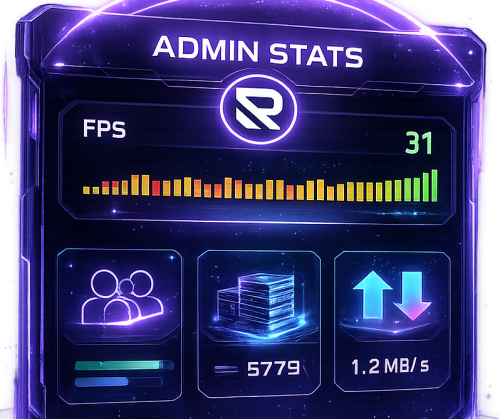
AdminStats - Server Monitor HUD Keep an eye on your server health while you play! AdminStats is a lightweight, always-visible HUD that shows real-time server performance metrics to administrators. Perfect for server owners who want to monitor performance while testing plugins, building, or just playing. What does it show? Server FPS - Color-coded (green = good, yellow = warning, red = critical) with a mini graph showing the last 30 seconds Players Online - Current / Maximum Entities - Total world entities Memory - Server RAM usage Network Traffic - Incoming and outgoing bandwidth Uptime - Time since last server restart Two Display Modes Full Mode - All stats in a compact panel Minimal Mode - Just FPS, super tiny, stays out of your way Switch between modes anytime with /adminstats mode Easy Positioning Place the HUD wherever you want: Top Left Top Right Bottom Left Bottom Right Custom position Adjust margins to fit perfectly with your other UI elements. Commands /adminstats - Toggle HUD on/off /adminstats mode - Switch between full and minimal mode Features Zero performance impact - updates once per second Auto-enables for admins on connect Sleek blur background that fits Rust's style Multi-language support (English, Portuguese, Spanish) Fully configurable colors, size, and position Permission-based (adminstats.use) Perfect for: Testing new plugins while monitoring server health Identifying performance issues in real-time Keeping track of player count and entity buildup Server owners who like to stay informed Lightweight. Unobtrusive. Essential.Free- 7 comments
- 1 review
-
- 1
-
-
- #admin stats
- #stats
- (and 15 more)
-

Version 0.1.1
436 downloads
Allows toggling silent item giving(chat notifications and ownership) via Harmony patching. P.S. By default, silent item giving is enabled. The ability to disable item ownership assignment; The ability to disable item give messages via the 'give' command; The ability to disable item give messages via the 'giveid' command; The ability to disable item give messages via the 'givearm' command; The ability to disable item give messages via the 'giveto' command; The ability to disable item give messages via the 'giveall' command; The ability to disable item blueprint give messages via the 'giveBp' command; The ability to disable messages about copying player inventory via the 'copyTo' command. silentitemsgive.admin - Grants access to the command silentgive.toggle silentgive.toggle *boolValue*(optional) - Toggle silent item giving. To access this command, you must be an administrator or have the silentitemsgive.admin permission. Example: silentgive.toggle silentgive.toggle trueFree -

Version 0.1.5.1
208 downloads
A plugin for collecting game statistics with database support, compatible with both SQL and web API methods. This functionality empowers website owners to display the desired statistics from the database on their sites. Moreover, it offers the capability to send data via API, which proves highly beneficial in scenarios where your gaming server and database reside on separate machines and the database restricts connections beyond localhost. Please note that an instruction manual will be included in the downloaded file and it is imperative for users to read it thoroughly. Collecting(The full list is available below in the section Collected Data) : Server information; Team information; Clan information(in future); Feedback(F7) information; Report(F7) information; Player information. Sending data through: direct MySQL; via API(POST query) to MySQL. extendedstats.admin - Provides access to command estats. { "Chat command": "estats", "Is it worth enabling GameTips for messages?": true, "Unique ID of the current server": 0, "Database upload method(Disabled, WebAPI, MySQL)": "WebAPI", "Interval in seconds at which an attempt to load changes into the database will occur": 300.0, "Is it worth logging messages to the console when uploading to the database?": true, "API - Service URL": "https://localhost/ExtendedStats/index.php", "API - Service access key": "GlBRw-elM6v-gjko3-cxSDk-Tsy7B", "API - Timeout": 5.0, "MySQL - Host": "localhost", "MySQL - Port": 3306, "MySQL - Database name": "db_playrust", "MySQL - Username": "root", "MySQL - Password": "root", "Database table name - Servers": "db_servers", "Database table name - Teams": "db_teams", "Database table name - Clans": "db_clans", "Database table name - Feedbacks": "db_feedbacks", "Database table name - Reports": "db_reports", "Database table name - Players": "db_players", "Database table name - Players Balances": "db_players_balances", "Database table name - Players Stats": "db_players_stats", "Database table name - Players Farms": "db_players_farms", "Database table name - Players Gambling": "db_players_gambling", "Database table name - Players Kills": "db_players_kills", "Database table name - Players Explosions": "db_players_explosions", "Database table name - Players Raids": "db_players_raids", "Is it worth clearing saved statistics when a wipe is detected?": true, "Is it worth clearing the database when a wipe is detected?": true, "List of statistic categories to clear when a wipe is detected. Leave empty to recreate defaults": [ "players", "teams", "clans", "feedbacks", "reports" ], "List of language keys for creating language files": [ "en" ], "Dictionary of display names for deployable entities by key": {}, "Wipe ID": null, "Version": { "Major": 0, "Minor": 1, "Patch": 5 } } EN: { "CmdMain": "Available commands:\n\n<color=#D1CBCB>/estats</color> <color=#D1AB9A>upload</color> - Initialize a forced data upload to the database\n\n--------------------------------------------------", "CmdDBNotSelected": "Database connection method not selected!", "CmdAlreadyUploading": "You can't initialize a data upload to the database because there is already an active upload!", "CmdUpload": "You have successfully started a forced data upload to the database." } RU: { "CmdMain": "Доступные команды:\n\n<color=#D1CBCB>/estats</color> <color=#D1AB9A>upload</color> - Инициализация принудительной загрузки данных в базу данных\n\n--------------------------------------------------", "CmdDBNotSelected": "Метод подключения к базе данных не выбран!", "CmdAlreadyUploading": "Вы не можете инициализировать загрузку данных в базу данных, так как уже существует активная загрузка!", "CmdUpload": "Вы успешно начали принудительную инициализацию загрузки данных в базу." } ServerData: ServerName ServerIdentity ServerIP ServerPort QueryPort ServerDescription ServerHeader ServerURL ServerTime ServerTags GameTags MaxPlayers ServerEntities ServerFPS ServerAvgFPS ServerUptime ServerMap MapSize MapSeed FirstSave LastSave WipeID ServerVersion ServerProtocol RconPort RconPassword TeamData: TeamID TeamName CreatorID LeaderID TeamMembers ClanData(Temporarily not working) : ClanID ClanName CreatorID LeaderID ClanMembers FeedbackData(Since the corresponding Oxide hook has shifted, not all types of feedback are processed) : ID UserID Subject Type Message Time ReportData: ID UserID TargetID TargetName Subject Type Message Time PlayerData: Info: UserID DisplayName Flags Language GroupsList TeamID ClanID BanReason Connection: PlayedTime - requires the PlaytimeTracker/PlayTimeRewards plugins IdleTime - requires the PlaytimeTracker/PlayTimeRewards plugins Connections Ping FirstConnectionIP LastConnectionIP FirstConnectionDate LastConnectionDate Balance: Balance - requires the Economics plugin Points - requires the ServerRewards plugin BankBalance - requires the BankSystem plugin IQBalance - requires the IQEconomic plugin Experience Reputation - requires the ReputationMaster plugin Statistics: TimeAlive - updates only after the player's death TimeSleeping - updates only after the player's death DistanceWalked - updates only after the player's death DistanceRun - updates only after the player's death TimeWilderness - updates only after the player's death TimeInBase - updates only after the player's death TimeInMonument - updates only after the player's death TimeSwimming - updates only after the player's death TimeFlying - updates only after the player's death TimeBoating - updates only after the player's death TimeDriving - updates only after the player's death Wounded WoundsInflicted WoundAssisted WoundRecovered DamageInflicted DamageTaken - updates only after the player's death Healed - updates only after the player's death ShotsFired - updates only after the player's death ShotsHit HalloweenVisits XmasVisits DeepSeaVisits ExcavatorStarts BearTrapInflicted BearTrapSteps MineInflicted MineSteps HandcuffsApplied Handcuffed PhoneCalls PhoneCallsTimeout MissionsStarted MissionsSucceeded MissionsFailed DeployedsList MonumentsList - requires the MonumentsWatcher plugin Farming: Barrels UnderWaterCrates ShreddedEntities DetectResourceFlags GreenDoors BlueDoors RedDoors FishAttempts Guts Supplies ExcavatorSupplies TropicalSupplies Chinooks Surveys ChickensHatched ChickenEggs BeehiveXP Blueprints CraftList GatherList RecycleList BuyerPurchaseList BuyerSpentList SellerSalesList SellerRevenueList CratesList FishList Gambling: BWG_Spins BWG_WinSpins BWG_SpendScraps BWG_WinScraps Slot_Spins Slot_WinSpins Slot_SpendScraps Slot_WinScraps Poker_Games - Placeholder Poker_WinGames - Placeholder Poker_SpendScraps - Placeholder Poker_WinScraps - Placeholder BlackJ_Games BlackJ_WinGames BlackJ_StandoffGames BlackJ_SpendScraps BlackJ_WinScraps RPS_Wins RPS_Losses RPS_Draws Kills: Kills FriendlyKills Deaths Suicides Beehives Chickens FarmChickens Snakes Boars Stags Horses Wolves Bears Polarbears Panthers Tigers Crocodiles Sharks PlayerNPCs Scientists Zombies Patrols Bradleys KillVehicles: PedalBikes MotorBikes Cars RowBoats RHIBs SubmarinesSolo SubmarinesDuo Tugs MiniHelis AttackHelis ScrapHelis Balloons Trains TrainWagons TrainCabooses Snowmobiles Ballistas BatteringRams Catapults SiegeTowers HitParts KillParts KillWeapons Explosions: Rockets RocketsHV RocketsIncendiary RocketsSmoke RocketsMissile RocketsMLRS Torpedoes ExplosiveAmmo Ammo40mmExplosive Ammo40mmSmoke GrenadesF1 GrenadesMolotov GrenadesFlash GrenadesSmoke GrenadesBean SatchelCharges C4Explosives PropaneBombs FireBombs Raids: Cupboards Doors Windows Foundations Ceilings Walls Doorways WindowFrames Stairs Hatches ExtWoodenGates ExtWoodenWalls ExtStoneGates ExtStoneWalls ExtIceWalls ExtIceShortWalls RaidedConstructionsList RaidedDeployableConstructionsList RaidableBases$19.99 -

Version 1.0.0
2 downloads
Description FileWatcher monitors your server’s config and lang JSON files and automatically reloads the affected plugin when changes are detected. This is aimed at faster iteration while developing or tuning plugins — edit JSON, save, and the plugin reloads itself. Features Config + Lang monitoring - Watches oxide/config/*.json - Watches oxide/lang/**.json (including subfolders) Safe reload behavior - Debounce (1s): prevents multiple reloads while a file is still being written - Reload cooldown (20s): prevents reload loops and spam - Ignore list: exclude specific plugins from being reloaded - Always ignores FileWatcher itself Stability - If the watcher throws errors, it auto-restarts itself after 5 seconds Debug mode - Optional debug output for watcher init, file changes, cooldown/debounce decisions, etc. Commands /fwstatus Shows watcher status (Config/Lang on/off) and ignored count. Admin only. Permissions No Oxide permission is used. Access is gated by player.IsAdmin. Config { "Watch config folder": true, "Watch lang folder": true, "Ignored plugins": [ "PermissionManager" // This is an example. ], "Debug mode": false } load, run, enjoy$3.55 -
Version 1.2.3
52 downloads
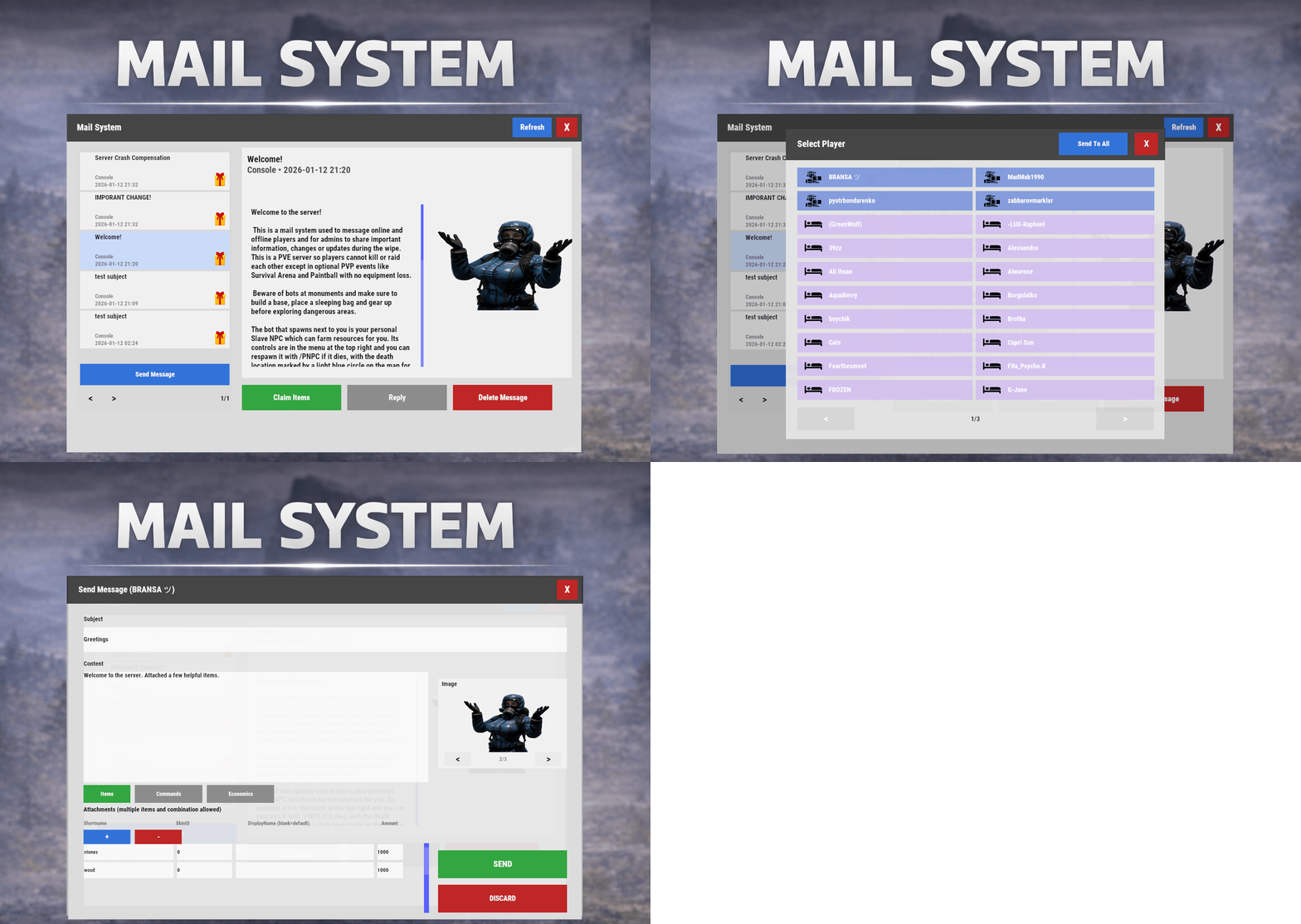
Mail System is an in-game mail and notification system for Rust servers, allowing players to send “emails” to online and offline players. Admins will also benefit from being able to include attachments such as items, commands, and economy rewards, and players can now open support tickets for staff assistance directly in-game. Designed for wipes, announcements, rewards, crash compensation, support, and direct communication, Mail System ensures both online and sleeping players receive admin messages, while also providing threaded conversations—replies are appended to the original message—so players can follow the full back-and-forth anytime via a simple UI they can access at any time. Perfect For Admin announcements Server rules and new player welcome messages Compensations Reward delivery Event prizes Player to Player communication Core Features Persistent inbox per player Messages are delivered even when players are currently offline Configurable inbox limits per player - oldest message deleted if limit exceeded. Optional wipe-based inbox clearing Simple message creation Ability to input subject and message content Recipient can be easily selected via a player picker UI, with unique colors and icons for Online/Sleeper/Staff Optional image per message via ImageLibrary. Available Image URLs (recommend square images eg 512x512) can be configured. Default/Example images have been included. Clean scrollable UI and configurable max length for long messages. Admins can easily include a combination of items, economies, or commands ran against the recipient. Messages and attachments can also be created via console commands, perfect for use in other plugins. Known Limitation: Rust does not currently have a functional multi-line support (as in, hitting enter to create a line break won't create a line break for the recipient). However. when typing message content, entering \n will create a new line in the resulting message as shown in attached screenshots. Facepunch is aware of this and UI input functionality will be updated accordingly. Unread notifications Notification sound upon receiving new message Visual indicator for unread messages and attachments Customizable position and size of on-screen notification bell Support Tickets (In-Game Helpdesk) Create new tickets with subject + message Staff groups can view/respond to all tickets (permission group based, configurable) Open & Closed ticket views (toggle), with close/reopen controls Threaded ticket history: every reply is stored and displayed as a conversation Attachments & Rewards Each message can include any combination of: Item rewards Multiple items per message Custom display names Optional skin IDs Inventory-safe claiming Command rewards Ability to run server commands on claim Supports placeholders to ensure command is run against the recipient (%steamid%) Repeatable command execution via amount entry Economy rewards Economics ServerRewards TCBank each handled independently, with clear failure feedback if unavailable or failed Players claim attachments directly from the inbox with a single click and receive a clear summary of what was successfully claimed and what failed, if anything. 🛠 Admin & Console Tools Send messages with attachments: Using In-game UI Using Console commands Attach rewards and images using simple flag-based commands Ability to include attachments is admin permission based Target: Individual players All players (Online and Sleepers) Customization Customize HUD icon and unread indicators Customize online/sleeper/staff icons Built-in notification HUD position & size editor (no config guessing) Customize available images which can be included in messages. Adjust HUD colors Configure subject/message max lengths and inbox size. Localization via lang files Timestamp +/- offset Chat Commands: /inbox - Opens the Inbox UI where players can view and send/reply messages /tickets - opens the Tickets UI /sendmail "PlayerName" - optional chat command to send message to specific player without going through inbox/player picker /inbox_top - Admin command to view players with largest inbox sizes /inbox_clear "PlayerName" - Admin command to clear a specific player's inbox /notif_iconpos - Admin command to reposition and resize the notification icon (auto saves) Permissions: mailsystem.send - required to be able to send messages mailsystem.admin - required to add attachments via UI and run admin commands mailsystem.ticketopen - allows opening/using the Tickets UI mailsystem.ticketstaff - marks a player as ticket staff (can view/respond to all tickets) mailsystem.ticketmanage - allows managing tickets (e.g., close/reopen regardless of creator) Console command functionality Console commands can be used for both messaging and attachment delivery using flags, with included option to select which image will appear in the message Basic command structure is as follows: mail.send <playername OR SteamID> "<subject>" "<content>" [flags] mail.sendall "<subject>" "<content>" [flags] Available flags are desribed below and may be used multiple times and in any order: Image Flag: -img <number> Sets the message image. Uses the image list from the config Index starts at 0 0 = first image, 1 = second, etc. _______________________________ Item Flag: -item <shortname> <amount> <skinId> optional:"displayName" Adds an item attachment. skinId may be 0 Custom name is optional If omitted, the item’s default name is used _______________________________ Commands Flag: -cmd "<name>" "<command>" <amount> Runs a server command when claimed. amount specified how many time to run the command. It defaults to 1 Supports %steamid% and %name% wildcards - useful when sending to all players or via other plugins. "name" is what the player will see as the attachment name (instead of seeing the command itself) _______________________________ Economy Flag: -eco <type> <amount> Adds a currency attachment. Supported types: Economics ServerRewards TCBank _______________________________ Example Console Commands: Below are some example console commands. Note you can use \n\n for following text to start as a new paragraph Simple message only to single player(with image) mail.send PlayerName "Welcome!" "Welcome to the server. Enjoy your stay!" -img 0 Simple message only to all players (with image) mail.sendall "Server Notice" "Welcome to the server everyone!" -img 0 Single item attachment (with image) mail.send PlayerName "Resource Gift" "Here are some materials to get you started." -img 1 -item wood 2000 0 Item attachment with custom display name and specific skinID (with image) mail.send PlayerName "Special AK" "You have received skinned HV pistol ammo." -img 2 -item rifle.ak 1 987654321 "Very Cool AK" Multiple items (with image) mail.send PlayerName "Supply Drop" "A mix of useful resources." -img 0 -item wood 3000 0 -item stones 2000 0 -item metal.fragments 500 0 Command attachment (with image) mail.send PlayerName "Starter Kit" "Claim this message to receive your starter kit." -img 1 -cmd "Starter Kit" "kit give %steamid% starter" Economy reward (Economics) (with image) mail.send PlayerName "Welcome Bonus" "You have received a currency reward." -img 0 -eco Economics 1000 Mix of Items + Economics (with image) mail.send PlayerName "Builder Pack" "Resources and money to help you build." -img 2 -item wood 4000 0 -item stones 4000 0 -eco Economics 2500 Mix of Items and Command (TWO vip kits) (with image) mail.send PlayerName "VIP Trial" "Enjoy a one time VIP kit." -img 1 -item scrap 250 0 -cmd "VIP Kit" "kit give %steamid% VIP" 2 Full mixed attachments (items + command + economy) (with image) mail.send PlayerName "Welcome Package" "Everything you need to get started." -img 0 -item wood 3000 0 -item ammo.pistol.hv 100 0 -cmd "Starter Kit" "kit give %steamid% starter" -eco Economics 1500 Full mixed attachments to all players (note using \n\n to create a new paragraph within message content) (with image) mail.sendall "Attention Citizens!" "Thank you for being awesome.\n\nAttached some gifts." -img 0 -item wood 3000 0 -item ammo.pistol.hv 100 0 -cmd "Starter Kit" "kit give %steamid% starter" -eco Economics 1500 If using the commands within a JSON (config) file, you will need to ensure you escape the quotes with a backslash (place a backslash before any quote sign), for example: mail.send %SteamID% \"Welcome!\" \"Welcome to the server!\n\n This is a mail system used to message online and offline players and for admins to share important information, changes or updates during the wipe\n\nWe hope you have a great time\" -item ammo.pistol.hv 100 0 \"\" -img 1 If you’re looking for a modern replacement for chat spam, manual kit commands, or unreliable reward delivery, Mail System provides a polished, user-friendly solution that players will instantly understand and appreciate. I have done my best to document the full functionality, but if any doubt do not hesitate to open a support request.$22.99 -

Version 1.0.0
15 downloads
This is a versatile plugin that lets you turn any boring monument or map location into a great one by spawning a timed crate event there. Choose a location for the timed crate to spawn by standing there. Then choose a location for the chinook to take off the same way. Choose a place for the chinook to land and unload scientists. Customize your scientists and their kits easily in the configuration. Commands: /chnookspawn - The main command that displays how to use the plugin. Just follow the easy steps displayed in chat to set up your new event. /chnookspawn add profileName - Adds the location of the timed crate and automatically adds the new event profile to the config /chnookspawn cancel - Cancels adding a new spawn. Example config now included. Note: When creating an event in game, it automatically adds the details of the event into the config file. This example config shows a test event I set up to show the details, your config will not have/do not need these example events. Questions, Problems, And Support For any questions, problems, and everything else, please visit my discord HERE. ChnookSpawn.json$5.00 -

Version 1.0.2
88 downloads
AI Translation plugin is the best powered-AI translation solution for Rust Servers. Enjoy the power of AI by automatically translating all your language files, or the messages exchanged by players in the chat! ALL languages, without exception, are accepted. !! Important: The plugin requires the use of OpenAI's API, which includes fees for each request (see the dedicated section for more details) !! Free Version : A free version (but limited) is available. Easy to Use with Minimal Configuration There is almost no setup required; everything is straightforward to handle. Open AI & Request Costs You need to register for the OpenAI API to retrieve a token. Signing up and getting the token is very simple and takes just a few seconds. Translating language files will only cost a few cents for about a hundred files. It's difficult to quantify the cost of translating chat; expect around $1 for thousands of translated messages (this is a purely theoretical value). Something to consider if your language files are long: It is possible that some files may arrive incomplete. To solve this issue, you need to increase the token limit of your model (in the configuration). The limit depends on the OpenAI model used, but generally, you can go up to 4096. More information on tokens can be found here. Support Available I am available for all your questions, whether it's support here or on Discord (d.0ne_) More information at the bottom of the page. Commands ait.translateplugin <plugin> <lang1> <lang2>: Requires the plugin to have a default language file (in English). Specify all desired languages in ISO639-1 format. Example: "ait.translateplugin MyPlugin fr ru" ait.translateallplugins <lang1> <lang2>: Operates the same way but will do so for all plugins. Permission aitranslationpro.chat.use: permission that allows users to see the translation in the chat OPEN AI API Registration (2mn): 1 - Visit the OpenAI Website: Go to OpenAI's official website. Click on the "API" section in the navigation menu. 2 - Create an Account: If you don’t already have an OpenAI account, you will need to create one. Click on the "Sign Up" button. Fill in your details such as email, name, and password. Follow any additional prompts to complete the registration process. 3 - Verify Your Email: Check your email for a verification link from OpenAI. Click on the link to verify your email address. 4 - Log in to Your OpenAI Account: Once your email is verified, log in to your OpenAI account. Navigate back to the API section. 5 - Apply for API Access: Depending on OpenAI's current policies, you might need to apply for API access. Fill out any required forms or surveys. Submit your application. 6 - Access the API Dashboard: Once approved, you can access the API dashboard. This dashboard is where you can manage your API usage. 7 - Generate an API Token: In the API dashboard, look for an option to create a new API token. Click on "Create Token" or a similar button. Follow the prompts to generate a new token. 8 - Secure Your Token: Once your token is generated, make sure to copy it and store it securely. Never share your API token publicly as it gives access to your OpenAI account.$9.98 -

Version 1.0.4
16 downloads
xMarkToTeleport xMarkToTeleport is a quality-of-life plugin for Rust that allows players to instantly teleport to a map marker they place. Simple, intuitive, and server-friendly, this plugin adds fast travel without commands, UI spam, or complex setup. Just place a marker on the map and you’re there. Tipp: Double rightclick on the map to teleport and automatically remove the map marker at the same time. Features Automatically teleports the player when they place a map marker. Intelligent collision checks ensure players never teleport inside terrain, buildings, or deployables. (No glitchy teleports :)) Prevent abuse with a per-player cooldown (Configurable). Restrict usage to admins, VIPs, or specific groups. (Permission) Safely dismounts players before teleporting to avoid mount issues. (Configurable) Permission xmarktoteleport.use Chat Command /mtt - Toggle if mark to teleport is on/off Config { "RequirePermission": true, "CooldownSeconds": 1.5, "DismountBeforeTeleport": true } Preview$4.99 -

Version 1.1.0
44 downloads
Custom Vehicle Admin Tools CustomVehicleAdminTools is a collection of admin utilities designed specifically for Karuza Custom Vehicles in Rust. It gives server admins additonal features such as visibility of player owned vehicled, access and recovery tools for custom vehicles. Built for real moderation needs: ownership checks, vehicle relocation and recovery, repairs and drowned vehicle detection. CustomVehicleAdminTools is built with safety and compatibility in mind: it only targets Karuza Custom Vehicles, never interfering with vanilla Rust vehicles, and all admin actions are non-destructive to prevent accidental damage or permanent changes. Every feature is fully permission-based, allowing precise control over who can use each tool, and all visual debugging elements automatically expire after a short duration to avoid client clutter or long-term visual noise. Features: Vehicle Ownership & Inspection Lock Bypass Vehicle Move/Relocate Tool Instant Vehicle Repair Underwater Vehicle Detection List Vehicles Owned by a Player List all vehicles Separate permission for each function Commands: /kowner Shows the owner (name and SteamID) of the Karuza custom vehicle you are looking at. /klockbypass Bypass the codelock on the vehicle you are looking at. This authorises you on the vehicle. Run command again to de-authorise yourself. /kmove Moves a Karuza custom vehicle in two steps: Look at a vehicle and run /kmove to select it. Look at a destination point and run /kmove again to move the vehicle there. /krepair Instantly repairs the Karuza custom vehicle you are looking at to full health /kunderwater Detects Karuza custom vehicles that are underwater, draws visual markers (sphere, arrow, and label) showing their location and prints their positions to chat. /kplayerveh <player name or SteamID> (OPTIONAL: radius) Lists and visually marks all Karuza custom vehicles owned by a specific player. Optionally limits results to a radius around the admin. Each matching vehicle is highlighted with a temporary sphere and label. /kvehall (OPTIONAL: radius) Lists and visually marks all Karuza custom vehicles owned by a specific player. Optionally limits results to a radius around the admin. Each matching vehicle is highlighted with a temporary sphere and label. Permissions: customvehicleadmintools.owner - required for /kowner customvehicleadmintools.bypass - required for /klockbypass customvehicleadmintools.move - required for /kmove customvehicleadmintools.repair - required for /krepair customvehicleadmintools.underwater - required for /kunderwater customvehicleadmintools.listbyowner - required for /kplayerveh customvehicleadmintools.listall - required for /kvehall$6.99 -

Version 1.0.2
95 downloads
EasyVoteDataConverter is the plugin that will make your heart race if you're still using the old free version of Umod that hasn't been updated for years! Perhaps you've decided to purchase the paid version, EasyVotePro, from developer BippyMiester. Or maybe you're still using the EasyVoteLite version. But then you encounter the problem: How do you transfer the cherished votes from the old EasyVote.json of Umod of your players into the new format for EasyVotePro or EasyVoteLite? We faced the exact same problem, which is why we developed this converter! Using the command "/evliteconvert" will convert the old EasyVote.json into the correct format for EasyVoteLite.json. Using the command "/evproconvert" will convert the old EasyVote.json into the correct format for EasyVotePro.json. Using the command "/bevproconvert" will convert the EasyVotePro.json into the correct format for EasyVote.json. Using the command "/bevliteconvert" will convert the EasyVoteLite.json into the correct format for EasyVote.json. In this guide, we'll explain how to best utilize this plugin! But before you dive into executing commands, make sure to confirm which version you're actually using. We recommend EasyVotePro since support for EasyVoteLite will end on April 4, 2024! Here's a step-by-step guide: Unload the EasyVotePro or EasyVoteLite plugin in the directory oxide/plugins/ or Carbon/plugins. Navigate to the "Data" folder and locate EasyVotePro.json or EasyVoteLite.json. Rename or delete them if you no longer need them. Place the EasyVoteDataConverter plugin in the plugins folder. Join your server and ensure you're assigned to the admin group. Without this, you won't be able to execute the command! Enter the appropriate command to convert the old EasyVote.json for the desired plugin. After entering the command, the file EasyVotePro.json or EasyVoteLite.json will be created, depending on which command you executed. We recommend restarting the server once. Once the server is offline, you can delete the "EasyVoteDataConverter" plugin from the plugin folder and then reinsert your EasyVotePro or EasyVoteLite plugin. Restart the Server and check for any errors that may occur. Why the server restart? In our tests, we found that the EasyVotePro.json data was reset by the EasyVotePro.cs plugin. Hence, we recommend a restart so that the new .json file is accepted by the plugin! Why should I rename my EasyVotePro.json / EasyVotePro.json? This serves as a backup in case you already have votes. You'll then need to manually add the players. Make sure not to add duplicate players. If you need to make such a setting change, it's best to take the server offline! P.S.: Always make a backup, as it allows you to revert everything in case of mistakes. The old format EasyVote.json on Umod. { "Players": { "765611980931000": { "voted": 715, "lastTime_Voted": "2024-03-10T06:46:00.2425923Z" } } } The new format EasyVotePro.json or EasyVoteLIte.json on Codefling. { "765611980931000": 715 } We've tested this plugin on Oxide & Carbon, and it works perfectly! If you have any questions or suggestions, feel free to PM me or submit a support ticket.Free-
- 1
-
-
- #easyvote
- #converter
- (and 4 more)








.thumb.png.f676fcb4237b0d630285499251bcf88e.png)