Search the Community
Showing results for tags 'auth'.
Found 8 results
-
Version 1.2.3
830 downloads
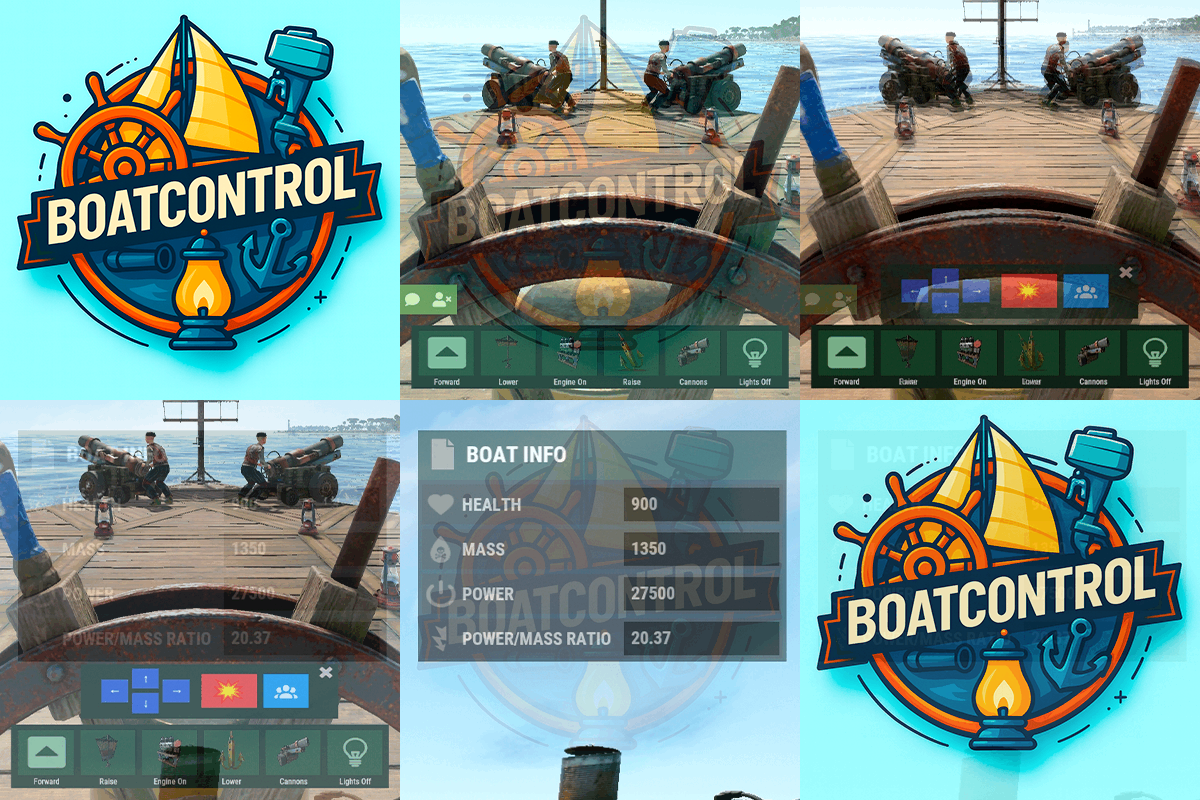
BoatControl is a Rust server plugin that completely enhances boat handling. When taking the helm, a user-friendly CUI interface appears, allowing players to raise/lower sails and anchors, start/stop engines, and switch navigation direction forward or backward. The plugin also supports automatic reloading when the player has ammunition, cannon firing with configurable cooldown (or bypass via permission), and toggling all torches and lanterns without fuel consumption. Additionally, players can control navigation using W/S and fire cannons with the left mouse click. Want to try it before you buy it? You can try it by accessing the Staging server: connect staging.rustspain.com (provided the server is online, as it's my test server). Video Update 1.0.0 Features Displays a CUI interface when taking the helm that allows you to: Raise / lower sails. Raise / lower anchors. Turn engines on / off. Change the navigation direction forward / backward (engines and sails reverse accordingly). Reload (if the player has ammunition in their inventory, with a permission to bypass this). Fire cannons with a cooldown (or without it if you have the bypass permission). Turn all torches and lamps on/off (In the settings you can decide whether you want them to consume fuel or not). Allows enabling boat editing anywhere. Blocks edit mode within safe zones. Blocks the ability to activate the anchor within safe zones. Allows you to view the list of authorized players (similar to BetterTC). Sail Configuration System: Displays a window similar to the config menu showing all sails placed on the boat. Each sail shows its health amount below it. Added a button that allows upgrading sails by levels (thrust power). Everything is configurable, including upgrade costs (in-game resources, RP, or Economy). This allows admins to add as many levels as they want in the config. Engine Configuration System: Displays a window similar to the config menu showing all engines placed on the boat. Each engine shows its fuel amount and health below it. Added the ability to refuel engines using fuel from the player’s inventory. Added another button that allows upgrading engines by levels (fuel efficiency and engine power). Everything is configurable, including upgrade costs (in-game resources, RP, or Economy). This allows admins to add as many levels as they want in the config. Important: There is a maximum speed limit in the game. I have been testing ways to increase the speed, but I still need to continue researching and testing to find the best way to increase it. Automatic repair system: If damage is received during repair, it will stop. If the player runs out of materials in their inventory, it will stop. If the player disconnects, it will also stop. Note: The boat health system is unusual and does not work like a normal building, so the system simulates repairs at different points on the boat depending on the percentage of health lost. That is why you will not hear the actual damaged entity being repaired. BetterTC Integration: If you have BetterTC installed with version 1.6.2 or higher, the automatic Wallpaper placement system will be enabled. Facepunch will add wallpaper support for Boats starting in March; you can test it meanwhile on staging. You can also change the navigation direction using the W and S keys, and fire the cannons with the left mouse click. I'm open to further improving this plugin over time. If you'd like to see any features integrated, please mention them in the discussion section. Ideas I've tried but haven't been able to implement: Modifying the build area (net size) to make it larger. It doesn't seem possible to change this. Making the engines work without fuel consumption. I managed to do this in an initial test, but then FacePunch changed something and it's no longer possible. I'll try to see if I can adjust fuel consumption to make it more economical. The maximum number of engines and sails cannot be increased. Or at least not easily; it could be done with commands and strange contraptions, but it wouldn't be entirely convenient. Permissions boatcontrol.use – Enables the functionality for the player when mounting the boat’s helm. boatcontrol.bypassammo – Allows you to fire cannons without using real ammunition from your inventory. Free ammo! (not recommended to give to regular players) boatcontrol.bypasscannoncooldown – Allows you to fire cannons with no cooldown. Maximum bombardment! boatcontrol.edit allows enabling boat editing anywhere. boatcontrol.cannonuse If the player doesn’t have it enabled, the option to control cannons won’t appear in the interface. Not having this permission will not block manual/vanilla use. boatcontrol.authlist Shows the list of players authorized to the Boat, similar to BetterTC. boatcontrol.deleteauth Allows authorized players to remove player permissions individually. boatcontrol.sailconfig Allows players to open and manage the Sail Configuration menu for boats. boatcontrol.sailupgrade Allows players to upgrade sails (thrust power) according to the configured upgrade levels. boatcontrol.engineconfig Allows players to open and manage the Engine Configuration menu for boats. boatcontrol.engineupgrade Allows players to upgrade engines (fuel efficiency and engine power) according to the configured upgrade levels. boatcontrol.wallpaper Allows players to use the wallpaper placement system on boats. (Requires BetterTC version 1.6.2 or higher.) boatcontrol.repair Allows players to use the automatic boat repair system. boatcontrol.repair.nocost Allows players to repair boats without consuming materials Dynamic repair permissions (speed adjustment) Allows admins to grant specific permissions defined in the config to adjust boat speed limits. Commands It currently has no chat or console commands. Configuration DEFAULT CONFIGURATION { "Enable WASD Direction": true, "Enable Cannon Fire Key (Left Mouse Button)": true, "Cannon Aim Step (degrees per click)": 5.0, "Cannon Fire Cooldown": 5.0, "Cannon Crew": { "Enable": true, "Names": [ "Seaman", "Deckhand", "Bosun", "Gunner", "Quartermaster", "Navigator", "Sailor", "Crewman", "Mate", "Boatswain", "Cannoneer", "Buccaneer", "Mariner", "Sea Dog", "Old Salt" ], "Health": 100.0, "MaxCannons": 0, "Wear": { "burlap.shirt": 1380044819, "burlap.trousers": 1380047706, "burlap.shoes": 2215057317, "hat.boonie": 965553937 }, "RequireOperate": true, "ToggleCrewCooldown": 30.0, "NoCorpse": true }, "Lights": { "Enable Light Toggle Key (R)": true, "Light Toggle Cooldown": 1.0, "Require Fuel For Lights": false, "Light Items (shortnames)": [ "tunalight", "lantern", "torchholder", "largecandles", "smallcandles", "jackolantern.angry", "jackolantern.happy", "chineselantern", "chineselanternwhite" ] }, "Impact Force Physics": { "Enable Impact Physics": true, "Impact Force (default: 100, range: 50-500)": 100.0, "Enable Debug Logging": false }, "Alert Chat": true, "Alert Notify Plugin": false, "Notify: select what notification type to be used": { "error": 0, "info": 0 }, "Color Prefix Chat": "#f74d31", "GUI": { "GUI Windows Belt": { "BG Color Primary": "0.10 0.15 0.10 1", "BG Color Secundary": "0.2 0.30 0.2 0.80", "Button Active Color": "0.2 0.6 0.2 0.80", "Button Inactive Color": "0.2 0.30 0.2 0.80", "OffsetMin": "-200 15", "OffsetMax": "181 79", "AnchorMin": "0.5 0", "AnchorMax": "0.5 0" }, "GUI Windows Info": { "BG Color Primary": "0.10 0.10 0.10 0.8", "BG Color Secundary": "0.2 0.30 0.2 0.80", "Button Active Color": "0.2 0.6 0.2 0.80", "Button Inactive Color": "0.2 0.30 0.2 0.80", "OffsetMin": "-115 -100", "OffsetMax": "115 100", "AnchorMin": "0.902 0.8104", "AnchorMax": "0.902 0.8104" }, "GUI Windows Cannons Menu": { "BG Color Primary": "0.10 0.15 0.10 1", "BG Color Secundary": "0.2 0.30 0.2 0.80", "Button Active Color": "0.2 0.6 0.2 0.80", "Button Inactive Color": "0.2 0.30 0.2 0.80", "OffsetMin": "-140 85", "OffsetMax": "140 185", "AnchorMin": "0.5 0", "AnchorMax": "0.5 0" } }, "Show Info Window": true, "Boat Edit Damage Cooldown (seconds)": 30.0, "Block Anchor in Safe Zone": true, "Block Boat Edit in Safe Zone": true, "Config Version": "1.2.0", "Repair Cooldown After Recent Damage (seconds)": 30.0, "Cooldown Frequency Repair (larger number is slower)": { "boatcontrol.use": 2.0, "boatcontrol.vip": 1.0 }, "Repair Costs (ItemShortName: Amount per block/component)": { "lowgradefuel": 4, "wood": 75 }, "Engine Upgrades": { "Enable Engine Upgrades": true, "Upgrade Levels": [ { "Level": 1, "Display Name": "Tier 1", "Fuel Efficiency Multiplier (1.0 = normal, 0.5 = half fuel consumption)": 0.9, "Power Multiplier (1.0 = normal, 2.0 = double power)": 2.0, "Upgrade Cost": { "Resource Costs (ItemShortName: Amount)": { "scrap": 100, "lowgradefuel": 50 }, "ServerRewards Points": 0, "Economics Money": 0.0 } }, { "Level": 2, "Display Name": "Tier 2", "Fuel Efficiency Multiplier (1.0 = normal, 0.5 = half fuel consumption)": 0.8, "Power Multiplier (1.0 = normal, 2.0 = double power)": 4.0, "Upgrade Cost": { "Resource Costs (ItemShortName: Amount)": { "scrap": 250, "lowgradefuel": 100, "metal.fragments": 300 }, "ServerRewards Points": 0, "Economics Money": 0.0 } }, { "Level": 3, "Display Name": "Tier 3", "Fuel Efficiency Multiplier (1.0 = normal, 0.5 = half fuel consumption)": 0.65, "Power Multiplier (1.0 = normal, 2.0 = double power)": 8.0, "Upgrade Cost": { "Resource Costs (ItemShortName: Amount)": { "scrap": 500, "lowgradefuel": 200, "metal.fragments": 500, "metal.refined": 25 }, "ServerRewards Points": 0, "Economics Money": 0.0 } }, { "Level": 4, "Display Name": "Tier 4", "Fuel Efficiency Multiplier (1.0 = normal, 0.5 = half fuel consumption)": 0.65, "Power Multiplier (1.0 = normal, 2.0 = double power)": 16.0, "Upgrade Cost": { "Resource Costs (ItemShortName: Amount)": { "scrap": 1000, "lowgradefuel": 300, "metal.fragments": 1500, "metal.refined": 100 }, "ServerRewards Points": 0, "Economics Money": 0.0 } } ], "Currency Type (Resources, ServerRewards, Economics)": "Resources" }, "Sail Upgrades": { "Enable Sail Upgrades": true, "Upgrade Levels": [ { "Level": 1, "Display Name": "Tier 1", "Thrust Multiplier (1.0 = normal, 2.0 = double thrust)": 1.5, "Upgrade Cost": { "Resource Costs (ItemShortName: Amount)": { "scrap": 75, "cloth": 100 }, "ServerRewards Points": 10, "Economics Money": 0.0 } }, { "Level": 2, "Display Name": "Tier 2", "Thrust Multiplier (1.0 = normal, 2.0 = double thrust)": 2.0, "Upgrade Cost": { "Resource Costs (ItemShortName: Amount)": { "scrap": 150, "cloth": 200, "leather": 50 }, "ServerRewards Points": 15, "Economics Money": 0.0 } }, { "Level": 3, "Display Name": "Tier 3", "Thrust Multiplier (1.0 = normal, 2.0 = double thrust)": 2.5, "Upgrade Cost": { "Resource Costs (ItemShortName: Amount)": { "scrap": 300, "cloth": 300, "leather": 100, "metal.fragments": 200 }, "ServerRewards Points": 20, "Economics Money": 0.0 } }, { "Level": 4, "Display Name": "Tier 4", "Thrust Multiplier (1.0 = normal, 2.0 = double thrust)": 3.0, "Upgrade Cost": { "Resource Costs (ItemShortName: Amount)": { "scrap": 600, "cloth": 500, "leather": 200, "metal.fragments": 500 }, "ServerRewards Points": 30, "Economics Money": 0.0 } } ], "Currency Type (Resources, ServerRewards, Economics)": "ServerRewards" } } For any problem, doubt, suggestion or assistance do not hesitate to contact me by Discord ninco90$15.00- 47 comments
- 5 reviews
-
- 11
-

-

-
- #boat
- #controller
- (and 8 more)
-
Version 2.1.3
2,150 downloads
Discord Link is a very simple, performant, and feature-rich Discord and Rust linking system. 2 Simple steps and a player can link to Discord! NO DISCORD.DLL!! FEATURES - NO DISCORD.DLL REQUIRED!!! - Link Rust and Discord accounts - Grant a role in discord and group in game for linked players - Soft unlinking (All past data on a user's account links will be forever stored) - 2 Way role syncing between rust to discord and discord to rust - Supports multi server linking - Booster perks for linked players boosting your discord - Steam to discord name syncing (Auto renames users in discord to their steam name) - Admin perms to unlink players - Search link commands in discord and in game to get who a player is linked to - Logs to discord when players link and unlink - Auto remove players from being linked when they leave the Discord - Syncing your old database files from steamcord, discord auth, or discord core PERMISSIONS discordlinkbot.search - ability to search players and use the UI The Plugin and Discord Bot both have very simple installations. We have included a readme.md file to make it even easier to setup! Need support or want updates about what is coming to the bot? Join the support discord here https://discord.gg/ZsRgCUNv2x This will require bot hosting to run the bot 24/7 since we do not use the Discord DLL therefore the server cannot host the bot. Thanks to @shady14u for co-developing!!$19.99 -

Version 1.1.1
77 downloads
Teleports players that are kicked for particular reasons to a safe place Avoids players getting frustrated with random disconnections and loss of loot Use /getmonumentpos in a monument in order to get the correct position & add it to the config if there are more than one monument added the safe place will be randomized, same mechanism applies to multiple positions The plugin allows you to set a list of positions for any monument you desire once, even if the map wipes and monument's positions changes the plugin will still teleport the player to the same position within the monument Configuration: { "Kick Reasons": [ "auth", "packet flooding: player tick", "unresponsive", "steam" ], "Monuments & positions to teleport (Randomized if more than one monument)": { "assets/bundled/prefabs/autospawn/monument/medium/compound.prefab": [ { "x": 0.0, "y": 0.0, "z": 0.0 }, { "x": 0.0, "y": 0.0, "z": 0.0 } ], "assets/bundled/prefabs/autospawn/monument/medium/bandit_town.prefab": [ { "x": 0.0, "y": 0.0, "z": 0.0 }, { "x": 0.0, "y": 0.0, "z": 0.0 } ] } } Permissions: safekick.use Commands: /getmonumentpos (Requires admin access)$5.00 -
Version 1.3.0
70 downloads
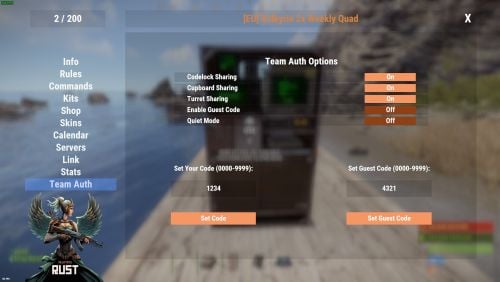
About Team Share Teamshare Allows automatic team auth on codelocks, turrets, and tool cupboards via the /share command, including guest code functionality Features toggles for every function so that the end user decides which feature is enabled or disabled. Toggle Codelock On or Off -- Enables or disables the sharing of Codelocks Toggle Cupboard On or Off -- Enables or disables the sharing of Cupboards (TC's) Toggle Turret On or Off -- Enables or disables the sharing of Turrets Enable Guest Code On or Off -- Enables or disables the automat input of guest code's Quiet Mode On or Off - Quiet mode stops all messages being posted in chat Supports WelcomeController V2 with full support for theme editor and panel support. Simply add a new addon panel and add TeamShare. Enable the setting in the config json "Using WelcomeController": true, AddonName for WelcomeController : TeamShare Animated buttons: true/false -- This turns on or off the animated buttons in the share panel Operating Mode (1 or 2) Mode 1: Auth happens only when something is placed, current team is authed on that one object (same as before). Mode 2 (backward auth): The plugin tracks every codelock, turret, and TC placed by players with teamshare.use. When someone joins the team, they are authed on all of those; when they leave or are kicked, they are removed from all of them. Permission teamshare.use teamshare.codelock teamshare.cupboard teamshare.turret teamshare.guest Configuration { "Use Permissions": true, "Using WelcomeController": false, "Debug Mode": false, "Messages": { "NoPermission": "You don't have permission to use this command.", "InvalidCode": "Invalid code. Please enter a 4-digit numerical code.", "CodeSet": "Code set to: {0}", "GuestCodeSet": "Guest code set to: {0}", "NoCodeSet": "You have not set any code. Use the UI to set a code.", "CodeAutoLocked": "Code lock placed with code {0}.", "CodeAutoLockedWithGuest": "Code lock placed with code {0} and guest code {1}.", "CupboardAuthorized": "{0} authorized on the Tool Cupboard", "NoEscape.RaidBlocked": "Cannot set codes during raid block.", "NoEscape.CombatBlocked": "Cannot set codes during combat block.", "NoGuestCodeSet": "Please enter a guest code first.", "AuthedBackward": "Authed \"{0}\" to {1} codelocks, {2} turrets and {3} TC's" }, "UI Settings": { "Animated Buttons": true, "_Comment_Colors": "All colors use format: R G B A (0-1 per channel). UIBackgroundColor = main panel background. UIPrimaryColor = primary buttons (e.g. Set Code). UIDangerButtonColor = close/danger buttons (e.g. X). UIToggleOnColor = toggle ON state (e.g. green). UIToggleOffColor = toggle OFF state (e.g. red).", "UIBackgroundColor": "0 0 0 0.6", "UIPrimaryColor": "1 0.4 0 0.5", "UIDangerButtonColor": "1 0 0 1", "UIToggleOnColor": "0.15 0.6 0.15 1", "UIToggleOffColor": "0.6 0.15 0.15 1" }, "Commands Settings": { "Open UI Command": "teamui", "Share Command": "share" }, "AddonName for WelcomeController": "TeamShare", "NoEscape Integration": { "Block During Raid Block": true, "Block During Combat Block": true }, "Operating Mode": 1 }$10.00 -
Version 1.9.0
480 downloads
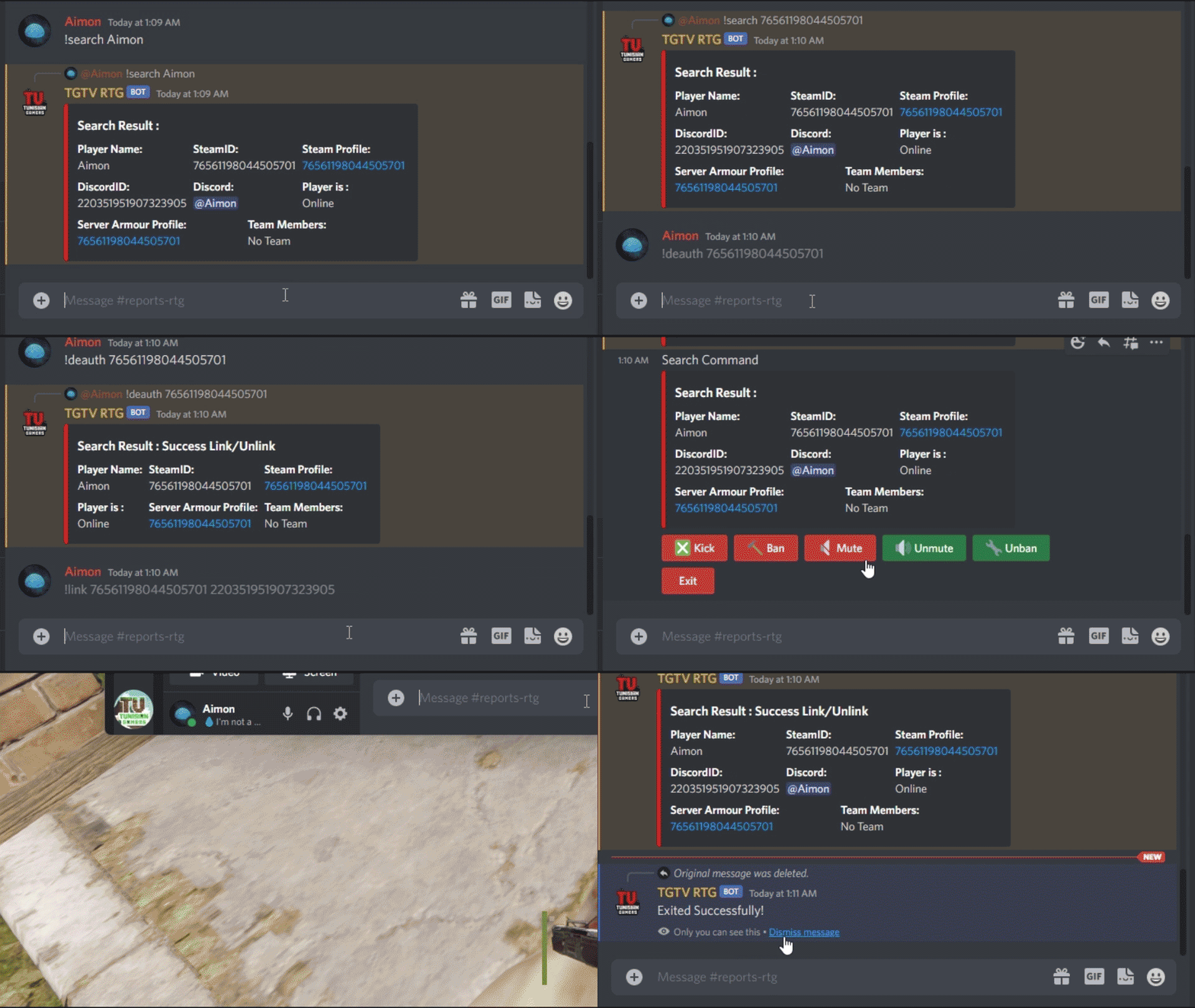
This plugin adds extra useful commands usable in a specific discord channel with a specific discord role, that gives access to an admin panel to do specific commands on players inside the server. Features : Gives access to a players list with a search interaction embedded in the buttons Gives a list of certain commands that you can use on each player (Kick, Ban, Mute, Unban, Unmute) Configurable to add each command's reason of command (If you're kicking a player you can put Toxicity or Warning as a reason for it) With each command that allows timed punishments like ban and mute, you are given access to 5 durations depending on the command. Adds a /auth command to DiscordCore that redirects to /dc join. Gives access to a search command in-game that shows different information about players. Optional : Gives access to a deauth admin command to unlink players from discord. Gives access to a link admin command to link players using their steamid and discordid. Gives access to buttons like Economics and Timed Permissions (configurable) Gives access to customizable buttons for commands on players (configurable) Permissions: DiscordAdminPanel.emberban allows player to use the /ember.ban command (Only functional with Ignore Ember set to false and Ember loaded) DiscordAdminPanel.emberunban allows player to use the /ember.ban command (Only functional with Ignore Ember set to false and Ember loaded) DiscordAdminPanel.auth allows player to use the /auth command DiscordAdminPanel.deauth allows admins to use the /deauth command to unlink players (Only functional with changing certain settings in DiscordCore or using DiscordAuth) DiscordAdminPanel.link allows admins to use the /link command to link players (Only functional with changing certain settings in DiscordCore or using DiscordAuth) DiscordAdminPanel.search allows admins to search for players details (SteamID and DiscordID) In-Game Commands: /search <steamID/DiscordID> : Searches for player details like SteamID, DiscordID, and his discord name. /auth : uses "/dc join" command from DiscordCore (Only usable if DiscordCore is loaded) /deauth <steamID/DiscordID> : Unlinks a player from discord (Only functional with changing certain settings in DiscordCore or using DiscordAuth) /link <steamID> <DiscordID> : Links a player with discord using their steamID and DiscordID (Only functional with changing certain settings in DiscordCore or using DiscordAuth) Discord Commands: /dap players : Shows a list of online players on the server /search <steamID/SteamName/DiscordID> : Gives an extended search on players details !deauth <steamID/DiscordID> : Unlinks a player from discord (Only functional with changing certain settings in DiscordCore or using DiscordAuth) !link <steamID> <DiscordID> : Links a player with discord using their steamID and DiscordID (Only functional with changing certain settings in DiscordCore or using DiscordAuth) Discord Interactions: When using !players, a list of online players will show up as interaction buttons. Once you use one of the buttons, an extensive search will show up and will give you more interaction buttons to use different commands on the searched player. Kick Command shows reasons after clicking on it : Similarly Ban Command and Mute Command shows periods then reason : (Reasons are configurable) Timed Permissions shows the roles then the period of time: (Both configurable) Economics shows the available commands then the amount : (amount is configurable) Configuration : { "LogFileName": "DiscordAdminPanel", "Bot token": "BOTTOKEN", "Ignore Roles": false, "Discord Channel ID where the command can be used": [ "1234567891234567890" ], "Embed's color": "#ff0000", "Show Clan Tag (Make sure clans is loaded)": false, "Show Oxide Groups": false, "Show Server Armour Profile (search)": false, "Show Team Info (search)": false, "Show Last Names (search) (PlayerInformations plugin required)": false, "Timed Permissions": { "Use Timed Permissions (true/false)": false, "Oxide Groups to give": [ "VIP", "Admin" ], "Time to give (Use 'd' for days, 'h' for hours, 'm' for minutes, 'wipe' for using wipe period)": [ "24h", "7d", "30d", "Wipe" ], "Discord Role ID (Can be left empty to use the first role id)": [] }, "Economics": { "Use Economics (true/false)": false, "Economy Amount (Use '.' for decimal)": [ "1500.5", "3000.3" ], "Discord Role ID (Can be left empty to use the first role id)": [] }, "Ban": { "Time to give (Use 'd' for days, 'h' for hours, 'm' for minutes, 'wipe' for using wipe period)": [ "24h", "7d", "30d", "Wipe" ], "Ban Reasons (One Word)": [ "Cheat", "Script", "OverToxicity", "Abuse" ], "Ignore Ember": true, "Ember Global (Only usable if ember is loaded)": false, "Discord Role ID (Can be left empty to use the first role id)": [] }, "Mute": { "Time to give (Use 'd' for days,'h' for hours, 'm' for minutes, 'wipe' for using wipe period)": [ "1h", "24h", "30d", "Wipe" ], "Mute Reasons (One Word)": [ "Toxicity", "Racism" ], "Discord Role ID (Can be left empty to use the first role id)": [] }, "Kick": { "Kick Reasons (One Word)": [ "Toxicity", "Warning" ], "Discord Role ID (Can be left empty to use the first role id)": [] }, "Custom": { "Use Custom (true/false)": false, "Use Confirmation (true/false)": false, "Custom Commands (Use '{player}' for player id, 'command name' 'command to send on console')": { "dogdoo": "dog {player}", "pacifism": "pf {player}" }, "Discord Role ID (Can be left empty to use the first role id)": [] }, "Link Commands": [ "link" ], "Auth Commands": [ "auth", "authenticate" ], "Deauth Commands": [ "dapdeauth", "deauthenticate" ], "Search Commands": [ "search", "look" ], "logs": { "Log to console (true/false)": true, "Log to discord (true/false)": false, "Log Data Type (Embed/Simple)": "Embed", "Discord Extension Log Level (Verbose/Debug/Info/Warning/Error/Exception/Off)": "Info", "Delete message after command": true, "Delete message after interaction": true, "Log Discord Channel ID": "" }, "Discord Guild ID (optional if the bot is in one guild)": "", "Discord Role ID": [ "1234567891234567890" ] } How to install : If you're using DiscordAuth as your link plugin, you can simply copy the plugin and use it as is. If you're using DiscordCore as your link plugin, and you want to use /link and /deauth commands, Follow these steps: 1- Open DiscordCore in Notepad 2- Search and replace : public void HandleLeave(IPlayer player, DiscordUser user, bool backup, bool message) with private void HandleLeave(IPlayer player, DiscordUser user, bool backup, bool message) 3- Search and replace : public void CompletedLink(LinkActivation activation) with private void CompletedLink(LinkActivation activation) 4- Search and replace : MJSU with Aimon 5- Save the file You can also load the plugin without any link plugin. Configure : Set Bot Token, ChannelID and RoleID in config. Reload Plugin. To Do List : Add logs to plugin. Add customizable commands in config. Add support for TimedPermissions. Add support for Economics. Make some infos in search command optional. You can suggest new functionalities or plugin ideas on discord : Aimon#9899 .$14.99 -

Version 3.1.19
1,468 downloads
Installation Place the AdminToggle.cs file in /oxide/plugins/ Place the XLIB.dll Dependency in /RustDedicated_Data/Managed/ Grant yourself the default permission o.grant user YOURNAME admintoggle.master the .master permission selector needs to be adapted to what you called the permission setting for the mode Information AdminToggle Allows admins with permission to toggle between player & admin mode Reset Command Open f1 console & write at.fix - Reverts you to player mode (the hard way) (Permission, Priority, Toggle Commands) - Must be unique Core Mode Featues Unlimited custom modes Customizable permission name Priority system for modes Master mode Oxide group toggling Custom commands to toggle Restriction system to specfic steam ids a certan mode Mode Settings (admin) Require a reason to toggle Autorun commands on toggle Separated inventories Teleport back to toggle location upon exiting Revert auth to 0 on disconnect Blocked commands Custom outfit while in mode Notifications (global-chat notification, local-chat notification, popup notification, sound perfab notification & Discord embed Notification) Interface toggle button, pulsing panel, action menu Blocked actions Blocked plugins hooks Mode Settings (player) Autorun commands on revert Notifications (global-chat notification, local-chat notification, popup notification, sound perfab notification & Discord embed Notification) Blocked commands Blocked plugins hooks API Hooks void admintoggle_onAdmin (BasePlayer player) { /*Do something epic*/ } void admintoggle_onPlayer (BasePlayer player) { /*Do something epic*/ } API Methods bool IsAdmin(BasePlayer player); object[] GetMode(BasePlayer player, bool TrueMode = false); /* IF player.userID IS ASSIGNED ANY MODE RETURNS TRUE IF player.userID IS NOT ASSIGNED ANY MODE RETURNS FALSE */ bool isAdmin = AdminToggle.Call<bool>("IsAdmin", player.userID); /* IF player IS NOT ASSIGNED MODE RETURNS NULL IF bool IS SET FALSE RETURNS CURRENT MODE -- object[0] permission (string), object[1] priority (int), object[2] isMaster (bool) IF bool IS SET TRUE RETURNS HIGHEST MODE -- object[0] permission (string), object[1] priority (int), object[2] isMaster (bool) */ object[] getMode = AdminToggle.Call<object[]>("GetMode", player, false); Default Configuration (1 mode) Known incompatible plugins Server Armour (Compatible with v2.29.44 and above)$8.99- 146 comments
- 11 reviews
-
- 2
-
-
- #admin
- #admintool
- (and 31 more)
-

Version 2.0.4
209 downloads
A lightweight plugin that disables various teaming methods to restrict players to solo gameplay. Now featuring an automated warning system with kick/ban abilities! Permissions soloenforcement.enforce Configuration { "Restrict tool cupboards" : true, "Require destruction of tool cupboards": true, "Ignore tool cupboard restrictions on decaying bases": true, "Restrict turrets": true, "Restrict sleeping bags & beds": true, "Restrict team creation": true, "Restrict codelock & keylock crafting": true, "Discord webhook URL": "https://support.discord.com/hc/en-us/articles/228383668-Intro-to-Webhooks", "Discord message color": 9109504, "Log tool cupboard alerts to discord": false, "Log turret alerts to discord": false, "Log respawn alerts to discord": false, "Log revive alerts to discord": false, "Log team alerts to discord": false, "Log craft alerts to discord": false, "Log auto kicks/bans from warning system to discord": false, "Show violation messages to players in chat": true, "Use automatic warning system": false, "Maximum warnings": 3, "Show popup on warning": false, "Warning popup time (seconds)": 5, "Ban after maximum warnings (will kick otherwise)": false, "Use temporary bans for warning system (must have ban after maximum warnings enabled)": false, "Temporary ban time (seconds) - default is 24 hours": 86400, "Administer warning for tool cupboard violations": false, "Administer warning for turret authorization violations": false, "Administer warning for turret assign violations": false, "Administer warning for respawn violations": false, "Administer warning for revive violations": false, "Administer warning for team violations": false, "Administer warning for crafting violations": false } Localization { "Discord_Title" = "Solo Enforcement", "Discord_Alert_Tool_Cupboard" = "{player1} ({player1_id}) attempted to authorize on an already claimed tool cupboard!", "Discord_Alert_Turret_Authorize" = "{player1} ({player1_id}) attempted to authorize on an already claimed auto turret!", "Discord_Alert_Turret_Assign" = "{player1} ({player1_id}) attempted to assign {player2} ({player2_id}) to their auto turret!", "Discord_Alert_Respawn_Assign" = "{player1} ({player1_id}) attempted to assign their sleeping bag/bed to {player2} ({player2_id})!", "Discord_Alert_Respawn_Public" = "{player1} ({player1_id}) attempted to set their bed to public!", "Discord_Alert_Revive" = "{player1} ({player1_id}) revived {player2} ({player2_id})!", "Discord_Alert_Team_Create" = "{player1} ({player1_id}) attempted to create a team!", "Discord_Alert_Craft" = "{player1} ({player1_id}) attempted to craft a keylock/codelock!", "Discord_Alert_Auto_Kick" = "{player1} ({player1_id}) was auto-kicked from the server for too many teaming violations!", "Discord_Alert_Auto_Ban" = "{player1} ({player1_id}) was auto-banned from the server for too many teaming violations!", "Chat_Message_Tool_Cupboard" = "Another player is already authorized on this tool cupboard!", "Chat_Message_Turret_Authorize" = "Another player is already authorized on this auto turret!", "Chat_Message_Turret_Assign" = "You are not allowed to assign other players to your auto turret!", "Chat_Message_Respawn_Assign" = "You are not allowed to assign your sleeping bag/bed to another player!", "Chat_Message_Respawn_Public" = "You are not allowed to set your bed to public!", "Chat_Message_Team_Create" = "Teams have been disabled on this server!", "Chat_Message_Craft" = "Crafting for this item has been disabled!", "Auto_Kick_Message" = "Too many teaming violations detected (auto kick).", "Auto_Ban_Message" = "Too many teaming violations detected (auto ban).", "Warning_Popup" = "Warning {0}/{1}" }$15.00 -
.thumb.png.2344caf06b4ddf3753a2d395bedf3b22.png)
Version 1.0.6
16 downloads
Cupboard auths will add an interactive UI to your server that will allow players to manage authed users list in cupboards. Permission: cupboardauths.use - permission required to use the plugin How it works? Contacts: Need help or custom plugin for your server? Contact me using Discord: metangerine ----------------------------------------------------------------------$10.00