Search the Community
Showing results for tags 'better'.
Found 19 results
-
.thumb.png.29172107bdd9ecc88fd15ccdd48ab0d8.png)
Version 1.0.0
63 downloads
2x BetterLoot Loot Table Built for moderately boosted Rust servers, this configuration doubles the standard loot without breaking game balance. Players get a steady flow of gear while keeping the classic Rust survival feel. Key Features Balanced Boost – Roughly 2x the normal loot, perfect for servers that want faster progression without going full high-rate. Cleaner Tables – Low-value “trash” items are removed, ensuring every container has useful gear. Flexible Gameplay – Ideal for weekend raids, small-group PvP, or lightly boosted community servers. Note: Designed specifically for the BetterLoot plugin. No AlphaLoot features, custom RNG, or special drop-rate mechanics included. Setup Place the config file into your server’s BetterLoot config folder, restart the server—done.$5.98 -
Version 1.0.0
17 downloads
10x BetterLoot Loot Table The 10x BetterLoot config is made for fast-paced servers where players need gear quick and action is nonstop. Everything is scaled up to match that style — from components to weapons, crates are fully loaded. Trash items are removed, and containers are packed with high-value loot that fits the 10x environment — plenty of explosives, kits, and rare gear. New items like the Minigun, Military Flamethrower, and Backpack are already included and drop often to keep fights going. Whether it’s raid weekends, PvP arenas, or just pure chaos — this loot table keeps up with the pace. Built specifically for the BetterLoot plugin — no AlphaLoot features, drop rates, or RNG mechanics included. Easy to set up.$5.98 -
.thumb.png.a524568eca061e4bd433e7cea2aa7882.png)
Version 1.0.0
47 downloads
5x BetterLoot Loot Table The 5x BetterLoot config is designed for servers that want fast progression and nonstop action, but still keep a touch of Rust’s survival challenge. Loot is boosted across the board — not excessive, just right for PvP-focused or active raid servers. Key Features 5x Scaled Loot – Resources, components, and gear are multiplied to match a 5x environment. No Trash Items – Containers are cleaned up for more valuable drops and less clutter. Balanced Variety – You’ll find everything from mid-tier weapons to endgame gear without making everything instant. New Items Included – Supports Minigun, Military Flamethrower, and Backpack with moderate drop rates. Ideal for Raiding & PvP – Keeps players equipped and active while preserving progression. Note: Built specifically for the BetterLoot plugin. Does not include AlphaLoot features, RNG tweaks, or custom drop-rate mechanics. Setup Drop the configuration file into your BetterLoot config folder, restart your server — and you’re good to go.$5.98 -
.thumb.png.129bb329d16947232d10138614fd2cd2.png)
Version 1.0.0
60 downloads
3x BetterLoot Loot Table The 3x BetterLoot config offers the perfect balance between vanilla progression and boosted excitement. Players gear up faster without losing the need to explore, farm, and fight for top-tier loot. Key Features 3x Boosted Loot – All key containers (crates, barrels, airdrops) scaled up for faster progression. Cleaner Loot Tables – Low-value junk removed, so every find feels rewarding. Modern Items Supported – Includes Minigun, Military Flamethrower, and Backpack with balanced drop rates. Balanced Gameplay – Keeps Rust’s survival feel intact while speeding up early- and mid-game gearing. Perfect for Community Servers – Great for semi-vanilla or lightly modded servers that want smoother pacing. Note: Made specifically for the BetterLoot plugin. No AlphaLoot systems, RNG modifiers, or custom drop-rate logic included. Setup Place the config file into your BetterLoot config folder and restart the server — that’s all you need.$5.98 -
Version 4.0.6
99 downloads
BetterLoot Loot Table Config Our professionally balanced BetterLoot loot table is designed to deliver a clean, optimized loot experience that fits most server types — from lightly modded PvP to high-rate servers. Junk items have been heavily filtered out to ensure quality and consistency in all loot containers. This setup includes newly added items such as the Minigun, Minigun Backpack, and Military Flamethrower — ensuring your loot stays up-to-date with the latest Rust content. All loot tiers have been carefully balanced to provide a smooth progression and competitive gameplay feel without relying on random chance. Please note that this is a standalone loot table for the BetterLoot plugin. It does not include AlphaLoot-style drop percentages or random chance mechanics. If you're looking for a more advanced, dynamic setup, check out our AlphaLoot configs on our profile. Installation is very simple — a step-by-step guide is included inside the downloaded ZIP file.$10.99 -
Version 4.0.6
856 downloads
BetterLoot Loot Table Config Our professionally balanced BetterLoot loot table is designed to deliver a clean, optimized loot experience that fits most server types — from lightly modded PvP to high-rate servers. Junk items have been heavily filtered out to ensure quality and consistency in all loot containers. This setup includes newly added items such as the Minigun, Minigun Backpack, and Military Flamethrower — ensuring your loot stays up-to-date with the latest Rust content. All loot tiers have been carefully balanced to provide a smooth progression and competitive gameplay feel without relying on random chance. Please note that this is a standalone loot table for the BetterLoot plugin. It does not include AlphaLoot-style drop percentages or random chance mechanics. If you're looking for a more advanced, dynamic setup, check out our AlphaLoot configs on our profile. Installation is very simple — a step-by-step guide is included inside the downloaded ZIP file.$10.99 -
Version 4.0.6
376 downloads
BetterLoot Loot Table Config Our professionally balanced BetterLoot loot table is designed to deliver a clean, optimized loot experience that fits most server types — from lightly modded PvP to high-rate servers. Junk items have been heavily filtered out to ensure quality and consistency in all loot containers. This setup includes newly added items such as the Minigun, Minigun Backpack, and Military Flamethrower — ensuring your loot stays up-to-date with the latest Rust content. All loot tiers have been carefully balanced to provide a smooth progression and competitive gameplay feel without relying on random chance. Please note that this is a standalone loot table for the BetterLoot plugin. It does not include AlphaLoot-style drop percentages or random chance mechanics. If you're looking for a more advanced, dynamic setup, check out our AlphaLoot configs on our profile. Installation is very simple — a step-by-step guide is included inside the downloaded ZIP file.$10.99 -
Version 4.0.6
418 downloads
BetterLoot Loot Table Config Our professionally balanced BetterLoot loot table is designed to deliver a clean, optimized loot experience that fits most server types — from lightly modded PvP to high-rate servers. Junk items have been heavily filtered out to ensure quality and consistency in all loot containers. This setup includes newly added items such as the Minigun, Minigun Backpack, and Military Flamethrower — ensuring your loot stays up-to-date with the latest Rust content. All loot tiers have been carefully balanced to provide a smooth progression and competitive gameplay feel without relying on random chance. Please note that this is a standalone loot table for the BetterLoot plugin. It does not include AlphaLoot-style drop percentages or random chance mechanics. If you're looking for a more advanced, dynamic setup, check out our AlphaLoot configs on our profile. Installation is very simple — a step-by-step guide is included inside the downloaded ZIP file.$10.99 -
Version 4.0.6
294 downloads
BetterLoot Loot Table Config Our professionally balanced BetterLoot loot table is designed to deliver a clean, optimized loot experience that fits most server types — from lightly modded PvP to high-rate servers. Junk items have been heavily filtered out to ensure quality and consistency in all loot containers. This setup includes newly added items such as the Minigun, Minigun Backpack, and Military Flamethrower — ensuring your loot stays up-to-date with the latest Rust content. All loot tiers have been carefully balanced to provide a smooth progression and competitive gameplay feel without relying on random chance. Please note that this is a standalone loot table for the BetterLoot plugin. It does not include AlphaLoot-style drop percentages or random chance mechanics. If you're looking for a more advanced, dynamic setup, check out our AlphaLoot configs on our profile. Installation is very simple — a step-by-step guide is included inside the downloaded ZIP file.$10.99 -
Version 0.1.8
404 downloads
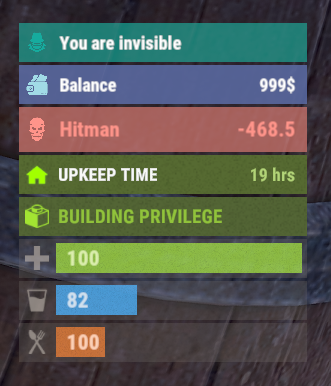
The plugin displays an invisibility indication in the status bar. Depends on AdvancedStatus plugin. The ability to set a sound effect for disappearance and appearance; The ability to automatically generate language files for different languages(filled in English); The ability to individually toggle the display of status bars; The ability to specify the order of the bar; The ability to change the height of the bar; The abillity to customize the color and transparency of the background; The ability to set a material for the background; The ability to switch between CuiRawImageComponent and CuiImageComponent for the image; The ability to get images from the local folder(*SERVER*\oxide\data\AdvancedStatus\Images); The abillity to set own image and customize the color and transparency of the image; The abillity to set sprite instead of the image; The ability to customize the color, size, font and outline of the text. { "Sound effect played upon disappearance, leave empty to disable": "assets/prefabs/npc/patrol helicopter/effects/rocket_fire.prefab", "Sound effect played upon appearance, leave empty to disable": "assets/prefabs/npc/patrol helicopter/effects/rocket_fire.prefab", "List of language keys for creating language files": [ "en" ], "The height of the bar": 26, "The display order of the bar": 10, "The background color of the bar(HEX or RGBA)": "#15AC9D", "The background transparency of the bar": 0.7, "The background material of the bar, leave empty to disable": "", "The URL of the bar image": "https://i.ibb.co/LzdbT8wT/Vanish-Status-Default.png", "The local image of the bar, leave empty to use URL": "VanishStatus_Default", "The sprite image of the bar, leave empty to use local or URL": "", "Is it worth using a raw image for the bar?": false, "The color of the bar image(HEX or RGBA)": "#15AC9D", "The transparency of the bar image": 1.0, "The outline color of the bar image(HEX or RGBA)": "0.1 0.3 0.8 0.9", "The outline transparency of the bar image": 1.0, "The outline distance of the bar image, leave empty to disable. Example '0.75 0.75'": "", "The size of the bar text": 12, "The color of the bar text(HEX or RGBA)": "#FFFFFF", "The transparency of the bar text": 1.0, "The font of the bar text(https://umod.org/guides/rust/basic-concepts-of-gui#fonts)": "RobotoCondensed-Bold.ttf", "The horizontal offset of the bar text": 0, "The outline color of the bar text(HEX or RGBA)": "#000000", "The outline transparency of the bar text": 1.0, "The outline distance of the bar text, leave empty to disable": "", "The size of the bar subtext": 12, "The color of the bar subtext(HEX or RGBA)": "#FFFFFF", "The transparency of the bar subtext": 1.0, "The font of the bar subtext": "RobotoCondensed-Bold.ttf", "The outline color of the bar subtext(HEX or RGBA)": "0.5 0.6 0.7 0.5", "The outline transparency of the bar subtext": 1.0, "The outline distance of the bar subtext, leave empty to disable": "", "Version": { "Major": 0, "Minor": 1, "Patch": 8 } } EN: { "BarVanish": "You are invisible" } RU: { "BarVanish": "Вы невидимы" }$3.99 -
Version 1.1.0
39 downloads
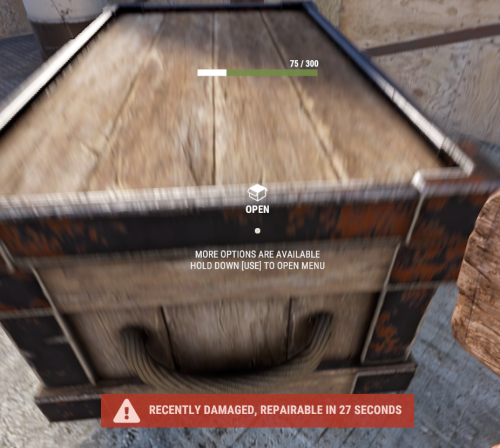
With just one tap, you can fully repair your base blocks and base items—no more having to tap repeatedly! Includes permission support and is optimized for top performance, with rotation & demolition support! Features * One Tap Repairs - Supports Base Blocks & Base Items & Vehicles, etc * Rotation - Re-Enables Base Blocks for easy native rotation again! * Demolition - Re-Enables Base Blocks for easy native demolition again! Permissions betterhammer.use ( required to do full 1 tap hit repairs with hammer & to use any features/functions )$5.00 -

Version 1.0.3
87 downloads
Better Body Bags optimizes server and client side performance of ragdolls and body bags. This is done by custom handeling of physics and streamlining native methods to assist with server performance and reduce the heavy networking impacts to clients, causing client side lag. Stop client side lag in high deathtoll zones Stabalize fps dips caused by ragdolls and bodybags Hookless - This plugin uses harmony for the best performance Configurable - Customize despawn times per item, dropping of weapons & burying of items Performance will vary depending on the number of players, client hardware and server hardware. If you have a high pop server, low end client hardware or low end server hardware then this plugin is for you. { "Corpse Removal Time": 10.0, "Block Active Item Drop": true, "Bury Leftover Items": true, "Despawn Time Tier 0 (seconds)": 30.0, "Despawn Time Tier 1 (seconds)": 300.0, "Despawn Time Tier 2 (seconds)": 600.0, "Despawn Time Tier 3 (seconds)": 1800.0, "Ground Watch - Updates bag position if ground is missing": true, "Advance mode (reload on first true)": false, "CustomTimes": {} }$14.99- 4 comments
- 1 review
-
- 1
-

-
- #betterbodybags
- #better body bags
- (and 9 more)
-

Version 2.1.2
211 downloads
Supports: Wind Mills | Solar Panels | Fuel & Test Generators | Small-Medium-Large Batteries | Tesla Coils | Heaters Both Globally & with permission-based settings allowing you to create as many different levels as you wish! Written for the best performance possible! Defaults to first permission assigned in the config if you give out multiple. Wind Mill Note: Max height Needed for Max output is floor 18 Battery Options Explained MaxOutput: Maximum Power Out Put Efficiency: How Efficient Battery is When Charging ( this How Fast it Charges ) MaxCapacitySeconds: How Much Energy We Can Request From Power Sources For Charging is this value * our maxOutput Batteries will not show new Max Out-Puts Batteries will show New Power Usage! ( Pic is below, this is because its hardcoded on client side ) Fuel Generator Options Explained StackSize: Sets Inventory Stack Size for Fuel Inside The Fuel Generator OutputEnergy: Sets Power OutPut FuelPerSec: Sets How Much Fuel to Use Per Second Electrical Heater Options Explained GLOBAL SETTER ONLY > "Sets the Max Temperature Range for Electric Heaters Only (Default is 4.0)": 4.0, FadeDuration: Sets How Long Before Heat Dissipates ( when powered off ) HeatAmount: Sets Heat Amount ( when powered on ) Solar Panel Explained To get max Output you Need 1 floor up else it will only ever be half! + Panel must Face Direct Sun-light! Tesla Coil Options Explained A TeslaCoils Power consumption amount Is Calculated By ( MaxDamageOutput Divided / By PowerToDamageRatio ) A TeslaCoils DamageAmount is Calculated By Its (currentEnergy input * powerToDamageRatio) * dischargeTickRate A TeslaCoils SelfHarmAmount is Calculated By Its ( dischargeTickRate Divided / By maxDischargeSelfDamageSeconds * SetHealth ) SetHealth: Sets Item Condition Level MaxDamageOutput: Sets the Maximum Damage it Can OutPut Like Ever PowerForHeavyShorting: Sets Electrical Input Amount Needed for Strong-Zap Zap else = Weak-Zap Zap DischargeTickRate: Sets How Fast A TeslaCoil Discharges its Zap Zap MaxDischargeSelfDamageSeconds: Configuration { "Enables use of permission based settings": true, "Reset all modifications on unload (recommended true if uninstalling)": false, "Global Battery Small": { "MaxOutput": 9000, "Efficiency": 4.0, "MaxCapacitySeconds": 1, "Permissions": { "toptier": { "MaxOutput": 30, "Efficiency": 2.0, "MaxCapacitySeconds": 18000 }, "midtier": { "MaxOutput": 20, "Efficiency": 1.4, "MaxCapacitySeconds": 13500 }, "lowtier": { "MaxOutput": 14, "Efficiency": 1.0, "MaxCapacitySeconds": 11250 } } }, "Global Battery Medium": { "MaxOutput": 50, "Efficiency": 0.8, "MaxCapacitySeconds": 540000, "Permissions": { "toptier": { "MaxOutput": 100, "Efficiency": 2.0, "MaxCapacitySeconds": 1080000 }, "midtier": { "MaxOutput": 75, "Efficiency": 1.5, "MaxCapacitySeconds": 810000 }, "lowtier": { "MaxOutput": 60, "Efficiency": 1.0, "MaxCapacitySeconds": 675000 } } }, "Global Battery Large": { "MaxOutput": 100, "Efficiency": 0.8, "MaxCapacitySeconds": 1440000, "Permissions": { "toptier": { "MaxOutput": 200, "Efficiency": 3.0, "MaxCapacitySeconds": 2880000 }, "midtier": { "MaxOutput": 150, "Efficiency": 2.0, "MaxCapacitySeconds": 2160000 }, "lowtier": { "MaxOutput": 125, "Efficiency": 1.0, "MaxCapacitySeconds": 1800000 } } }, "Global Electric Generator": { "MaxOutputTestGen": 8, "Permissions": { "toptier": { "MaxOutputTestGen": 30 }, "midtier": { "MaxOutputTestGen": 20 }, "lowtier": { "MaxOutputTestGen": 12 } } }, "Global Fuel Generator": { "StackSize": 1000, "OutputEnergy": 35, "FuelPerSec": 1.0, "Permissions": { "toptier": { "StackSize": 2000, "OutputEnergy": 70, "FuelPerSec": 1.2 }, "midtier": { "StackSize": 1500, "OutputEnergy": 60, "FuelPerSec": 1.1 }, "lowtier": { "StackSize": 1250, "OutputEnergy": 45, "FuelPerSec": 1.0 } } }, "Global Solar Panel": { "MaxOutputSolar": 20, "Permissions": { "toptier": { "MaxOutputSolar": 30 }, "midtier": { "MaxOutputSolar": 20 }, "lowtier": { "MaxOutputSolar": 13 } } }, "Global Electric Wind Turbine": { "MaxOutput": 100, "TargetSpeed": 0.0, "Permissions": { "toptier": { "MaxOutput": 250, "TargetSpeed": 3.0 }, "midtier": { "MaxOutput": 200, "TargetSpeed": 2.0 }, "lowtier": { "MaxOutput": 140, "TargetSpeed": 1.0 } } }, "Global Electric Heater": { "FadeDuration": 1.0, "HeatAmount": 5.0, "HeaterTemperatureGrowableRange": 4.0, "Permissions": { "toptier": { "FadeDuration": 9.0, "HeatAmount": 16.0, "HeaterTemperatureGrowableRange": 14.0 }, "midtier": { "FadeDuration": 6.0, "HeatAmount": 12.0, "HeaterTemperatureGrowableRange": 10.0 }, "lowtier": { "FadeDuration": 3.0, "HeatAmount": 8.0, "HeaterTemperatureGrowableRange": 6.0 } } }, "Global Tesla Coil": { "SetHealth": 250.0, "PowerToDamageRatio": 2.0, "DischargeTickRate": 0.25, "MaxDischargeSelfDamageSeconds": 120.0, "MaxDamageOutput": 35.0, "PowerForHeavyShorting": 10, "Permissions": { "toptier": { "SetHealth": 350.0, "PowerToDamageRatio": 2.0, "DischargeTickRate": 0.25, "MaxDischargeSelfDamageSeconds": 120.0, "MaxDamageOutput": 50.0, "PowerForHeavyShorting": 10 }, "midtier": { "SetHealth": 325.0, "PowerToDamageRatio": 2.0, "DischargeTickRate": 0.25, "MaxDischargeSelfDamageSeconds": 120.0, "MaxDamageOutput": 45.0, "PowerForHeavyShorting": 10 }, "lowtier": { "SetHealth": 300.0, "PowerToDamageRatio": 2.0, "DischargeTickRate": 0.25, "MaxDischargeSelfDamageSeconds": 120.0, "MaxDamageOutput": 40.0, "PowerForHeavyShorting": 10 } } } }$19.99 -

Version 1.0.0
5 downloads
Better Fishing Villages enhances all fishing villages by adding helipads and recyclers to Tier A, B, and C locations.$3.99 -
Version 1.0.4
54 downloads
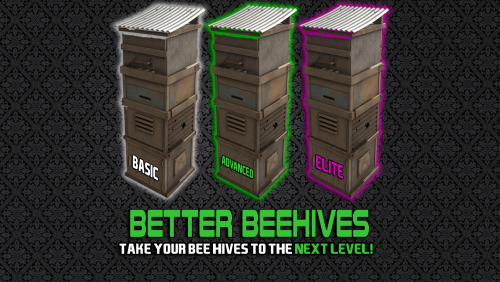
Introducing BetterBeehive, the comprehensive beehive plugin! Features Tiered Beehive System Three Distinct Tiers: Basic, Advanced, and Elite beehives, each with unique skins and progressively better capabilities Customizable Progression: Server admins can fully configure each tier's properties Enhanced Production Increased Production Rates: Up to 4x faster honey production with higher-tier beehives Configurable Output: Set minimum and maximum honeycomb production for each tier Boosted XP: Higher XP gains for bee nucleus with each tier Quality of Life Improvements Indoor Functionality: Elite beehives can function inside bases, eliminating the need for outdoor placement Environmental Adaptability: Higher tiers can ignore temperature and humidity constraints Bee Sting Protection: Advanced and Elite beehives eliminate bee damage to nearby players Permission-Based System Tiered Permissions: Control access to each beehive tier through permissions Simple Upgrading: Players can upgrade regular beehives to custom tiers with a simple chat command Customization Options Fully Configurable: Admins can adjust production rates, indoor functionality, and environmental constraints Production Parameters: Fine-tune minimum/maximum honeycomb production and XP gains Update Intervals: Customize how frequently beehives update and produce resources Commands /bees [tier] - Converts a regular beehive in your inventory to the specified tier (or highest tier you have permission for) Permissions betterbeehive.use - Allows use of the plugin's commands betterbeehive.tier1 - Access to Basic tier beehives betterbeehive.tier2 - Access to Advanced tier beehives betterbeehive.tier3 - Access to Elite tier beehives$10.00 -
Version 1.0.2
234 downloads
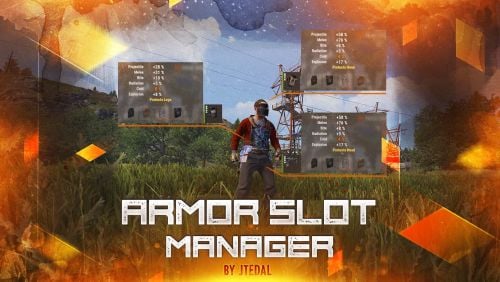
This plugin allows you to manage additional armor slots on clothing. It provides the ability to customize the chances of slots appearing when items are spawned, as well as when they are created (crafting), with the ability to customize privileges for different groups of players. The main features of the plugin: Setting the chance of slots appearing when crafting or spawning an item Adds the possibility of 4 slots for armor Allows you to adjust the chance of each slot appearing Allows you to adjust the odds for different groups/users Plugin Config config As of March 10, the standard configuration already includes all items that can have slots configured. If you are a user of the plugin for instant craft, then you may need minor improvements that will allow you to track the fact that the player has created an item. Check out more of my work here JTedal's library. Come see our whole teams work Mad Mapper Library. Come by the Mad Mapper Discord for support, feedback, or suggestions!$11.99- 11 comments
- 1 review
-
- 4
-

-
-
- #jtedal
- #mad mappers
- (and 12 more)
-
Version 1.0.7
94 downloads
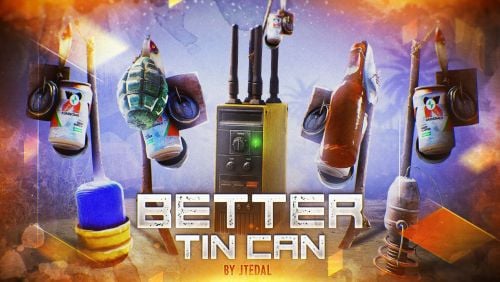
This plugin will add 5 new types of traps to your server based on Tin Can Alarm. Make the players be careful about the clinking sticks with cans. There are also some parameters in the config that you can adjust, and most importantly, you can set the rules for whom the trap should work and who should not. Trap Types Tin Can Alarm Boom - This trap is complemented by a regular grenade, which falls at the moment when the player passes through it. Tin Can Alarm Flame - This trap is complemented by the usual Molotov cocktail, which falls at the moment when the player passes through it. Tin Can Alarm Tesla - This trap is based on a Tesla coil that shocks players. Tin Can Alarm Electrical - This trap is based on a flasher that can sell N amounts of energy to other electrical appliances that the player will connect Tin Can Alarm Broadcaster - this trap will send a signal to the pager or Rf Receiver when someone passes through it. Video Console Command (RCON only) givetincan <type trap> {amount} {SteamID64} - give a custom trap to a given player. Example: givetincan Boom 1 76561198334533025 Types: Boom (SkinID: 3299661003) Flame (SkinID: 3299661403) Tesla (SkinID: 3299661633) Electrical (SkinID: 3299661847) Broadcaster (SkinID: 3299662188) Plugin Config config Check out more of my work here JTedal's library. Come see our whole teams work Mad Mapper Library. Come by the Mad Mapper Discord for support, feedback, or suggestions!$11.99- 2 comments
- 2 reviews
-
- 4
-

-
-
- #jtedal
- #mad mappers
- (and 10 more)
-
Version 1.0.4
133 downloads
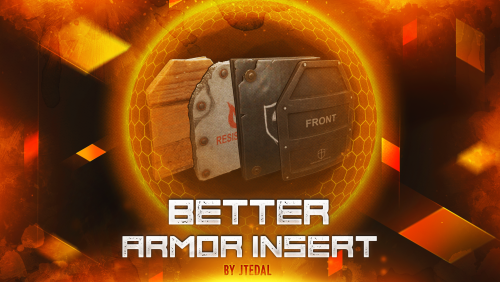
This plugin allows you to add and customize custom Armor Inserts to clothing items. Each such insert has its own parameters that give an additional percentage of protection from different types of damage to the standard indicators of the plate, and can also be configured to fall out of different boxes with a given probability. The plugin is easily managed through the configuration file, where you can set the damage and chance of failure for each insert. The main features of the plugin: You can create an unlimited number of custom armor insert variations. For each custom item, you can set the percentage of protection for absolutely any damage (more on this below) You can customize the dropout of each custom item in the crates or add them to the preset of the custom interface for crafting items that cannot be done through the standard menu. How does it work? The values specified in the configuration file DO NOT REPLACE the standard percentage of damage protection, but only add their own value to it. That is, if the armor insert indicates that it provides 2% protection against bullets, and in the config you have, for example, the entry "Bullet": 2.0, this means that this armor insert will have 4% protection. Everything is very easy, the standard percentage of protection + the one that you specify in the config Plugin Config config How to configure the plugin correctly To set up a custom item correctly, you must specify the type of damage and the percentage of protection against it in the "Damage type and scale (0-100) for it". Keep in mind that you should not focus on the description that we see in the game, because you can see one line of the record, and in fact it means the percentage of protection for several types of damage at once. Therefore, I strongly recommend that you use the plaque that I will provide below with all the damage types that you could customize. Types of damage and their description: "Hunger" : "Hunger damage" "Thirst" : "Water shortage damage" "Cold" : "Cold damage" "Drowned" : "Suffocation damage" "Heat" : "Heat damage" "Bleeding" : "Bleeding damage" "Poison" : "Poison damage" "Bullet" : "Bullet damage" "Slash" : "Melee weapon damage" "Blunt" : "Melee weapon damage" "Fall" : "Fall damage" "Radiation" : "Radiation damage" "Bite" : "Animal bite damage" "Stab" : "Melee damage from NPCs" "Explosion" : "Explosion damage" "RadiationExposure" : "Radiation exposure damage" "ColdExposure" : "" "ElectricShock" : "Electric shock damage" "Arrow" : "Arrow damage" "AntiVehicle" : "Transport damage" "BeeSting" : "Bee damage" Console Command (RCON only) giveinsert <StemID|Player name> (wooden|asbestos|lead|metal) <SkinID> <Amount> - gives the player a custom armor insert For each custom item in the config, there is a table in the format [Damage type] = [Additional percentage of protection] Check out more of my work here JTedal's library. Come see our whole teams work Mad Mapper Library. Come by the Mad Mapper Discord for support, feedback, or suggestions!$11.99- 6 comments
- 1 review
-
- 2
-
-
- #jtedal
- #mad mappers
- (and 11 more)