
Search the Community
Showing results for tags 'creator'.
Found 3 results
-
Version 1.1.1
20 downloads
CodeFling Creator Bot is a Discord bot, written in Python using Discord.py. The bot monitors users specified in the config and using the CodeFling API, sends notifications to Discord for various actions: New Releases (Plugins, Maps, Tools etc) Plugin/Release Updates New Comments/Discussion Posts New Support requests and replies to threads New Reviews New Private Messages The bot is lightweight and written with efficiency and reliability in mind. It makes only the API calls it needs and stores data in an SQLite database for use later. When guild members use the bot commands, the data is pulled from the local database and doesn’t make extra calls to the API, which means you don’t need to worry about rate limiting or getting banned by the API. The bot polls the API looking for new content at set periods as set in the config, notifying about new content and then updating the database with new data. PLEASE NOTE: Requires Python 3.6 or higher. README: CodeFling Creator Bot 1.1.1 Discord Bot by ZEODE ========================================== Minimum requirements: Python 3.6 or higher Dependacies: Discord.py aiohttp Using pip: pip install -U discord.py pip install -U aiohttp The -U flag just means “upgrade to the latest version if already installed.” Using apt: apt install python3-discord apt install python3-aiohttp This file explains each configuration option in config.json *************** DEFAULT CONFIG FILE IS CREATED ON FIRST RUN *************** DISCORD SETTINGS ---------------- Make sure your Discord bot has at least "Send Messages", "Read Message History" and "Embed Links" permissions. bot: bot_token: Your Discord bot token from the Discord Developer Portal. Get it from: https://discord.com/developers/applications channels: release_channel_id: Discord channel ID where file release/update notifications will be posted. To get channel ID: Enable Developer Mode in Discord settings, right-click channel, "Copy ID" purchase_channel_id: Discord channel ID for purchase notifications (recommend private channel). Shows when someone buys one of your paid plugins. support_channel_id: Discord channel ID for support request notifications. comments_channel_id: Discord channel ID for comment/discussion notifications. Shows when users comment on your files (excludes file author replies). downloads_channel_id: Discord channel ID for file downloads notifications (recommend private channel). Shows when users download your files. reviews_channel_id: Discord channel ID for file review notifications. Shows when users review a monitored file. messages_channel_id: Discord channel ID for user message notifications (recommend private channel). Notifys when a monitored user receives a message on CodeFling. commands_channel_id: Discord channel ID for people to use bot commands. People can use bot ! commands here, all user messages can be cleaned automatically, see below. admin_commands_channel_id: Channel for users with the bot admin role to use admin commands away from public channels All normal commands also work here for bot admin role users to use here too NOTE: - Leaving any of the channel IDs blank will disable notifications for those actions - Although there are separate channels for each type in the config, this is just for anyone wanting this, if you want you can put the same channel ID in more than one channel config misc: clean_commands_channel: If true, users messages are automatically deleted shortly after they are sent to the channel. max_number_files_to_list: Number of files to return when users use the "!list plugins" command bot_admin_role_id: Users need this role to use the admin only commands ping_release_channel: If this is true, new releases or updates to files will be notified with the @everyone tag presence: enabled: true or false to enable or disable Discord presence. type: Available options: "playing" "watching" "listening" "competing" text: The text to display, e.g. www.codefling.com CODEFLING SETTINGS ------------------ monitored_users: Dictionary of Codefling user IDs and their API tokens. Format: "user_id": "api_token" How to get your User ID: - Visit your Codefling profile - Hover over or click on "See my activity" - Your user ID is in the URL: https://codefling.com/profile/USER_ID-username/content/ - Copy just the numbers, without the "-username" part How to get API Token: - Visit: https://codefling.com/settings/apps/ - Click "Add App" > "Creator API" - Select "All" under scopes - Copy the access token to paste in your config NOTE: For message_buyer_on_purchase you will require a Creator Pro API token. Example: "monitored_users": { "user_id_1": "your_api_token_here", "user_id_2": "another_api_token" } Note: Each user needs to use their own API token. poll_interval_seconds: How often (in seconds) the bot checks Codefling for new content. Default: 120 (2 minutes) Suggested values: | Type | Safe poll interval | Notes | | ----------------------- | ------------------ | ----------------------------------- | | Light use (1–2 authors) | 60 s | Feels instant, safe if few requests | | Medium (3–5 authors) | 120 s | Recommended default | | Heavy use (5+ authors) | 300 s | Low strain, good scaling | | Massive / strict API | 600–900 s | Extremely safe | Note: Too frequent polling may hit API rate limits. The more files a user has, the harder it is on the API leading to possible rate limits or IP ban, so be cautious. retention_days: How many days of historical data to track and store. Default: 7 days The bot will: - Only notify about content within this time window - Automatically clean up older data daily - On first run, load existing content from this period Recommended values: - 7 days (minimal storage) - 30 days (balanced) - 90 days (extended history) NOTE: Monitored resource/file data is kept indefinitely for users !stats !list commands etc, but the bot will only look for new actions within this period to send notifications to Discord or not. This maintains speed and performance so the bot isn't retreiving more data than is necessary with each API call. In most cases, 7 days should be more than sufficient for all use cases. message_buyer_on_purchase: If true, when a new purchase is detected, the bot will send a private message on the Codefling website with the message content taken from users/{userid}/purchase_message.txt. This can be edited to whatever you like, using html formatting and with available placeholders: {buyer_name} {resource_name} {resource_url} {support_url} NOTE: You will require a Creator Pro API token to use this feature!!! notify_support_request_replies: Limitation of the API at present means that it is not possible to know the reply comment author in support requests. Therefore we cannot filter replies by the file owner, so all replies will be announced, inclduing from the file owner. If you do not want this, you can disable announcing replies so that only new support requests are announced. If the API endpoint is updated in future this can be improved. LOGGING SETTINGS ---------------- timestamp_date_format: The format for timestamps in the console/log output. Availble: - %d - %m - %y e.g: %d-%m-%y would make something like 30-10-25 timestamp_time_format: Specify the format for the timestamp. - 12h - 24h log_file_path: Set the path to the OPTIONAL log file. If left blank, no log file will be used. API OPTIONS ----------- Note: You can usually leave this as is and it will work absolutely fine. max_attempts: How many times to try an API request if it fails before giving up on that attempt Useful for occasional CloudFare errors/timeouts timeout_seconds: How long to wait before retrying a API request due to timeout DEBUG OPTIONS ------------------ enable_verbose_debug_logging: As it says, enabled verbose loigging which can help in troubleshooting issues. Default is false. config_version: DO NOT EDIT THIS COMMANDS ------------------ NOTE: Commands by users do not query the CodeFling API every time. They only retreive data from the SQLite database, so you don't have to worry about rate limiting or banning from users abusing the commands on Discord. This also means it is much quicker with results. The database is updated with all the info every time the API is queried as per the poll rate in the config only. Non-Admin Commands: !help Lists all available commands !stats [username] Get own stats without parameter if you are monitored by the bot or get stats for the user specified !list files List all files monitored by the plugin (config option to limit results) !list authors List all file authors/devs monitored by the bot !file <FileName> / !file <file_id> Give information about that file Admin Commands: !user add <user_id> <api_token> Add the specified user ID and API token to the bot, save in the config and begin monitoring !user remove <user_id> Stops monitoring and removes the specified user ID from the bot and config !rotate Immediately rotate the log file and begin a new blank log file (rotated files saved in logs/) !cleardb Immediately clear the SQLite database and re-seed a new database (ALL DATA WILL BE CLEARED) !test <review|download|purchase|comment|support|message> Send a test notification to Discord for the most recent entry of the given type !test <purchase_msg> <user_id> <purchaser_id> Send a test purchase message by PM on CodeFling !test <file> [new|updated] Send a test notification to Discord for the most recent entry for files/releases, using the new or updated parameter accordingly/ FIRST RUN BEHAVIOR ------------------ On first run, the bot will: 1. Create a SQLite database (codefling_bot.db) 2. Load/Cache all users existing files. 3. Load/Cache all existing content from the last N days (retention_days) 4. DOES NOT send any notifications for existing content 5. Only notify about NEW content after initialization On subsequent runs: 1. Check for content created while bot was offline 2. Send notifications for missed content 3. Continue normal monitoring TROUBLESHOOTING --------------- No notifications appearing: - Verify channel IDs are correct - Check bot has "Send Messages", "Read Message History" and "Embed Links" permissions - Confirm API tokens are valid and have correct scopes Getting rate limited: - Increase poll_interval_seconds value - Default 300 seconds (5 minutes) should be safe Bot sends old notifications on startup: - This is normal if content was created while bot was offline - Bot catches up on missed content within retention period - On first run, no old notifications should appear SUPPORT ------- For issues with the bot, check console output for error messages. Get more support in my Discord: https://discord.gg/jnyg3FvDnc For Codefling API issues, see: https://codefling.com/developers$14.99- 1 review
-
- 2
-

-
- #discord
- #discordbot
- (and 8 more)
-
Version 1.0.6
1,257 downloads
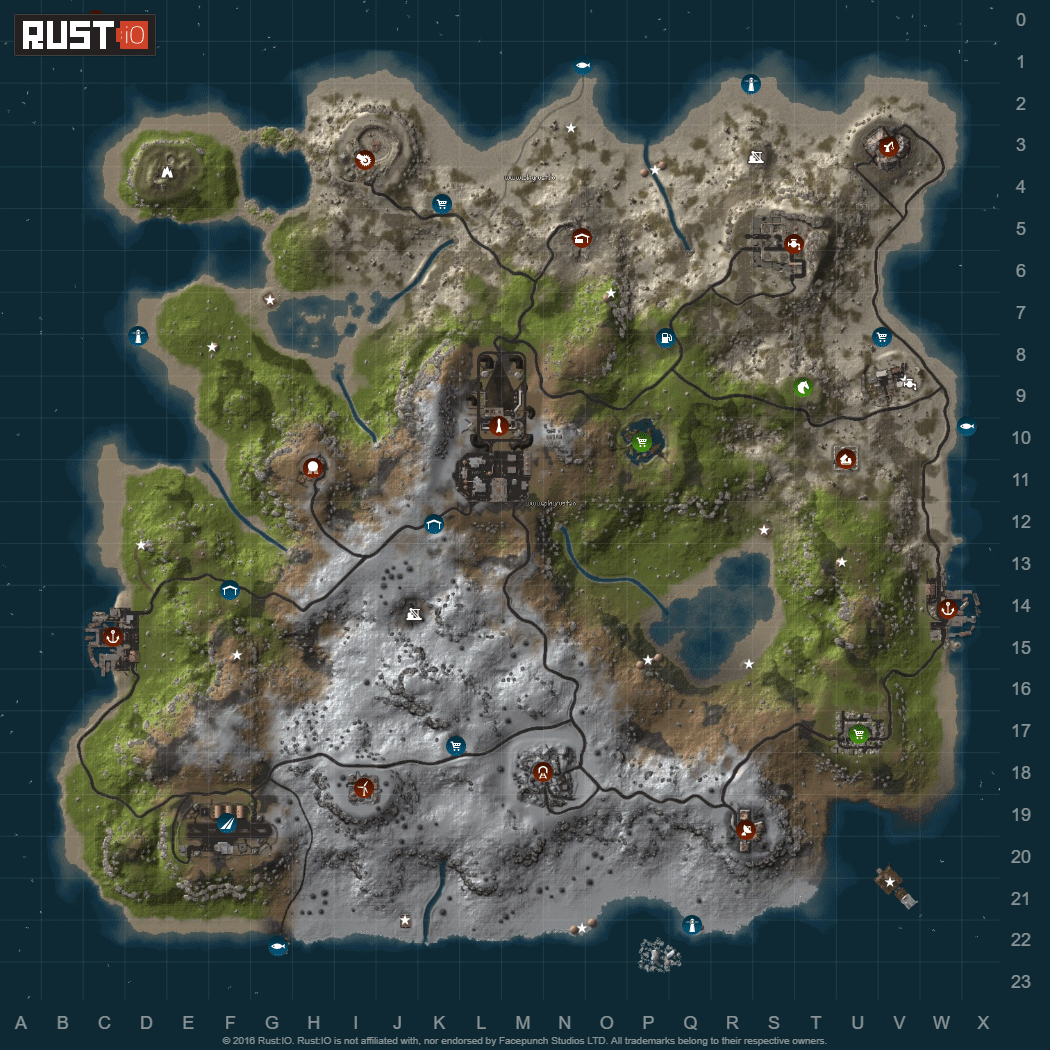
Survive apocalypse by taking over abandoned bases in the air, on the ground or under it. Be brave and explore original and custom monuments on the map. This 3.5k Saga Island custom map is made with World Creator and finished in Rust Edit. It has 8.9k prefab count Custom Monuments: Factory: It has up to tier 3 loot and blue card door barrels Sea Market: You cand find up to tier 2 loot, barrels and recycler H: Small house for players to build in CH: Bigger scale clan house to build in FH: Flying house bigger scale house to build in Underground H: Underground place that is separated and capable to hold 4 different bases Original Monuments: 1. Giant Excavator Pit 2. Harbor 1 3. Harbor 2 4. Airfield 5. Water Treatment Plant 6. Launch Site 7. Military Tunnel 8. Outpost 9. Fishing Village 1.2.3 10. Sewer Branch 11. Junkyard 12. Sulfur Quarry 13. Ranch 14. Bandit Camp 15. Abandoned Military Base 16. Satelite Dish 17. Lighthouse 18. Arctic Research Base 19. HQM Quarry 20. Dome 21. Underwater Lab 22. Oil Rig 1 23. Oil Rig 2 Customer can modify map, password will be included in to Zip file. Be aware of the TOS-Restrictions, map cant be sold or transferred to 3rd partiesFree -
Version 2.0.0
1,697 downloads
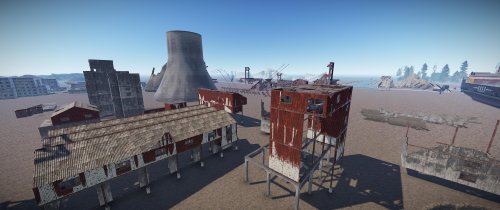
Attention!!! The Creator Map is out of date since the HDRP update. It is still usable in parts, but some newer components are missing and many old prefabs are broken. There will be NO new Creator Map, because after communication with the community, the problem arose that the map often jerks and stalls due to the high prefab count, which makes working with it impossible in this case. This toolmap includes 99% of all working prefabs, objects and effects to increase your workflow while creating stuff in RustEdit. (State: Rust Patch November. 2020) The creator map was created to help all you RustEdit creators out there to increase your workflow and don ´t let you stuck in the creation process because you search for hours for the right prefab or object to use. Sometimes it ´s easier to see something to get an idea what is possible with it. Just copy/paste or drag and drop the stuff you need to the building areas at the lower edge of the map. I tried to locate every working object and testet every single of it. For proper use make sure, you have unlocked all prefabs in RustEdit ´s config.json. Open the file "config.json" in your RustEdit root folder with a texteditor and navigate to the following entry: "Prefab List - Show all prefabs (WARNING: Some prefabs may not work or break the editor/your map)": false, Change "false" to "true" to unlock all prefabs and save the config file. I split everything up to different areas like building parts, deployables, effects, nature, rocks, aso, so you can easily find what you need. You have the possibility to run the map on your server to see how the different objects acting ingame. Useful to check how effects will look, or to see which objects are working in which way. To run it, you have to deactivate the ocean paths, because there is no ocean around the map. To do so, add the following commands to your server.cfg or server batch file: +cargoship.event_enabled false +baseboat.generate_paths false +ai.ocean_patrol_path_iterations 0 Some effects or objects may cause navmesh errors or null.exception errors while starting your server, but they will work and the server will start. But that affects maybe just 0.1% of all objects. It makes sense to have oxide and the Oxide.Ext.RustEdit.dll installed, because some things like the NPC spawners, IO elements and stuff are just working properly with this extension. You find the Oxide.Ext.RustEdit.dll here: https://github.com/k1lly0u/Oxide.Ext.RustEdit Please note that Rust and RustEdit are always work in progress. Patches and updates can change things. There will be new stuff, old stuff could be removed. I try to keep the Creator Map up to date dependent on the latest patches. Demonstration video:Free


![[GER]Abracadaver](https://codefling.com/uploads/monthly_2020_07/Logo3.thumb.png.972c012dad5d2b8ceda5edf8dca46cc2.png)

