
Search the Community
Showing results for tags 'exit'.
Found 2 results
-
Version 0.1.10
1,566 downloads
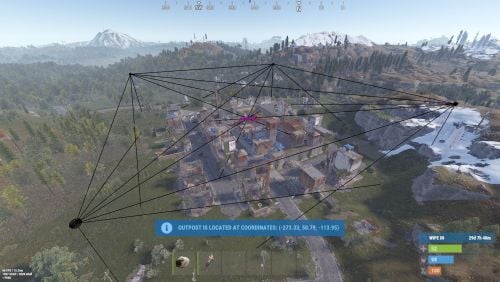
A plugin that allows other plugins to interact with players and entities in monuments via API. The list of all monuments can be viewed in the: Default(Source of monument boundaries when changing the map or recreating boundaries) - *SERVER*\oxide\data\MonumentsWatcher\DefaultBounds.json Vanilla - *SERVER*\oxide\data\MonumentsWatcher\MonumentsBounds.json Custom - *SERVER*\oxide\data\MonumentsWatcher\CustomMonumentsBounds.json Note: MonumentsWatcher is utilized as an API for other plugins. You won't obtain any functionality beyond displaying monument boundaries without an additional plugin. The ability to automatically generate boundaries for vanilla and custom monuments; The ability to automatically regenerate boundaries for monuments on wipe; The ability to automatically adding languages for custom monuments; The ability to manually configure boundaries for monuments; The ability to track the entrance and exit of players, npcs and entities in a Monument and CargoShip; The ability to display boundaries. monumentswatcher.admin - Provides the capability to recreate or display monument boundaries. { "Chat command": "monument", "Is it worth enabling GameTips for messages?": true, "List of language keys for creating language files": [ "en" ], "Is it worth recreating boundaries(excluding custom monuments) upon detecting a wipe?": true, "List of tracked categories of monuments. Leave blank to track all": [], "Wipe ID": null, "Version": { "Major": 0, "Minor": 1, "Patch": 10 } } Note: The list of available categories for monuments can be found in the Developer API section. ENG: https://pastebin.com/nsjBCqZe RUS: https://pastebin.com/ut2icv9T Note: After the plugin initialization, keys for custom monuments will be automatically added. show *monumentID*(optional) *floatValue*(optional) - Display the boundary of the monument you are in or specified. The display will last for the specified time or 30 seconds; list - List of available monuments; rotate *monumentID*(optional) *floatValue*(optional) - Rotate the monument you are in or specified, either in the direction you are looking or in the specified direction; recreate custom/all(optional) - Recreate the boundaries of vanilla/custom/all monuments. Note: Instead of a monumentID, you can leave it empty, but you must be inside a monument. You can also use the word 'closest' to select the nearest monument to you. Example: /monument show closest /monument show gas_station_1 /monument show gas_station_1_4 /monument rotation /monument rotation closest /monument rotation gas_station_1_0 256.5 /monument recreate void OnMonumentsWatcherLoaded() Called after the MonumentsWatcher plugin is fully loaded and ready. void OnCargoWatcherCreated(string monumentID, string type, CargoShip cargoShip) Called when a watcher is created for a CargoShip. void OnCargoWatcherDeleted(string monumentID) Called when a watcher is removed for a CargoShip. void OnSpawnableWatcherCreated(string monumentID, string type, BaseEntity entity) Called when a watcher is created for a Spawnable monument. void OnSpawnableWatcherDeleted(string monumentID) Called when a watcher is removed for a Spawnable monument. void OnMonumentsWatcherLoaded() { Puts("MonumentsWatcher plugin is ready!"); } void OnCargoWatcherCreated(string monumentID, string type, CargoShip cargoShip) { Puts($"Watcher for monument {monumentID}({type}) has been created!"); } void OnCargoWatcherDeleted(string monumentID) { Puts($"Watcher for monument {monumentID} has been deleted!"); } void OnSpawnableWatcherCreated(string monumentID, string type, BaseEntity entity) { Puts($"Watcher for monument {monumentID}({type}) has been created!"); } void OnSpawnableWatcherDeleted(string monumentID) { Puts($"Watcher for monument {monumentID} has been deleted!"); } Monument entry hooks: void OnPlayerEnteredMonument(string monumentID, BasePlayer player, string type, string oldMonumentID) Called when a player enters any monument. void OnNpcEnteredMonument(string monumentID, BasePlayer npcPlayer, string type, string oldMonumentID) Called when an NPC player enters any monument. void OnEntityEnteredMonument(string monumentID, BaseEntity entity, string type, string oldMonumentID) Called when any other BaseEntity enters any monument. void OnPlayerEnteredMonument(string monumentID, BasePlayer player, string type, string oldMonumentID) { Puts($"{player.displayName} entered to {monumentID}({type}). His previous monument was {oldMonumentID}"); } void OnNpcEnteredMonument(string monumentID, BasePlayer npcPlayer, string type, string oldMonumentID) { Puts($"Npc({npcPlayer.displayName}) entered to {monumentID}({type}). Previous monument was {oldMonumentID}"); } void OnEntityEnteredMonument(string monumentID, BaseEntity entity, string type, string oldMonumentID) { Puts($"Entity({entity.net.ID}) entered to {monumentID}({type}). Previous monument was {oldMonumentID}"); } Monument exit hooks: void OnPlayerExitedMonument(string monumentID, BasePlayer player, string type, string reason, string newMonumentID) Called when a player exits any monument. void OnNpcExitedMonument(string monumentID, BasePlayer npcPlayer, string type, string reason, string newMonumentID) Called when an NPC player exits any monument. void OnEntityExitedMonument(string monumentID, BaseEntity entity, string type, string reason, string newMonumentID) Called when any other BaseEntity exits any monument. void OnPlayerExitedMonument(string monumentID, BasePlayer player, string type, string reason, string newMonumentID) { Puts($"{player.displayName} left from {monumentID}({type}). Reason: {reason}. They are now at '{newMonumentID}'."); } void OnNpcExitedMonument(string monumentID, BasePlayer npcPlayer, string type, string reason, string newMonumentID) { Puts($"Npc({npcPlayer.displayName}) left from {monumentID}({type}). Reason: {reason}. They are now in {newMonumentID}"); } void OnEntityExitedMonument(string monumentID, BaseEntity entity, string type, string reason, string newMonumentID) { Puts($"Entity({entity.net.ID}) left from {monumentID}({type}). Reason: {reason}. They are now in {newMonumentID}"); } [PluginReference] private Plugin MonumentsWatcher; There are 15 categories of monuments: SafeZone(0): Bandit Camp, Outpost, Floating City, Fishing Village, Ranch and Large Barn. RadTown(1): Airfield, Arctic Research Base, Abandoned Military Base, Giant Excavator Pit, Ferry Terminal, Harbor, Junkyard, Launch Site; Military Tunnel, Missile Silo, Power Plant, Sewer Branch, Satellite Dish, The Dome, Toxic Village(Legacy Radtown), Train Yard, Water Treatment Plant. RadTownWater(2): Oil Rigs, Underwater Labs, Cargo Ships and Ghost Ships. RadTownSmall(3): Lighthouse, Oxum's Gas Station, Abandoned Supermarket and Mining Outpost. TunnelStation(4) MiningQuarry(5): Sulfur Quarry, Stone Quarry and HQM Quarry. BunkerEntrance(6) Cave(7) Swamp(8) IceLake(9) PowerSubstation(10) Ruins(11): Jungle Ruins and Tropical Ruins. WaterWell(12) DeepSeaIsland(13) Custom(14) There are 29 api methods: IsReady: Used to check if the MonumentsWatcher plugin is loaded and ready to work. The IsReady method returns true if it is ready, or null if it is not. (bool)MonumentsWatcher?.Call("IsReady"); GetAllMonuments: Used to retrieve an array of IDs for all available monuments. (string[])(MonumentsWatcher?.Call("GetAllMonuments") ?? Array.Empty<string>()); GetAllMonumentsCategories: Used to retrieve a dictionary of IDs and categories for all available monuments. (Dictionary<string, string>)(MonumentsWatcher?.Call("GetAllMonumentsCategories") ?? new Dictionary<string, string>()); GetMonumentsByCategory: Used to retrieve all available monuments by category. To call the GetMonumentsByCategory method, you need to pass 1 parameter: monument category as a string. (string[])(MonumentsWatcher?.Call("GetMonumentsByCategory", "SafeZone") ?? Array.Empty<string>()); GetMonumentCategory: Used to retrieve the category of the specified monument. Returns an empty string on failure. To call the GetMonumentCategory method, you need to pass 1 parameter: monumentID as a string. (string)(MonumentsWatcher?.Call("GetMonumentCategory", monumentID) ?? string.Empty); GetMonumentDisplayName: Used to retrieve the nicename of a monument in the player's language. Returns an empty string on failure. To call the GetMonumentDisplayName method, you need to pass 3 parameters: monumentID as a string; Available options: userID as a ulong or a string; player as a BasePlayer or an IPlayer. displaySuffix as a bool. Should the suffix be displayed in the name if there are multiple such monuments? This parameter is optional. (string)(MonumentsWatcher?.Call("GetMonumentDisplayName", monumentID, player.userID, true) ?? string.Empty);//(ulong)userID (string)(MonumentsWatcher?.Call("GetMonumentDisplayName", monumentID, player, true) ?? string.Empty);//(BasePlayer/IPlayer)player (string)(MonumentsWatcher?.Call("GetMonumentDisplayName", monumentID, player.UserIDString, true) ?? string.Empty);//(string)userID ***recommended option*** GetMonumentDisplayNameByLang: Used to retrieve the nicename of a monument in the specified language. Returns an empty string on failure. To call the GetMonumentDisplayNameByLang method, you need to pass 3 parameters: monumentID as a string; two-char language as a string; displaySuffix as a bool. Should the suffix be displayed in the name if there are multiple such monuments? This parameter is optional. (string)(MonumentsWatcher?.Call("GetMonumentDisplayNameByLang", monumentID, "en", true) ?? string.Empty); GetMonumentPosition: Used to retrieve the Vector3 position of the specified monument. Returns Vector3.zero on failure. To call the GetMonumentPosition method, you need to pass 1 parameter: monumentID as a string. (Vector3)(MonumentsWatcher?.Call("GetMonumentPosition", monumentID) ?? Vector3.zero); GetMonumentByPos: Used to retrieve the monument at the specified position. Returns an empty string on failure. To call the GetMonumentByPos method, you need to pass 1 parameter: position as a Vector3. (string)(MonumentsWatcher?.Call("GetMonumentByPos", pos) ?? string.Empty); Note: This method returns the first encountered monument. Occasionally, there may be multiple monuments at a single point. Therefore, it is recommended to use the GetMonumentsByPos method. GetMonumentsByPos: Used to retrieve all monuments at the specified position. Returns null on failure. To call the GetMonumentsByPos method, you need to pass 1 parameter: position as a Vector3. (string[])(MonumentsWatcher?.Call("GetMonumentsByPos", pos) ?? Array.Empty<string>()); GetClosestMonument: Used to retrieve the nearest monument to the specified position. Returns an empty string on failure. To call the GetClosestMonument method, you need to pass 1 parameter: position as a Vector3. (string)(MonumentsWatcher?.Call("GetClosestMonument", pos) ?? string.Empty); IsPosInMonument: Used to check whether the specified position is within the specified monument. Returns a false on failure. To call the IsPosInMonument method, you need to pass 2 parameters: monumentID as a string; position as a Vector3. (bool)(MonumentsWatcher?.Call("IsPosInMonument", monumentID, pos) ?? false); ShowBounds: Used to display the boundaries of the specified monument to the specified player. To call the ShowBounds method, you need to pass 3 parameters: monumentID as a string; player as a BasePlayer; displayDuration as a float. Duration of displaying the monument boundaries in seconds. This parameter is optional. MonumentsWatcher?.Call("ShowBounds", monumentID, player, 20f); Note: Since an Admin flag is required for rendering, players without it will be temporarily granted an Admin flag and promptly revoked. PLAYERS API GetMonumentPlayers: Used to retrieve an array of all players located in the specified monument. Returns null on failure. To call the GetMonumentPlayers method, you need to pass 1 parameter: monumentID as a string. (BasePlayer[])(MonumentsWatcher?.Call("GetMonumentPlayers", monumentID) ?? Array.Empty<BasePlayer>()); GetMonumentPlayersNoAlloc: Used to fill your existing list with players located in the specified monument. Returns true if at least one player is added, otherwise null. To call the GetMonumentPlayersNoAlloc method, you need to pass 2 parameters: monumentID as a string; list as List<BasePlayer>. (bool)(MonumentsWatcher?.Call("GetMonumentPlayersNoAlloc", monumentID, yourList) ?? false); MonumentsWatcher?.Call("GetMonumentPlayersNoAlloc", monumentID, yourList); GetPlayerMonument: Used to retrieve the monument in which the specified player is located. Returns an empty string on failure. To call the GetPlayerMonument method, you need to pass 1 parameter: Available options: player as a BasePlayer; userID as a ulong or a string. (string)(MonumentsWatcher?.Call("GetPlayerMonument", player.UserIDString) ?? string.Empty);//(string)userID (string)(MonumentsWatcher?.Call("GetPlayerMonument", player) ?? string.Empty);//(BasePlayer)player (string)(MonumentsWatcher?.Call("GetPlayerMonument", player.userID) ?? string.Empty);//(ulong)userID ***recommended option*** GetPlayerMonuments: Used to retrieve all monuments in which the specified player is located. Returns null on failure. To call the GetPlayerMonuments method, you need to pass 1 parameter: Available options: player as a BasePlayer; userID as a ulong or a string. (string[])(MonumentsWatcher?.Call("GetPlayerMonuments", player.UserIDString) ?? Array.Empty<string>());//(string)userID (string[])(MonumentsWatcher?.Call("GetPlayerMonuments", player) ?? Array.Empty<string>());//(BasePlayer)player (string[])(MonumentsWatcher?.Call("GetPlayerMonuments", player.userID) ?? Array.Empty<string>());//(ulong)userID ***recommended option*** GetPlayerClosestMonument: Used to retrieve the nearest monument to the specified player. Returns an empty string on failure. To call the GetPlayerClosestMonument method, you need to pass 1 parameter: Available options: player as a BasePlayer; userID as a ulong or a string. (string)(MonumentsWatcher?.Call("GetPlayerClosestMonument", player.UserIDString) ?? string.Empty);//(string)userID (string)(MonumentsWatcher?.Call("GetPlayerClosestMonument", player.userID) ?? string.Empty);//(ulong)userID (string)(MonumentsWatcher?.Call("GetPlayerClosestMonument", player) ?? string.Empty);//(BasePlayer)player ***recommended option*** IsPlayerInMonument: Used to check whether the specified player is in the specified monument. Returns a false on failure. To call the IsPlayerInMonument method, you need to pass 2 parameters: monumentID as a string; Available options: player as a BasePlayer; userID as a ulong or a string. (bool)(MonumentsWatcher?.Call("IsPlayerInMonument", monumentID, player.UserIDString) ?? false);//(string)userID (bool)(MonumentsWatcher?.Call("IsPlayerInMonument", monumentID, player) ?? false);//(BasePlayer)player (bool)(MonumentsWatcher?.Call("IsPlayerInMonument", monumentID, player.userID) ?? false);//(ulong)userID ***recommended option*** NPCS API GetMonumentNpcs: Used to retrieve an array of all npcs located in the specified monument. Returns null on failure. To call the GetMonumentNpcs method, you need to pass 1 parameter: monumentID as a string. (BasePlayer[])(MonumentsWatcher?.Call("GetMonumentNpcs", monumentID) ?? Array.Empty<BasePlayer>()); GetMonumentNpcsNoAlloc: Used to fill your existing list with npcs located in the specified monument. Returns true if at least one npc is added, otherwise null. To call the GetMonumentNpcsNoAlloc method, you need to pass 2 parameters: monumentID as a string; list as List<BasePlayer>. (bool)(MonumentsWatcher?.Call("GetMonumentNpcsNoAlloc", monumentID, yourList) ?? false); MonumentsWatcher?.Call("GetMonumentNpcsNoAlloc", monumentID, yourList); GetNpcMonument: Used to retrieve the monument in which the specified npc is located. Returns an empty string on failure. To call the GetNpcMonument method, you need to pass 1 parameter: Available options: npcPlayer as a BasePlayer; netID as a ulong; netID as a NetworkableId. (string)(MonumentsWatcher?.Call("GetNpcMonument", npcPlayer) ?? string.Empty);//(BasePlayer)npcPlayer (string)(MonumentsWatcher?.Call("GetNpcMonument", npcPlayer.net.ID.Value) ?? string.Empty);//(ulong)netID (string)(MonumentsWatcher?.Call("GetNpcMonument", npcPlayer.net.ID) ?? string.Empty);//(NetworkableId)netID ***recommended option*** GetNpcMonuments: Used to retrieve all monuments in which the specified npc is located. Returns null on failure. To call the GetNpcMonuments method, you need to pass 1 parameter: Available options: npcPlayer as a BasePlayer; netID as a ulong; netID as a NetworkableId. (string[])(MonumentsWatcher?.Call("GetNpcMonuments", npcPlayer) ?? Array.Empty<string>());//(BasePlayer)npcPlayer (string[])(MonumentsWatcher?.Call("GetNpcMonuments", npcPlayer.net.ID.Value) ?? Array.Empty<string>());//(ulong)netID (string[])(MonumentsWatcher?.Call("GetNpcMonuments", npcPlayer.net.ID) ?? Array.Empty<string>());//(NetworkableId)netID ***recommended option*** IsNpcInMonument: Used to check whether the specified npc is in the specified monument. Returns a false on failure. To call the IsNpcInMonument method, you need to pass 2 parameters: monumentID as a string; Available options: npcPlayer as a BasePlayer; netID as a ulong; netID as a NetworkableId. (bool)(MonumentsWatcher?.Call("IsNpcInMonument", monumentID, npcPlayer.net.ID) ?? false);//(NetworkableId)netID (bool)(MonumentsWatcher?.Call("IsNpcInMonument", monumentID, npcPlayer.net.ID.Value) ?? false);//(ulong)netID (bool)(MonumentsWatcher?.Call("IsNpcInMonument", monumentID, npcPlayer) ?? false);//(BasePlayer)npcPlayer ***recommended option*** ENTITIES API GetMonumentEntities: Used to retrieve an array of all entities located in the specified monument. Returns null on failure. To call the GetMonumentEntities method, you need to pass 1 parameter: monumentID as a string. (BaseEntity[])(MonumentsWatcher?.Call("GetMonumentEntities", monumentID) ?? Array.Empty<BaseEntity>()); GetMonumentEntitiesNoAlloc: Used to fill your existing list with entities located in the specified monument. Returns true if at least one entity is added, otherwise null. To call the GetMonumentEntitiesNoAlloc method, you need to pass 2 parameters: monumentID as a string; list as List<BaseEntity>. (bool)(MonumentsWatcher?.Call("GetMonumentEntitiesNoAlloc", monumentID, yourList) ?? false); MonumentsWatcher?.Call("GetMonumentEntitiesNoAlloc", monumentID, yourList); GetEntityMonument: Used to retrieve the monument in which the specified entity is located. Returns an empty string on failure. To call the GetEntityMonument method, you need to pass 1 parameter: Available options: entity as a BaseEntity; netID as a ulong; netID as a NetworkableId. (string)(MonumentsWatcher?.Call("GetEntityMonument", entity) ?? string.Empty);//(BaseEntity)entity (string)(MonumentsWatcher?.Call("GetEntityMonument", entity.net.ID.Value) ?? string.Empty);//(ulong)netID (string)(MonumentsWatcher?.Call("GetEntityMonument", entity.net.ID) ?? string.Empty);//(NetworkableId)netID ***recommended option*** GetEntityMonuments: Used to retrieve all monuments in which the specified entity is located. Returns null on failure. To call the GetEntityMonuments method, you need to pass 1 parameter: Available options: entity as a BaseEntity; netID as a ulong; netID as a NetworkableId. (string[])(MonumentsWatcher?.Call("GetEntityMonuments", entity) ?? Array.Empty<string>());//(BaseEntity)entity (string[])(MonumentsWatcher?.Call("GetEntityMonuments", entity.net.ID.Value) ?? Array.Empty<string>());//(ulong)netID (string[])(MonumentsWatcher?.Call("GetEntityMonuments", entity.net.ID) ?? Array.Empty<string>());//(NetworkableId)netID ***recommended option*** IsEntityInMonument: Used to check whether the specified entity is in the specified monument. Returns a false on failure. To call the IsEntityInMonument method, you need to pass 2 parameters: monumentID as a string; Available options: entity as a BaseEntity; netID as a ulong; netID as a NetworkableId. (bool)(MonumentsWatcher?.Call("IsEntityInMonument", monumentID, entity.net.ID) ?? false);//(NetworkableId)netID bool)(MonumentsWatcher?.Call("IsEntityInMonument", monumentID, entity.net.ID.Value) ?? false);//(ulong)netID (bool)(MonumentsWatcher?.Call("IsEntityInMonument", monumentID, entity) ?? false);//(BaseEntity)entity ***recommended option***Free -
Version 1.1.1
75 downloads
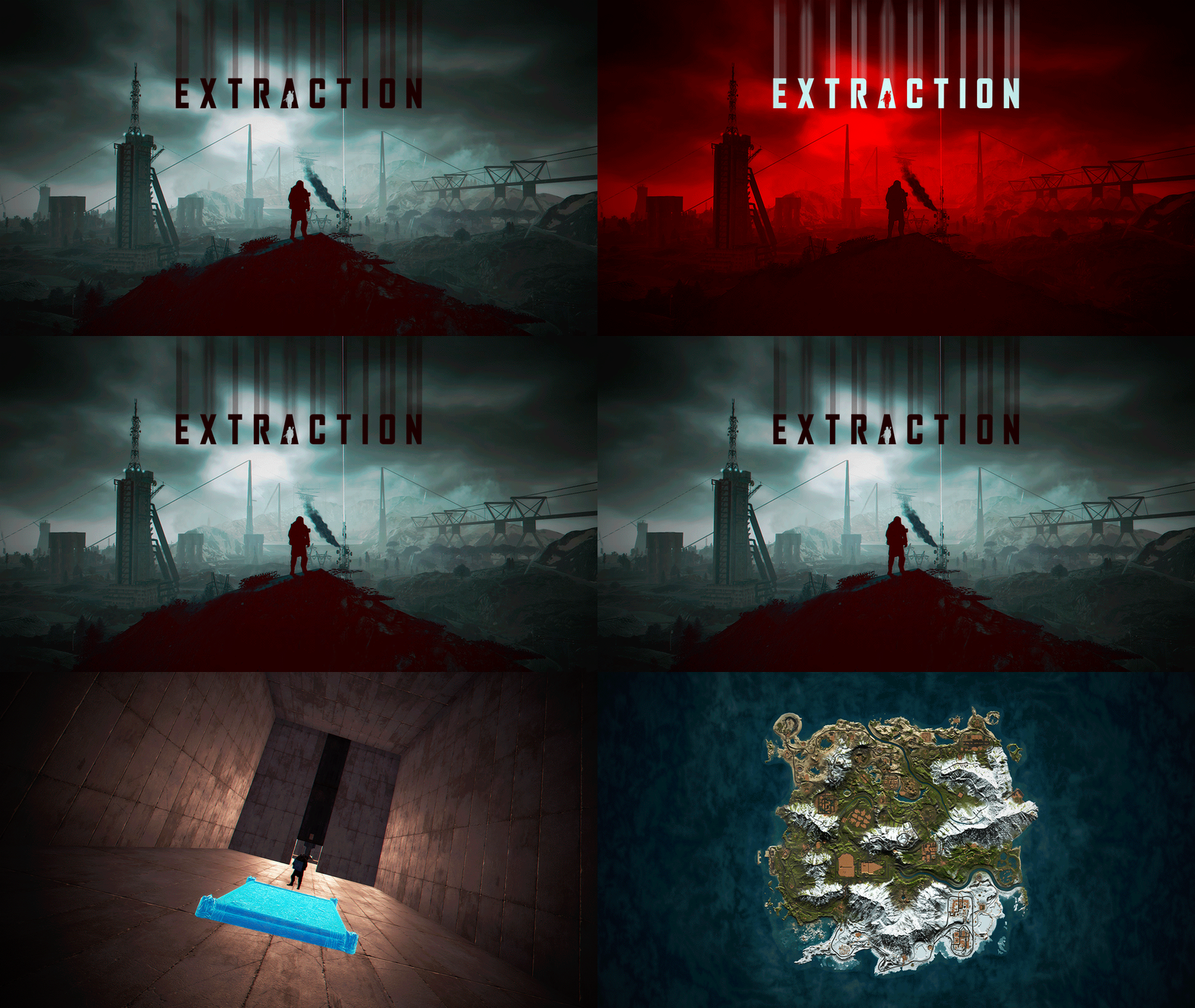
In Extraction, players will not feel alone on your server, despite its size of 3500. In Extraction, players will find all the official Rust Monuments. Extraction contains more than 300 construction zones, which are distributed across all the exits available on the map. In addition, these gigantic construction zones are equipped with electricity and water for each player. When an exit is activated, an alarm sounds to alert other players that a player is about to leave the surface to access an area designed for better player safety. - OFFER YOUR PLAYERS A BETTER PVP EXPERIENCE (Optional) Extraction includes a prefab “Extraction-NoBuild” to block construction on the map surface and force players to build in areas located inside the exits. Follow these steps to block construction on the surface: 1- Include “Extraction-NoBuild.prefab” in the RustEdit “CustomPrefabs” folder. 2- Open the map in RustEdit. 3- In the list of prefabs, find and include “Extraction-NoBuild” in the map. 4- Place “Extraction-NoBuild” at the coordinates: X:0,000 - Y:390,431 - Z:0,000 5- Save the changes you have made. - FEATURES Size: 3500. Objects: 81002. Map protection plugin included. Editable map: Yes Profile Better Npc: Yes. - CONTAINS ALL OFFICIAL MONUMENTS - CUSTOM MONUMENTS Five giant islands surround the map to support the Raidable Bases plugin. Over 300 construction areas equipped with electricity and water. Bunkers: Three types of mini-bunkers scattered throughout the map. Use grenades or explosives to open the door. Each bunker has its own color light to indicate its difficulty: green, blue, and red. Trees with safe zones: These trees are scattered throughout the jungle area. Climb the stairs and access these safe zones to recycle, shop, and more. Ammunition Tower: A giant tower where you will find ammunition and other resources inside. C4 Tower: A giant tower where you will find C4 explosives and other resources inside. Medical Tower: A giant tower where you will find medicine and other resources inside. The Arecibo Observatory: Also known as the National Astronomy and Ionosphere Center (NAIC) and formerly known as the Arecibo Ionosphere Observatory, is an observatory located in Barrio Esperanza, Arecibo, Puerto Rico, owned by the US National Science Foundation (NSF). Communications Center: Four giant towers where you will find all kinds of resources inside. Access from one tower to another via zip lines. Helicopter Tower: A classic but modern tower for shooting combat helicopters. This tower is equipped to meet all your needs. Train Stations: With a waiting room, loot, and NPCs, with secondary respawn on the railroad. Crocodile Lakes: Do you like crocodiles? Visit these locations to see them, but don't disturb the crocodiles. Green Exit: Access this exit using a button located in a booth. The waiting time at this exit is 5 minutes. After 5 minutes, the player will be able to access the construction area. Blue Exit: Access this exit using a blue card. The waiting time at this exit is 3 minutes. After 3 minutes, the player can access the construction area. Red Exit: Access to this exit is immediate and the player can access the construction area immediately. - TIPS Remove the “Extraction-NoBuild” prefab to allow players to build on the map surface. Have fun - SUPPORT: https://discord.gg/ASxJynGndj$49.90- 24 comments
- 2 reviews
-
- 3
-

-

-
- #extraction
- #extraction game
- (and 51 more)


