Search the Community
Showing results for tags 'hit'.
Found 2 results
-
Version 1.2.5
529 downloads
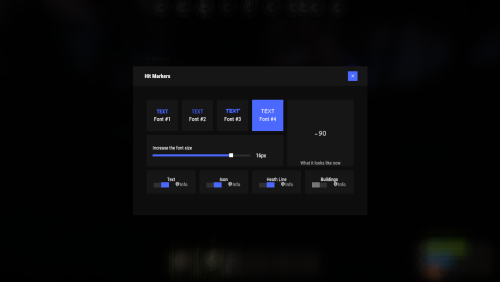
Each user can choose his own marker, which is convenient for him! Commands marker - open an UI Permissions You can set permission in config, for example: "Permission (ex: hitmarkers.use)": "hitmarkers.use", You can also set your own permission for each font and button. Config { "Commands": [ "marker", "hits" ], "Permission (ex: hitmarkers.use)": "", "Work with Notify?": true, "Fonts": { "0": { "Font": "robotocondensed-bold.ttf", "Permission (ex: hitmarkers.font)": "" }, "1": { "Font": "robotocondensed-regular.ttf", "Permission (ex: hitmarkers.font)": "" }, "2": { "Font": "permanentmarker.ttf", "Permission (ex: hitmarkers.font)": "" }, "3": { "Font": "droidsansmono.ttf", "Permission (ex: hitmarkers.font)": "" } }, "Min Font Size": 8, "Max Font Size": 18, "Buttons": [ { "Enabled": true, "Title": "Text", "Type": "Text", "Description": "<b>Damage numbers</b> will pop up in the center of the screen!", "Permission": "hitmarkers.text" }, { "Enabled": true, "Title": "Icon", "Type": "Icon", "Description": "The familiar hit icon changes color after a <b>headshot!</b>", "Permission": "hitmarkers.icon" }, { "Enabled": true, "Title": "Heath Line", "Type": "HealthLine", "Description": "A bar appears above the slots, showing the <b>remaining</b> health of the enemy", "Permission": "hitmarkers.line" }, { "Enabled": true, "Title": "Buildings", "Type": "Buildings", "Description": "Displaying damage by buildings", "Permission": "hitmarkers.buildings" } ], "Info Icon": "https://i.imgur.com/YIRjnIT.png", "Show damage to NPC": true, "Show damage to animals": false, "Marker removal time": 0.25, "Default Values": { "Font ID": 0, "Font Size": 14, "Text": true, "Icon": false, "Health Line": false, "Buildings": false } }$19.95 -
(1).thumb.gif.3621bf913311ac348587437f75a3cf0e.gif)
Version 0.0.5
36 downloads
FloatingHits – World-Space Hit Indicators. Now hits will be displayed in 3D space, rather than just on the screen. Configuration: { "Default hit": "<b> <size=25> <color=yellow> %DAMAGE% </color> </size> </b>", "Headshot": "<b> <size=25> <color=red> %DAMAGE% </color> </size> </b>", "Wounded": "<b> <size=25> <color=red> Fell! </color> </size> </b>", "Dead": "<b> <size=30> <color=red> Dead! </color> </size> </b>", "Maximum distance for drawing a hit (0 = endless)": 100, "Show hit if hitted npc": true, "Show hit if hitted animal": false }$5.00