Search the Community
Showing results for tags 'javascript'.
Found 5 results
-
Version 2.0.1
8 downloads
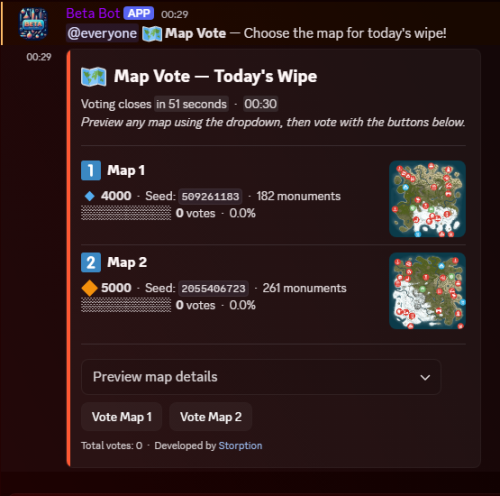
Map Vote Bot MapVote is a self-hosted Discord bot that lets your Rust community vote on the next wipe map. Built for server owners who want a clean, reliable voting system. What's New in v2.0.0 Scheduled votes — Queue a vote to start automatically at a set time. Schedules survive bot restarts, so nothing gets lost if the bot goes down. Vote history — /vote_history shows a full log of past votes with winners, vote counts, and timestamps. Role select ping — Optionally select a role to ping when a vote starts to notify your community. Persistent storage — All votes and map data are stored in SQLite. Nothing is lost on restart. Features Live vote tracking with animated progress bars 2–5 maps per voting session Standard maps (any size/seed), custom RustMaps.com maps, and staging branch support Detailed map info — biomes, islands, rivers, and more Automatic winner determination with random tie-breaking Role-based command access via Discord's built-in Server Integrations (no bot config needed) Ephemeral setup flow — vote configuration is private to the admin running it Commands /map_vote Start or schedule a map vote /vote_history View past vote results for your server Restricting Access By default the commands require Administrator. You can grant access to specific roles without giving them admin — go to Server Settings > Integrations > MapVote and configure per-command role access. Requirements Node.js 24+ Discord bot token RustMaps.com API key Setup Download and extract the files Run npm install Fill in your TKN and RUSTMAPS_API_KEY in the .env file Run npm start Need help? Join the support server: Click Here Updating Stop the bot Overwrite the src/ folder and package.json, README.md, CHANGELOG with the new version Delete the node_modules/ folder package-lock.json Run npm install Start the bot Your .env and .db files are not touched — all settings and vote history are preserved.$45.00 -
Version 1.0.3
80 downloads
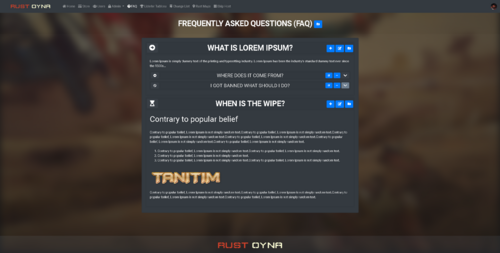
This addon will add FAQ and Rules Page for your Ember based website. (Actually you can use it for anything...) Dependencies Ember (Required): https://www.gmodstore.com/market/view/5620 Features Create, delete, edit Entries Create, delete, edit Categories Adding images - videos - embed codes of YouTube etc.. Customizable Font Awesome Icons Rich Text Editor Future Plans Just let us know whatever u want to see with FAQ Page How to? You just need to drag - drop / copy - paste the Better FAQ & Rules Page for Ember module to your Ember Modules folder, that is all, it will work. We have to verify your profile. After you purchase it, you just need to find me on DM, just send me a message, I will help you ASAP. Discord: Miu#3686 / glasiore#0085 Installation To complete installation, you should go to this address; https://site.com/admin/faq/setup/24-01-2021$50.00 -
Version 2.9.1
81 downloads
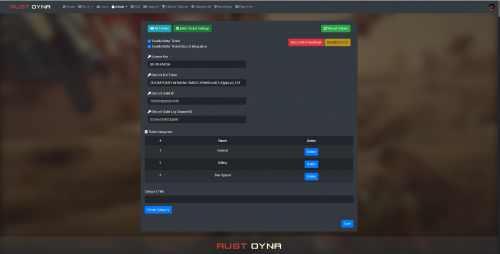
Better Ticket for Ember is a support tickets module with Discord integration for Ember script. With this module, your players will be able to create tickets. You can answer each ticket, delete the tickets, manage the tickets, change the server type, change the status. Also you can add Discord integration between this module and your Discord server. Each activity will be sent to your Discord channel and to ticket creator player's DM box. Features Ticket page. Ticket creation. Answering tickets. Discord integration. (Logging ticket creation, answers from players. Also players with Discord verified profiles will get a direct message about the ticket.) Category creation for tickets. Your servers will be listed under Manage Ticket - Server Installation Place the BetterTicket folder into Ember's modules folder. Go to your website, Go to Better Ticket Settings, Enter your License Key (You can get your licence key after purchasing the module. Send me a message after you buy it.) Enter your Discord Bot Token (If you want to use Discord Integration.) Enter your Discord Guild ID (If you want to use Discord Integration.) Enber your Discord Guild Log Channel ID (If you want to use Discord Integration) Click on SAVE button. Click on "Install Better Ticket v(current version)" It will be installed after all of these steps. Here is a video about it:$60.00 -
Version 2.1.4
121 downloads
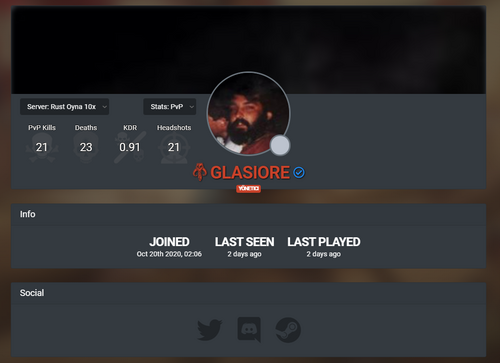
This addon will make user profiles somewhere better than default for your Ember based website. Dependencies Ember (Required) https://www.gmodstore.com/market/view/5620 PlayerRanks (Required for In-game stats on profile) https://codefling.com/file/14-playerranks/ Features Social Links Commenting Profile Customization In-game Statistics (multiple servers supported) Owned Products Credit Transfer Future Plans Profile music. Customizable follow/unfollow and notification system for every actions. (we waiting for ember update.) Clan(team) system Clan statistics And more.. How to? You just need to drag - drop / copy - paste the Better Profile for Ember module to your Ember Modules folder, that is all, it will work. We have to verify your profile. After you purchase it, you just need to find me on DM, just send me a message, I will help you ASAP. Discord: Miu#3686 / glasiore#0085 Installation To complate installation, you should go to these addresses; If you just bought Better Profile for Ember you should do all steps, If you are updating it, you should only do the Step 2 and 3. Step 1: https://youtsite.com/admin/betterprofile/setupdb-20210117-1337 Step 2: https://youtsite.com/admin/betterprofile/setup/social Step 3: https://youtsite.com/admin/betterprofile/setup/20-01-2021 Step 4: https://youtsite.com/admin/betterprofile/setup/23-01-2021 Future Plans We are planning to add emojis, gifs, image, video link support soon. We are waiting for Ember updates.$60.00 -
Version 1.0.0
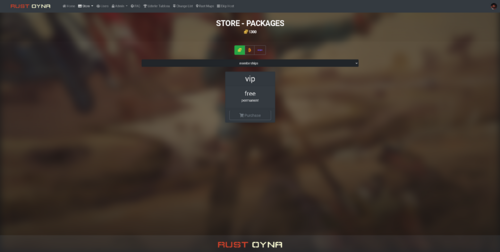
25 downloads
This addon adds category support to your Ember Shop. Ember does not support categories on shop currently and with this module, you can add categories for each package of each server you have. This is not a module, this is an addon. Installation is different than module installation. It is easy. You will be able to add categories to your Ember store packages. You can select store package category from: site.com/admin/packages/packagenumber Under site.com.com/admin/servers you can add categories to your servers. Multiple server supported. Dependencies Ember (Required) https://www.gmodstore.com/market/view/5620 Installation 1: Upload the BetterStore.zip to your host. 2: Unzip the Better Store zip file to Ember Installation Folder (Main Directory). 3: Go to this link (edit it with your website name before using it!!!) = https://site.com/api/betterStoreSetup Installation is done. If you need further help, just send me a message.$25.00